

はじめに
AIアプリケーションにおいて大規模なリクエストが想定される場合や大量のトークンを消費する処理が含まれる場合、RateLimit到達を避けるために複数のLLMエンドポイントへの負荷分散が必要となるケースがあります。今回はDifyで作成したAIアプリケーションに、LiteLLM Proxyによる負荷分散を設定する方法について記述します。
OSS版のDifyのみを対象にしています。エンタープライズ版・SaaS版(有料プラン)は標準で負荷分散機能を備えているので、まずは以下をご確認ください。
https://docs.dify.ai/ja-jp/guides/model-configuration/load-balancing
LiteLLM Proxyとは
LiteLLM Proxyは、複数のLLMプロバイダー(OpenAI、Anthropic、Gemini、Azure、Bedrockなど)をOpenAI形式の統一APIで扱えるLLMゲートウェイです。
OSS版・エンタープライズ版をともに展開しており、今回はOSS版を使用します。組織の管理やSSOとの連携など一部機能はエンタープライズ版限定となっています。
システム構成
以下の構成をとります。
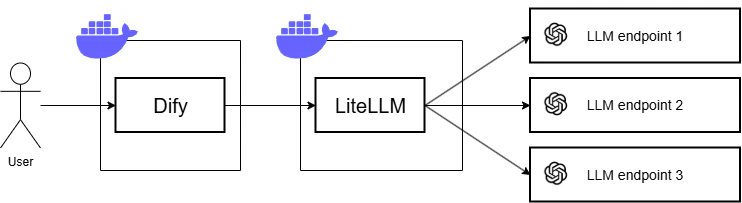
DifyとLiteLLMはそれぞれDocker Composeにて起動します(同一ネットワーク上に立てているので互いに通信可能です)。LLMはOpenAI APIを使い、3つの異なるプロジェクトごとにAPIキーを払い出します。
環境構築
動作環境は以下の通りです。
- OS:Ubuntu22.04.3LTS
- Docker:27.5.0
- Dify:1.9.1
- LiteLLM:1.77.5-stable
Dify(インフラ)
まずはDifyのDockerコンテナを起動します。環境変数の修正等はありません。
LiteLLMをDifyコンテナと同一ネットワーク上で起動する都合上、先にDifyコンテナを起動しておく必要があります。
cd dify/docker
docker compose up -d
OpenAI API
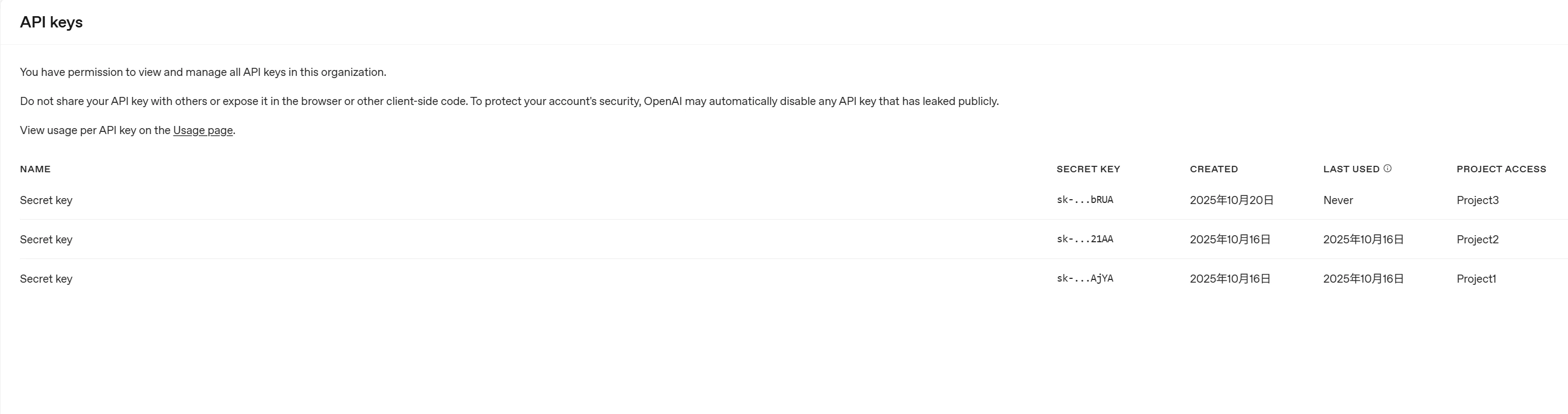
APIキー払い出しはOpenAI APIコンソールを操作して行います。
詳細な手順は以下をご確認ください。
今回は3つのプロジェクトを作成し、プロジェクトごとにひとつのAPIキーを払い出します。
LiteLLM Proxy
LiteLLM Proxyでは、yaml形式のconfigファイルで各種設定を定義します。
以下のconfigファイルを作成します。
# ルーティング先のモデルをリスト形式で指定
model_list:
  - model_name: gpt-4.1
    litellm_params:
      model: openai/gpt-4.1
      api_key: os.environ/OPENAI_API_KEY_PJ1
  - model_name: gpt-4.1
    litellm_params:
      model: openai/gpt-4.1
      api_key: os.environ/OPENAI_API_KEY_PJ2
  - model_name: gpt-4.1
    litellm_params:
      model: openai/gpt-4.1
      api_key: os.environ/OPENAI_API_KEY_PJ3

# ルーティング設定
router_settings:
  routing_strategy: simple-shuffle # ランダムにルーティング
  num_retries: 2

general_settings:
  master_key: os.environ/LITELLM_MASTER_KEY # LiteLLMのすべての操作権限をもつ鍵
今回はルーティング先のモデルはすべてGPT4.1に設定していますが、その他ClaudeやAzureOpenAIといったモデルを使うようconfigを定義することも可能です。詳細な記載方法は以下をご確認ください。
今回はrouting_strategyはランダム(simple-shuffle)にしていますが、事前定義した重み付けによるルーティングや、TPMやRPMに基づいたルーティング、レート制限に基づいたルーティングなども設定可能です。ただしレート制限に基づいたルーティングに関しては使用状況を保存・追跡するためのredisが追加で必要となり、通信オーバーヘッドが発生するぶんパフォーマンスは低下するようです。
https://docs.litellm.ai/docs/routing#advanced---routing-strategies-%EF%B8%8F
configファイル作成後、以下のDocker ComposeファイルでLiteLLM Proxyを起動します。
services:
  litellm:
    image: ghcr.io/berriai/litellm:v1.77.5-stable
    env_file: .env
    ports:
      - "4000:4000"
    # configファイル(litellm_config.yaml)をマウント
    volumes:
      - ./litellm_config.yaml:/app/config.yaml
    command:
      - "--config=/app/config.yaml"
    # Difyがデフォルトで使用するネットワーク(docker-default)で起動
    networks:
      - docker_default
networks:
  docker_default:
    external: true
    name: docker_default
Dify(アプリ)
Difyコンソールにアクセスし、マーケットプレイスからOpenAI-API-compatibleプラグインをインストールします。OpenAI API互換のモデルへアクセスするためのプラグインです。
「設定」>「モデルプロバイダー」> OpenAI-API-compatible > 「モデルを追加」を選択します。

以下の値を設定し、「追加」を押下します。
- Model Name: 任意の値
- Model Type: LLM
- API Key: LiteLLM Proxyに設定した
LITELLM_MASTER_KEY - API endpoint URL: http://litellm:4000/
- model name for API endpoint: gpt-4.1

これで環境構築は完了です。
動作確認
Difyでテスト用のチャットフローを作成しました。ユーザーのチャット入力をそのままユーザープロンプトとして、6個のLLMブロックが並列で動きます。すべてのLLMブロックに先ほど追加したモデルを使用します。
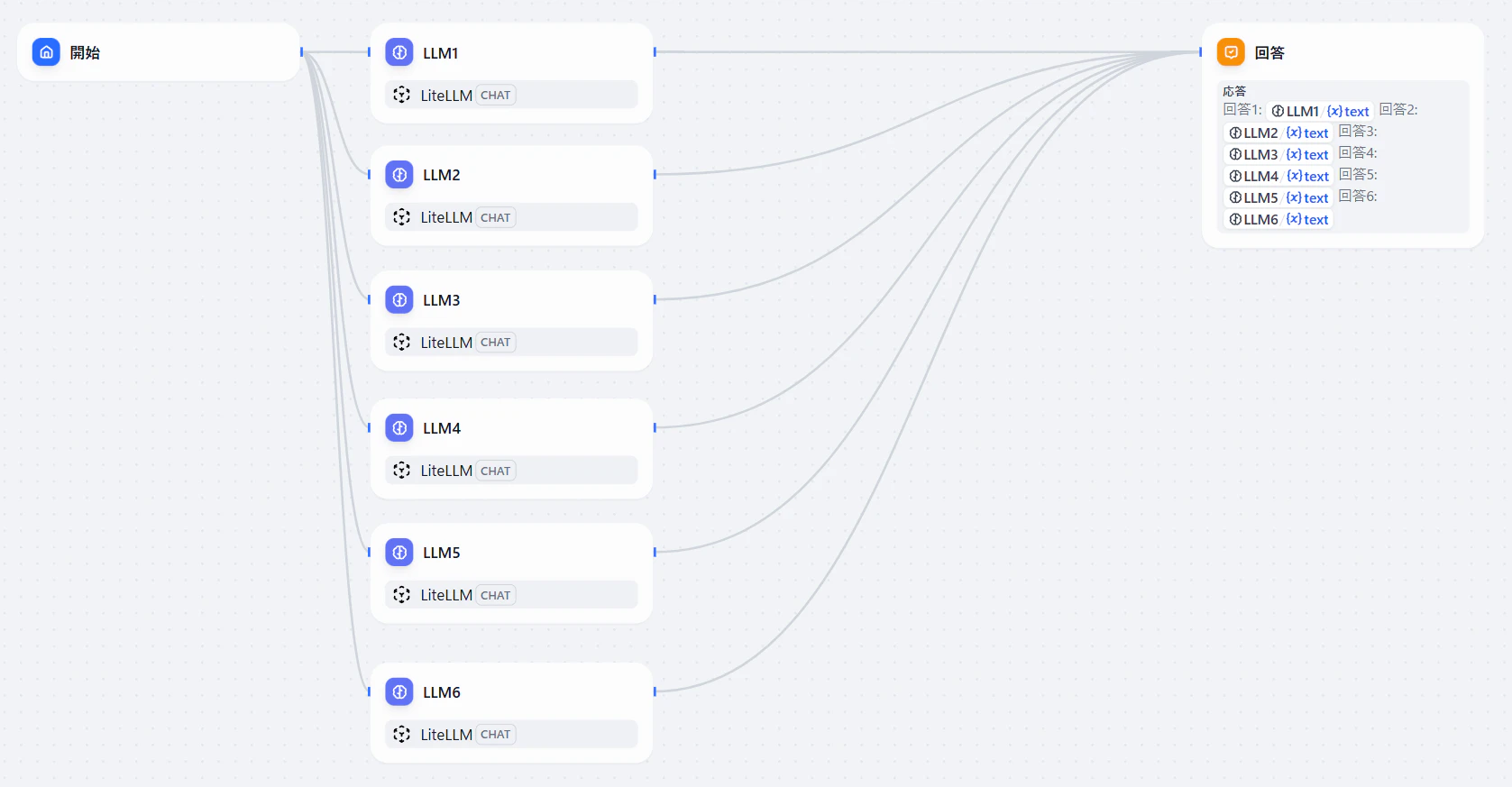
チャットフローのDSL
app:
  description: ''
  icon: 🤖
  icon_background: '#FFEAD5'
  mode: advanced-chat
  name: test-chatflow
  use_icon_as_answer_icon: false
dependencies:
- current_identifier: null
  type: marketplace
  value:
    marketplace_plugin_unique_identifier: langgenius/openai_api_compatible:0.0.22@88c295aff1ea52ea6ab56e3869ee37702d91f7b678c547254cf2b48271c8e81f
    version: null
kind: app
version: 0.4.0
workflow:
  conversation_variables: []
  environment_variables: []
  features:
    file_upload:
      allowed_file_extensions:
      - .JPG
      - .JPEG
      - .PNG
      - .GIF
      - .WEBP
      - .SVG
      allowed_file_types:
      - image
      allowed_file_upload_methods:
      - local_file
      - remote_url
      enabled: false
      fileUploadConfig:
        audio_file_size_limit: 50
        batch_count_limit: 5
        file_size_limit: 15
        image_file_size_limit: 10
        video_file_size_limit: 100
        workflow_file_upload_limit: 10
      image:
        enabled: false
        number_limits: 3
        transfer_methods:
        - local_file
        - remote_url
      number_limits: 3
    opening_statement: ''
    retriever_resource:
      enabled: true
    sensitive_word_avoidance:
      enabled: false
    speech_to_text:
      enabled: false
    suggested_questions: []
    suggested_questions_after_answer:
      enabled: false
    text_to_speech:
      enabled: false
      language: ''
      voice: ''
  graph:
    edges:
    - data:
        sourceType: start
        targetType: llm
      id: 1761054713585-llm
      selected: false
      source: '1761054713585'
      sourceHandle: source
      target: llm
      targetHandle: target
      type: custom
    - data:
        isInLoop: false
        sourceType: start
        targetType: llm
      id: 1761054713585-source-17610547905480-target
      selected: false
      source: '1761054713585'
      sourceHandle: source
      target: '17610547905480'
      targetHandle: target
      type: custom
      zIndex: 0
    - data:
        isInLoop: false
        sourceType: start
        targetType: llm
      id: 1761054713585-source-17610547909970-target
      selected: false
      source: '1761054713585'
      sourceHandle: source
      target: '17610547909970'
      targetHandle: target
      type: custom
      zIndex: 0
    - data:
        isInLoop: false
        sourceType: start
        targetType: llm
      id: 1761054713585-source-17610548033130-target
      selected: false
      source: '1761054713585'
      sourceHandle: source
      target: '17610548033130'
      targetHandle: target
      type: custom
      zIndex: 0
    - data:
        isInLoop: false
        sourceType: start
        targetType: llm
      id: 1761054713585-source-17610548013190-target
      selected: false
      source: '1761054713585'
      sourceHandle: source
      target: '17610548013190'
      targetHandle: target
      type: custom
      zIndex: 0
    - data:
        isInLoop: false
        sourceType: start
        targetType: llm
      id: 1761054713585-source-17610548050250-target
      selected: false
      source: '1761054713585'
      sourceHandle: source
      target: '17610548050250'
      targetHandle: target
      type: custom
      zIndex: 0
    - data:
        isInIteration: false
        isInLoop: false
        sourceType: llm
        targetType: answer
      id: 17610548050250-source-1761054865257-target
      selected: false
      source: '17610548050250'
      sourceHandle: source
      target: '1761054865257'
      targetHandle: target
      type: custom
      zIndex: 0
    - data:
        isInLoop: false
        sourceType: llm
        targetType: answer
      id: 17610548013190-source-1761054865257-target
      selected: false
      source: '17610548013190'
      sourceHandle: source
      target: '1761054865257'
      targetHandle: target
      type: custom
      zIndex: 0
    - data:
        isInLoop: false
        sourceType: llm
        targetType: answer
      id: 17610548033130-source-1761054865257-target
      selected: false
      source: '17610548033130'
      sourceHandle: source
      target: '1761054865257'
      targetHandle: target
      type: custom
      zIndex: 0
    - data:
        isInLoop: false
        sourceType: llm
        targetType: answer
      id: 17610547909970-source-1761054865257-target
      selected: false
      source: '17610547909970'
      sourceHandle: source
      target: '1761054865257'
      targetHandle: target
      type: custom
      zIndex: 0
    - data:
        isInLoop: false
        sourceType: llm
        targetType: answer
      id: 17610547905480-source-1761054865257-target
      selected: false
      source: '17610547905480'
      sourceHandle: source
      target: '1761054865257'
      targetHandle: target
      type: custom
      zIndex: 0
    - data:
        isInLoop: false
        sourceType: llm
        targetType: answer
      id: llm-source-1761054865257-target
      selected: false
      source: llm
      sourceHandle: source
      target: '1761054865257'
      targetHandle: target
      type: custom
      zIndex: 0
    nodes:
    - data:
        selected: false
        title: 開始
        type: start
        variables: []
      height: 51
      id: '1761054713585'
      position:
        x: 80
        y: 282
      positionAbsolute:
        x: 80
        y: 282
      selected: false
      sourcePosition: right
      targetPosition: left
      type: custom
      width: 241
    - data:
        context:
          enabled: false
          variable_selector: []
        model:
          completion_params:
            temperature: 1
          mode: chat
          name: LiteLLM
          provider: langgenius/openai_api_compatible/openai_api_compatible
        prompt_template:
        - id: e87cec68-735e-4fb4-8143-a4f26b740a57
          role: system
          text: ''
        - id: 57b01bd2-fae8-4543-aa16-763b18717213
          role: user
          text: '{{#sys.query#}}'
        selected: false
        title: LLM1
        type: llm
        vision:
          enabled: false
      height: 87
      id: llm
      position:
        x: 380
        y: 282
      positionAbsolute:
        x: 380
        y: 282
      selected: false
      sourcePosition: right
      targetPosition: left
      type: custom
      width: 241
    - data:
        context:
          enabled: false
          variable_selector: []
        model:
          completion_params:
            temperature: 1
          mode: chat
          name: LiteLLM
          provider: langgenius/openai_api_compatible/openai_api_compatible
        prompt_template:
        - id: e87cec68-735e-4fb4-8143-a4f26b740a57
          role: system
          text: ''
        - id: 3976e970-e125-4e87-baa5-e4a7b5f0ad81
          role: user
          text: '{{#sys.query#}}'
        selected: false
        title: LLM2
        type: llm
        vision:
          enabled: false
      height: 87
      id: '17610547905480'
      position:
        x: 380
        y: 386.0408375411378
      positionAbsolute:
        x: 380
        y: 386.0408375411378
      selected: false
      sourcePosition: right
      targetPosition: left
      type: custom
      width: 241
    - data:
        context:
          enabled: false
          variable_selector: []
        model:
          completion_params:
            temperature: 1
          mode: chat
          name: LiteLLM
          provider: langgenius/openai_api_compatible/openai_api_compatible
        prompt_template:
        - id: e87cec68-735e-4fb4-8143-a4f26b740a57
          role: system
          text: ''
        - id: 96a1611a-8395-4eb1-a853-f01cce28ef8e
          role: user
          text: '{{#sys.query#}}'
        selected: false
        title: LLM3
        type: llm
        vision:
          enabled: false
      height: 87
      id: '17610547909970'
      position:
        x: 380
        y: 492.24800626326487
      positionAbsolute:
        x: 380
        y: 492.24800626326487
      selected: false
      sourcePosition: right
      targetPosition: left
      type: custom
      width: 241
    - data:
        context:
          enabled: false
          variable_selector: []
        model:
          completion_params:
            temperature: 1
          mode: chat
          name: LiteLLM
          provider: langgenius/openai_api_compatible/openai_api_compatible
        prompt_template:
        - id: e87cec68-735e-4fb4-8143-a4f26b740a57
          role: system
          text: ''
        - id: d7e0ad1b-1f2a-4e07-bd19-9746cc7283c0
          role: user
          text: '{{#sys.query#}}'
        selected: false
        title: LLM5
        type: llm
        vision:
          enabled: false
      height: 87
      id: '17610548013190'
      position:
        x: 380
        y: 706.8286748885084
      positionAbsolute:
        x: 380
        y: 706.8286748885084
      selected: false
      sourcePosition: right
      targetPosition: left
      type: custom
      width: 241
    - data:
        context:
          enabled: false
          variable_selector: []
        model:
          completion_params:
            temperature: 0.7
          mode: chat
          name: LiteLLM
          provider: langgenius/openai_api_compatible/openai_api_compatible
        prompt_template:
        - id: e87cec68-735e-4fb4-8143-a4f26b740a57
          role: system
          text: ''
        - id: 31706945-e083-4a46-ab90-3418dca24d77
          role: user
          text: '{{#sys.query#}}'
        selected: false
        title: LLM4
        type: llm
        vision:
          enabled: false
      height: 87
      id: '17610548033130'
      position:
        x: 380
        y: 601.0668266752805
      positionAbsolute:
        x: 380
        y: 601.0668266752805
      selected: false
      sourcePosition: right
      targetPosition: left
      type: custom
      width: 241
    - data:
        context:
          enabled: false
          variable_selector: []
        model:
          completion_params:
            temperature: 1
          mode: chat
          name: LiteLLM
          provider: langgenius/openai_api_compatible/openai_api_compatible
        prompt_template:
        - id: e87cec68-735e-4fb4-8143-a4f26b740a57
          role: system
          text: ''
        - id: 13eb859f-0121-4a8b-a3c7-9a70db170b58
          role: user
          text: '{{#sys.query#}}'
        selected: false
        title: LLM6
        type: llm
        vision:
          enabled: false
      height: 87
      id: '17610548050250'
      position:
        x: 380
        y: 825.3343219135975
      positionAbsolute:
        x: 380
        y: 825.3343219135975
      selected: true
      sourcePosition: right
      targetPosition: left
      type: custom
      width: 241
    - data:
        answer: '回答1:

          {{#llm.text#}}


          回答2:

          {{#17610547905480.text#}}


          回答3:

          {{#17610547909970.text#}}


          回答4:

          {{#17610548033130.text#}}


          回答5:

          {{#17610548013190.text#}}


          回答6:

          {{#17610548050250.text#}}'
        selected: false
        title: 回答
        type: answer
        variables: []
      height: 193
      id: '1761054865257'
      position:
        x: 1086.3129908855617
        y: 282
      positionAbsolute:
        x: 1086.3129908855617
        y: 282
      selected: false
      sourcePosition: right
      targetPosition: left
      type: custom
      width: 241
    viewport:
      x: 1.4082709914939642
      y: 277.99661179241707
      zoom: 0.8705505632961241
  rag_pipeline_variables: []
チャットフローを実行します。想定通りに動作すればリクエストは3つのエンドポイントに負荷分散されます。
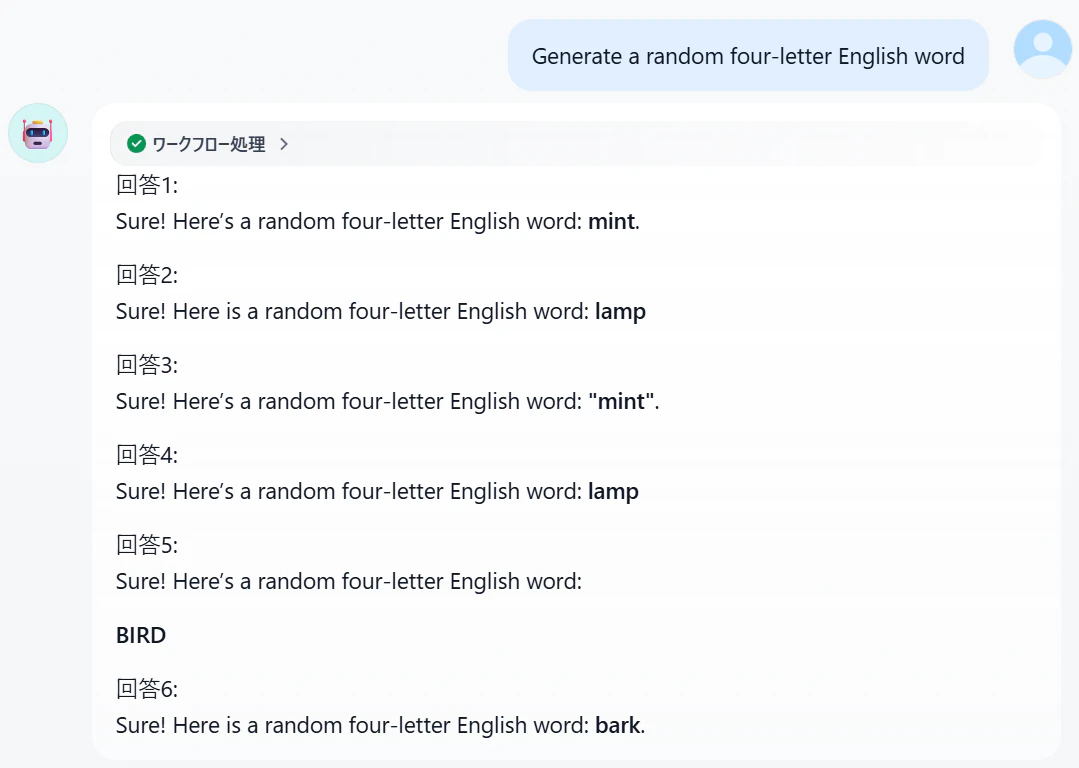
OpenAI APIコンソールでプロジェクトごとにログを確認します。



プロジェクト1、2、3それぞれに2リクエストずつ分散されたことが確認できました。
もう1パターン試してみます。次はランダムな数字を出力するプロンプトを与えます。
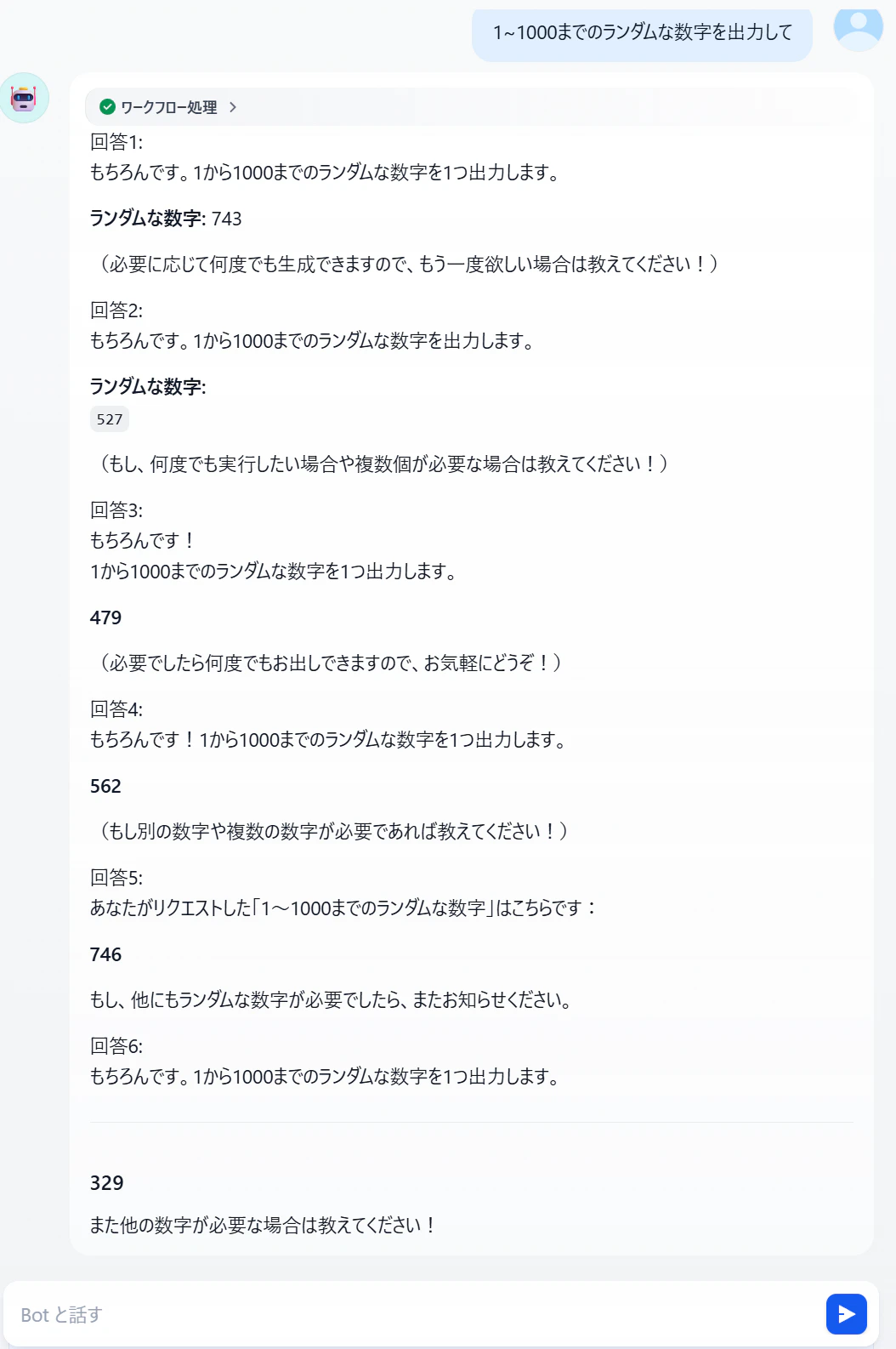
再度OpenAI APIコンソールでプロジェクトごとにログを確認します。



今度はプロジェクト1に1リクエスト、プロジェクト2に2リクエスト、プロジェクト3に3リクエストという配分で分散されたことが確認できました。
このように、LiteLLM Proxyによる負荷分散が正常に行われていることを確認できました。
所感
DifyはOpenAI互換のモデルであればプラグインを通じて簡単に疎通できるので、その点LiteLLM Proxyとの相性が非常に良いことがわかりました。またLiteLLM Proxyについては、負荷分散等あらゆる設定をconfigファイルへ直感的に書き込める点が個人的に使いやすい印象を受けました。
Difyへの負荷分散機能組み込みを検討する際、LiteLLM Proxyとの連携は有力な選択肢になり得ると思います。