
これは何の記事
サ〇ーウォーズの誕生日当て Web アプリを通して,
以下のことを学んでいく記事です
- VSCode で FastAPI を使った開発をする方法
- フロントからバックまでの開発方法をざっくり
今回の内容
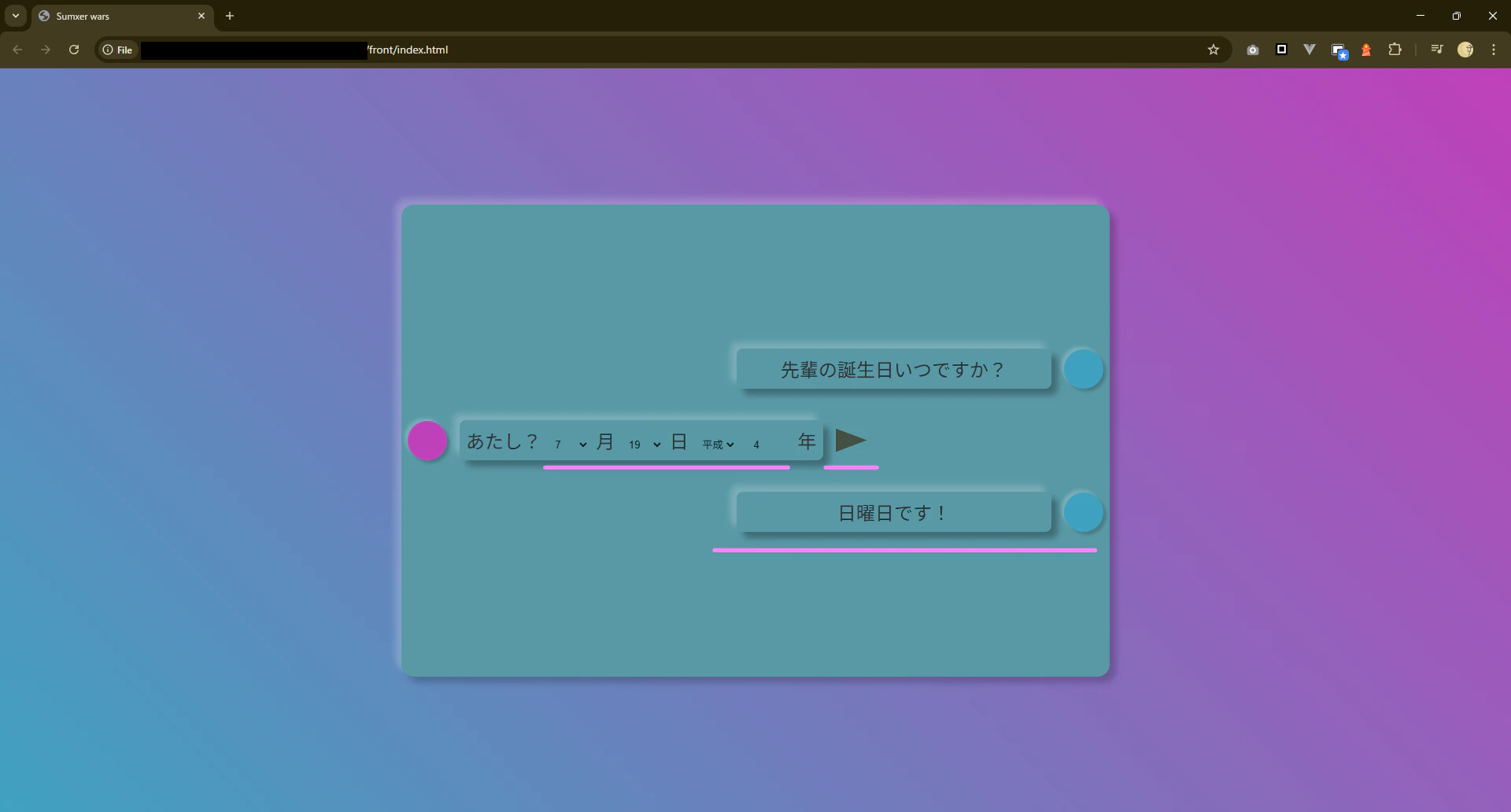
いよいよ完成編です
これをつくります

バックエンド
まずフォルダとファイルを作ります
-
routersフォルダにbirthdayフォルダを作ってください -
birthdayフォルダにbirthday.pyを作ってください -
birthdayフォルダにlibフォルダを作ってください -
libフォルダに__init__.pyを作ってください -
libフォルダにbirthday_module.pyを作ってください

birthday.py
こちらをコピペしてください
中身はだいたいこんなことをしています
- URL が
http://localhost:8765/birthdayだった時の処理をここにまとめる - 送られてくるデータが何型の何かを
BirthdayModelとして作っておく - 自作のモジュール(
birthday_module.py) を使って曜日を算出して返す
# 標準ライブラリ
import math

# サードパーティライブラリ
from fastapi import APIRouter
from pydantic import BaseModel


# 自作ライブラリ
from routers.birthday.lib.birthday_module import Birthday


router = APIRouter(
    prefix="/birthday",
    tags=["birthday"],
    responses={404: {"description": "Not found"}},
)


class BirthdayModel(BaseModel):
    month: int
    day: int
    year_name: str
    year: int


@router.post("/")
def get_birthday(body: BirthdayModel):

    birthday_instance = Birthday(body.month, body.day, body.year_name, body.year)
    day_of_week = birthday_instance.get_day_of_week()

    return {"status_code": 200, "message": "Success", "day_of_week": day_of_week}
init.py
何も書いていないままで大丈夫です
パッケージとして Python に扱わせるための特別なファイルです
birthday_module.py
以下をコピペしてください
内容はこんな感じです
- 和暦から西暦に変換する関数を用意
- ツェラーの公式を使って何曜日かを算出
import math


class Birthday:
    WEEK_LIST = {0: "土", 1: "日", 2: "月", 3: "火", 4: "水", 5: "木", 6: "金"}
    ERA_LIST = {
        "明治": "18730101",
        "大正": "19120730",
        "昭和": "19261226",
        "平成": "19890108",
        "令和": "20190501",
    }

    def __init__(self, month: int, day: int, year_name: str, year: int):
        self.month = month
        self.day = day
        self.year_name = year_name
        self.year = year

    def get_day_of_week(self):
        """産まれた日が何曜日だったかを返す"""

        # 和暦から西暦に変換する
        yyyymmdd_str = self._wareki_to_ymd()

        year = int(yyyymmdd_str[:4])
        month = int(yyyymmdd_str[4:6])
        day = int(yyyymmdd_str[6:])

        # 曜日を算出して返す
        return self._calc_day_of_birthday(year, month, day)

    def _calc_day_of_birthday(self, year: int, month: int, day: int) -> str:
        """西暦の日付から曜日を求める (Zeller's congruence)

        Args:
            year (int): 西暦年 (e.g., 2023)
            month (int): 月 (1-12)
            day (int): 日 (1-31)

        Returns:
            "水" のような曜日の文字列
        """
        q = day
        m = month
        Y = year

        # January and February are treated as months 13 and 14 of the previous year.
        if m < 3:  # m == 1 (Jan) or m == 2 (Feb)
            m += 12
            Y -= 1

        # Year of the century
        K = Y % 100
        # Century
        J = Y // 100

        # Zeller's congruence formula for the Gregorian calendar:
        # h = (q + floor(13*(m+1)/5) + K + floor(K/4) + floor(J/4) - 2*J) mod 7
        # or h = (q + floor(13*(m+1)/5) + K + floor(K/4) + 5*J + floor(J/4)) mod 7
        # The term math.floor(26 * (m + 1) / 10) is equivalent to math.floor(13 * (m + 1) / 5)

        h_val = (
            q
            + math.floor((13 * (m + 1)) / 5)
            + K
            + math.floor(K / 4)
            + math.floor(J / 4)
            - 2 * J
        )

        day_of_week_index = h_val % 7

        # Zeller's congruence: 0 = Saturday, 1 = Sunday, ..., 6 = Friday
        return self.WEEK_LIST[day_of_week_index]

    def _wareki_to_ymd(self) -> str:
        """
        和暦から西暦に変換する関数

        Returns:
        yyyymmdd 形式の数字
        Raises:
            ValueError: If self.year_name is not a supported era.
        """

        if self.year_name not in self.ERA_LIST:
            raise ValueError(f"Unsupported era name: {self.year_name}")

        era_start_date_str = self.ERA_LIST[self.year_name]
        era_start_year = int(era_start_date_str[:4])

        # yearの変換
        yyyy = str(era_start_year + int(self.year) - 1)
        return f"{yyyy}{self.month:02}{self.day:02}"
main.py
また,main.py も書き換えます
import fastapi
from fastapi.middleware.cors import CORSMiddleware


from routers import learn_break_point
from routers.birthday import birthday #  追加


app = fastapi.FastAPI()
app.include_router(learn_break_point.router)
app.include_router(birthday.router) #  追加

# CORS の設定
app.add_middleware(
    CORSMiddleware,
    allow_origins=["*"],
    allow_credentials=True,
    allow_methods=["*"],
    allow_headers=["*"],
)


@app.get("/")
def get_hello():
    return {"message": "Hello World"}
フロント
実際に見るアプリの画面を作ります
まずはフォルダとファイルを作りましょう
-
frontフォルダを作ってください -
frontフォルダの中にindex.htmlを作ってください -
frontフォルダの中にstyle.cssを作ってください -
frontフォルダの中にscript.jsを作ってください

index.html
内容は気にせずコピペしましょう
<!DOCTYPE html>
<html lang="ja">

<head>
    <meta charset="UTF-8">
    <meta name="viewport" content="width=device-width, initial-scale=1.0">
    <link rel="stylesheet" href="style.css">
    <title>Sumxer wars</title>
</head>

<body>
    <main>
        <div class="container">
            <div class="item">
                <div class="message">先輩の誕生日いつですか?</div>
                <div class="icon icon-a"></div>
            </div>

            <div class="item item-reverse">
                <div id="send"></div>
                <div class="message">
                    <label for="birth" name="birth">
                        あたし?
                        <!--
                            7 月 19 日 平成 4 年
                        -->
                        <select name="month" id="month">
                            <option value="1">1</option>
                            <option value="2">2</option>
                            <option value="3">3</option>
                            <option value="4">4</option>
                            <option value="5">5</option>
                            <option value="6">6</option>
                            <option value="7" selected>7</option>
                            <option value="8">8</option>
                            <option value="9">9</option>
                            <option value="10">10</option>
                            <option value="11">11</option>
                            <option value="12">12</option>
                        </select>月
                        <select name="day" id="day">
                            <option value="1">1</option>
                            <option value="2">2</option>
                            <option value="3">3</option>
                            <option value="4">4</option>
                            <option value="5">5</option>
                            <option value="6">6</option>
                            <option value="7">7</option>
                            <option value="8">8</option>
                            <option value="9">9</option>
                            <option value="10">10</option>
                            <option value="11">11</option>
                            <option value="12">12</option>
                            <option value="13">13</option>
                            <option value="14">14</option>
                            <option value="15">15</option>
                            <option value="16">16</option>
                            <option value="17">17</option>
                            <option value="18">18</option>
                            <option value="19" selected>19</option>
                            <option value="20">20</option>
                            <option value="21">21</option>
                            <option value="22">22</option>
                            <option value="23">23</option>
                            <option value="24">24</option>
                            <option value="25">25</option>
                            <option value="26">26</option>
                            <option value="27">27</option>
                            <option value="28">28</option>
                            <option value="29">29</option>
                            <option value="30">30</option>
                            <option value="31">31</option>
                        </select>日
                        <select name="year_name" id="year_name">
                            <option value="明治">明治</option>
                            <option value="大正">大正</option>
                            <option value="昭和">昭和</option>
                            <option value="平成" selected>平成</option>
                            <option value="令和">令和</option>
                        </select>
                        <input type="number" name="year" id="year" value="4">年
                    </label>
                </div>
                <div class="icon icon-b"></div>
            </div>
        </div>
    </main>
    <script src="script.js"></script>
</body>

</html>
style.css
こちらも内容は気にせずコピペしましょう
* {
  margin: 0;
  padding: 0;
  box-sizing: border-box;

  --outer-background-cyan: hsl(194, 50%, 50%);
  --outer-background-magenta: hsl(303, 50%, 50%);

  --main-background: hsl(190, 30%, 50%);
  --main-background-light: hsla(190, 30%, 70%, 0.5);
  --main-background-shadow: hsla(190, 30%, 20%, 0.5);

  --common-light: hsla(0, 0%, 100%, 0.2);
  --common-shadow: hsla(0, 0%, 0%, 0.2);
}

main {
  display: flex;
  flex-direction: column;
  align-self: center;
  justify-content: center;
  height: 100vh;
  width: 100vw;

  color: hsl(60, 80%, 80%);
  background-image: linear-gradient(
    45deg,
    var(--outer-background-cyan),
    var(--outer-background-magenta)
  );
}

.container {
  position: relative;
  display: flex;
  flex-direction: column;
  justify-content: center;

  gap: 24px;

  width: 900px;
  height: 600px;
  border-radius: 16px;

  margin: 0 auto;

  background-color: var(--main-background);
  box-shadow:
    -8px -8px 8px hsla(0, 0%, 100%, 0.2), /* 光 */
    8px 8px 8px hsla(0, 0%, 0%, 0.2); /* 影 */
}

.item {
  display: flex;
  justify-content: end;
  align-items: center;

  gap: 16px;
  padding: 8px;

  animation-name: up;
  animation-duration: 1s;
  animation-timing-function: ease-in-out;
}

@keyframes up {
  0% {
    transform: translateY(20px);
  }
  100% {
    transform: translateY(0px);
  }
}

.item-reverse {
  justify-content: start;
  flex-direction: row-reverse;
}

.message {
  display: flex;
  justify-content: center;
  align-items: center;

  min-width: 400px;

  font-size: 24px;
  color: #333;

  padding: 8px;
  background-color: var(--main-background);
  box-shadow:
    -8px -8px 8px var(--main-background-light), /* 光 */
    8px 8px 8px var(--main-background-shadow); /* 影 */

  border-radius: 8px;
}

.icon {
  display: flex;
  justify-content: center;
  align-items: center;
  width: 50px;
  height: 50px;
  border-radius: 999px;

  box-shadow:
    -4px -4px 4px var(--common-light), /* 光 */
    4px 4px 4px var(--common-shadow); /* 影 */
}

.icon-a {
  background-color: var(--outer-background-cyan);
}

.icon-b {
  background-color: var(--outer-background-magenta);
}

#year {
  width: 3rem;
}

#send {
  width: 40px;
  height: 30px;
  background-color: hsl(60, 20%, 20%);
  clip-path: polygon(0 0, 0 100%, 100% 50%);
  opacity: 0.8;
  transition: .5s;
  cursor: pointer;

  box-shadow:
    -4px -4px 4px var(--common-light), /* 光 */
    4px 4px 4px var(--common-shadow); /* 影 */
}

#send:hover {
  opacity: 1;
}

select, input {
  display: inline-block;
  background-color: var(--main-background);
  opacity: 0.8;
  border: none;

  width: 3rem;

  outline: none;
  margin: auto 8px;
}
script.js
こちらをコピペしましょう
内容はこんな感じです
- API を実行する
- URL は
http://localhost:8765/birthday/ - body に画面から取ってきた月,日,年をセット
- URL は
- 値が返ってきたら画面に反映する
const container = document.querySelector('.container');
const sendBtn = document.querySelector('#send')

const month = document.querySelector('#month')
const day = document.querySelector('#day')
const yearName = document.querySelector('#year_name')
const year = document.querySelector('#year')


sendBtn.addEventListener('click', async () => {
  console.log(`${month.value}, ${day.value}, ${yearName.value}, ${year.value}`)
  const response = await fetch(
    'http://localhost:8765/birthday/',
    {
      method: 'POST',
      headers: {
        'Content-Type': 'application/json',
      },
      body: JSON.stringify({
        month: parseInt(month.value),
        day: parseInt(day.value),
        year_name: yearName.value,
        year: parseInt(year.value),
      }),
    }

  )
  const data = await response.json()
  createItem(data)
});

const createItem = (data) => {
  const item = document.createElement('div')
  item.classList.add('item')

  const message = document.createElement('div')
  message.classList.add('message')
  message.innerText = `${data.day_of_week}曜日です!`

  const icon = document.createElement('div')
  icon.classList.add('icon', 'icon-a')


  item.appendChild(message)
  item.appendChild(icon)

  container.appendChild(item)
}
実行
1. FastAPI起動
VSCode で F5 を押してください
main.py を表示している状態だと安心です
2. フロントを表示
エクスプローラーを開いて,
index.html をダブルクリックしてください
どのアプリで開くか聞かれたら,
お好みのブラウザ(Chrome)を選択してください
するとこのような画面が表示されます
色々月や日などを変えて送信ボタンを押してみてください
FastAPIで作ったバックエンドが頑張って曜日を計算してくれます
