
免責事項
本サイトおよび対応するコメントにおいて表明される意見は、投稿者本人の個人的意見であり、シスコの意見ではありません。本サイトの内容は、情報の提供のみを目的として掲載されており、シスコや他の関係者による推奨や表明を目的としたものではありません。各利用者は、本Webサイトへの掲載により、投稿、リンクその他の方法でアップロードした全ての情報の内容に対して全責任を負い、本Web サイトの利用に関するあらゆる責任からシスコを免責することに同意したものとします。
この記事はCisco Systems Japan Advent Calendar 2025の7日目の記事となります。
はじめに
Segment Routingといえば主に通信キャリア系などの大規模ネットワーク環境にてASRやNCSといったIOS-XRルータを導入して利用されていますが、Enterprise系で主に利用されることの多いCatalystシリーズに搭載されているIOS-XEでもSegment Routingの機能が実装されています。
IOS-XEでのSegment Routingはどのようなものか調べてみたいと思い、今回はCatalyst9300にて実際にSegment Routingを設定しつつIOS-XRルータとのSegment Routing混在環境での動作確認を実施してみたいと思います。Segment Routingを勉強中の方がおられましたら、少しでも参考になると幸いです。
Segment Routingとは
本記事ではSegment Routingの解説を目的としているわけではございませんので以下簡単な説明のみで詳細は割愛します。詳細はchat gptなどのAIに聞いてみてください。
Segment Routingとは従来のルーティングとは異なりIPアドレスではなくSIDと呼ばれるセグメントを用いたソースルーティング手法であり、主に通信事業者や大手ISPなどのコアネットワーク環境にて多く利用されている技術となります。
Segment RoutingにはMPLSベースのSR-MPLSとIPv6ベースのSRv6の2種類がありますが、本記事ではSR-MPLSにフォーカスしております。
確認内容
今回はCatalyst9300(IOS-XE)におけるSR-MPLSの以下機能について確認してみます。
- SR-MPLSの基本設定と動作
- SR-TEによる経路制御の設定と動作
- IOS-XRとの違いなど
環境
catalyst9300とIOS-XRルータの混在環境
OSバージョン
・Catalyst9300(IOS-XE):17.16.1
・IOS-XRルータ4台:24.4.2、7.9.1
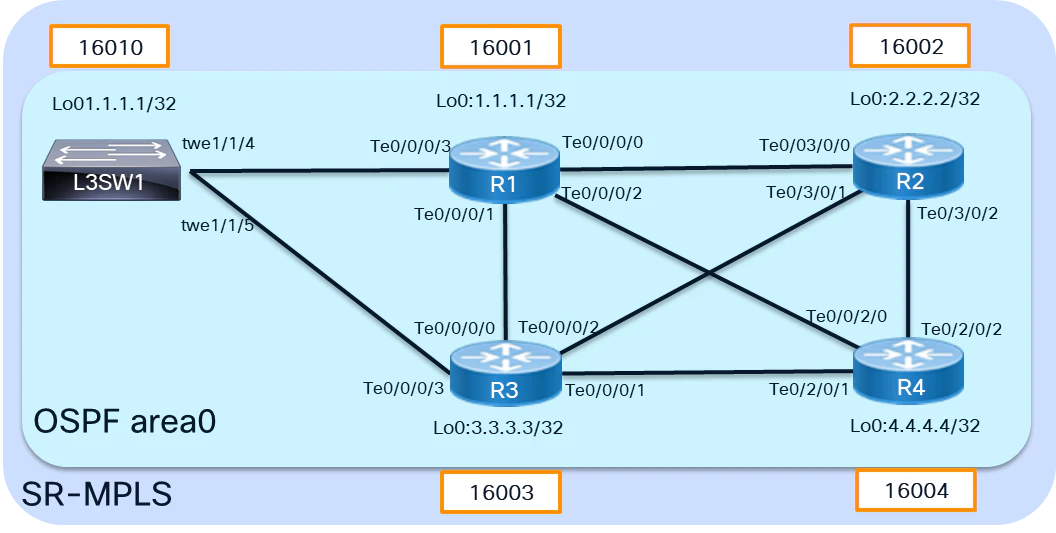
基本設定
Segment Routingを動作させるためにはIGP設定が必須になりますので、まずは各装置間でOSPFv2にてルーティング設定を行います。
各ルータ、L3SWにて以下基本設定を実施。※基本設定のため割愛します。
・各ルータ、SWとの接続ポートに対するIPアドレスの設定。
・各ルータ、SWでのloopbackアドレス
・各ルータ、SWでのOSPF設定(同一エリア)
各ルータのloopbackアドレス間で疎通可能な状態にします。
SR-MPLS設定
まずはSR-MPLSを有効化します。
IOS-XR設定
IOS-XR設定例はこちらより↓
router ospf OSPF
 segment-routing mpls
 area 0
  interface Loopback0
   prefix-sid index 1
  !
  interface TenGigE0/0/0/0
   network point-to-point
  !
  interface TenGigE0/0/0/1
   network point-to-point
  !
  interface TenGigE0/0/0/2
   network point-to-point
IOS-XE設定
L3SW01(config)#segment-routing mpls
L3SW01(config-srmpls)#connected-prefix-sid-map
L3SW01(config-srmpls-conn)#address-family ipv4
L3SW01(config-srmpls-conn-af)#10.10.10.10/32 1
L3SW01(config-srmpls-conn-af)#exit-address-family
L3SW01(config-srmpls-conn)#exit
L3SW01(config-srmpls)#exit
L3SW01(config)#
L3SW01(config)#router ospf 1
L3SW01(config-router)#segment-routing mpls
L3SW01(config-router)#segment-routing area 0 mpls
IOS-XEではグローバルコンフィグレーションモードでSR-MPLSの有効化を実施後、OSPFプロセスにてSR-MPLSを有効化します。
設定確認
SR-MPLSステータスとLFIBテーブルを確認してみます。
L3SW01#show ip ospf 1 segment-routing

            OSPF Router with ID (10.10.10.10) (Process ID 1)

Global segment-routing state: Enabled    # SR-MPLS有効化

Segment Routing enabled:
           Area    Topology name    Forwarding    Strict SPF
              0    Base             MPLS          Capable
    AS external    Base             MPLS          Not applicable

SR Attributes
    Prefer non-SR (LDP) Labels
    Do not advertise Explicit Null

Global Block (SRGB):
    Range: 16000 - 23999                  # SRGB範囲
    State: Created

Local Block (SRLB):
    Range: 15000 - 15999
    State: Created

Registered with SR App, client handle: 2
  SR algo 0 Connected map notifications active (handle 0x0), bitmask 0x1
  SR algo 0 Active policy map notifications active (handle 0x2), bitmask 0xC
  SR algo 1 Connected map notifications active (handle 0x1), bitmask 0x1
  SR algo 1 Active policy map notifications active (handle 0x3), bitmask 0xC

Registered with MPLS, client-id: 100

Max labels: platform 5, available 2    # ラベルスタック数
Max labels pushed by OSPF: uloop tunnels 2, TI-LFA tunnels 2    # ラベルスタック数
mfi label reservation ack not pending

Bind Retry timer not running
Adj Label Bind Retry timer not running
sr-app locks requested: srgb 0, srlb 0
TEAPP:
 TE Router ID 10.10.10.10
上記出力結果よりSR-MPLSが有効化されていることやSRGBの範囲等各種SR-MPLSの状態が確認できます。
また、Max labels: platform 5, available 2 より、SR-TEによるラベルスタック数がCatalyst9300シリーズでは最大5つまで対応と表記されているように見えます。後ほど設定するSR-TEにて実際にこの辺りの動きを見てみたいと思います。
※ハードウェア実装差分もありますがIOS-XRでは10個程度まで対応しているハードウェアが多いかと思います。
IOS-XR MAX SIDスタック数↓
RP/0/RP0/CPU0:R3#show ip ospf database opaque-area 4.0.0.0 adv-router 1.1.1.1

            OSPF Router with ID (3.3.3.3) (Process ID OSPF)

                Type-10 Opaque Link Area Link States (Area 0)

  LS age: 1657
  Options: (No TOS-capability, DC)
  LS Type: Opaque Area Link
  Link State ID: 4.0.0.0
  Opaque Type: 4
  Opaque ID: 0
  Advertising Router: 1.1.1.1
  LS Seq Number: 8000044a
  Checksum: 0x3d31
  Length: 84

    Router Information TLV: Length: 4
    Capabilities:
      Graceful Restart Helper Capable
      Stub Router Capable
      Traffic Engineering enabled area
      All capability bits: 0x70000000

    Segment Routing Algorithm TLV: Length: 2
      Algorithm: 0
      Algorithm: 1

    Segment Routing Range TLV: Length: 12
      Range Size: 8000

        SID sub-TLV: Length 3
         Label: 16000

    Node MSD TLV: Length: 2         #SIDスタック可能数
        Type: 1, Value 12

    Segment Routing Local Block TLV: Length: 12
      Range Size: 1000

        SID sub-TLV: Length 3
         Label: 15000

    Dynamic Hostname TLV: Length: 2
      Hostname: R1

RP/0/RP0/CPU0:R3#
↑上記例では最大SID搭載可能数は12個のようです。
L3SW01#show mpls forwarding-table
Local      Outgoing   Prefix           Bytes Label   Outgoing   Next Hop
Label      Label      or Tunnel Id     Switched      interface
16         Pop Label  10.0.103.3-A     0             Twe1/1/5   10.0.103.3
17         Pop Label  10.0.101.1-A     0             Twe1/1/4   10.0.101.1
16001      Pop Label  1.1.1.1/32       0             Twe1/1/4   10.0.101.1
16002      16002      2.2.2.2/32       0             Twe1/1/4   10.0.101.1
           16002      2.2.2.2/32       0             Twe1/1/5   10.0.103.3
16003      Pop Label  3.3.3.3/32       0             Twe1/1/5   10.0.103.3
16004      16004      4.4.4.4/32       0             Twe1/1/4   10.0.101.1
           16004      4.4.4.4/32       0             Twe1/1/5   10.0.103.3

A  - Adjacency SID
↑ LFIBテーブルを確認してみると、他のルータからPrefix SID(16001-16004)をOSPF経由でアドバタイズされ、IGPによるindexアドバタイズが正常にできている様子がわかります。
また、Adjacency SIDは16、17でありIOS-XRルータと割り当てるポリシーに違いがあるように見えます。
- IOS-XRルータは24000以降の番号で自動採番↓
RP/0/RP0/CPU0:R3#show mpls forwarding
Local  Outgoing    Prefix             Outgoing     Next Hop        Bytes
Label  Label       or ID              Interface                    Switched
------ ----------- ------------------ ------------ --------------- ------------
16001  Pop         SR Pfx (idx 1)     Te0/0/0/0    10.0.13.1       28181
       16001       SR Pfx (idx 1)     Te0/0/0/1    10.0.34.4       0            (!)
16002  Pop         SR Pfx (idx 2)     Te0/0/0/2    10.0.23.2       211538
       16002       SR Pfx (idx 2)     Te0/0/0/0    10.0.13.1       0            (!)
16004  Pop         SR Pfx (idx 4)     Te0/0/0/1    10.0.34.4       146035
       16004       SR Pfx (idx 4)     Te0/0/0/0    10.0.13.1       0            (!)
16010  Pop         SR Pfx (idx 10)    Te0/0/0/4    10.0.103.10     0
       16010       SR Pfx (idx 10)    Te0/0/0/0    10.0.13.1       0            (!)
24000  Pop         SR Adj (idx 0)     Te0/0/0/0    10.0.13.1       0
24001  Pop         SR Adj (idx 0)     Te0/0/0/0    10.0.13.1       0
       16001       SR Adj (idx 0)     Te0/0/0/1    10.0.34.4       0            (!)
24002  Pop         SR Adj (idx 0)     Te0/0/0/2    10.0.23.2       0
24003  Pop         SR Adj (idx 0)     Te0/0/0/2    10.0.23.2       0
       16002       SR Adj (idx 0)     Te0/0/0/0    10.0.13.1       0            (!)
24004  Pop         SR Adj (idx 0)     Te0/0/0/4    10.0.103.10     0
SRのSIDはOSPF opaque LSAにてアドバタイズされており、LinkState IDは7.0.0.0を使用しているようです。
L3SW01#show ip ospf database opaque-area 7.0.0.0 self-originate

            OSPF Router with ID (10.10.10.10) (Process ID 1)

                Type-10 Opaque Area Link States (Area 0)

  LS age: 155
  Options: (No TOS-capability, DC)
  LS Type: Opaque Area Link
  Link State ID: 7.0.0.0
  Opaque Type: 7 (Extended Prefix)
  Opaque ID: 0
  Advertising Router: 10.10.10.10
  LS Seq Number: 80000002
  Checksum: 0x8DB7
  Length: 44

    TLV Type: Extended Prefix
    Length: 20
      Prefix    : 10.10.10.10/32
      AF        : 0
      Route-type: Intra
      Flags     : N-bit

      Sub-TLV Type: Prefix SID
      Length: 8
        Flags : None
        MTID  : 0
        Algo  : SPF
        SID   : 10

L3SW01#
- IOS-XRはLink state ID 7.0.0.1を使用。↓
RP/0/RP0/CPU0:R3#show ip ospf database opaque-area 7.0.0.1 self-originate
Sat Dec  6 10:53:52.730 JST


            OSPF Router with ID (3.3.3.3) (Process ID OSPF)

                Type-10 Opaque Link Area Link States (Area 0)

  LS age: 223
  Options: (No TOS-capability, DC)
  LS Type: Opaque Area Link
  Link State ID: 7.0.0.1
  Opaque Type: 7
  Opaque ID: 1
  Advertising Router: 3.3.3.3
  LS Seq Number: 8000002b
  Checksum: 0xed6c
  Length: 44

    Extended Prefix TLV: Length: 20
      Route-type: 1
      AF        : 0
      Flags     : 0x40
      Prefix    : 3.3.3.3/32

      SID sub-TLV: Length: 8
        Flags     : 0x0
        MTID      : 0
        Algo      : 0
        SID Index : 3
tracerouteによる疎通確認
SR-MPLSを有効化させたこのタイミングで一度疎通確認を実施してみます。
L3SW01#traceroute mpls ipv4 2.2.2.2 255.255.255.255
Tracing MPLS Label Switched Path to 2.2.2.2/32, timeout is 2 seconds

Codes: '!' - success, 'Q' - request not sent, '.' - timeout,
  'L' - labeled output interface, 'B' - unlabeled output interface,
  'D' - DS Map mismatch, 'F' - no FEC mapping, 'f' - FEC mismatch,
  'M' - malformed request, 'm' - unsupported tlvs, 'N' - no label entry,
  'P' - no rx intf label prot, 'p' - premature termination of LSP,
  'R' - transit router, 'I' - unknown upstream index,
  'l' - Label switched with FEC change, 'd' - see DDMAP for return code,
  'X' - unknown return code, 'x' - return code 0

Type escape sequence to abort.
  0 10.0.101.10 MRU 1500 [Labels: 16002 Exp: 0]
L 1 10.0.101.1 MRU 1500 [Labels: implicit-null Exp: 0] 6 ms
! 2 10.0.12.2 2 ms
L3SW1→(SID:16002)→R1→(implicit-null)→R2とMPLSラベルの付与とPHPの動作が確認できます。
※LSPによるTracerouteの実施はIOS-XEでもIOS-XR同様MPLS OAMを有効化が必要になります。
L3SW01(config)#mpls oam
SR-TEの設定
続いてはSR-TEの設定をCatalyst9300に入れてみて経路制御を実施させてみたいと思います。
SR-TEをExplicit pathとしてC9300→R1→R4を通る経路で設定してみます。
※SR-TE:Segment RoutingによるTraffic Enginnering制御の機能のこと。
explict Pathの作成
L3SW01(config)#ip explicit-path name TEST-PATH1
L3SW01(cfg-ip-expl-path)#next-?
next-address  next-label

L3SW01(cfg-ip-expl-path)#next-lab
L3SW01(cfg-ip-expl-path)#next-label ?
  <0-1048575>  Label value

L3SW01(cfg-ip-expl-path)#next-label 16001
Explicit Path name TEST-PATH1:
    1: next-label 16001
L3SW01(cfg-ip-expl-path)#next-label 16002
Explicit Path name TEST-PATH1:
    1: next-label 16001
    2: next-label 16002
L3SW01(cfg-ip-expl-path)#next-label 16004
Explicit Path name TEST-PATH1:
    1: next-label 16001
    2: next-label 16002
    3: next-label 16004
L3SW01(cfg-ip-expl-path)#
↑ IOS-XR同様 explicit-pathの指定はIPアドレスもしくはMPLSラベルを指定できます。
TEトンネルの作成
L3SW01(config)#interface tunnel 1
L3SW01(config-if)#ip unnumbered loopback 0
L3SW01(config-if)#tunnel mode mpls traffic-eng
L3SW01(config-if)#tunnel destination 4.4.4.4
L3SW01(config-if)#tunnel mpls traffic-eng autoroute announce
L3SW01(config-if)#tunnel mpls traffic-eng path-option 1 explicit name TEST-PATH1 segment-routing
L3SW01(config-if)#tunnel mpls traffic-eng path-selection metric igp

L3SW01(config)#router ospf 1
L3SW01(config-router)#segment-routing mpls
L3SW01(config-router)#mpls traffic-eng area 0
L3SW01(config-router)#mpls traffic-eng router-id loopback 0
↑SR-TEの設定はIOS-XEではTEトンネルを作成する流れになっているようです。
作成後、TEトンネルの状態を見てみましょう。
L3SW01#show mpls traffic-eng tunnels tunnel 1

Name: L3SW01_t1                           (Tunnel1) Destination: 4.4.4.4
  Status:
    Admin: up         Oper: down   Path: not valid   Signalling: Down
    path option 1, (SEGMENT-ROUTING) type explicit TEST-PATH1
      Last Error: CTRL:: Destination IP address, 4.4.4.4, not found   #Destinationへのパスがないとエラー。

  Config Parameters:
    Bandwidth: 0        kbps (Global)  Priority: 7  7   Affinity: 0x0/0xFFFF
    Metric Type: TE (default)
    Path Selection:
     Protection: any (default)
    Path-selection Tiebreaker:
      Global: not set   Tunnel Specific: not set   Effective: min-fill (default)
    Hop Limit: disabled
    Cost Limit: disabled
    Path-invalidation timeout: 10000 msec (default), Action: Tear
    AutoRoute: enabled  LockDown: disabled Loadshare: 0 [0] bw-based
    auto-bw: disabled
    Fault-OAM: disabled, Wrap-Protection: disabled, Wrap-Capable: No
  Shortest Unconstrained Path Info:
    Path Weight: UNKNOWN
    Explicit Route:  UNKNOWN

  History:
    Tunnel:
      Time since created: 19 minutes, 29 seconds
      Number of LSP IDs (Tun_Instances) used: 59
トンネルがDOWNになっており、対向ルータ(4.4.4.4)にて対してのパスがないと言われてます。
C9300ではSR-TEの設定はTEトンネルを使用するため、mpls traffic-engの設定を対向ルータ側にて設定を入れる必要がありそうです。
対向ルータ(IOS-XR)側にて以下設定を追加
RP/0/RSP0/CPU0:R4(config)#mpls traffic-eng interface tenGigE 0/0/2/0
RP/0/RSP0/CPU0:R4(config)#mpls traffic-eng interface tenGigE 0/0/2/1
RP/0/RSP0/CPU0:R4(config)#mpls traffic-eng interface tenGigE 0/0/2/2
再度Catalyst9300にてTEトンネルの状態を見てみましょう。↓
L3SW01#show mpls traffic-eng tunnels tunnel 1

Name: L3SW01_t1                           (Tunnel1) Destination: 4.4.4.4
  Status:
    Admin: up         Oper: down   Path: not valid   Signalling: Down
    path option 1, (SEGMENT-ROUTING) type explicit TEST-PATH1
      Last Error: CTRL:: No path to destination, 1.1.1.1 (no path)   #nexthopへのパスがないとエラー。

  Config Parameters:
    Bandwidth: 0        kbps (Global)  Priority: 6  6   Affinity: 0x0/0xFFFF
    Metric Type: IGP (interface)
    Path Selection:
     Protection: any (default)
    Path-selection Tiebreaker:
      Global: not set   Tunnel Specific: not set   Effective: min-fill (default)
    Hop Limit: disabled
    Cost Limit: disabled
    Path-invalidation timeout: 10000 msec (default), Action: Tear
    AutoRoute: enabled  LockDown: disabled Loadshare: 0 [0] bw-based
    auto-bw: disabled
    Fault-OAM: disabled, Wrap-Protection: disabled, Wrap-Capable: No
  Shortest Unconstrained Path Info:
    Path Weight: 2 (IGP)
    Explicit Route: 10.0.103.3 10.0.34.4 4.4.4.4

  History:
    Tunnel:
      Time since created: 57 minutes, 5 seconds
      Time since path change: 1 minutes, 32 seconds
      Number of LSP IDs (Tun_Instances) used: 582
    Prior LSP: [ID: 546]
      ID: path option 10 [582]
      Removal Trigger: signalling shutdown
      Last Error: CTRL:: No path to destination, 1.1.1.1 (no path)
今度は1.1.1.1に対してパスがないと言われている。
どうやらnexthopとなるルータにも設定を入れてあげる必要がありそうです。
nexthopルータにmpls traffic-eng設定追加後
L3SW01#show mpls traffic-eng tunnels tunnel 1

Name: L3SW01_t1                           (Tunnel1) Destination: 4.4.4.4
  Status:
    Admin: up         Oper: up     Path: valid       Signalling: connected
    path option 1, (SEGMENT-ROUTING) type explicit TEST-PATH1 (Basis for Setup)

  Config Parameters:
    Bandwidth: 0        kbps (Global)  Priority: 6  6   Affinity: 0x0/0xFFFF
    Metric Type: IGP (interface)
    Path Selection:
     Protection: any (default)
    Path-selection Tiebreaker:
      Global: not set   Tunnel Specific: not set   Effective: min-fill (default)
    Hop Limit: disabled [ignore: Explicit Path Option with all Strict Hops]
    Cost Limit: disabled
    Path-invalidation timeout: 10000 msec (default), Action: Tear
    AutoRoute: enabled  LockDown: disabled Loadshare: 0 [0] bw-based
    auto-bw: disabled
    Fault-OAM: disabled, Wrap-Protection: disabled, Wrap-Capable: No
  Active Path Option Parameters:
    State: explicit path option 1 is active
    BandwidthOverride: disabled  LockDown: disabled  Verbatim: disabled

  History:
    Tunnel:
      Time since created: 48 minutes, 33 seconds
      Time since path change: 0 seconds
      Number of LSP IDs (Tun_Instances) used: 546
    Current LSP: [ID: 546]
      Uptime: 0 seconds
  Tun_Instance: 546
  Segment-Routing Path Info (ospf 1  area 0)
    Segment0[Node]: 1.1.1.1, Label: 16001
    Segment1[Node]: 2.2.2.2, Label: 16002
    Segment2[Node]: 4.4.4.4, Label: 16004
L3SW01#
TEトンネルがUPになりました。
これまでの挙動よりどうやらIOS-XEではSR-TEによる経路制御を実行する際、TEトンネルの設定+対向ルータやnexthopルータにてmpls traffic-engの設定を入れる必要がありそうです。ここがIOS-XRルータの方がシンプルでポリシーが違うようですね。
IOS-XRだけの環境ではmpls traffic-eng設定は非推奨となっています。
IOS-XR : SR-TEの仕様変更に関して (CSCwh42382)
tracerouteによる経路確認
L3SW01#traceroute mpls ipv4 4.4.4.4 255.255.255.255
Tracing MPLS Label Switched Path to 4.4.4.4/32, timeout is 2 seconds

Codes: '!' - success, 'Q' - request not sent, '.' - timeout,
  'L' - labeled output interface, 'B' - unlabeled output interface,
  'D' - DS Map mismatch, 'F' - no FEC mapping, 'f' - FEC mismatch,
  'M' - malformed request, 'm' - unsupported tlvs, 'N' - no label entry,
  'P' - no rx intf label prot, 'p' - premature termination of LSP,
  'R' - transit router, 'I' - unknown upstream index,
  'l' - Label switched with FEC change, 'd' - see DDMAP for return code,
  'X' - unknown return code, 'x' - return code 0

Type escape sequence to abort.
  0 10.0.101.10 MRU 1500 [Labels: 16002/16004/implicit-null Exp: 0/0/0]
L 1 10.0.101.1 MRU 1500 [Labels: implicit-null/16004/implicit-null Exp: 0/0/0] 3 ms
L 2 10.0.12.2 MRU 1500 [Labels: implicit-null/implicit-null Exp: 0/0] 2 ms
! 3 10.0.24.4 2 ms
TEST-PATH1にて指定した経路でtracerouteが流れています。
■SIDスタック数確認
先ほど確認したSIDスタック数上限について、合わせて確認してみましょう。
L3SW01(config)#ip explicit-path name TEST-PATH2
L3SW01(cfg-ip-expl-path)#next-label 16001
Explicit Path name TEST-PATH1:
    1: next-label 16001
L3SW01(cfg-ip-expl-path)#next-label 16002
Explicit Path name TEST-PATH1:
    1: next-label 16001
    2: next-label 16002
L3SW01(cfg-ip-expl-path)#next-label 16003
Explicit Path name TEST-PATH1:
    1: next-label 16001
    2: next-label 16002
    3: next-label 16004
L3SW01(cfg-ip-expl-path)#next-label 16001
Explicit Path name TEST-PATH1:
    1: next-label 16001
    2: next-label 16002
    3: next-label 16004
    4: next-label 16001
L3SW01(cfg-ip-expl-path)#next-label 16002
Explicit Path name TEST-PATH1:
    1: next-label 16001
    2: next-label 16002
    3: next-label 16004
    4: next-label 16001
    5: next-label 16002
L3SW01(cfg-ip-expl-path)#next-label 16004
Explicit Path name TEST-PATH1:
    1: next-label 16001
    2: next-label 16002
    3: next-label 16004
    4: next-label 16001
    5: next-label 16002
    6: next-label 16004
L3SW01(cfg-ip-expl-path)#exit

L3SW01(config)#interface tunnel 2
L3SW01(config-if)#ip unnumbered loopback 0
L3SW01(config-if)#tunnel mode mpls traffic-eng
L3SW01(config-if)#tunnel destination 4.4.4.4
L3SW01(config-if)#tunnel mpls traffic-eng autoroute announce
L3SW01(config-if)#$ng path-option 1 explicit name TEST-PATH2 segment-routing
L3SW01(config-if)#tunnel mpls traffic-eng path-selection metric igp
L3SW01#show mpls traffic-eng tunnels tunnel 2

Name: L3SW01_t2                           (Tunnel2) Destination: 4.4.4.4
  Status:
    Admin: up         Oper: down   Path: not valid   Signalling: Down
    path option 1, (SEGMENT-ROUTING) type explicit TEST-PATH2
      Last Error: CTRL:: Platform label push limit exceeded

  Config Parameters:
    Bandwidth: 0        kbps (Global)  Priority: 7  7   Affinity: 0x0/0xFFFF
    Metric Type: IGP (interface)
    Path Selection:
     Protection: any (default)
    Path-selection Tiebreaker:
      Global: not set   Tunnel Specific: not set   Effective: min-fill (default)
    Hop Limit: disabled
    Cost Limit: disabled
    Path-invalidation timeout: 10000 msec (default), Action: Tear
    AutoRoute: enabled  LockDown: disabled Loadshare: 0 [0] bw-based
    auto-bw: disabled
    Fault-OAM: disabled, Wrap-Protection: disabled, Wrap-Capable: No
  Shortest Unconstrained Path Info:
    Path Weight: 2 (IGP)
    Explicit Route: 10.0.101.1 10.0.14.4 4.4.4.4

  History:
    Tunnel:
      Time since created: 3 minutes, 48 seconds
      Number of LSP IDs (Tun_Instances) used: 24
L3SW01#
ラベルスタック数を6つで設定してみるもTEトンネルはダウンとなり、Last Error: CTRL:: Platform label push limit exceeded と表示されているため、MAXラベルスタック数を超過していることによりTEトンネルは作られない動作のようです。
まとめ
Catalyst9300(IOS-XE)にてSR-MPLSを設定し、性能面やSR-TEの設定ポリシーなどIOS-XRとの差分や制約がありつつもSR-MPLS、SR-TEが動作することを確認できました。
※今回は一部機能しか見ていないのでFlex-AlgoやTI-LFAなんかも別途見てみたいですね。
Segment Routingを運用するケースでは大量のユーザ収容、大容量トラフィックが流れるような環境で利用されることが主なため、実運用において現時点ではIOS-XRルータで利用する必要があるかと思いますが、Catalyst9000シリーズでも機能として使用できるようになっていることから気軽にSegment Routingの動作を確認できるようになる点は良いと感じました。
ぜひCatalystシリーズでSegment Routingを遊んでみてはいかがでしょうか。