

これは何?
ZedというRust製の超イケてるIDEのv1.0が出たのでHaskellが最低限書ける設定を実施した作業ログ。
追記: VS Codeに比べてメモリ消費量が少ないように感じる
環境
- Ubuntu 24.04 LTS
- Zed 1.0.1 ad3e097279b3a5c04b273a4f2f6c6ed1729ea0c8
- ghc 9.6.7
使用用途は、AtCoder。
インストール
Haskell Extensionsの追加
上記Extensionsを追加した。
もちろんZedのUIからインストールできる。
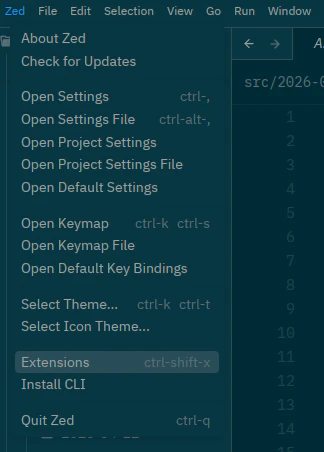
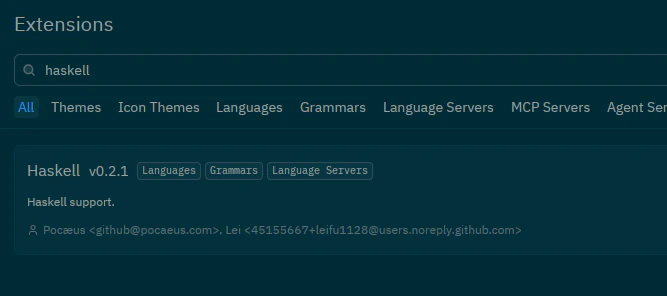
この時点でシンタックスハイライトがつくようになった。
HLS(LSP)の設定
自分はHaskell周りの環境はNix Flakeでやっており、VS CodeだとうまくHLSが使用できていた。
しかし、Zedではうまくいかなかったので以下の対応を実施したら動いた。
-
./.zed/settings.jsonにNix Flakeで入れたhaskell-language-server-wrapperのpath等設定。settings.json"lsp": { "hls": { "binary": { "path": "/nix/store/n8zj6zg7i3wibpsmj92k4djwy0sg6lzr-haskell-language-server-2.12.0.0/bin/haskell-language-server-wrapper", "arguments": ["--lsp"] }, "initialization_options": { "haskell": { "checkProject": false } } } }, -
この時点で一応動くのだが、
hie.yamlが無いという警告がでるのでリポジトリトップに追加した。(GhcSession,NormalizedFilePath "/home/sigma/atcoder/src/2026-05-02/A.hs")InvalidYaml (Just (YamlException "Yaml file not found: /home/sigma/atcoder/hie.yaml")) -
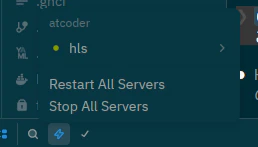
HLSの再起動をして動作確認。
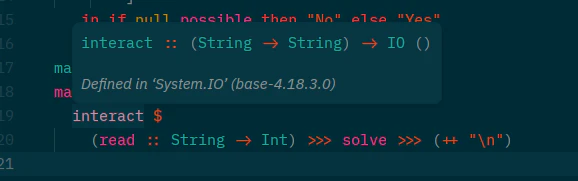
interactにホバーしたら型定義等の情報がでたのでヨシ!
Formatter
nix fmtでCLIで書ける前提なのであまり気にしていないが、上記のExtensionsを入れただけで保存時のフォーマッタがかかるようになった。
スニペットについて
自分も競技プログラミング用のスニペットをいくつか使用していたため、これもZodに移行した。
結論から書くと、2026年5月現在Zedにスニペットを移行したところ以下のことができなくなった(と思っているが実はやり方があれば教えてください)
- プロジェクトごとのスニペットの登録: 2026年5月現在、Zedでは
~/.config/zed/snippets/配下にすべてのスニペットを配置する必要がある - コントロールパネルからのスニペットの挿入: VS Codeの場合はCtrl shift pを押下した後に、Snippets: Insert Snippets`を選択することで事前定義したスニペットを挿入できた。
Zedでは事前定義したスニペットの名前(prefix)を入力することで補完候補にスニペットがでてくるようになっているようだ。

以下は一部抜粋
~/.config/zed/snippets/haskell.json
  "Interact2DIntMatrix": {
    "prefix": "interact2d",
    "description": "Read a 2D matrix via interact with solve function.",
    "body": [
      "{-# OPTIONS_GHC -Wunused-imports #-}",
      "{-# LANGUAGE BangPatterns #-}",
      "{-# LANGUAGE CPP #-}",
      "import Debug.Trace (traceShowId)",
      "",
      "-- {-# OPTIONS_GHC -DATCODER #-}",
      "#ifdef ATCODER",
      "debug :: Bool ; debug = False",
      "#else",
      "debug :: Bool ; debug = True",
      "#endif",
      "",
      "dbgId :: (Show a) => a -> a",
      "dbgId x",
      "  | debug = traceShowId x",
      "  | otherwise = x",
      "",
      "solve :: [[Int]] -> [[Int]]",
      "solve xss = dbgId \\$ map (map (subtract 0)) xss",
      "",
      "main :: IO ()",
      "main = interact \\$ \\inputs ->",
      "  let ls = lines inputs",
      "      [_, _] = map read . words \\$ head ls :: [Int]",
      "      intList2D = map (map read . words) \\$ drop 1 ls :: [[Int]]",
      "   in unlines . map (unwords . map show) \\$ solve intList2D"
    ]
  },
まとめ
- VS CodeからZedにHaskell開発環境を移行してみた。
- 最低限開発ができるようにシンタックスハイライトとHLS(LSP)の設定をした。
- 競技プログラミングのコンテストに出るならばスニペットが欲しいのでこれもVS Codeから移行した。スニペットに関しては一部制約がある。