
つづき。
他に API 通信で必要なことといえば、検索!
文字列で検索したり、ページネーションを行ったり、毎度実装するのが面倒だなぁと思う要素かと思います。
これも Inertia.js ならサクッと作ることができます。
いざ作成
過去の記事で作成している Post - PostTag を検索するとします。
まずは検索用の DTO を作ります!
個人的には検索系は Search を名前に付けてますね。
$ php artisan make:data PostSearchData
とりあえず user_id と search で検索ができるようにします。
ポイントとして、ユーザーIDの検索などに
Uniqueは使わないようにしましょう。
エラー表示でユーザーがいるかが分かってしまうので!
namespace App\Data;

use Spatie\LaravelData\Attributes\Validation\Max;
use Spatie\LaravelData\Attributes\Validation\Min;
use Spatie\LaravelData\Data;
use Spatie\TypeScriptTransformer\Attributes\TypeScript;

#[TypeScript()]
class PostSearchData extends Data
{
    public function __construct(
        #[Min(0)] // unique は付けない
        public ?int $user_id,
        #[Max(20)]
        public ?string $search,
        #[Min(0)]
        public ?int $page = 1,
    ) {}
}
これを検索できるコントローラーを用意します。
引数に DTO を指定して、各検索条件は属性の中のクロージャーに when() を使って書いていきます。
wneh() を使うことで、チェーンして書くことができ、見通しが良くなります。
ポイントとして、必ず並び替え条件を書いておきましよう。
特にPostgreSQLは並び順が保障されてないです。。。
namespace App\Http\Controllers;

use App\Data\PostSearchData;
use App\Models\Post;
use App\Models\User;
use Illuminate\Database\Eloquent\Builder;
use Inertia\Inertia;

class TestController extends Controller
{
    public function index(PostSearchData $data)
    {
        return Inertia::render('Test', [
            'posts' => fn () => Post::with('tags')
                ->when($data->user_id, function (Builder $query, $value) {
                    $query->where('user_id', '=', $value);
                })
                ->when($data->search, function (Builder $query, $value) {
                    $query->whereAny(['title', 'body'], 'like', "%{$value}%");
                })
                ->orderBy('id', 'ASC')
                ->paginate(),
            'users' => fn () => User::all(),
        ]);
    }
}
これらを操作する画面側を作成します。
クエリを useForm() で作成し、router.reload() というやつでデータを更新します。
その際に only をかけるのを忘れずにしてください。
<template>
  <div class="m-4 grid grid-cols-1 gap-y-2">
    <div class="w-md grid grid-cols-[auto_1fr] items-center gap-2">
      <label>検索</label>
      <div>
        <InputText v-model="query.search" fluid/>
        <small class="text-red-500">{{ query.errors.search }}</small>
      </div>

      <label>ユーザー</label>
      <div>
        <Select
          v-model="query.user_id"
          :options="users"
          option-value="id"
          option-label="name"
          fluid
        />
        <small class="text-red-500">{{ query.errors.search }}</small>
      </div>

      <div class="flex gap-2">
        <Button label="クリア" severity="secondary" @click="onClear()" />
        <Button label="検索" @click="onSearch()" />
      </div>
    </div>

    <div class="flex items-center gap-2">
      <label>Posts: ({{ posts.total }})</label>

      <Button
        v-for="n in (posts.total / posts.per_page | 0) + 1"
        :key="n"
        :label="String(n)"
        @click="onPage(n)"
      />
    </div>

    <table
      class="
        border-collapse border border-gray-400
        [&_th]:border [&_th]:border-gray-300 [&_th]:px-2 [&_th]:py-1
        [&_td]:border [&_td]:border-gray-300 [&_td]:px-2 [&_td]:py-1
      "
    >
      <thead>
        <tr>
          <th>ID</th>
          <th>著者</th>
          <th>タイトル</th>
          <th>本文</th>
          <th>更新日時</th>
        </tr>
      </thead>

      <tbody>
        <tr v-for="post in posts.data" :key="post.id">
          <td>{{ post.id }}</td>
          <td>{{ post.user?.name }}</td>
          <td>{{ ellipsis(post.title, 16) }}</td>
          <td>{{ ellipsis(post.body, 16) }}</td>
          <td>{{ datetime(post.updated_at) }}</td>
        </tr>
      </tbody>
    </table>
  </div>
</template>

<script setup lang="ts">
import { router, useForm } from '@inertiajs/vue3'

import InputText from 'primevue/inputtext'
import Select from 'primevue/select'
import Button from 'primevue/button'

type Paginate<T> = {
  data: T[]

  current_page: number
  per_page: number
  total: number
}

defineProps<{
  posts: Paginate<App.Models.Post>,
  users: App.Models.User[],
}>()

const query = useForm<App.Data.PostSearchData>({
  user_id: undefined,
  search: undefined,
  page: 1
})

////////////////////
// formatter
////////////////////

const ellipsis = (str: string | null, max: number): string =>
  (str && str.length > max)
    ? (str.slice(0, max) + '…')
    : (str ?? '')

const datetime = (str: string | null): string =>
  str ? new Date(str).toISOString() : ''

////////////////////
// action
////////////////////

const onClear = () => {
  query.reset()
  handleSearch()
}

const onPage = (page: number) => {
  query.page = page
  handleSearch()
}

const onSearch = () => {
  query.page = 1
  handleSearch()
}

const handleSearch = () => {
  router.reload({
    data: query.data(),
    only: ['posts'],
  })
}
</script>
ざっとこんな感じですかね。
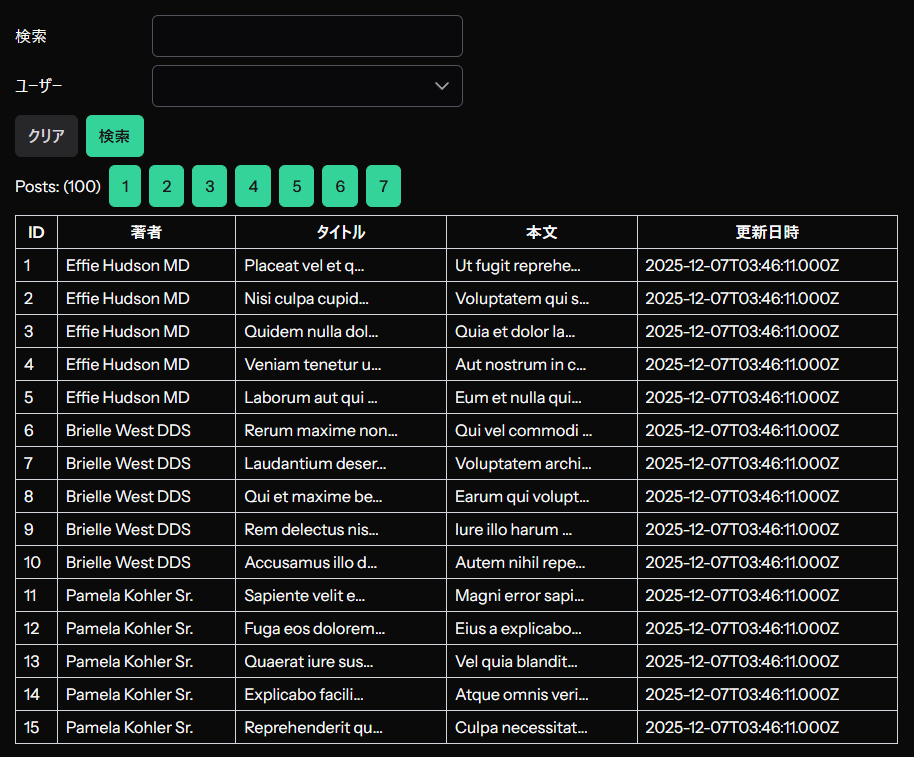
検索を行うと、勝手にデータが更新されて反映されます。

意外とかんたんでしょ?
▼ URLとフォームの内容がリンクしてないんだけど...
Inertia.js では、Laravel 側で処理が走るため、URLにパラメタがついた状態でページを開くと、自動的に検索結果が表示されます。
ただ先ほど、フォームの初期値を undefined で定義したので、少しぎこちない形になっています...直しましょう。
実は useForm() はクロージャーを受け取ることができます。
なので、クロージャーで URLSearchParams を使って、クエリを初期値に登録します。
このあたりの処理は composable 化しちゃってもいいかもしれませんね。
- const query = useForm<App.Data.PostSearchData>({
-   user_id: undefined,
-   search: undefined,
-   page: 1
- })
+ const query = useForm<App.Data.PostSearchData>(() => {
+   const params = new URLSearchParams(window.location.href)
+
+   return {
+     user_id: params.get('user_id') ? Number(params.get('user_id')) : undefined,
+     search: params.get('search') ?? undefined,
+     page: params.get('page') ? Number(params.get('page')) : 1,
+   }
+ })
もし暗黙のデフォルト値がある場合は、この段階で挿入しましょう。
このようにすることで、 reset() をかけた時に、最初の状態に戻すことができます!
▼ 配列のデータってどうやって送るの...?
意外と悩むことの多い配列データの受け渡し。
これは少しテクニックが必要です。
試しに user_id を複数受け取れるようにしましょう。
配列の場合は Attribute では各アイテムへバリデーションをかける user_ids.* が使えないようです...。なので rules() を併用して、手動記載を行います。
class PostSearchData extends Data
{
    public function __construct(
-       #[Min(0)] // unique は付けない
-       public ?int $user_id,
+       #[Min(0)]
+       /** @var int[] */
+       public ?array $user_ids = [],
        #[Max(20)]
        public ?string $search,
        #[Min(0)]
        public ?int $page = 1,
    ) {}
+
+   public static function rules(): array
+   {
+       return [
+           'user_ids.*' => ['integer'],
+       ];
+   }
}
そして検索コントローラーを複数の where へ対応させます。
whereでくくってあげることで、選択した userId を OR 検索させることができます。
        return Inertia::render('Test', [
            'posts' => fn () => Post::with(['user', 'tags'])
-               ->when($data->user_id, function (Builder $query, $value) {
-                   $query->where('user_id', '=', $value);
+               ->when($data->user_ids, function (Builder $query, $value) {
+                   $query->where(function (Builder $sub) use ($value) {
+                       foreach($value as $user_id) {
+                           $sub->orwhere('user_id', '=', $user_id);
+                       }
+                   });
                })
                ->when($data->search, function (Builder $query, $value) {
                    $query->whereAny(['title', 'body'], 'like', "%{$value}%");
                })
                ->orderBy('id', 'ASC')
                ->paginate(),
画面側はこんな感じにします。
長いので変更点だけ記載しますね。
  <div>
    <div class="grid grid-cols-1 gap-2">
      <div
        v-for="(user_id, idx) in query.user_ids"
        :key="idx"
        class="flex gap-2"
      >
        <Select
          :model-value="user_id"
          :options="users"
          option-value="id"
          option-label="name"
          fluid
          @update:model-value="query.user_ids![idx] = $event"
        />
        <Button label="-" severity="danger" @click="onRemoveUserSearch(idx)"/>
      </div>

      <Button label="+ 追加" @click="onAppendUserSearch" />
    </div>

    <small class="text-red-500">{{ query.errors.search }}</small>
  </div>
配列の場合は user_ids[] という bracket 形式を利用します。
const query = useForm<App.Data.PostSearchData>(() => {
  const params = new URLSearchParams(window.location.href)

  return {
+   user_ids: params.getAll('user_ids[]')
+     ? params.getAll('user_ids[]').map(e => Number(e))
+     : undefined,
    search: params.get('search') ?? undefined,
    page: params.get('page') ? Number(params.get('page')) : 1,
  }
})

+ const onAppendUserSearch = () => {
+   if(!query.user_ids) {
+     query.user_ids = []
+   }
+
+   query.user_ids.push(0)
+ }
+
+ const onRemoveUserSearch = (index: number) => {
+   query.user_ids?.splice(index, 1)
+ }
こうすることで、複数検索も可能となります。

ただ、URLを見てみると、通信に利用している URL は
http://localhost:8000/test?page=1&user_ids[]=2&user_ids[]=3 (bracket)
なのに対して、アドレスバーに表示される URL は
http://localhost:8000/test?page=1&user_ids[0]=2&user_ids[1]=3 (indices)
となってしまします。
[0] [1] 形式は URLSearchParams で扱うことができません...。
これの説明は長くなるため次の記事にまとめます。
おわりに
こんな感じで、データの検索もフォームと同じ感じで実行することができます!