
お客様~フォームの送信ボタンを連打しないでください~ 
もし、 PHP 側の処理が3秒程度かかるシステムだとすると、ボタンを連打されると大変なことになります... 
そうでなくても、画面が変わらなければ利用者は送信されたか分からないですよね...
そんなローディング機能も Inertia.js には備わっています。
useForm の状態を取り出す
useform() の中には processing という属性があります。
もし通信を行っているのであれば、ここに true が格納されているんですよね。
試しに簡単なフォームで実験してみます。
<template>
  <form class="m-4 grid grid-cols-1 gap-2" @submit.prevent>
    <div class="grid grid-cols-1">
      <label>テキスト</label>
      <InputText v-model="form.text"/>
      <small class="text-red-500">{{ form.errors.text }}</small>
    </div>

    <div>
      <Button label="送信" :loading="form.processing" @click="onSubmit" />
    </div>
  </form>
</template>

<script setup lang="ts">
import { useForm } from '@inertiajs/vue3'

import Button from 'primevue/button'
import InputText from 'primevue/inputtext'

import { store } from '@/routes/tests'

const form = useForm<App.Data.FileUploadData>({
  text: '',
})

const onSubmit = () => {
  form.submit(store())
}
</script>
このように loading.value = true とかも必要なく実装ができてしまいます!

よく見ると画面上部のインジケーターも動いていますね。
インジケーター
これは Inertia.js に備わっているデフォルトのロードインジケーターです。
ちなみに app.ts の progress で色を変えることができます!
resources/js/app.ts
createInertiaApp({
    // ...
    progress: {
-       color: '#4B5563',
+       color: '#FF0000',
    },
});
こうすると、赤くなります。
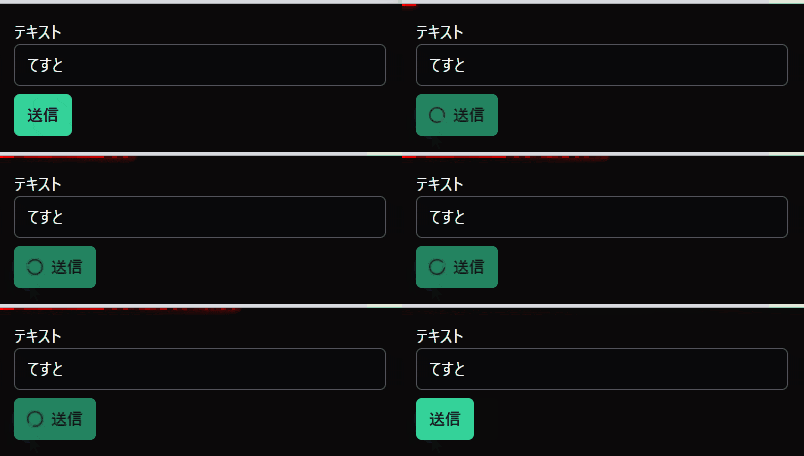
いらなければ、通信中のオプションに showProgres があるので、切っちゃってください。
form.submit(store(), {
  showProgress: false,
})
逆に reload() などではインジケーターが動かないことがあります。
その時は showProgress: true としてあげると動くようになります。
発展
もし更なるカスタムがしたい場合は、router についてるイベントが発火しているので、それを使ってみてください。
レイアウトなどに受信部を作成したら、画面全体のローディングとかもできちゃいます。
import { router } from '@inertiajs/vue3'

router.on('start', () => /* loading start */ )
router.on('finish', () => /* loading finish */ )
終わりに
こんなことまで至れり尽くせりですね;;
Form 編はこれで最後の記事のはずです。
まだまだ最適化できる余地はありそうなので、もしお気づきの人は情報をネットの海に放流してください!