

はじめに
Viteでprocess.envを使うためvite-plugin-env-compatibleプラグインを利用したのですが、Cannot find name 'process'エラーが発生したため、解決方法を備忘として残します。
問題
予めvite-plugin-env-compatibleプラグインをインストールします。
npm i -D vite-plugin-env-compatible
そのあと、vite.config.tsに対して、次の追加を行いました。
import react from "@vitejs/plugin-react";
import { defineConfig } from "vite";
+ import env from "vite-plugin-env-compatible";
import viteTsconfigPaths from "vite-tsconfig-paths";

// https://vite.dev/config/
export default defineConfig({
  plugins: [
    react(),
    viteTsconfigPaths(),
+    env({ prefix: "VITE", mountedPath: "process.env" }),
  ],
});
そしてsrcフォルダ配下でprocess.envを記述したところCannot find name 'process'エラーが発生します。
import { createClient } from "@supabase/supabase-js";

export const supabase = createClient(
  // Cannot find name 'process'. エラー発生
  process.env.VITE_SUPABASE_URL!,
  process.env.VITE_SUPABASE_PUBLISHABLE_KEY!
);
解決方法
tsconfig.app.jsonファイルのtypesプロパティに"node"を追加してください。
tsconfig.node.jsonでは無いので注意してください。
{
  "compilerOptions": {
    "tsBuildInfoFile": "./node_modules/.tmp/tsconfig.app.tsbuildinfo",
    "target": "ES2022",
    "useDefineForClassFields": true,
    "lib": ["ES2022", "DOM", "DOM.Iterable"],
    "module": "ESNext",
-    // "types": ["vite/client"],
+    "types": ["vite/client", "node"],
    "skipLibCheck": true,

    /* Bundler mode */
    "moduleResolution": "bundler",
    "allowImportingTsExtensions": true,
    "verbatimModuleSyntax": true,
    "moduleDetection": "force",
    "noEmit": true,
    "jsx": "react-jsx",

    /* Linting */
    "strict": true,
    "noUnusedLocals": true,
    "noUnusedParameters": true,
    "erasableSyntaxOnly": true,
    "noFallthroughCasesInSwitch": true,
    "noUncheckedSideEffectImports": true,

    "paths": {
      "@/*": ["./src/*"]
    }
  },
  "include": ["src"]
}
"types": ["vite/client", "node"]は何をしている?
`typescriptに対して以下のような指示を出しています。
node_modules/@types/*の中で、自動的にグローバルスコープに読み込むのは、vite/clientとnodeだけにして!そして他の@types/*は無視して!
グローバルスコープに読み込まれるとimport xxx from ●●●をしなくても、最初からxxxというモジュールが使える状態になります。(細かく言うと、xxxというモジュールの型定義ファイルをどこからでも読み込められる状態にしてします。)
viteプロジェクトのデフォルトでは"types": ["vite/client"]となっており、これにはprocessの型定義が含まれていません。
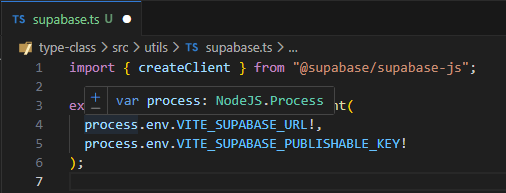
そこで、processの型定義を持っている"node"(@types/node)を"types"プロパティに追加することで、processを読み込めるようにしました。
以下キャプチャのようにprocessの型が表示されるようになりました。
おわりに
この方法でエラーは解消されますが、グローバル型定義の競合や、ブラウザ側では使えないAPIがソースコード上で使えるように見えるなど、リスクはありそうです...!
参考
https://qiita.com/shunii/items/b00d556f3730e6b88708
https://www.typescriptlang.org/tsconfig/#types
https://ja.vite.dev/guide/features#client-types
JISOUのメンバー募集中!
プログラミングコーチングJISOUでは、新たなメンバーを募集しています。
日本一のアウトプットコミュニティでキャリアアップしませんか?
興味のある方は、ぜひホームページをのぞいてみてください!
▼▼▼
https://projisou.jp