

はじめに
AIを使いながら個人開発をして、体系的に技術を学びたい。
そう思いながら細々何かを作っては途中で諦めて...を繰り返しています。
そんな現状を打破するべく、現在はAI夢占いアプリを個人開発中です。
設定したはずのOGPはうまく表示されていませんが、ぜひ一度遊んでみてください。
ユーザーが夢の内容を入力すると、Google Gemini APIが心理学的な観点で分析します。
夢に出てきた象徴の意味・解釈・アドバイスを返すサービスです。

今回の大きな目的は3つです。
- 継続して開発をする(途中で放置しない)
- 本番運用を意識したインフラ構成を学ぶ
- Google Adsenseの審査通過の基準をクリアする
今回は、Next.js・Gemini API・Supabase・MDXを組み合わせた実装について紹介します。
技術スタック
| 分類 | 技術 |
|---|---|
| フレームワーク | Next.js 15(App Router), React 19 |
| AI | Google Gemini API (@google/generative-ai) |
| 認証・DB | Supabase (Auth + RLS + JSONB) |
| ホスティング | Netlify |
| ドメイン | お名前.com(取得)/ Cloudflare(DNS管理・CDN) |
| コンテンツ | MDX + gray-matter |
| フォーム | React Hook Form + Zod |
| スタイル | Tailwind CSS v4 |
| メール | Resend |
| 通知 | Sonner |
1. 二段階分析フロー(追加質問)
一番お気に入りの実装です。
夢の内容が短すぎる場合、AIが「追加情報」を求めてから本分析を行います。
追加情報をもとに分析することで、より的確な結果を返せるようになっています。
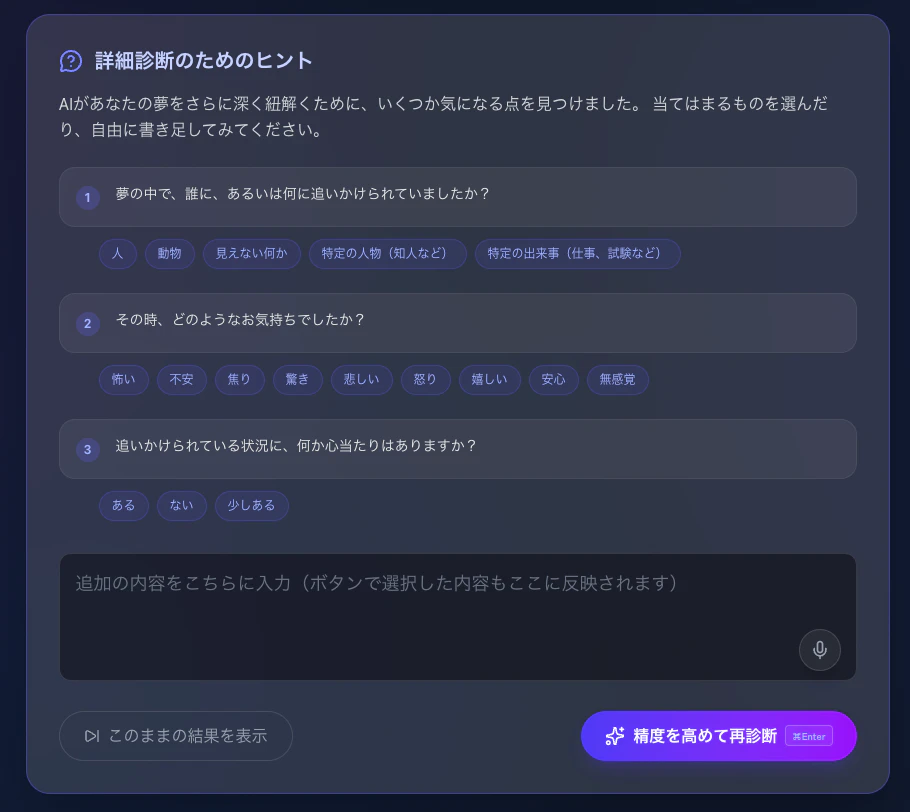
データフロー
-
ユーザー入力 →
/api/analyze→needsMoreInfo: true -
追加質問を表示(選択肢付き)
-
ユーザー回答 →
/api/analyze(【追加情報】マーカー付き) -
最終分析結果 →
/result/[id]
API実装
// app/api/analyze/route.ts
const inputText = isFollowUp
  ? `${dream}\n\n【追加情報】\n${moreInfo}`
  : dream;
AIプロンプト側に「【追加情報】が含まれる場合は needsMoreInfo: false にすること」と明示することで、無限ループを防いでいます。
フロントエンド
const handleAnalyze = async (isFollowUp = false) => {
  // ...分析リクエスト処理
  if (data.needsMoreInfo && !isFollowUp) {
    setNeedsMoreInfo(true);
    setQuestions(data.missingInfoQuestions || []);

    // 質問セクションへスムーススクロール
    setTimeout(() => {
      questionsSectionRef.current?.scrollIntoView({ behavior: 'smooth' });
    }, 150);
    return;
  }
  router.push(`/result/${data.id}`);
};
2. 構造化プロンプトと型安全な分析結果
Gemini APIには「事実と解釈を分けること」「根拠のない断定を禁止すること」を明示したプロンプトを渡します。
出力はJSONのみを要求し、パース失敗を減らします。
分析結果の型定義
// lib/types.ts
export interface AnalysisResult {
  isDiagnosable: boolean;
  needsMoreInfo: boolean;
  missingInfoQuestions: { question: string; options: string[] }[];

  facts: string[];              // 解釈なしの事実(「蛇が出た」等)
  emotions: string[];           // 夢の中の感情
  symbols: {
    symbol: string;
    meaningCandidates: string[]; // 複数の解釈候補
  }[];
  interpretations: {
    summary: string;
    confidence: number;         // 0〜1の信頼度スコア
    evidence: string[];         // 根拠となる事実
  }[];
  advice: string;
  nextActions: string[];
}
facts と interpretations を分離することで、「夢の事実」と「AIの推測」をUIで明確に区別できます。
confidence(信頼度)スコアはプログレスバーで可視化しています。

Gemini APIの安全性設定
夢分析では学術的な観点からセンシティブな内容も扱う必要があるため、カテゴリごとにしきい値を調整しています。
const model = genAI.getGenerativeModel({
  model: "gemini-2.0-flash",
  safetySettings: [
    {
      category: HarmCategory.HARM_CATEGORY_SEXUALLY_EXPLICIT,
      threshold: HarmBlockThreshold.BLOCK_NONE, // 夢分析のため許容
    },
    {
      category: HarmCategory.HARM_CATEGORY_HATE_SPEECH,
      threshold: HarmBlockThreshold.BLOCK_MEDIUM_AND_ABOVE,
    },
  ],
});
AIレスポンスのクリーニング
GeminiがMarkdownコードブロックを含めて返してしまう場合があるため、JSONを抽出する処理を入れています。
export function cleanJsonText(text: string): string {
  return text.replace(/```json/g, "").replace(/```/g, "").trim();
}
3. インメモリレートリミッター
Redisを使わずに globalThis でインメモリ管理しています。
シンプルなスライディングウィンドウ方式です。
// lib/rate-limit.ts
const RATE_LIMIT_STORE_KEY = Symbol.for('__rate_limit_store__');

function getStore(): RateLimitStore {
  const g = globalThis as typeof globalThis & {
    [RATE_LIMIT_STORE_KEY]?: RateLimitStore;
  };
  if (!g[RATE_LIMIT_STORE_KEY]) {
    g[RATE_LIMIT_STORE_KEY] = new Map<string, number[]>();
  }
  return g[RATE_LIMIT_STORE_KEY]!;
}

export function consumeRateLimit({ key, limit, windowMs }: ConsumeParams): ConsumeResult {
  const now = Date.now();
  const windowStart = now - windowMs;
  const store = getStore();

  const current = (store.get(key) ?? []).filter(ts => ts > windowStart);

  if (current.length >= limit) {
    const retryAfterMs = current[0] + windowMs - now;
    return { allowed: false, retryAfterSeconds: Math.ceil(retryAfterMs / 1000) };
  }

  current.push(now);
  store.set(key, current);
  return { allowed: true, remaining: limit - current.length };
}
制限値はゲスト(IP単位)が20回/10分、認証ユーザーが60回/10分です。
※本番環境でマルチインスタンス構成にする場合はRedis等の外部ストアへの移行が必要です。
4. MDXコンテンツ管理 × React cache()
夢占い辞典のコンテンツはMDXファイルで管理しています(DBレス構成)。
content/dictionary/
  animals/
    snake.mdx
    dog.mdx
  nature/
    rain.mdx

gray-matterでのパースとメモ化
React 19の cache() を使い、リクエスト内での重複読み込みを防いでいます。
// lib/mdx.ts
import { cache } from 'react';

export const getAllDictionaryItems = cache((): DictionaryItem[] => {
  // ファイルシステムを走査してMDXを読み込み
  const categories = fs.readdirSync(CONTENT_PATH);
  // ...パース処理
});
5. Supabase SSR × RLS
ミドルウェアでのセッション管理
// middleware.ts
export async function middleware(request: NextRequest) {
  return await updateSession(request);
}

export const config = {
  matcher: [
    '/((?!_next/static|_next/image|favicon.ico|.*\\.(?:svg|png|jpg|jpeg|gif|webp)$).*)',
  ],
};
Row Level Security (RLS)
認証ユーザーは自分の夢だけ、ゲストは共有トークン経由でのみアクセスできるよう設計しています。
-- 認証ユーザーは自分の夢のみ
CREATE POLICY "Users can view their own dreams" ON dreams
  FOR SELECT USING (auth.uid() = user_id);

-- ゲストと認証ユーザー両方が保存可能
CREATE POLICY "Anyone can insert dreams" ON dreams
  FOR INSERT WITH CHECK (
    (auth.uid() IS NULL AND user_id IS NULL)
    OR (auth.uid() = user_id)
  );
ゲストユーザーには、自動削除されることをメッセージ表示で伝えています。
「夢を保存したい場合は会員登録してね」という感じで誘導できたらいいなという思惑です。

6. Web Speech API(音声入力)
夢の内容を音声で入力できる機能です。

ステールクロージャ対策として Ref を活用しています。
const SpeechRecognition = window.SpeechRecognition || window.webkitSpeechRecognition;
const recognition = new SpeechRecognition();

recognition.onresult = (event) => {
  let totalTranscript = '';
  for (let i = 0; i < event.results.length; i++) {
    totalTranscript += event.results[i][0].transcript;
  }
  onTranscriptRef.current(totalTranscript); // Ref経由で最新のコールバックを参照
};
まとめ
SEO対策などもしているのですが、なかなかうまくいかず、試行錯誤している最中です。
そちらについても今後記事にしていきたいと思います。
気になる点があれば、ぜひコメントで教えてください!