0
0

Delete article

Deleted articles cannot be recovered.

Draft of this article would be also deleted.

Are you sure you want to delete this article?

Selenideで日付入力が日本規格でできない

0
Posted at

問題が起きたコード

前提: OSはUbuntu 24

日付を入力するSelenideのコード

.kt
    fun 日付を入力する() {
        val date = "2025-12-1"
        $("input[name='date']").setValue("00$date")
    }

上記のようなコードで日付の入力を試みるも、以下のようになってほしいところが
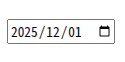
image.png

mm/dd/yyyyの形式(おそらく英語圏の規格)になっている

解決方法

以下のシステムの設定をしてSelenideが使用するChromeの設定が日本になるようにしました。

# 日本語言語パックと locales を入れる
sudo apt update
sudo apt install -y language-pack-ja locales

# 日本語ロケールを生成
sudo locale-gen ja_JP.UTF-8

# システムのデフォルトロケールを日本語に
sudo update-locale LANG=ja_JP.UTF-8

# 念の為再起動
sudo reboot

私はこれで期待通りにSelenideが動くようになりました。

大したことではなかったものの、ちょっと時間を食ってしまったのでこの記事が誰かの助けになれば嬉しいです。

0
0
0

Register as a new user and use Qiita more conveniently

  1. You get articles that match your needs
  2. You can efficiently read back useful information
  3. You can use dark theme
What you can do with signing up
0
0

Delete article

Deleted articles cannot be recovered.

Draft of this article would be also deleted.

Are you sure you want to delete this article?