
はじめに
私は生まれてからずっと東京近辺に住んでいるのですが、1日1回は挙動のおかしい人を見かけるんですよね。
変な人から身を守るためには、事前に情報を入手することが必要です。
ということで、今回は警視庁が発表している不審者情報をLINEで通知してくれるBotを作成しました。
元ネタは以下の記事です。
東京23区の不審者情報をプッシュしてくれるLINE Botつくってみた|立花翔|note
今回の開発ではテキスト情報にプラスして、住所からマップ画像を生成して通知できるようにしました。
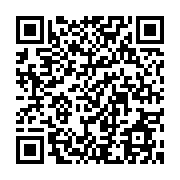
友達登録
スマホの方はこちら
使い方
アカウントを登録し、通知対象のエリアを登録します。
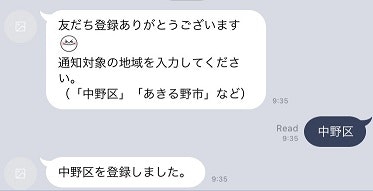
その後毎日1回、通知対象エリアの不審者情報がある場合は、情報が配信されます。
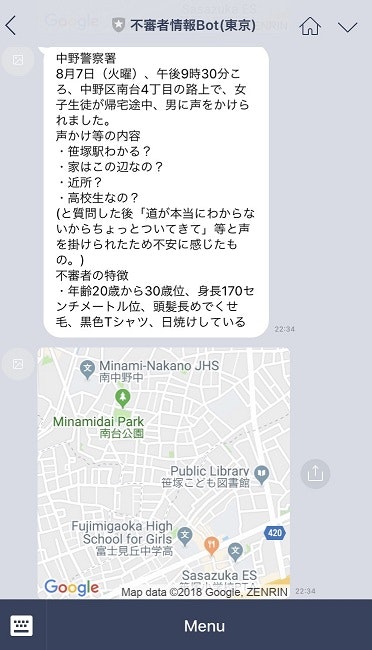
ちなみにこのケースだと、おじさんは道を尋ねて見事不審者データベース入りを果たしました
構成
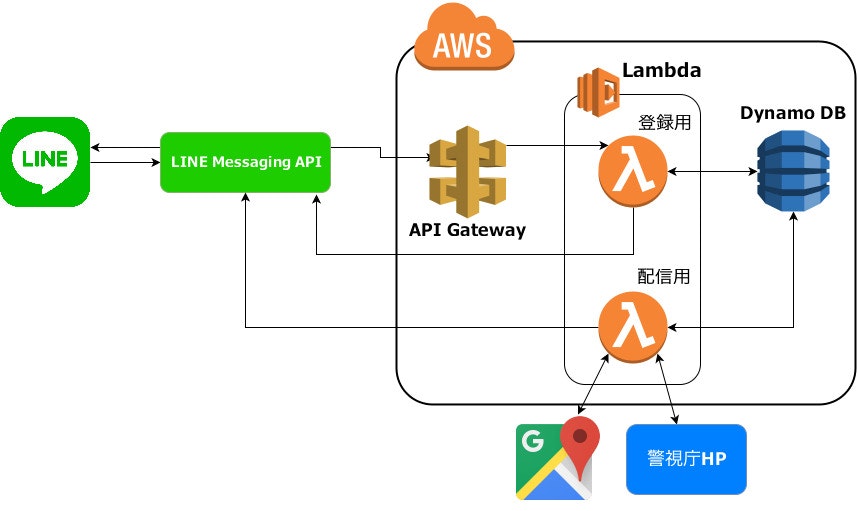
まずLINEのBotアカウントをフォローすると、Webhook URLに設定したAPI Gatewayにリクエストが送られます。それはLambdaで受け取り、ユーザIDをDynamo DBに登録します。
その後ユーザより通知対象エリア(「足立区」「あきる野市」など)をテキストで送信してもらい、同様の流れでエリアをDB登録します。
あとは配信用のLambda関数を定期実行させて、通知対象エリアと一致するユーザに対して、Push APIで不審者情報とマップ画像を送信します。
手順
①Dynamo DBのテーブル作成
「ユーザID」と「通知対象エリア」を値として持つテーブルを作成します。
(プライマリキーはユーザID)
②Lambda関数の作成
言語はPython3を使用しました。
import urllib.request
import json
import boto3
from boto3.dynamodb.conditions import Key

DYNAMO_DB = boto3.resource('dynamodb')
LINE_CHANNEL_ACCESS_TOKEN =''

def message(event):
    DYNAMO_DB.Table('SuspiciousPersonInfoUser').update_item(
        Key={
            'user_id': event['source']['userId']
        },
        UpdateExpression='set area=:area',
        ExpressionAttributeValues={
            ':area': event['message']['text']
        }
    )

    REPLY_URL = 'https://api.line.me/v2/bot/message/reply'
    headers = {
        'Content-Type': 'application/json',
        'Authorization': 'Bearer ' + LINE_CHANNEL_ACCESS_TOKEN
    }
    body = {
        'replyToken': event['replyToken'],
        'messages': [
            {
                'type': 'text',
                'text': event['message']['text'] + 'を登録しました。'
            }
        ]
    }

    req = urllib.request.Request(REPLY_URL, data=json.dumps(body).encode('utf-8'), method='POST', headers=headers)
    urllib.request.urlopen(req)

def follow(event):
    DYNAMO_DB.Table('SuspiciousPersonInfoUser').put_item(
        Item={
            'user_id': event['source']['userId']
        }
    )

def unfollow(event):
    DYNAMO_DB.Table('SuspiciousPersonInfoUser').delete_item(
        Key={
            'user_id': event['source']['userId']
        }
    )

def lambda_handler(request, context):
    for event in request['events']:
        if event['type'] == 'message':
            message(event)
        elif event['type'] == 'follow':
            follow(event)
        elif event['type'] == 'unfollow':
            unfollow(event)
    return {'statusCode': 200, 'body': '{}'}
import urllib.request
import urllib.parse
import datetime
import json
import boto3
from boto3.dynamodb.conditions import Key
from bs4 import BeautifulSoup

def push_message(user_id_list,encode_place,message):
    MULTICAST_URL = 'https://api.line.me/v2/bot/message/multicast'
    LINE_CHANNEL_ACCESS_TOKEN = ''
    GOOGLE_MAP_API_KEY = ''
    map_url = 'https://maps.google.com/maps/api/staticmap?center=' + encode_place + '&zoom=15&size=250x250&&scale=2&key=' + GOOGLE_MAP_API_KEY
    headers = {
        'Content-Type': 'application/json',
        'Authorization': 'Bearer ' + LINE_CHANNEL_ACCESS_TOKEN
    }
    data = {
        'to' : user_id_list,
        'messages' : [
            {
                'type' : 'text',
                'text' : message
            },
            {
                'type' : 'image',
                'originalContentUrl' : map_url,
                'previewImageUrl' : map_url
            }
        ]
    }

    request = urllib.request.Request(MULTICAST_URL, data=json.dumps(data).encode('utf-8'),method='POST', headers=headers)
    urllib.request.urlopen(request)

def main():
    day = datetime.date.today().day

    try:
        req = urllib.request.urlopen('http://www.keishicho.metro.tokyo.jp/kurashi/higai/kodomo/fushin/' + str(day) + '_fushin.html')
    except urllib.error.HTTPError as e:
        print('Error Code:' + str(e.code))
        return

    soup = BeautifulSoup(req,'html.parser')
    table = soup.find('table')
    td_list = table.find_all('td')
    th_list = table.find_all('th')

    for i,td in enumerate(td_list):
        place = td.text.split('、')[2].split('の')[0].split('付近')[0]
        encode_place = urllib.parse.quote(place)
        user_id_list = []

        DYNAMO_DB = boto3.resource('dynamodb')
        response = DYNAMO_DB.Table('SuspiciousPersonInfoUser').query(
            IndexName='area-index',
            KeyConditionExpression=Key('area').eq(th_list[i].text)
        )
        items = response['Items']

        for item in items:
            user_id_list.append(item['user_id'])

        message = str(td.find('p'))[3:-4].replace('<br/>','\r\n')

        if user_id_list:
            push_message(user_id_list,encode_place,message)

def lambda_handler(event, context):
    main()
DynamoDBへの読み書きが発生しますので、IAMで権限を設定する必要があります。
③API Gatewayの設定
Lambda関数をPOSTメソッドの送信先に設定します。
(登録用Lambda関数のARNを設定)
④LINE Messaging APIの設定
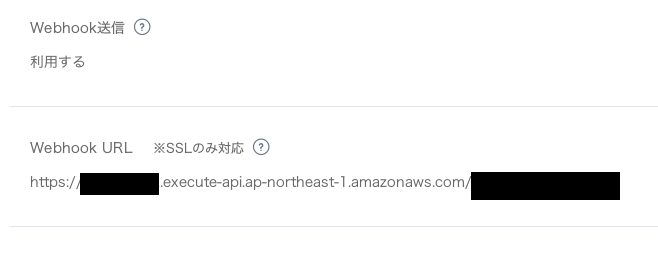
LINE Developerより、Webhook URLにAPI Gatewayで生成したURLを設定します。
⑤CloudWatch Eventsで定期実行の設定
毎日12:10に通知用Lambda関数が実行されるようにcron式を設定する。
fin.
おわりに
このBotがあれば、東京へお出かけする時も安心です
あっ、ちなみに不審者情報は平日にしか更新されませんので、休日出かける際は役に立ちませんのでご注意ください
少しでも「面白い!」「参考になる!」と思いましたら、いいねボタンをクリックしていただけると幸いです