
npmに公開したくないけどモジュールが膨らむのは嫌だ、細かく分けて再利用したい、という時に役立ちました。
環境
node: 6.2.0
typescript 1.8.10
※全体的にtscの工程は端折ります。
1. 自作したnodeモジュールに読み込ませるnodeモジュールを自作する。(ややこしい)
ディレクトリ構成
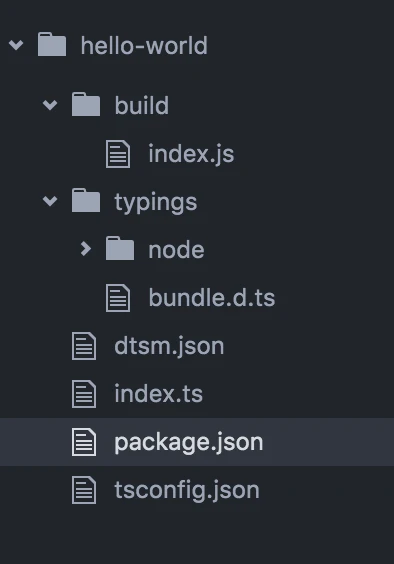
試しにhello()されるとworldと叫ぶfunctionをexport
index.ts
///<reference path="./typings/bundle.d.ts"/>

module.exports = {
    hello: () => {
        console.log('world!!')
    }
}
2. 自作したnodeモジュールに1.で自作したnodeモジュールを読み込ませる(ややこしい)
ディレクトリ構成
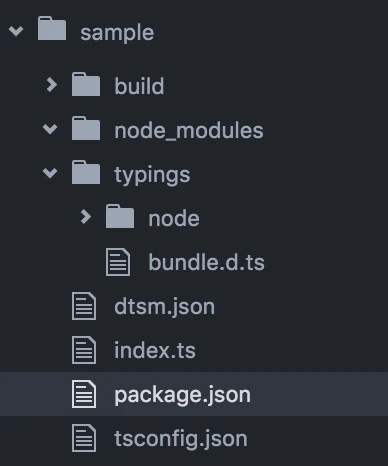
dependencies に ../hello-world というように相対パス指定してあげる(ここがミソ)
package.json
{
  "name": "sample",
  "version": "1.0.0",
  "description": "",
  "main": "build/index.js",
  "scripts": {
    "test": "echo \"Error: no test specified\" && exit 1"
  },
  "author": "",
  "license": "ISC",
  "dependencies": {
   "hello-world": "../hello-world"
  }
}
いつも通り npm install すればOK
$ npm install
sample@1.0.0 ~/sample
└── hello-world@1.0.0
import して
index.ts
///<reference path="./typings/bundle.d.ts"/>

import fs = require('fs')
import HelloWorld = require('hello-world')
HelloWorld.hello()
実行!!!
$ node build/index.js
world!!
以上。
3. 余談
型定義ファイルを作ってあげたり
declare module HelloWorld {
     export function hello(): void
}

declare module 'hello-world' {
    export = HelloWorld;
}
修正を反映しやすいようにスクリプトを定義してあげれば
package.json
{
  "name": "sample",
  "version": "1.0.0",
  "description": "",
  "main": "build/index.js",
  "scripts": {
    "u": "npm uninstall hello-world && npm install hello-world"
  },
  "author": "",
  "license": "ISC",
  "dependencies": {
   "hello-world": "../hello-world"
  }
}
$ npm run u
> sample@1.0.0 u ~/sample
> npm uninstall hello-world && npm install hello-world

- hello-world@1.0.0 node_modules/hello-world
sample@1.0.0 ~/sample
└── hello-world@1.0.0
分業やモジュールの再利用がしやすくなりますね。
快適なモジュール分割ライフを。