

はじめに
備忘録としてElasticsearchのスナップショット環境構築メモ
環境
以下のサーバ環境において、スナップショットをとっておきたい
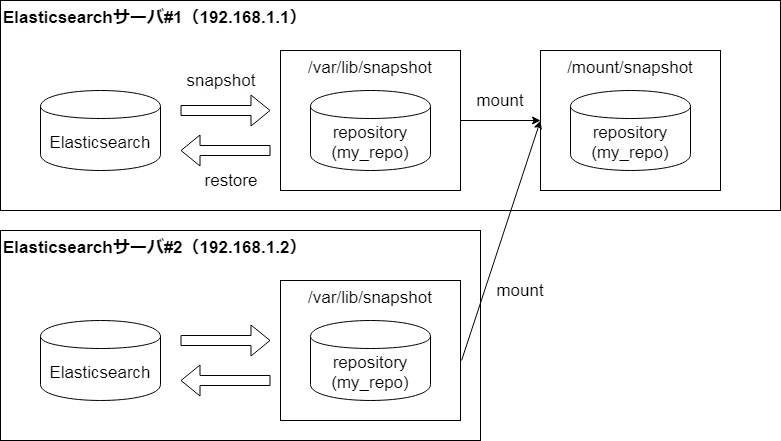
- OS: CentOS6
- Elasticsearch: 2.3.3
構築
1.NFSサーバ設定(192.168.1.1)
マウント対象となるリポジトリディレクトリを作成
$ mkdir -p /mount/snapshot
$ chown -R elasticsearch:elasticsearch /mount/snapshot
マウント設定
$ vim /etc/exports
/mount/snapshot 192.168.1.1/32(rw,no_root_squash,sync,wdelay)
/mount/snapshot 192.168.1.2/32(rw,no_root_squash,sync,wdelay)
nfs設定反映
$ exportfs -ra
2.NFSクライアント設定(192.168.1.1、192.168.1.2)
マウントポイントとなるディレクトリを作成
$ mkdir -p /var/lib/snapshot
$ chown -R elasticsearch:elasticsearch /var/lib/snapshot
マウント実行
$ mount -t nfs 192.168.1.1:/mount/snapshot/ /var/lib/snapshot/
3.Elasticsearch設定(192.168.1.1、192.168.1.2)
設定ファイルの修正
$ vim /etc/elasticsearch/elasticsearch.yml
path.repo: ["/var/lib/snapshot"]
Elasticsearch再起動
$ service elasticsearch restart
4.リポジトリ登録(192.168.1.1)
$ curl -XPUT 'http://localhost:9200/_snapshot/my_repo?pretty=true' -d '{
  "type" : "fs",
  "settings" : {
    "location" : "/var/lib/snapshot/my_repo",
    "compress" : true
  }
}'
ここでのはまりポイント
リポジトリ登録時に以下のエラーが発生し、リポジトリ登録に失敗した。
$ curl -XPUT 'http://localhost:9200/_snapshot/my_repo?pretty=true' -d '{
  "type" : "fs",
  "settings" : {
    "location" : "/var/lib/snapshot/my_repo",
    "compress" : true
  }
}'
{
  "error" : {
    "root_cause" : [ {
      "type" : "repository_verification_exception",
      "reason" : "[my_repo] [1234567890abcdefghijkl, 'RemoteTransportException[[May Parker][192.168.1.2:9300][internal:admin/repository/verify]]; nested: RepositoryVerificationException[[my_repo] store location [/var/lib/snapshot/my_repo] is not accessible on the node [{May Parker}{1234567890abcdefghijkl}{192.168.1.2}{192.168.1.2:9300}]]; nested: NotSerializableExceptionWrapper[access_denied_exception: /var/lib/snapshot/my_repo/tests-0987654321zyxwvutsrqpo/data-1234567890abcdefghijkl.dat];']]"
    } ],
    "type" : "repository_verification_exception",
    "reason" : "[my_repo] [1234567890abcdefghijkl, 'RemoteTransportException[[May Parker][192.168.1.2:9300][internal:admin/repository/verify]]; nested: RepositoryVerificationException[[my_repo] store location [/var/lib/snapshot/my_repo] is not accessible on the node [{May Parker}{1234567890abcdefghijkl}{192.168.1.2}{192.168.1.2:9300}]]; nested: NotSerializableExceptionWrapper[access_denied_exception: /var/lib/snapshot/my_repo/tests-0987654321zyxwvutsrqpo/data-1234567890abcdefghijkl.dat];']]"
  },
  "status" : 500
}
原因として、各ノードのelasticsearchユーザのuseridもしくはgroupidが統一されていない場合に発生する模様
# 192.168.1.1
$ cat /etc/passwd | grep elasticsearch
elasticsearch:x:487:486:elasticsearch user:/home/elasticsearch:/sbin/nologin

# 192.168.1.2
$ cat /etc/passwd | grep elasticsearch
elasticsearch:x:493:493:elasticsearch user:/home/elasticsearch:/bin/bash
回避するべく、各ノードのelasticsearchユーザのuseridおよびgroupidを統一する
以下は192.168.1.2でのオペレーション
# いったんelasticsearchを停止
$ service elasticsearch stop

# elasticsearchユーザのuseridとgroupidを#1の環境と合わせる
$ usermod -u 487 elasticsearch
$ groupmod -g 486 elasticsearch

# 関連ファイルの所有者情報を最新化する
$ find / -group 493 -exec chgrp -h elasticsearch {} \;
$ find / -user 493 -exec chown -h elasticsearch {} \;

# elasticsearchを起動
$ service elasticsearch start
5.スナップショット取得(192.168.1.1)
$ curl -XPUT 'http://192.168.1.1:9200/_snapshot/my_repo/my_ss-2019.12.25?wait_for_completion=true' -d '{
"indices": "*",
"ignore_unavailable": true,
"include_global_state": false
}'