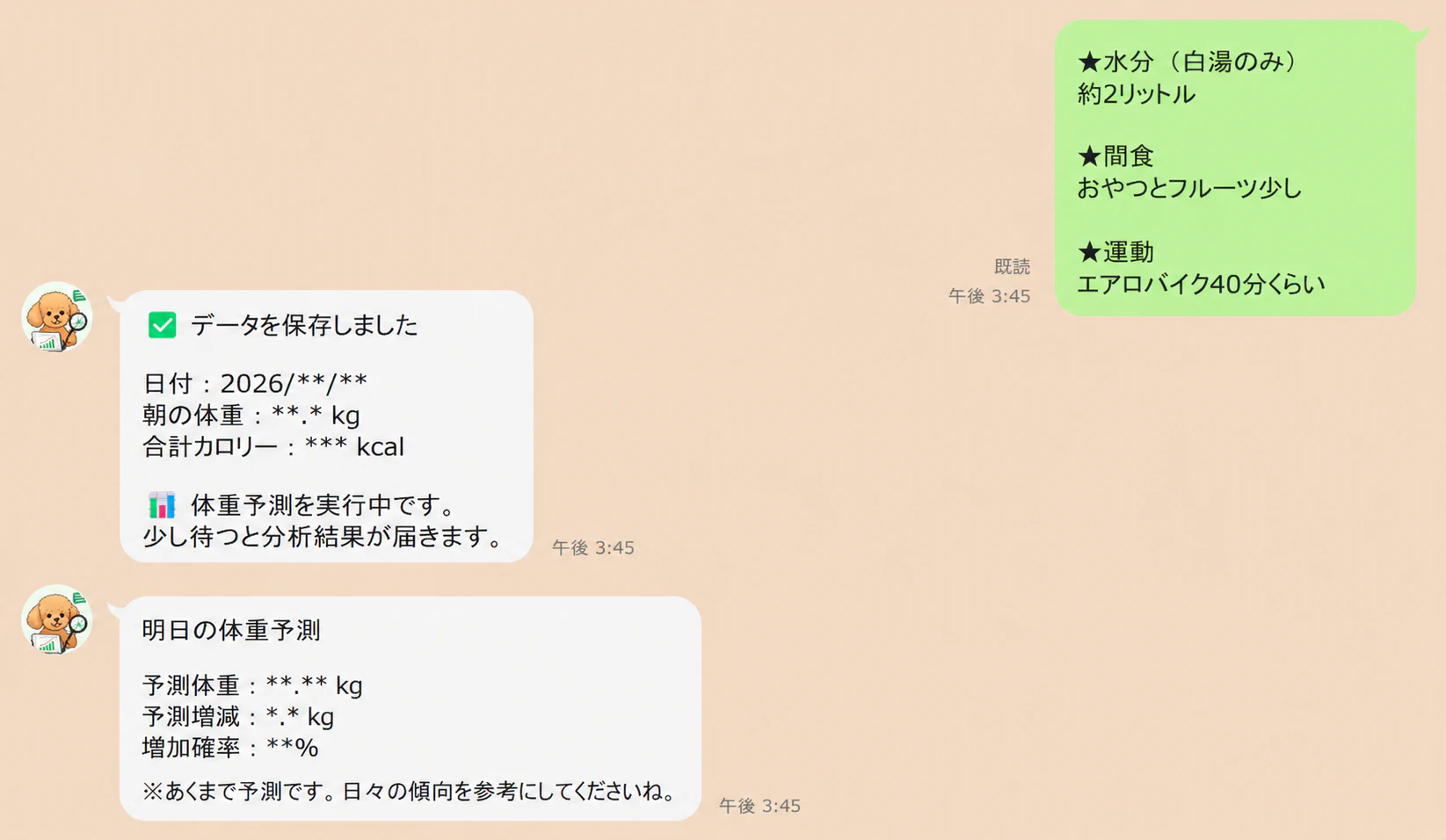
GWなので、妻向けにAI diet Botを作ってみた
最近あまり個人開発もしていなかったのですが、
妻が毎日トレーナーさんへ食事記録や体重データを送っているのを見て、
「これ、LINE Botで自動化できるのでは…?」
と思い、勢いで作ってみました💪
やったことはシンプルで、
- LINEに自然文で食事内容を送信
- GASでデータ解析
- スプレッドシートへ自動蓄積
- GitHub ActionsでML推論
- LightGBMで翌日の体重増減を予測
- 結果をLINEへPush通知
という構成です。
思った以上に、
「家庭内MLOps」みたいな構成になりました😂
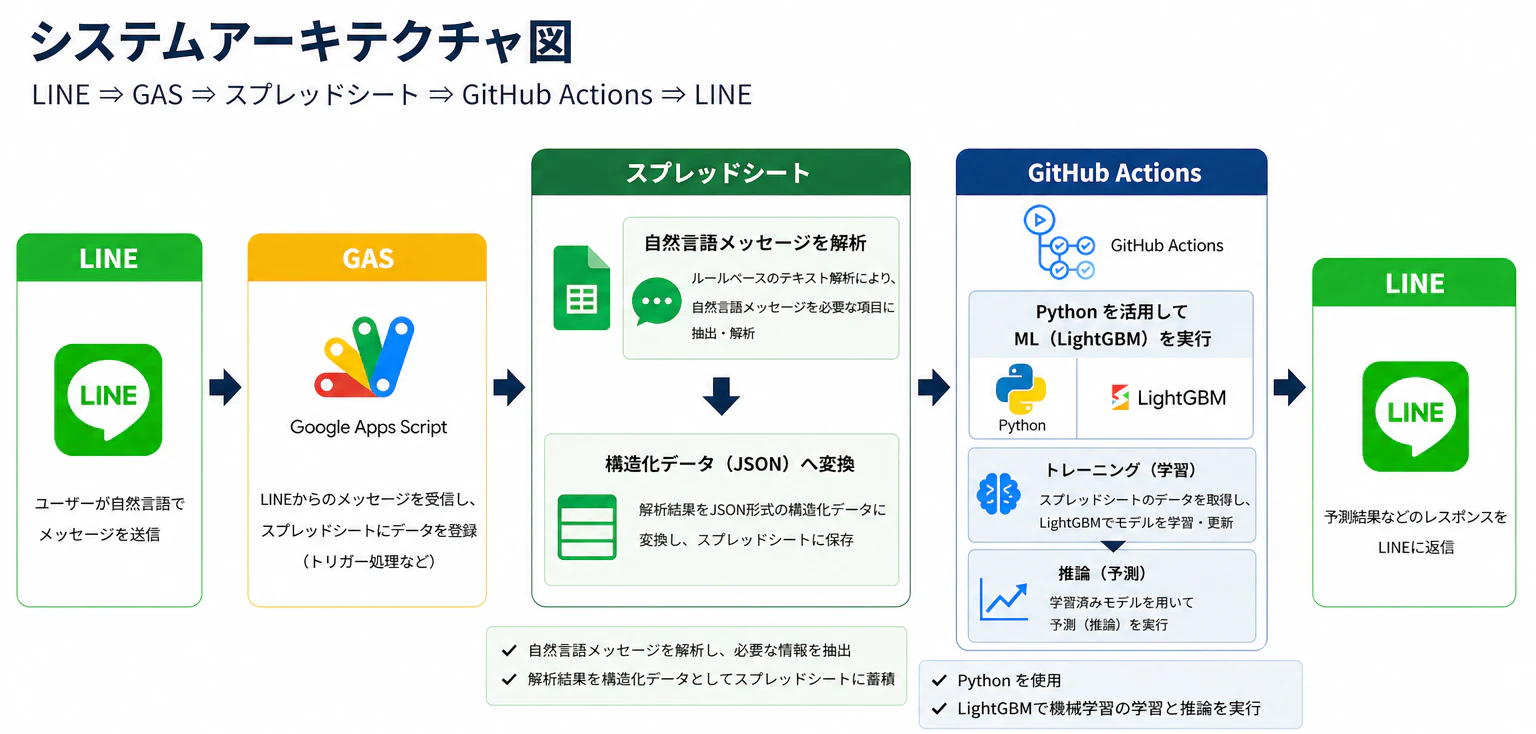
システムアーキテクチャ
構成はこんな感じ LINE DeveloperでLINE Message APIを活用し、
LINE→Google Apps Script(GAS)→スプレッドシート→GitHub Action→LINE
構造化
LINEから送られてくる自然文を、
GAS側で構造化(JSON化)し、
そのままスプレッドシートへ蓄積しています。
モデル選択
今回は推論速度と実装コストを優先し、
LightGBMを採用しました。
LSTMなどの時系列モデルも候補でしたが、
今回の用途では、
「即レスポンスが返ること」を重視しています。
LINE側
LINE Developer > プロバイダ > Messaging API を作成していく
必要なMessaging APIのチャネルアクセストークンを用意する
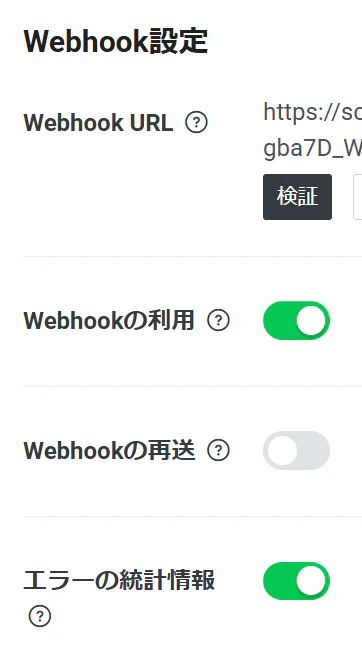
Google Apps Scriptでデプロイしてからにはなるが
Webhook URLも必要なので後程用意する!
Google Apps Script
https://script.google.com/home
Google Apps ScriptでJavaScriptを作成していく。
下記はサンプルだが大体こんな感じで作りこんでいる。
必要な特徴量、因子などは各自で構造化してください
GAS用のjavascriptサンプルコード
// =========================
// Script Properties から取得
// =========================
const props = PropertiesService.getScriptProperties();

const ACCESS_TOKEN = props.getProperty("LINE_ACCESS_TOKEN");
const CHANNEL_SECRET = props.getProperty("LINE_CHANNEL_SECRET");

const SPREADSHEET_ID = props.getProperty("SPREADSHEET_ID");
const SHEET_NAME = props.getProperty("SHEET_NAME");

const GITHUB_TOKEN = props.getProperty("GITHUB_TOKEN");
const GITHUB_OWNER = props.getProperty("GITHUB_OWNER");
const GITHUB_REPO = props.getProperty("GITHUB_REPO");
const GITHUB_WORKFLOW_FILE = props.getProperty("GITHUB_WORKFLOW_FILE");
const GITHUB_BRANCH = props.getProperty("GITHUB_BRANCH");


// =========================
// LINE Webhook
// =========================
function doPost(e) {

  // 本番では署名検証推奨
  // verifyLineSignature(e);

  const lineJson = JSON.parse(e.postData.contents);

  const event = lineJson.events[0];
  const replyToken = event.replyToken;
  const userId = event.source.userId;
  const userMessage = event.message.text;

  try {

    // 自然言語解析
    const data = parseDietText(userMessage);

    // スプレッドシート保存
    saveDietData(data);

    // GitHub Actions起動
    let githubTriggered = false;

    try {
      triggerGitHubActions(userId);
      githubTriggered = true;

    } catch (githubError) {

      Logger.log(
        "GitHub Actions Trigger Error: " +
        githubError.message
      );
    }

    // LINE返信
    const replyText =
      "✅ データを保存しました\n\n" +
      `日付:${data["日付"]}\n` +
      `朝の体重:${data["朝の体重"]} kg\n` +
      `合計カロリー:${calcTotalKcal(data)} kcal\n\n` +
      (
        githubTriggered
          ? "📊 AI分析を実行中です。"
          : "⚠️ 保存は完了しましたが、分析起動に失敗しました。"
      );

    reply(replyToken, replyText);

  } catch (error) {

    Logger.log("Parse Error: " + error.message);

    reply(
      replyToken,
      "⚠️ データを読み取れませんでした。"
    );
  }

  return ContentService.createTextOutput("OK");
}


// =========================
// GitHub Actions起動
// =========================
function triggerGitHubActions(userId) {

  const url =
    `https://api.github.com/repos/${GITHUB_OWNER}/${GITHUB_REPO}` +
    `/actions/workflows/${GITHUB_WORKFLOW_FILE}/dispatches`;

  const payload = {
    ref: GITHUB_BRANCH,
    inputs: {
      user_id: userId
    }
  };

  const options = {
    method: "post",

    headers: {
      "Accept": "application/vnd.github+json",
      "Authorization": "Bearer " + GITHUB_TOKEN,
      "X-GitHub-Api-Version": "2022-11-28"
    },

    contentType: "application/json",

    payload: JSON.stringify(payload),

    muteHttpExceptions: true
  };

  const response = UrlFetchApp.fetch(url, options);

  // ステータスコードのみログ
  Logger.log(
    "GitHub Status: " +
    response.getResponseCode()
  );

  if (response.getResponseCode() !== 204) {

    throw new Error(
      "GitHub Actions起動失敗"
    );
  }
}


// =========================
// LINE返信
// =========================
function reply(replyToken, text) {

  const url =
    "https://api.line.me/v2/bot/message/reply";

  const payload = {
    replyToken: replyToken,

    messages: [{
      type: "text",
      text: text
    }]
  };

  const options = {

    method: "post",

    headers: {
      "Content-Type": "application/json",
      "Authorization": "Bearer " + ACCESS_TOKEN
    },

    payload: JSON.stringify(payload),

    muteHttpExceptions: true
  };

  const response =
    UrlFetchApp.fetch(url, options);

  Logger.log(
    "LINE Reply Status: " +
    response.getResponseCode()
  );
}
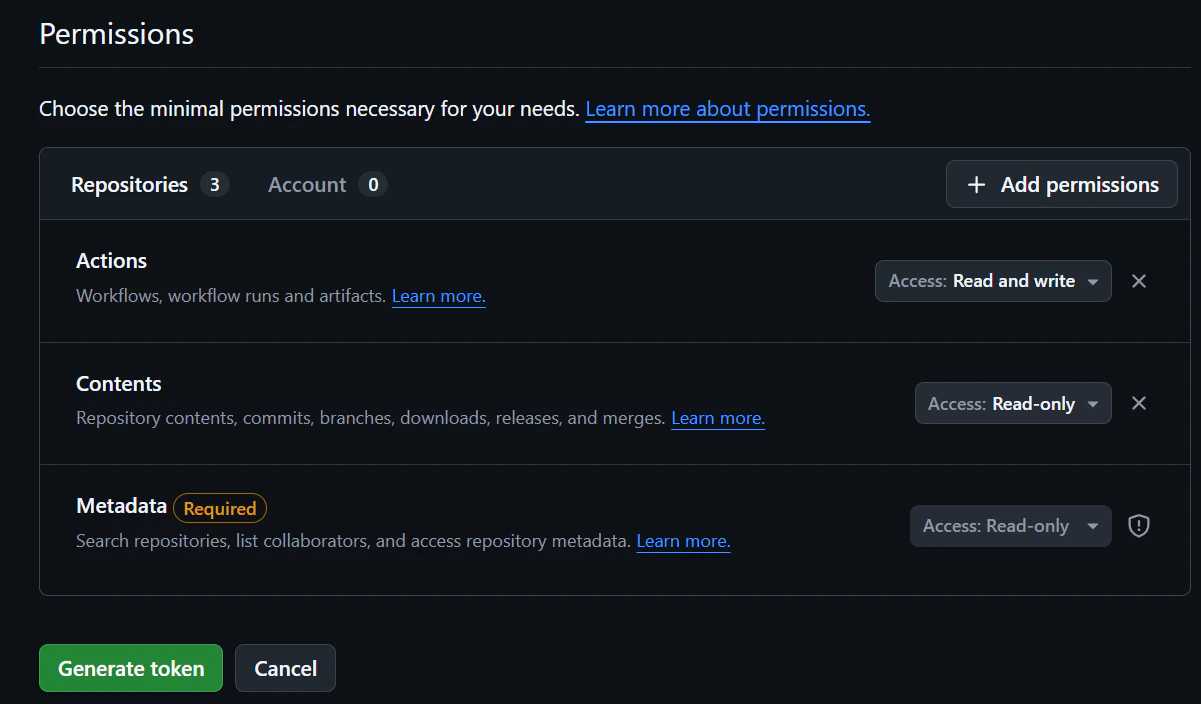
このときSettings/ Developer Settings > Personal access tokens > Fine-grained personal access tokensが必要なので用意してくださいね
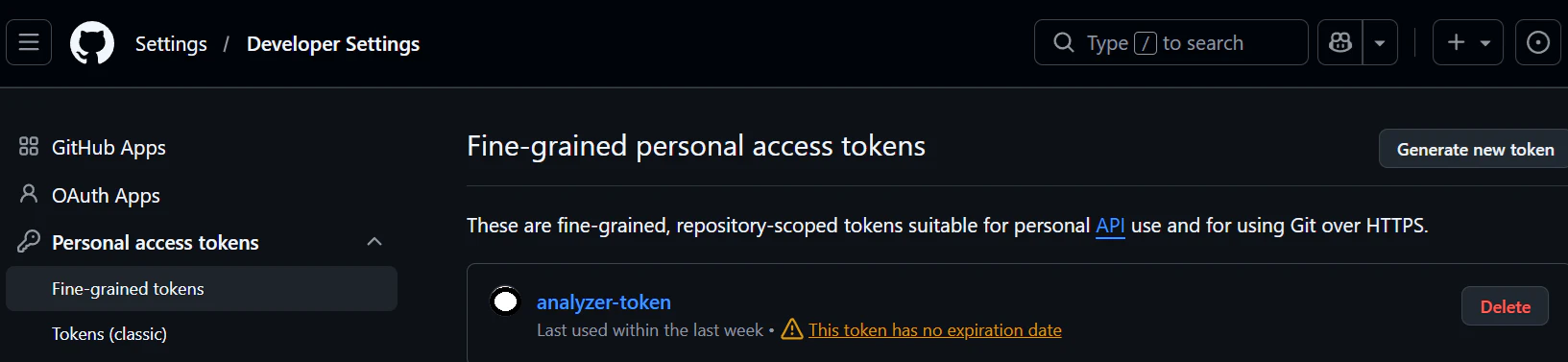
Permissions ではActionsはRead and write, ContentsはRead-onlyで!
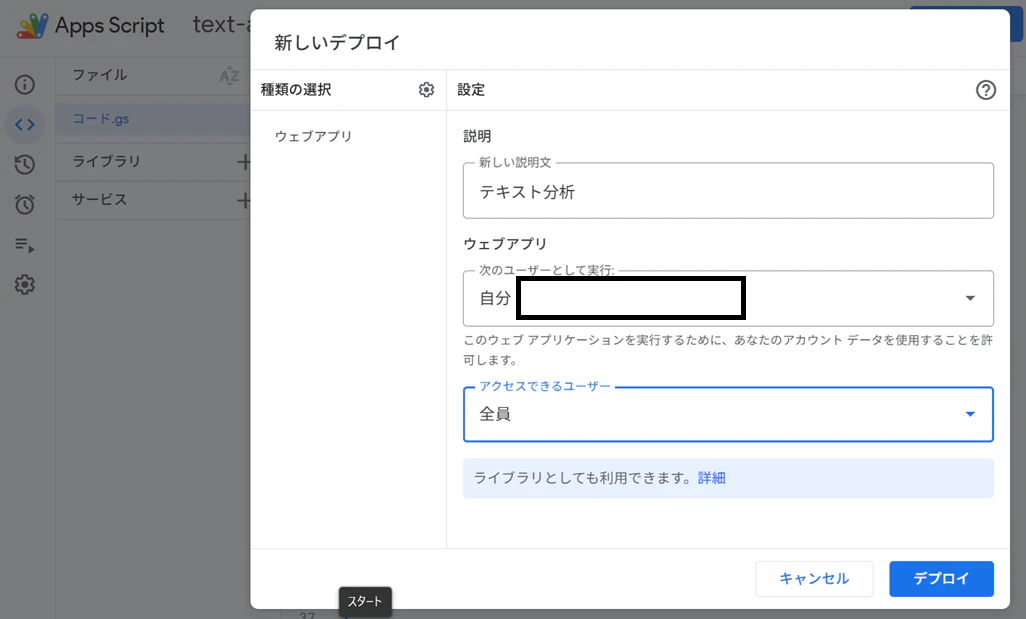
そしてデプロイ
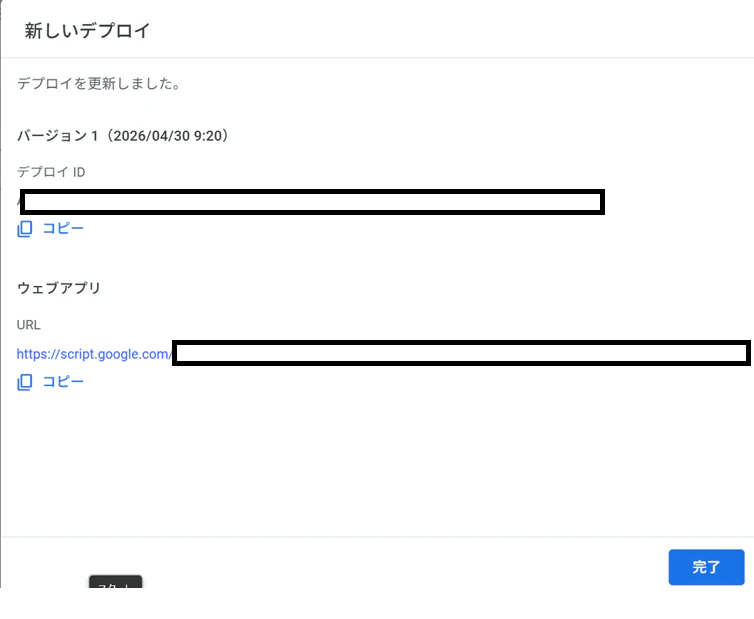
ウェブアプリのURLをコピーし、LINEのWebhook URLにペーストする
Github Actions
次にGithub側の準備
repositoryを作って、
①.github/workflows/analyze.yaml
②src/analyze.py
③requirements.txt
を用意する
analyze.yaml
name: Analyze Diet Data

on:
  workflow_dispatch:
    inputs:
      user_id:
        description: "LINE user ID"
        required: true
        type: string

jobs:
  analyze:
    runs-on: ubuntu-latest

    steps:
      - name: Checkout repository
        uses: actions/checkout@v4

      - name: Set up Python
        uses: actions/setup-python@v5
        with:
          python-version: "3.11"

      - name: Install dependencies
        run: pip install -r requirements.txt

      - name: Run analysis and push LINE message
        env:
          SHEET_CSV_URL: ${{ secrets.SHEET_CSV_URL }}
          LINE_ACCESS_TOKEN: ${{ secrets.LINE_ACCESS_TOKEN }}
          LINE_USER_ID: ${{ github.event.inputs.user_id }}
        run: python src/analyze.py
analyze.py
import os
from io import BytesIO, StringIO
from urllib.parse import parse_qs, urlparse

import numpy as np
import pandas as pd
import requests
from lightgbm import LGBMClassifier, LGBMRegressor


SHEET_CSV_URL = os.environ["SHEET_CSV_URL"]
LINE_ACCESS_TOKEN = os.environ["LINE_ACCESS_TOKEN"]
LINE_USER_ID = os.environ["LINE_USER_ID"]


FEATURE_COLUMNS = [
    "morning_weight",
    "evening_weight",
    "breakfast_cal",
    "lunch_cal",
    "dinner_cal",
    "activity_cal",
    "water_ml",
    "stool_count",
    "exercise_cal",
    "exercise_flag",
    "menstruation_flag",
    "morning_weight_diff",
    "day_weight_range",
    "energy_balance",
    "meal_cal_3day_avg",
    "weight_3day_avg",
]


FACTOR_LABELS = {
    "morning_weight": "朝体重",
    "evening_weight": "夜体重",
    "breakfast_cal": "朝食カロリー",
    "lunch_cal": "昼食カロリー",
    "dinner_cal": "夕食カロリー",
    "activity_cal": "活動カロリー",
    "water_ml": "水分量",
    "stool_count": "排便回数",
    "exercise_cal": "運動カロリー",
    "exercise_flag": "運動の有無",
    "menstruation_flag": "生理の有無",
    "morning_weight_diff": "前日からの朝体重差",
    "day_weight_range": "日内の体重差",
    "energy_balance": "摂取カロリーと活動の差",
    "meal_cal_3day_avg": "直近3日の食事カロリー平均",
    "weight_3day_avg": "直近3日の朝体重平均",
}

USER_FACING_EXCLUDED_FACTORS = {
    "morning_weight",
    "evening_weight",
    "breakfast_cal",
    "lunch_cal",
    "dinner_cal",
    "activity_cal",
    "exercise_cal",
    "morning_weight_diff",
    "day_weight_range",
    "energy_balance",
    "meal_cal_3day_avg",
    "weight_3day_avg",
}


def _to_google_csv_export_url(url: str) -> str:
    if "docs.google.com/spreadsheets" not in url:
        return url

    parsed = urlparse(url)
    query = parse_qs(parsed.query)
    gid = query.get("gid", ["0"])[0]

    # /d/<sheet_id>/... 形式から sheet_id を抽出
    parts = [p for p in parsed.path.split("/") if p]
    sheet_id = ""
    if "d" in parts:
        i = parts.index("d")
        if i + 1 < len(parts):
            sheet_id = parts[i + 1]

    if sheet_id:
        return f"https://docs.google.com/spreadsheets/d/{sheet_id}/export?format=csv&gid={gid}"
    return url


def _parse_date_series(series: pd.Series) -> pd.Series:
    text = series.astype(str).str.strip()

    # 1) 通常の日付文字列
    dt = pd.to_datetime(text, errors="coerce")

    # 2) Google Sheets / Excel シリアル日付
    missing = dt.isna()
    if missing.any():
        serial = pd.to_numeric(text[missing], errors="coerce")
        serial_dt = pd.to_datetime(serial, unit="D", origin="1899-12-30", errors="coerce")
        dt.loc[missing] = serial_dt

    return dt


def _coerce_numeric(series: pd.Series) -> pd.Series:
    cleaned = (
        series.astype(str)
        .str.replace(",", "", regex=False)
        .str.replace(r"[^0-9+\-.]", "", regex=True)
        .replace("", np.nan)
    )
    return pd.to_numeric(cleaned, errors="coerce")


def _coerce_bool(series: pd.Series) -> pd.Series:
    text = series.astype(str).str.strip().str.lower()
    true_values = {"true", "1", "yes", "y", "on", "あり", "有", "有り"}
    false_values = {"false", "0", "no", "n", "off", "なし", "無"}

    mapped = pd.Series(np.nan, index=series.index, dtype="float64")
    mapped[text.isin(true_values)] = 1.0
    mapped[text.isin(false_values)] = 0.0

    numeric_fallback = pd.to_numeric(text, errors="coerce")
    mapped = mapped.fillna(numeric_fallback)
    return mapped.fillna(0).clip(lower=0, upper=1)


def _download_sheet(url: str) -> requests.Response:
    res = requests.get(url, timeout=30)
    res.raise_for_status()
    return res


def _read_sheet_like(response: requests.Response) -> pd.DataFrame:
    # まず区切り自動判定(CSV/TSV 等)
    text = response.text
    try:
        df = pd.read_csv(StringIO(text), sep=None, engine="python")
        if len(df.columns) > 1:
            return df
    except Exception:
        pass

    # fallback: 明示CSV
    try:
        return pd.read_csv(StringIO(text))
    except Exception:
        pass

    # fallback: Excel
    return pd.read_excel(BytesIO(response.content))


def load_data() -> pd.DataFrame:
    url = _to_google_csv_export_url(SHEET_CSV_URL)
    response = _download_sheet(url)
    raw_df = _read_sheet_like(response)

    if raw_df.empty:
        raise ValueError("スプレッドシートのデータが空です。")

    # 既存実装の列順を前提に安全に内部名へマッピング
    index_map = {
        0: "date",
        1: "morning_weight",
        2: "evening_weight",
        3: "breakfast_cal",
        5: "lunch_cal",
        7: "dinner_cal",
        9: "target_cal",
        10: "activity_cal",
        11: "water_ml",
        12: "stool_count",
        13: "sleep_hours",
        14: "exercise_cal",
        15: "exercise_flag",
        16: "menstruation_flag",
    }

    cols = {}
    for i, name in index_map.items():
        if i < len(raw_df.columns):
            cols[raw_df.columns[i]] = name

    df = raw_df.rename(columns=cols).copy()

    if "date" not in df.columns:
        raise ValueError("日付列を見つけられません。シートの1列目に日付を入れてください。")

    df["date"] = _parse_date_series(df["date"])
    df = df.dropna(subset=["date"]).sort_values("date").reset_index(drop=True)

    numeric_cols = [
        "morning_weight",
        "evening_weight",
        "breakfast_cal",
        "lunch_cal",
        "dinner_cal",
        "target_cal",
        "activity_cal",
        "water_ml",
        "stool_count",
        "exercise_cal",
    ]
    bool_cols = ["exercise_flag", "menstruation_flag"]

    for col in numeric_cols:
        if col not in df.columns:
            df[col] = 0
        df[col] = _coerce_numeric(df[col]).fillna(0)

    for col in bool_cols:
        if col not in df.columns:
            df[col] = 0
        df[col] = _coerce_bool(df[col])

    # 運動カロリー列が空なら食事カロリー合計を採用
    if df["exercise_cal"].sum() == 0:
        df["exercise_cal"] = df["breakfast_cal"] + df["lunch_cal"] + df["dinner_cal"]

    return df


def add_features(df: pd.DataFrame) -> pd.DataFrame:
    df = df.copy()

    df["morning_weight_diff"] = df["morning_weight"].diff()
    df["day_weight_range"] = df["evening_weight"] - df["morning_weight"]
    df["energy_balance"] = df["exercise_cal"] - df["activity_cal"]

    df["meal_cal_3day_avg"] = df["exercise_cal"].rolling(window=3, min_periods=1).mean()
    df["weight_3day_avg"] = df["morning_weight"].rolling(window=3, min_periods=1).mean()

    df["next_morning_weight"] = df["morning_weight"].shift(-1)
    df["next_weight_change"] = df["next_morning_weight"] - df["morning_weight"]
    df["next_increase_flag"] = (df["next_weight_change"] > 0).astype(int)

    df[FEATURE_COLUMNS] = df[FEATURE_COLUMNS].replace([np.inf, -np.inf], np.nan).fillna(0)
    return df


def make_comment(weight_change: float, prob: float) -> str:
    if prob >= 0.70:
        return "明日は体重が増えやすい見込みです。食事量と水分・睡眠のバランスを意識してください。焦らず整えていきましょう💪🙂"
    if prob >= 0.55:
        return "やや増加傾向です。塩分と夜食、活動量を少し調整するのがおすすめです。小さな改善の積み重ねが効きます🌱😊"
    if prob <= 0.35:
        return "明日は体重が下がりやすい見込みです。現在の習慣を維持してください。この調子で続けましょう✨👍"
    return "明日の体重変化は小さめの見込みです。一歩ずつ着実に進めています🙌🙂"


def train_and_predict(df: pd.DataFrame) -> dict:
    train_df = df.dropna(subset=["next_morning_weight"]).copy()

    latest = df.iloc[[-1]][FEATURE_COLUMNS]
    current_weight = float(df.iloc[-1]["morning_weight"])

    if len(train_df) < 10:
        return {
            "predicted_weight": round(current_weight, 2),
            "weight_change": 0.0,
            "increase_probability": 0.5,
            "top_factors": ["データ不足"] * 5,
            "top_factor_importances": [0.0] * 5,
            "comment": "学習データが少ないため、現在体重を基準に保守的に予測しています。記録を続けるほど精度が上がります📈😊",
        }

    X = train_df[FEATURE_COLUMNS]
    y_reg = train_df["next_weight_change"]
    y_cls = train_df["next_increase_flag"]

    reg_model = LGBMRegressor(
        n_estimators=300,
        max_depth=4,
        min_child_samples=2,
        learning_rate=0.05,
        random_state=42,
        verbose=-1,
    )
    reg_model.fit(X, y_reg)

    pred_change = float(reg_model.predict(latest)[0])
    predicted_weight = current_weight + pred_change

    if y_cls.nunique() >= 2:
        cls_model = LGBMClassifier(
            n_estimators=300,
            max_depth=4,
            min_child_samples=2,
            learning_rate=0.05,
            random_state=42,
            verbose=-1,
        )
        cls_model.fit(X, y_cls)
        increase_probability = float(cls_model.predict_proba(latest)[0][1])
    else:
        increase_probability = 0.5

    importances = reg_model.feature_importances_
    ranked_features = [FEATURE_COLUMNS[i] for i in np.argsort(importances)[::-1]]

    user_facing_candidates = [
        f for f in ranked_features if f not in USER_FACING_EXCLUDED_FACTORS
    ]
    selected = user_facing_candidates[:5]
    if len(selected) < 5:
        fallback = [f for f in ranked_features if f not in selected]
        selected.extend(fallback[: 5 - len(selected)])
    top_factors = [FACTOR_LABELS.get(f, f) for f in selected]
    total_importance = float(np.sum(importances))
    importance_by_feature = {FEATURE_COLUMNS[i]: float(importances[i]) for i in range(len(FEATURE_COLUMNS))}
    if total_importance > 0:
        top_factor_importances = [
            round((importance_by_feature.get(f, 0.0) / total_importance) * 100, 1) for f in selected
        ]
    else:
        top_factor_importances = [0.0] * len(selected)

    return {
        "predicted_weight": round(predicted_weight, 2),
        "weight_change": round(pred_change, 2),
        "increase_probability": round(increase_probability, 2),
        "top_factors": top_factors,
        "top_factor_importances": top_factor_importances,
        "comment": make_comment(pred_change, increase_probability),
    }


def create_line_message(result: dict) -> str:
    change = result["weight_change"]
    sign = "+" if change > 0 else ""
    factors = result["top_factors"]
    factor_importances = result.get("top_factor_importances", [0.0] * len(factors))
    factors_text = "\n".join(
        [
            f"{i}. {factor}(重要度 {importance:.1f}%)"
            for i, (factor, importance) in enumerate(zip(factors, factor_importances), start=1)
        ]
    )

    return (
        "明日の体重予測\n\n"
        f"予測体重: {result['predicted_weight']} kg\n"
        f"予測増減: {sign}{change} kg\n"
        f"増加確率: {int(result['increase_probability'] * 100)}%\n\n"
        "主な影響因子\n"
        f"{factors_text}\n\n"
        f"コメント\n{result['comment']}"
    )


def push_line_message(text: str) -> None:
    url = "https://api.line.me/v2/bot/message/push"

    headers = {
        "Content-Type": "application/json",
        "Authorization": f"Bearer {LINE_ACCESS_TOKEN}",
    }

    payload = {
        "to": LINE_USER_ID,
        "messages": [{"type": "text", "text": text}],
    }

    response = requests.post(url, headers=headers, json=payload, timeout=30)
    print("LINE status:", response.status_code)
    print("LINE body:", response.text)
    response.raise_for_status()


def main() -> None:
    df = load_data()
    df = add_features(df)

    result = train_and_predict(df)
    message = create_line_message(result)

    print(message)
    push_line_message(message)


if __name__ == "__main__":
    main()
requirements.txt
pandas
numpy
scikit-learn
lightgbm
requests
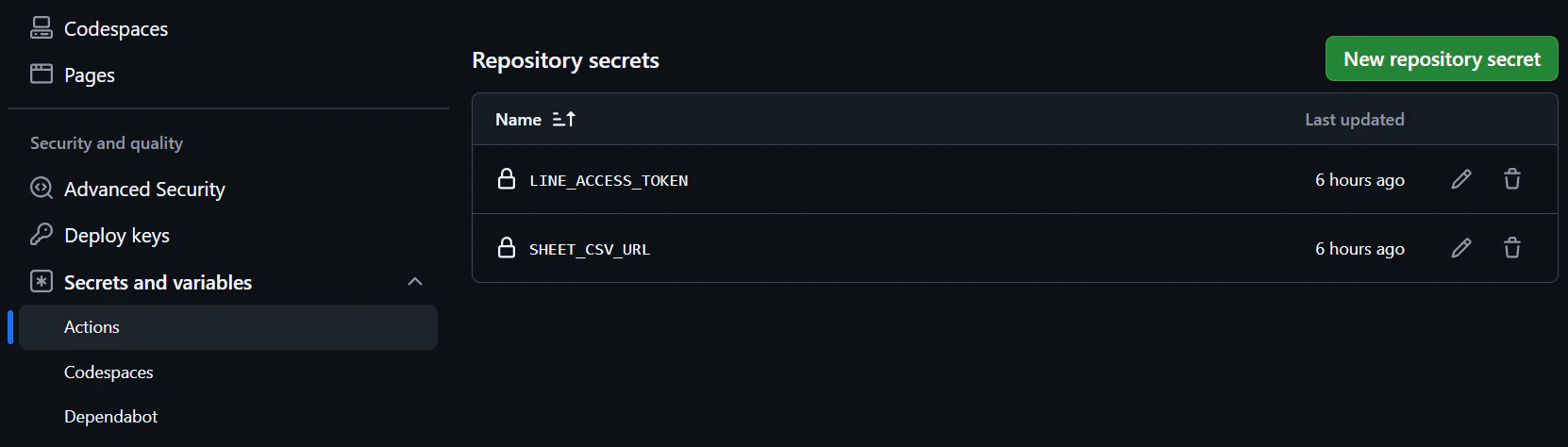
このときrepositoryのSecrets and variablesのsecretでLINE_ACCESS_TOKENでラインのチャネルアクセストークンとSHEET_CSV_URLでスプレッドシートのURLを設定するのを忘れずに!
LINEトーク送信
妻が毎日トレーナーさんに送っている送信内容をこちらのボットに送ると
スプレッドシートにデータが自動的に蓄積され、LightGBMによる体重増減などを予測し返答することができるようになった!
LINEを入口にすると、
「毎日使うUI」になるので継続しやすく、
個人開発との相性もかなり良いと感じました。
今回はLightGBMを使いましたが、
将来的には時系列モデルやLLMによる食事分析なども試してみたいです!
同じように、
「家族向けにちょっと便利なものを作りたい」
という方の参考になれば嬉しいです🙌