
M5 Din Meterを用いた投薬時間記録時計の製作
概要
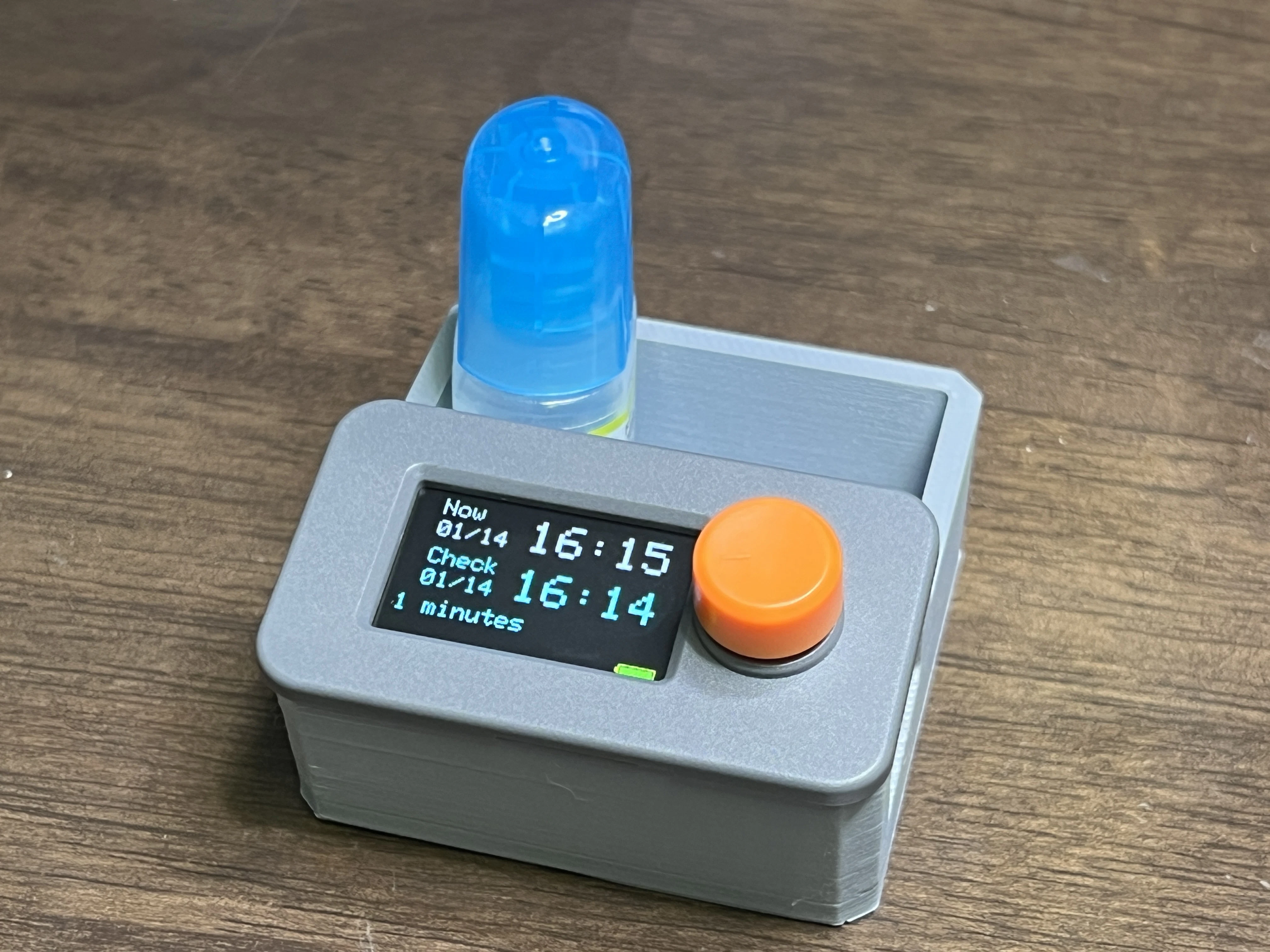
M5 Din Meterを使用して、投薬時間を記録・表示するための時計デバイスを製作しました。スイッチの押下時刻を記録し、現在時刻との経過時間を表示する機能を実装しています。
背景
私はドライアイを患っていて1日に6回も目薬を点眼する必要があります。ところが寄る年波で、前にいつ点眼したか覚えていられません。飲み薬は予め日付を書いて小分けできますが、目薬や軟膏のような薬にはその手が使えません。
「紙に書く手間は掛けたくない」「必要なのは直近の投薬からの経過時間だけで、過去の記録の蓄積は不要」という要件だと、時計と組み合わせた簡単なデバイスが最適なのではないかと考えました。投薬の際にボタンを押すと時刻が記録され、直近の投薬から何時間経過しているか確認ができるシンプルなツールです。
市販のデバイスを探したのですが、いまひとつピンとくるものが見当たりません。代わりに M5 Din Meter という小型の液晶モニタとロータリースイッチのついたM5系キットが見つかりました。スイッチサイエンスから¥4kほどで入手できます。これに自作プログラムを組み込めば、期待するデバイスが作れそうです。
開発内容
- M5 Din Meterを使用した投薬時間記録デバイスの製作
- WiFi接続とNTP同期による自動時刻調整機能
- スイッチ押下時刻の記録と経過時間表示機能
- パワーセーブ機能の実装
- 表示の最適化による画面ちらつきの抑制
- 本体と目薬を入れるケースの作成
主な機能
時刻表示機能
画面には以下の情報が表示されます:
-
上段(Now): 現在日時を表示
- 日付: MM/DD形式(例: 12/25)
- 時刻: HH:MM形式(例: 14:30)、大きいフォントで表示
- 1秒ごとに更新
-
中段(Check): 最後のボタン押下日時を表示
- 日付: MM/DD形式
- 時刻: HH:MM形式、大きいフォントで表示
- ボタン押下時に更新
-
下段: 最後のボタン押下からの経過時間を表示
- 1日以上: "X days X hours"形式
- 1時間以上: "X hours X minutes"形式
- 1時間未満: "X minutes"形式
- 1秒ごとに更新
-
バッテリー表示: 画面右下にバッテリー残量を表示
- バッテリーアイコンと残量バーを表示
- 残量に応じて色が変化(緑: 50%以上、オレンジ: 25-50%、赤: 25%未満)
WiFi接続とNTP時刻同期
-
起動時に自動的にWiFi接続とNTP同期を実行
- WiFi SSIDとパスワードはコード内にハードコードされています(
WIFI_SSID、WIFI_PASSWORD) - 使用前にコード内のSSIDとパスワード、タイムゾーンを自分の環境に合わせて変更してください
- NTPサーバー: 0.pool.ntp.org, 1.pool.ntp.org, 2.pool.ntp.org
- タイムゾーン: JST-9(日本標準時)
- 同期完了後、RTCに時刻を設定してWiFi接続を切断します
- WiFi SSIDとパスワードはコード内にハードコードされています(
スイッチ押下時刻の記録
- ロータリーエンコーダのスイッチ(BtnA)押下時に現在時刻を記録
- 記録された時刻は画面中段に表示され、下段に経過時間が表示されます
パワーセーブ機能
- 60秒間操作がないと自動的にパワーセーブモードに移行
- パワーセーブモード中はディスプレイがスリープ状態になります
- ボタンを押すとパワーセーブモードから復帰し、通常表示に戻ります
表示の最適化
- 日付が変わった場合は画面全体をクリアして再描画
- 時刻が変わった場合は時刻表示部分のみを更新(部分更新)
- 記録時刻が変わった場合は記録表示部分のみを更新(部分更新)
- これにより、画面のちらつきを最小限に抑えています
M5 Din Meterのハードウェア仕様
- ディスプレイ: 1.14インチ ST7789V2 LCD(135 x 240ピクセル)
- ロータリーエンコーダ: スイッチ付き(BtnA: 時刻記録、パワーセーブ復帰)
- RTC: I²C接続のRTCを搭載(電源断時も時刻保持)
- 電源: 外部電源入力(DC 6~36V)、内蔵バッテリー(250mAh LiPo)、USB Type-C給電可能
- マイコン: ESP32ベース
- バッテリー電圧検出: G10ピンでバッテリー電圧を監視
開発手順
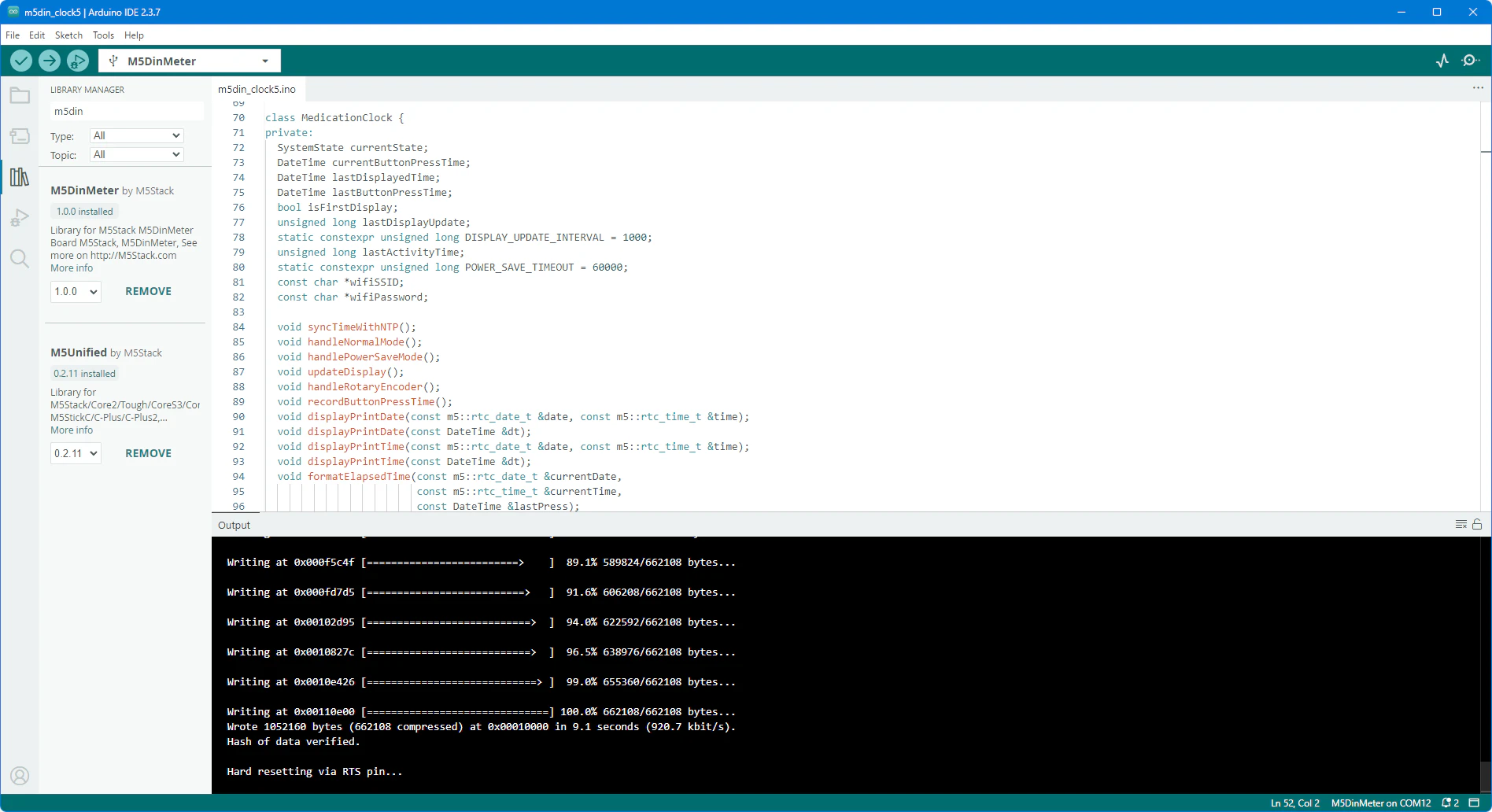
1. Arduino IDEを準備する
Arduino IDE 2.3.7以降をインストールします。
2. ボードマネージャーにM5Stackボードパッケージを追加する
ファイル → 環境設定 → 追加のボードマネージャーのURL に https://m5stack.oss-cn-shenzhen.aliyuncs.com/resource/arduino/package_m5stack_index.json を追加します。
3. ボードマネージャーから「M5Stack」をインストール
ツール → ボード → ボードマネージャーから「M5Stack」を検索してインストールします(執筆時点でv3.2.5)。
4. ライブラリをインストールする
ライブラリマネージャーから以下のライブラリをインストールします:
- M5Unified(M5Stackデバイス制御用、執筆時点で0.2.11)
- M5GFX(グラフィックス表示用、執筆時点で0.2.18)
- M5DinMeter(M5 Din Meter専用ライブラリ、執筆時点で1.0.0)
5. ボードとシリアルポートを設定する
ツール → ボード → M5Stack Arduino → M5 Din Meter を選択します。
M5 Din MeterをUSB Type-CケーブルでPCに接続し、ツール → シリアルポートで適切なポートを選択します。
M5 Din Meterのポート番号は、ケーブルを抜き差ししてデバイス マネージャーから確認できます。
6. サンプルスケッチで動作確認する
M5DinMeter のサンプルスケッチ(M5 Din Meterの基本動作確認用)のアップロードと動作確認を行います:
- button.inoを実行してボタン動作確認
- buzzer.inoを実行してブザーの動作を確認
- rtc.inoを実行してRTCの動作確認
- wakeup.inoを実行してスリープ機能の動作確認
7. ソースコードを作成する
サンプルを組み合わせてソースコードを作成します。主な実装内容は以下の通りです:
- WiFi接続とNTP同期による自動時刻調整
- RTCからの時刻取得と表示
- ボタン押下時の時刻記録
- 経過時間の計算と表示
- バッテリー電圧の監視と表示
- パワーセーブモードの実装
- 表示の最適化(部分更新)
8. 動作検証とデバッグ
アップロードして動作検証を行い、バグがなくなるまで修正します。
主な検証項目:
- WiFi接続とNTP同期の正常動作
- 時刻表示の正確性
- ボタン押下時の時刻記録
- 経過時間の計算と表示
- パワーセーブモードの動作
- バッテリー電圧の監視
9. ケースを設計する
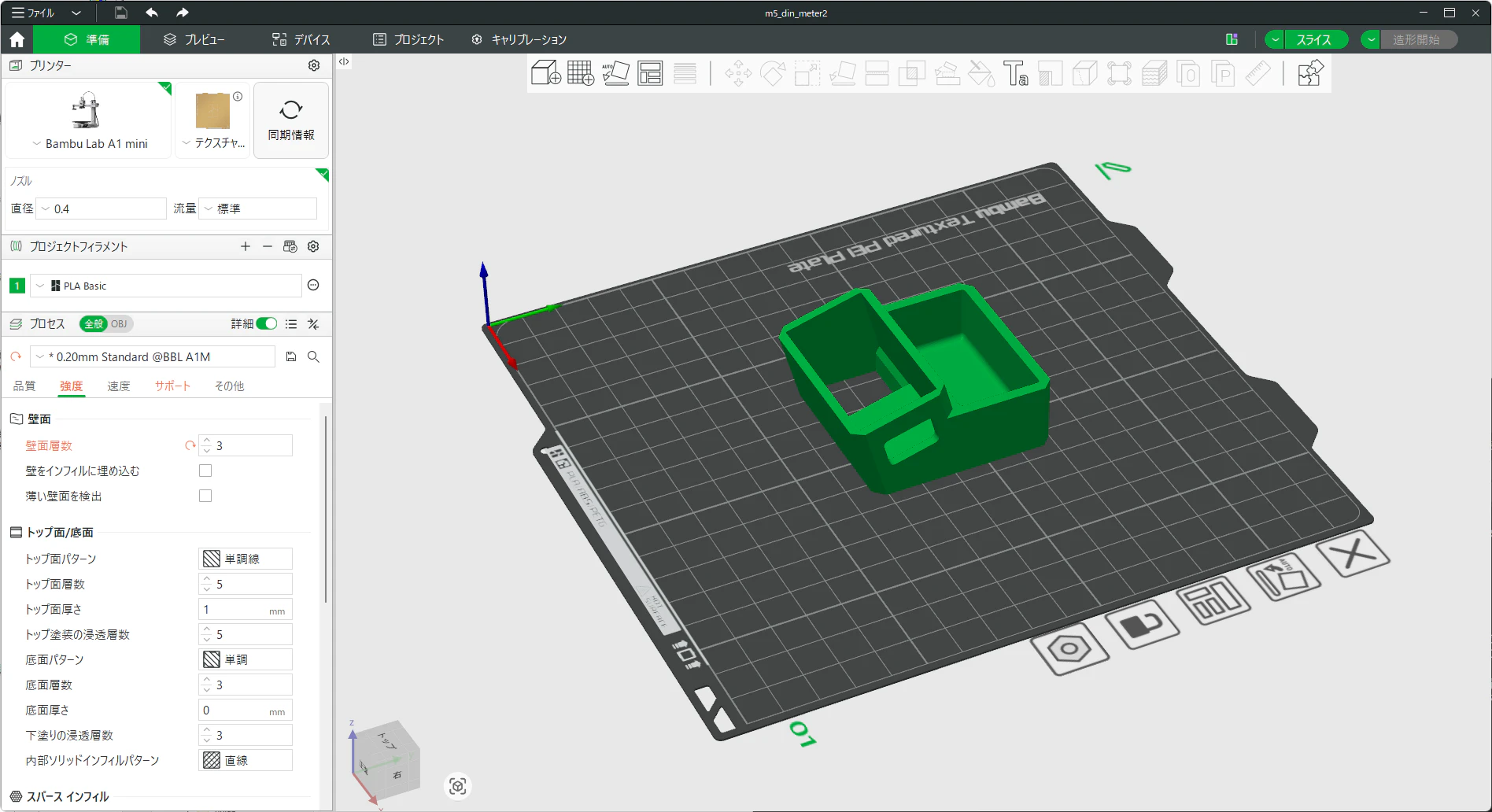
Autodesk Fusion 360(無償版)でM5 Din Meterがちょうど納まってUSBケーブルが接続できるように穴を開けたケースを設計します。完成したらSTLでモデルをファイル出力します。

10. 3Dプリンタでケースを作成して組み立てる
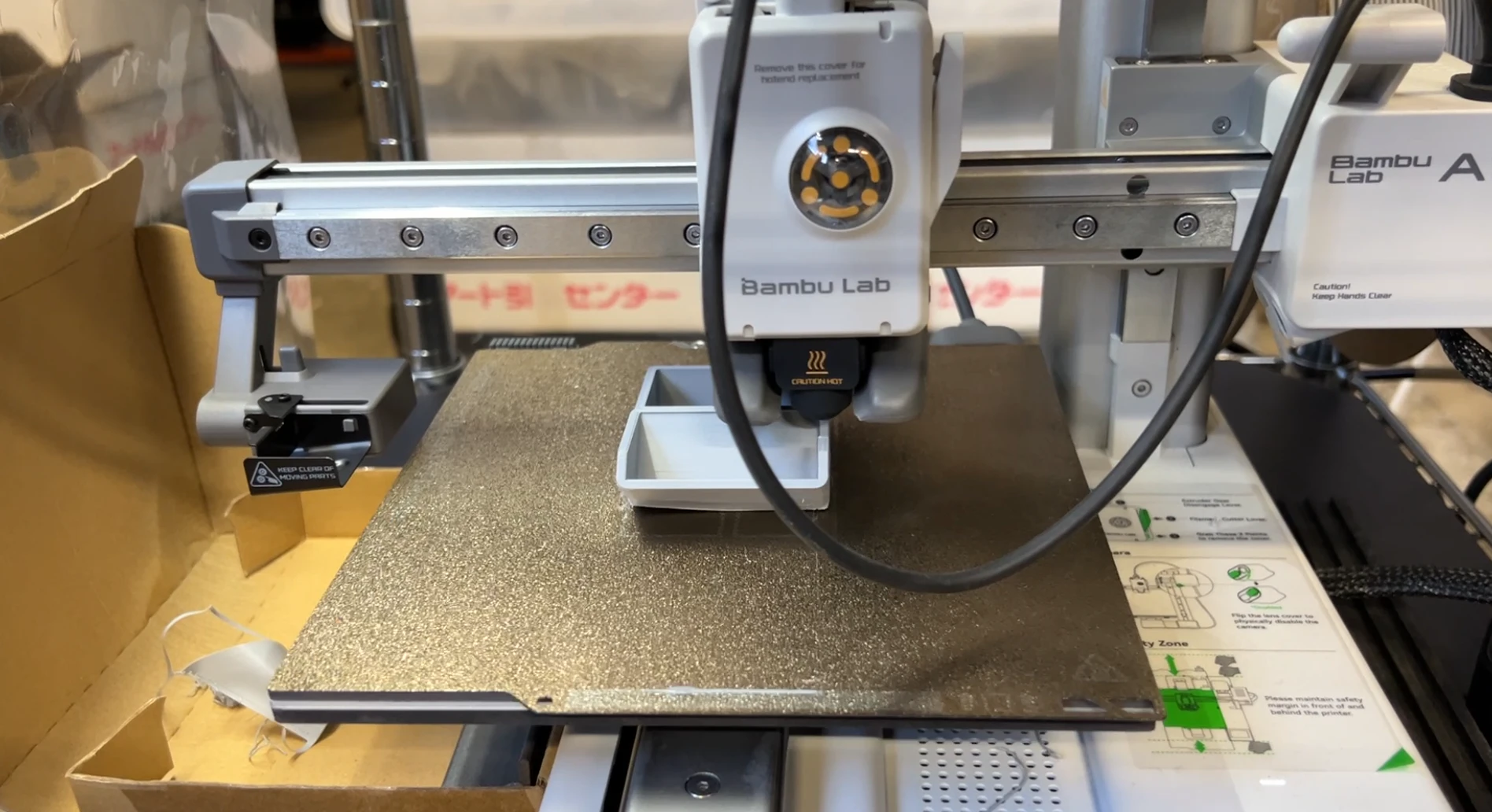
Bambu StudioでSTLを読み込んでスライスします。Bambu Lab A1 miniを使ってPLAで出力し、組み立てて完成させます。
ソースコード
/**
* @file m5din_clock1.ino
* @brief M5 Din Meter 投薬時間記録時計
* @version 1.0
*
* @Hardwares: M5DinMeter
* @Platform Version: Arduino M5Stack Board Manager v2.1.1
* @Dependent Library:
* M5GFX: https://github.com/m5stack/M5GFX
* M5Unified: https://github.com/m5stack/M5Unified
*/
#if defined(ARDUINO)
#define SERIAL_BAUD_RATE 115200
#define WIFI_SSID "Your SSID"
#define WIFI_PASSWORD "Your Password"
// ex.) "JST-9", "UTC+9"
#define NTP_TIMEZONE "Your Timezone"
#define NTP_SERVER1 "0.pool.ntp.org"
#define NTP_SERVER2 "1.pool.ntp.org"
#define NTP_SERVER3 "2.pool.ntp.org"
#define BAT_PIN G10
#define VREF 3.3f
#define VMAX 3.7f
#define ADC_RESOLUTION 4095
#define DIVIDER 2.0f
#include <WiFi.h>
#include <esp_sntp.h>
#include <M5DinMeter.h>
#include <string.h>
struct DateTime {
uint16_t year;
uint8_t month;
uint8_t day;
uint8_t weekday;
uint8_t hour;
uint8_t minute;
uint8_t second;
};
enum SystemState {
STATE_BOOTING,
STATE_NTP_SYNC,
STATE_NORMAL,
STATE_POWER_SAVE,
};
class MedicationClock {
private:
SystemState currentState;
DateTime currentButtonPressTime;
DateTime lastDisplayedTime;
DateTime lastButtonPressTime;
bool isFirstDisplay;
unsigned long lastDisplayUpdate;
static constexpr unsigned long DISPLAY_UPDATE_INTERVAL = 1000;
unsigned long lastActivityTime;
static constexpr unsigned long POWER_SAVE_TIMEOUT = 60000;
const char *wifiSSID;
const char *wifiPassword;
void syncTimeWithNTP();
void handleNormalMode();
void handlePowerSaveMode();
void updateDisplay();
void handleRotaryEncoder();
void recordButtonPressTime();
void displayPrintDate(const m5::rtc_date_t &date, const m5::rtc_time_t &time);
void displayPrintDate(const DateTime &dt);
void displayPrintTime(const m5::rtc_date_t &date, const m5::rtc_time_t &time);
void displayPrintTime(const DateTime &dt);
void formatElapsedTime(const m5::rtc_date_t ¤tDate,
const m5::rtc_time_t ¤tTime,
const DateTime &lastPress);
uint32_t calculateElapsedSeconds(const m5::rtc_date_t ¤tDate,
const m5::rtc_time_t ¤tTime,
const DateTime &lastPress);
public:
MedicationClock(const char *ssid, const char *password);
void begin();
void update();
};
MedicationClock::MedicationClock(const char *ssid, const char *password)
: currentState(STATE_BOOTING),
isFirstDisplay(true), lastDisplayUpdate(0), lastActivityTime(0),
wifiSSID(ssid), wifiPassword(password) {
memset(&lastDisplayedTime, 0, sizeof(DateTime));
}
void MedicationClock::begin() {
DinMeter.begin();
DinMeter.Display.setRotation(1);
DinMeter.Display.setTextSize(2);
DinMeter.Display.setCursor(25, 5);
if (!DinMeter.Rtc.isEnabled()) {
Serial.println("RTC not found.");
DinMeter.Display.println("RTC not found.");
for (;;) {
vTaskDelay(500);
}
}
Serial.println("RTC found.");
syncTimeWithNTP();
currentState = STATE_NORMAL;
lastActivityTime = millis();
analogSetPinAttenuation(BAT_PIN, ADC_11db);
recordButtonPressTime();
}
void MedicationClock::update() {
DinMeter.update();
switch (currentState) {
case STATE_NORMAL:
handleNormalMode();
break;
case STATE_POWER_SAVE:
handlePowerSaveMode();
break;
default:
break;
}
delay(10);
}
void MedicationClock::syncTimeWithNTP() {
Serial.print("WiFi:");
DinMeter.Display.print("WiFi:");
WiFi.begin(wifiSSID, wifiPassword);
while (WiFi.status() != WL_CONNECTED) {
Serial.print('.');
delay(500);
}
Serial.println("\r\n WiFi Connected.");
DinMeter.Display.print("Connected.\r\nNTP:");
configTzTime(NTP_TIMEZONE, NTP_SERVER1, NTP_SERVER2, NTP_SERVER3);
while (sntp_get_sync_status() != SNTP_SYNC_STATUS_COMPLETED) {
Serial.print('.');
delay(1000);
}
Serial.println("\r\n NTP Connected.");
DinMeter.Display.print("Connected.");
time_t t = time(nullptr) + 1;
while (t > time(nullptr))
;
DinMeter.Rtc.setDateTime(localtime(&t));
WiFi.disconnect();
}
void MedicationClock::handleNormalMode() {
handleRotaryEncoder();
unsigned long currentMillis = millis();
if (currentMillis - lastDisplayUpdate >= DISPLAY_UPDATE_INTERVAL) {
updateDisplay();
lastDisplayUpdate = currentMillis;
}
if (millis() - lastActivityTime > POWER_SAVE_TIMEOUT) {
currentState = STATE_POWER_SAVE;
}
}
void MedicationClock::handlePowerSaveMode() {
DinMeter.Display.sleep();
handleRotaryEncoder();
delay(1000);
}
void MedicationClock::updateDisplay() {
m5::rtc_date_t rtcDate;
m5::rtc_time_t rtcTime;
DinMeter.Rtc.getDate(&rtcDate);
DinMeter.Rtc.getTime(&rtcTime);
DateTime currentTime;
currentTime.year = rtcDate.year;
currentTime.month = rtcDate.month;
currentTime.day = rtcDate.date;
currentTime.weekday = rtcDate.weekDay;
currentTime.hour = rtcTime.hours;
currentTime.minute = rtcTime.minutes;
currentTime.second = rtcTime.seconds;
lastButtonPressTime = DateTime();
bool needFullClear = isFirstDisplay ||
(currentTime.year != lastDisplayedTime.year) ||
(currentTime.month != lastDisplayedTime.month) ||
(currentTime.day != lastDisplayedTime.day);
if (needFullClear) {
DinMeter.Display.clear();
isFirstDisplay = false;
}
bool needUpdateDateTime = needFullClear ||
(currentTime.hour != lastDisplayedTime.hour) ||
(currentTime.minute != lastDisplayedTime.minute) ||
(currentTime.second != lastDisplayedTime.second);
bool needUpdateRecordDateTime = needFullClear ||
(currentButtonPressTime.year != lastButtonPressTime.year) ||
(currentButtonPressTime.month != lastButtonPressTime.month) ||
(currentButtonPressTime.day != lastButtonPressTime.day) ||
(currentButtonPressTime.hour != lastButtonPressTime.hour) ||
(currentButtonPressTime.minute != lastButtonPressTime.minute) ||
(currentButtonPressTime.second != lastButtonPressTime.second);
if (needUpdateDateTime) {
if (!needFullClear) {
DinMeter.Display.fillRect(25, 5, DinMeter.Display.width(), 45, BLACK);
}
DinMeter.Display.setTextColor(WHITE);
DinMeter.Display.setCursor(25, 5);
DinMeter.Display.setTextSize(2);
DinMeter.Display.print("Now");
DinMeter.Display.setCursor(25, 25);
DinMeter.Display.setTextSize(2);
displayPrintDate(rtcDate, rtcTime);
DinMeter.Display.setCursor(100, 10);
DinMeter.Display.setTextSize(4);
displayPrintTime(rtcDate, rtcTime);
}
if (needUpdateRecordDateTime) {
if (!needFullClear) {
DinMeter.Display.fillRect(0, 50, DinMeter.Display.width(), 45, BLACK);
}
DinMeter.Display.setTextColor(CYAN);
DinMeter.Display.setCursor(25, 50);
DinMeter.Display.setTextSize(2);
DinMeter.Display.print("Check");
DinMeter.Display.setCursor(25, 70);
DinMeter.Display.setTextSize(2);
displayPrintDate(currentButtonPressTime);
DinMeter.Display.setCursor(100, 55);
DinMeter.Display.setTextSize(4);
displayPrintTime(currentButtonPressTime);
lastButtonPressTime = currentButtonPressTime;
}
if (needUpdateDateTime) {
if (!needFullClear) {
DinMeter.Display.fillRect(0, 95, DinMeter.Display.width(), 20, BLACK);
}
DinMeter.Display.setTextColor(CYAN);
DinMeter.Display.setCursor(10, 95);
DinMeter.Display.setTextSize(2);
formatElapsedTime(rtcDate, rtcTime, lastButtonPressTime);
}
int raw = analogRead(BAT_PIN);
float vb = (raw / float(ADC_RESOLUTION)) * VREF * DIVIDER;
float vratio = vb < VREF ? 0.0 : (vb > VMAX ? 1.0 : ((vb - VREF) / (VMAX - VREF)));
int w = (int)(vratio * 26);
DinMeter.Display.drawRect(200, 120, 30, 10, YELLOW);
DinMeter.Display.drawRect(198, 123, 2, 4, YELLOW);
DinMeter.Display.fillRect(202, 122, 28 - w, 6, BLACK);
int bat_color = vratio >= 0.5 ? GREEN : (vratio >= 0.25 ? ORANGE : RED);
DinMeter.Display.fillRect(228 - w, 122, w, 6, bat_color);
lastDisplayedTime = currentTime;
}
void MedicationClock::handleRotaryEncoder() {
bool buttonPressed = DinMeter.BtnA.wasPressed();
if (buttonPressed) {
lastActivityTime = millis();
if (currentState == STATE_POWER_SAVE) {
currentState = STATE_NORMAL;
DinMeter.Display.wakeup();
} else if (currentState == STATE_NORMAL) {
recordButtonPressTime();
}
}
}
void MedicationClock::recordButtonPressTime() {
m5::rtc_date_t rtcDate;
m5::rtc_time_t rtcTime;
DinMeter.Rtc.getDate(&rtcDate);
DinMeter.Rtc.getTime(&rtcTime);
currentButtonPressTime.year = rtcDate.year;
currentButtonPressTime.month = rtcDate.month;
currentButtonPressTime.day = rtcDate.date;
currentButtonPressTime.weekday = rtcDate.weekDay;
currentButtonPressTime.hour = rtcTime.hours;
currentButtonPressTime.minute = rtcTime.minutes;
currentButtonPressTime.second = rtcTime.seconds;
}
void MedicationClock::displayPrintDate(const m5::rtc_date_t &date,
const m5::rtc_time_t &time) {
DinMeter.Display.printf("%02d/%02d", date.month, date.date);
}
void MedicationClock::displayPrintDate(const DateTime &dt) {
DinMeter.Display.printf("%02d/%02d", dt.month, dt.day);
}
void MedicationClock::displayPrintTime(const m5::rtc_date_t &date,
const m5::rtc_time_t &time) {
DinMeter.Display.printf("%02d:%02d", time.hours, time.minutes);
}
void MedicationClock::displayPrintTime(const DateTime &dt) {
DinMeter.Display.printf("%02d:%02d", dt.hour, dt.minute);
}
void MedicationClock::formatElapsedTime(const m5::rtc_date_t ¤tDate,
const m5::rtc_time_t ¤tTime,
const DateTime &lastPress) {
uint32_t elapsedSeconds =
calculateElapsedSeconds(currentDate, currentTime, lastPress);
uint32_t days = elapsedSeconds / 86400;
uint32_t hours = (elapsedSeconds % 86400) / 3600;
uint32_t minutes = (elapsedSeconds % 3600) / 60;
if (days > 0) {
DinMeter.Display.printf("%lu days %lu hours", days, hours, minutes);
} else if (hours > 0) {
DinMeter.Display.printf("%lu hours %lu minutes", hours, minutes);
} else {
DinMeter.Display.printf("%lu minutes", minutes);
}
}
uint32_t
MedicationClock::calculateElapsedSeconds(const m5::rtc_date_t ¤tDate,
const m5::rtc_time_t ¤tTime,
const DateTime &lastPress) {
m5::rtc_datetime_t currentDateTime;
currentDateTime.date = currentDate;
currentDateTime.time = currentTime;
struct tm currentTm = currentDateTime.get_tm();
time_t currentEpoch = mktime(¤tTm);
struct tm pressTm;
pressTm.tm_year = lastPress.year - 1900;
pressTm.tm_mon = lastPress.month - 1;
pressTm.tm_mday = lastPress.day;
pressTm.tm_hour = lastPress.hour;
pressTm.tm_min = lastPress.minute;
pressTm.tm_sec = lastPress.second;
pressTm.tm_isdst = -1;
time_t pressEpoch = mktime(&pressTm);
return (uint32_t)(currentEpoch - pressEpoch);
}
MedicationClock medicationClock(WIFI_SSID, WIFI_PASSWORD);
void setup() {
Serial.begin(SERIAL_BAUD_RATE);
medicationClock.begin();
}
void loop() {
medicationClock.update();
}
使用方法
- 起動: デバイス起動後、自動的にWiFi接続とNTP同期が実行されます
- 時刻記録: 投薬時にボタンを押すと、その時刻が記録されます
- 経過時間確認: 画面下段に最後の投薬からの経過時間が表示されます
注意事項
- WiFi認証情報のハードコード: 本コードではWiFi SSIDとパスワード、タイムゾーンがコード内に直接記述されています。使用前に必ず自分の環境に合わせて変更してください。
- NTP同期: 起動時にのみNTP同期を行います。長時間使用する場合は、定期的な再同期を検討してください。
- RTC: RTCが検出できない場合は起動時にエラー表示され、動作を停止します。
まとめ
M5 Din Meterを使用して、投薬時間を記録・表示する時計デバイスを製作しました。投薬の際にボタンを押すだけで、直近の投薬からの経過時間を確認できるようになり、ドライアイの点眼薬を間を置かずに点眼してしまうミスがなくなりました。
参考資料
- M5 Din Meter製品ページ: https://www.switch-science.com/products/9569
- M5 Din Meter 公式ドキュメント: https://docs.m5stack.com/ja/arduino/m5dinmeter/program
- M5DinMeterレポジトリ: https://github.com/m5stack/M5DinMeter
- M5Stack公式サイト: https://docs.m5stack.com/