
Thoughtworks Technology Radar Vol 34 (April 2026) の Trial 枠に Mutation testing が載っている。「カバレッジは高いのにテストが意味のある assertion を 1 つもしていない」状態を検出する、テスト品質測定の本命。LLM が雑にテストを生成する時代、コードカバレッジが信用できなくなったので mutation testing が再評価されている、というのが Radar の主張。500 行 vanilla JS で ブラウザ完結の mutation testing playground を作ってみた。19 operator、source-string mutation、
new Functionで in-page 実行、サンプルとして「弱いテスト」と「強いテスト」のペアを並べて見せる。
🌐 Demo: https://sen.ltd/portfolio/mutation-testing/
📦 GitHub: https://github.com/sen-ltd/mutation-testing
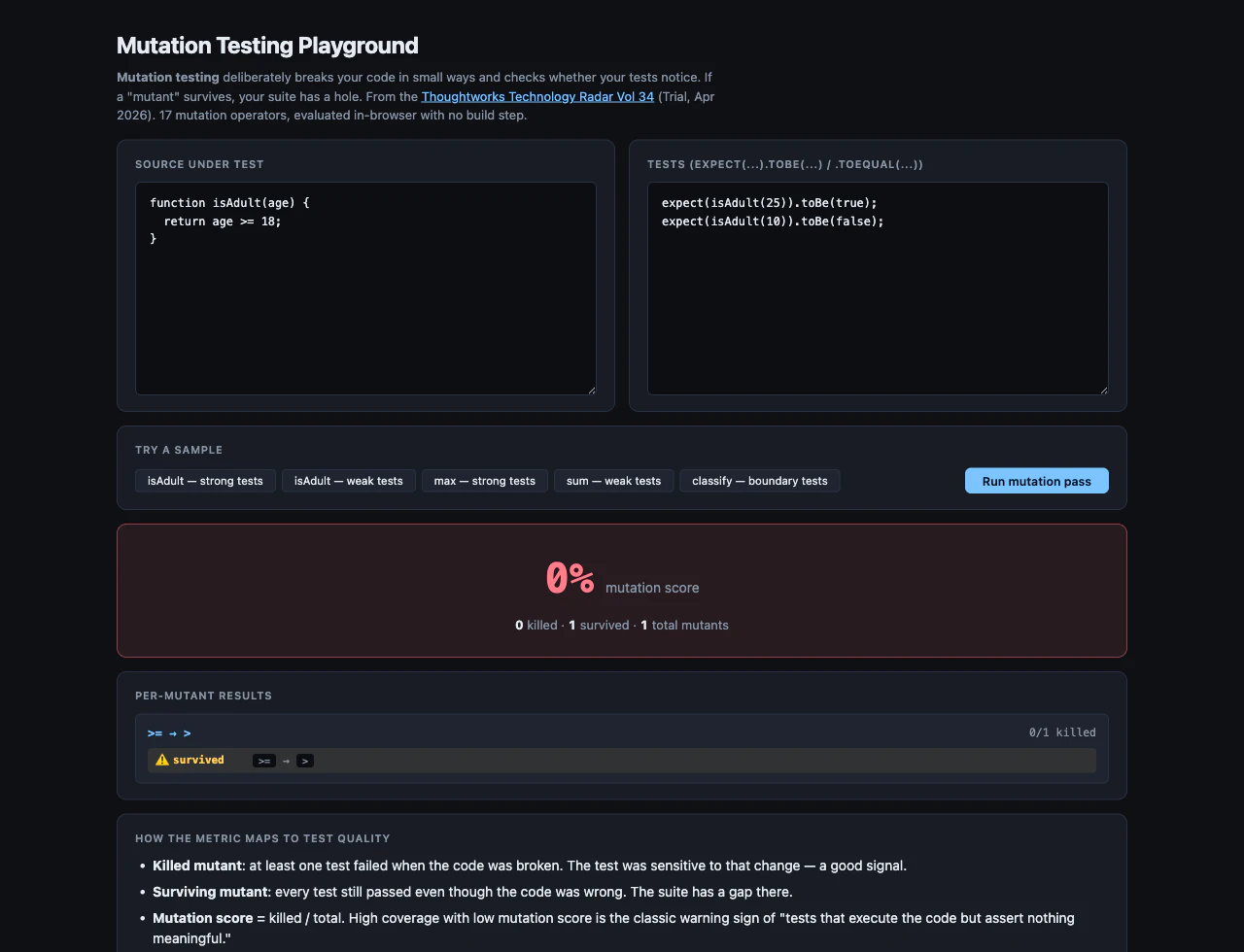
カバレッジ 100% で意味のあるテストはあるか
「カバレッジ 100% の sum(arr) 関数のテスト」が expect(sum([1,2,3])).toBe(6) の 1 行だけ、というケースを考える。
カバレッジレポート: 全行実行された ✅
真の品質: return が 6 を返せば全部通る
このテストでは:
-
total = total + arr[i]をtotal = total - arr[i]に変えても通る? → いいえ、6 → -6 で落ちる -
total = 0をtotal = 1に変えても通る? → いいえ、7 になる
OK、sum の例だけはカバレッジ + 1 行 assert で十分強い。だが:
-
isAdult(age)のreturn age >= 18、テストがexpect(isAdult(25)).toBe(true)とexpect(isAdult(10)).toBe(false)だけ - カバレッジ: 100%
- mutation:
>=を>に変えても 25 と 10 では結果が変わらない (両方とも結果同じ) - mutation:
18を 境界値で test していない ので、>= 17でも>= 19でも 25 と 10 では通ってしまう
mutation score: 0%。「カバレッジ 100% でも assertion が境界を捉えていない」というのが本ツールの教育ポイント。
Operator カタログ
source string 置換ベース。AST パーサを bundle すると重くなるので regex で。
export const OPERATORS = [
  // arithmetic
  { id: "plus-to-minus",  re: /\+/g, replace: () => "-", desc: "+ → -" },
  { id: "mul-to-div",     re: /\*/g, replace: () => "/", desc: "* → /" },
  // comparison (off-by-one を捕まえるのに重要)
  { id: "lt-to-le",       re: /(?<![<])<(?!=)/g, replace: () => "<=", desc: "< → <=" },
  { id: "gt-to-ge",       re: /(?<![>])>(?!=)/g, replace: () => ">=", desc: "> → >=" },
  { id: "ge-to-gt",       re: />=/g, replace: () => ">",   desc: ">= → >" },
  { id: "le-to-lt",       re: /<=/g, replace: () => "<",   desc: "<= → <" },
  { id: "eqeq-to-neq",    re: /===?/g, replace: () => "!==", desc: "== → !=" },
  // logical
  { id: "and-to-or",      re: /&&/g, replace: () => "||", desc: "&& → ||" },
  // constants
  { id: "true-to-false",  re: /\btrue\b/g, replace: () => "false", desc: "true → false" },
  { id: "zero-to-one",    re: /\b0\b/g, replace: () => "1", desc: "0 → 1" },
  // control flow
  { id: "negate-if",      re: /\bif\s*\(([^()]+)\)/g, replace: (_, c) => `if (!(${c}))`,
    desc: "if(x) → if(!x)" },
  // update
  { id: "inc-to-dec",     re: /\+\+/g, replace: () => "--", desc: "++ → --" },
  // ... 計 19 種類
];
ポイント 3 つ:
-
>を>=だけでなく逆方向もカバー —>=→>を入れないと「境界値テストがあるか」を検出できない。最初の版でこれを忘れて、isAdult の弱いテストが mutation 0 件になった (= 教育的に強い demo にならない)。気づいて追加した。 -
lookbehind で長い演算子を保護 —
<を<=にする regex は<<や<=を巻き込まないように(?<![<])<(?!=)。複合演算子と被らないように丁寧に書く必要がある。 -
word boundary で識別子を保護 —
0 → 1の regex は\b0\b。x0がx1になる事故を防ぐ。
文字列とコメントを跨ぐな問題
source 置換の弱点は string literal や comment の中身までマッチしてしまう こと。const s = "1 + 2" の + を - にしたら syntax error にはならないが、テスト結果が変わる (= equivalent mutant ではない false 検出)。
簡易トークナイザで skip mask を作って回避:
function buildSkipMask(src) {
  const mask = new Array(src.length).fill(false);
  let i = 0;
  while (i < src.length) {
    const c = src[i];
    // line comment
    if (c === "/" && src[i + 1] === "/") {
      while (i < src.length && src[i] !== "\n") { mask[i++] = true; }
      continue;
    }
    // string literal
    if (c === '"' || c === "'" || c === "`") {
      mask[i++] = true;
      while (i < src.length && src[i] !== c) {
        if (src[i] === "\\") mask[i++] = true; // エスケープシーケンス
        if (i < src.length) mask[i++] = true;
      }
      if (i < src.length) mask[i++] = true; // 閉じクォート
      continue;
    }
    i++;
  }
  return mask;
}
mutant 生成時に skipMask[match.index] が true なら skip。これでテストが通る:
test("operators inside strings are not mutated", () => {
  const ms = generateMutants(`const s = "1 + 2";`);
  assert.equal(ms.filter((m) => m.operatorId === "plus-to-minus").length, 0);
  assert.equal(ms.filter((m) => m.operatorId === "one-to-zero").length, 0);
});
block comment (/* */) はサポートしていない (簡易実装のため)。ほとんどのテストコードでは // の方が一般的なので実用上問題ない。
In-browser runner
各 mutant について「ソース置換 + テスト実行 → 通れば survived、落ちれば killed」を回す。new Function で in-page 実行:
const HELPERS = `
function expect(actual) {
  return {
    toEqual(expected) {
      if (!deepEqual(actual, expected)) {
        throw new Error(\`expected \${JSON.stringify(expected)}, got \${JSON.stringify(actual)}\`);
      }
    },
    toBe(expected) {
      if (actual !== expected) {
        throw new Error(\`expected \${expected}, got \${actual}\`);
      }
    },
  };
}
`;

export function runOne(source, tests) {
  const body = HELPERS + "\n" + source + "\n" + tests;
  try {
    new Function(body)();
    return { passed: true };
  } catch (e) {
    return { passed: false, error: String(e?.message ?? e) };
  }
}
セキュリティ注記: new Function は user input を page realm で eval する。portfolio demo としては許容範囲 (ユーザは自分のコードを貼る)、production なら iframe sandbox や Web Worker で隔離が必要。
サンプル — strong tests vs weak tests
これが教育の本丸。同じ isAdult 関数に対して 2 つのテストスイートを用意:
Weak (mutation score 0%):
expect(isAdult(25)).toBe(true);
expect(isAdult(10)).toBe(false);
→ >= → > 変換に気づかない。境界値 18 / 17 を test していないので、age > 18 でも age >= 18 でも 25 と 10 では区別がつかない。
Strong (mutation score 100%):
expect(isAdult(17)).toBe(false);   // 境界 -1
expect(isAdult(18)).toBe(true);    // 境界 ちょうど ← これが効く
expect(isAdult(19)).toBe(true);
expect(isAdult(0)).toBe(false);
→ >= を > にすると isAdult(18) が false を返してテストが落ちる。境界値 18 を直接 assert していること が mutation を kill する条件。
「境界値テスト」がなぜ重要かを mutation testing が 数値で示す のがこのツールの面白さ。
カバレッジとの違いを見せる demo
sum_weak プリセット:
function sum(arr) {
  let total = 0;
  for (let i = 0; i < arr.length; i++) {
    total = total + arr[i];
  }
  return total;
}
// test: expect(sum([1, 2, 3])).toBe(6);
カバレッジ: 全行 100% 実行。
mutation 結果: + → - (total = total - arr[i]) → -1+2-3=-2、kill ✓
mutation 結果: 0 → 1 (total = 1) → 1+1+2+3=7、kill ✓
mutation 結果: < → <= (i <= arr.length) → undefined を足す、kill ✓ (NaN or throw)
mutation 結果: + → - (i + 1 とは違うが、循環の足し算でテストが落ちる)
→ 単一の assertion でも 計算ロジックに直接効く mutation は全部 kill する。「assertion の数」ではなく「assertion が実際に走るパス」が重要、という事実が見える。
19 operator のカテゴリ別内訳
| Category | Operators |
|---|---|
| arithmetic |
+ → -, - → +, * → /, / → *
|
| comparison |
< → <=, > → >=, >= → >, <= → <, == → !=, != → ==
|
| logical |
&& → ||, || → &&
|
| constant |
true → false, false → true, 0 → 1, 1 → 0
|
| control | if(x) → if(!x) |
| update |
++ → --, -- → ++
|
実プロダクトの Stryker / Pitest / cargo-mutants は 30-50 種類の operator を持つが、上記が「弱いテスト」検出のコアセット。
教育ツールとしての限界
意図的に省略している:
-
AST 解析なし — 構文木を辿らないので "equivalent mutant" (構文違うが意味同一、e.g.
x + 0→x - 0) を survived として誤判定する場合がある -
block comment 非対応 —
/* */内を skip しない -
infinite loop 検出なし —
while (true) {...}のtrueをfalseにすると即終了、< → <=ループ break 条件を変えると無限ループになる場合がある (実装は best-effort try/catch のみ) - timeout なし — 上記の延長で、本物の mutation tester は worker + timeout で隔離
「real tool は AST レベルで動くから equivalent mutant を弾ける」という caveat を tool 側にも記事側にも書いた。
まとめ
- カバレッジ 100% でも assertion が境界を捉えていない ことを mutation testing が数値で示す
-
>=系の双方向 operator を入れないと off-by-one を検出できない - string / line comment の skip mask を作っておかないと false positive まみれになる
- 同じ関数に strong / weak の 2 種類のテストスイート を並べると「テスト品質」の差が即座に見える教育になる
-
new Functionベースの in-page runner はセキュリティ trade-off を取った演習用、production は iframe sandbox / Web Worker 必須 - 実プロダクトは Stryker (JS/TS), Pitest (Java), cargo-mutants (Rust) を使うべし — このツールはあくまで仕組みを理解する用
リポジトリ: https://github.com/sen-ltd/mutation-testing
このツールは弊社の OSS ポートフォリオ #251 として作成しました。Tech Radar 試してみた シリーズ第 5 弾。前回は #250 Server-driven UI、#249 Schema → LLM Prompt、#248 Markdown → Typst、#247 TOON コンバータ。シリーズ最終回 (#252) は Semantic layer 予定。SEN 合同会社(東京)では小さくて切れ味のあるツール群を継続的に公開しています: https://sen.ltd/portfolio/