
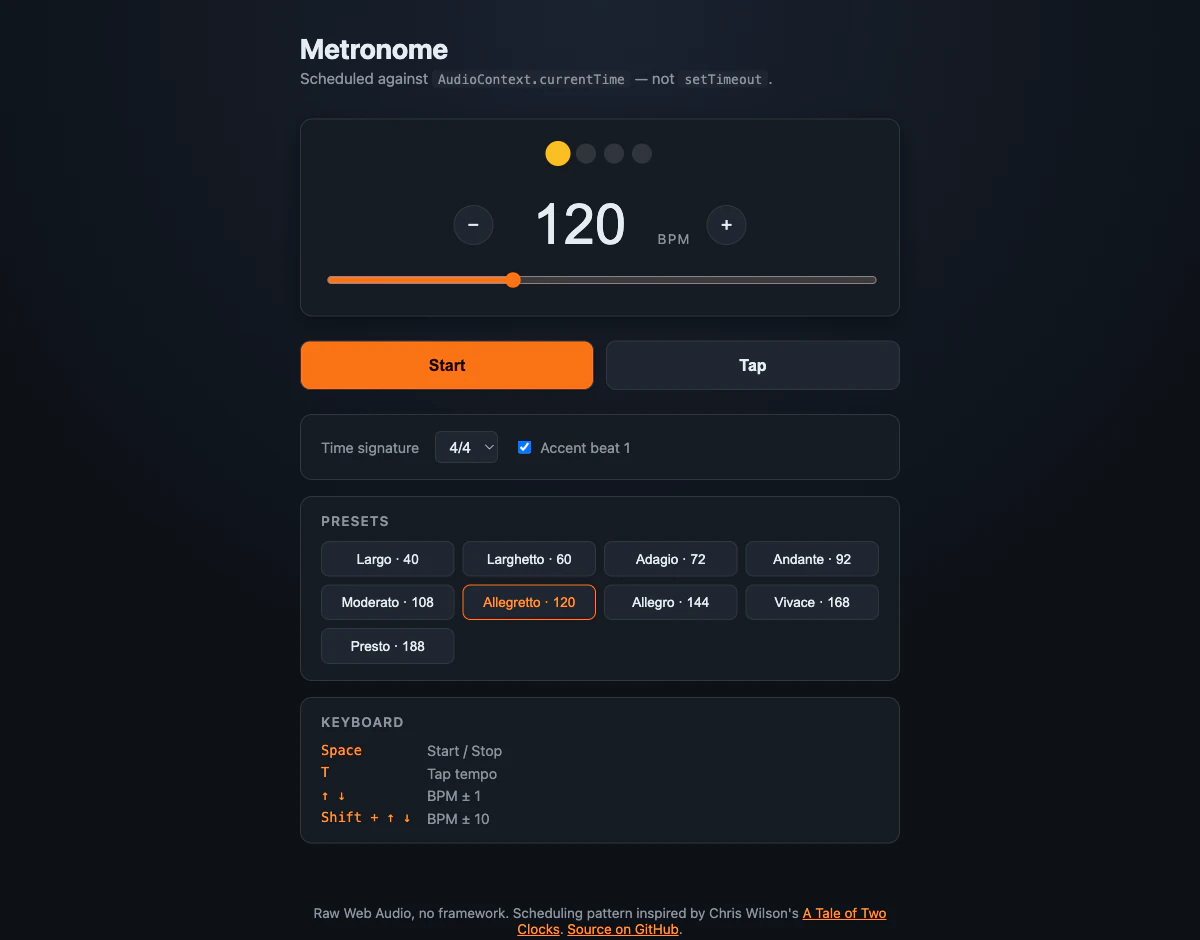
setInterval(fireClick, 60000/bpm)で web メトロノームを書いたら 2 小節以内に音が聞いて分かるレベルでズレた。なぜズレるか と、これを置き換えた ~60 行のスケジューラがどうやって永遠に sample-accurate を保つか を書く。
📦 GitHub: https://github.com/sen-ltd/metronome
🎵 Demo: https://sen.ltd/portfolio/metronome/
何度も踏んだバグ
「1 拍ごとにクリック音を鳴らしたい」素朴版は 3 行:
const ctx = new AudioContext();
const everyBeat = () => click(ctx, ctx.currentTime);
setInterval(everyBeat, 60000 / bpm);
120 BPM なら 500 ms ごとにクリック。本物のメトロノームと並べると 十数拍以内 に目で見えるレベルでズレる。240 BPM なら 4 拍以内。
理由は単純で、setInterval のコールバックスケジュールは オーディオハードウェアのクロックと一切連動していない。ブラウザは「だいたい 500 ms 後」にメインスレッドで callback を発火するが、メインスレッドはレイアウト・GC・別タスク・拡張機能の content script など他のことで忙しい。1 発の発火が 5–50 ms 遅れることがあり (これを jitter = タイミングのぶれ と呼ぶ)、しかもその誤差が 発火のたびに足し算で蓄積する。一方でオーディオクロックは正確に sample rate で進む。
修正方針、1 文で
各クリックを いつ鳴らすか をメインスレッドに決めさせない。Web Audio に「AudioContext.currentTime 基準で時刻 t に鳴らせ」と渡して、オーディオスレッドにその sample で render させる。
osc.start(t) // t は AudioContext.currentTime クロック上の時刻、wall clock ではない
メインスレッドのタイマがどれだけぶれようと、t 秒に出力される sample は変わらない。「いつ鳴らすかの計算」と「実際の発音」を別クロック上に分離した、それだけ。
lookahead スケジューラ (= 先読み予約)
「これから鳴らす拍を、少し先まで先回りして予約しておく」設計。パターンは Chris Wilson の 2013 年の記事 A Tale of Two Clocks。ノブ 2 つ + ループ 1 つ:
-
scheduleAheadSec— 何秒先までの拍を Web Audio に予約しておくか。本実装は 0.1 秒 -
lookaheadMs— JS タイマが起きて予約キューを覗きにくる間隔。本実装は 25 ms
不変条件: 今後 scheduleAheadSec 秒以内に再生される拍は、すべてすでに Web Audio に渡してある。
export function createScheduler({ audioCtx, bpm, beatsPerBar, onBeat }) {
  let nextBeatTime = 0;
  let beat = 0;
  let timer = null;

  const secondsPerBeat = () => 60 / bpm;

  function tick() {
    while (nextBeatTime < audioCtx.currentTime + 0.1) {
      onBeat({ beat, time: nextBeatTime });
      nextBeatTime += secondsPerBeat();
      beat = (beat + 1) % beatsPerBar;
    }
  }

  return {
    start() {
      beat = 0;
      nextBeatTime = audioCtx.currentTime + 0.05;
      tick();
      timer = setInterval(tick, 25);
    },
    stop() { clearInterval(timer); timer = null; },
    setBpm(next) { bpm = next; },
  };
}
onBeat が実音を出す場所:
function click(ctx, time, accent) {
  const osc = ctx.createOscillator();
  const gain = ctx.createGain();
  osc.frequency.value = accent ? 1500 : 1000;
  osc.type = "square";
  gain.gain.setValueAtTime(0, time);
  gain.gain.linearRampToValueAtTime(0.4, time + 0.001);
  gain.gain.exponentialRampToValueAtTime(0.0001, time + 0.05);
  osc.connect(gain).connect(ctx.destination);
  osc.start(time);
  osc.stop(time + 0.06);
}
time 引数がそのまま osc.start(time) に流れるのがポイント。JS タイマの起床が 20 ms 遅かろうと 80 ms 遅かろうと、100 ms 先までの拍はすでに予約済 なので、オーディオスレッドはタイマの遅延を気にしない。メインスレッド側も次の tick まで 75 ms の余裕がある。
なぜ全部一気に予約しないのか
「次の小節 (or 次の 10 秒) を全部予約しちゃえばいいのでは」が出る当然の質問。答え: ユーザーが何かを変える から。
BPM スライダを 120 から 140 に動かしたとき、欲しいのは「次の拍は新しいテンポ」であって、「先に予約済の遅い拍が 10 個鳴り終わってからテンポ変更が反映される」ではない。100 ms 窓は、テンポ変更を即座に感じられるには十分短く、メインスレッドのぶれを吸収するには十分長い、その境界。
想定外だった効能
擬似 AudioContext と擬似 setInterval を使ってユニットテストを書いた:
function fakeCtx(startAt = 0) { return { currentTime: startAt }; }

test("拍の間隔が厳密に 60/bpm", () => {
  const ctx = fakeCtx(0);
  const beats = [];
  const sched = createScheduler({ audioCtx: ctx, bpm: 120, beatsPerBar: 4,
                                  onBeat: b => beats.push(b),
                                  setIntervalFn: () => 1, clearIntervalFn: () => {} });
  sched.start();
  ctx.currentTime = 2;    // オーディオクロックを早送り
  sched._tick();
  for (let i = 1; i < beats.length; i++) {
    const gap = beats[i].time - beats[i - 1].time;
    assert.ok(Math.abs(gap - 0.5) < 1e-9);
  }
});
差は マシン精度で厳密に 0.5。「およそ 500 ms ± ちょっとのぶれ」ではない。なぜなら wall clock (Date.now() 等) を一切読まず、nextBeatTime への加算しかしないので、そもそもぶれの入り込む余地がない。
このテストは「リファクタ中に誰かが Date.now() や performance.now() をスケジューリング演算に紛れ込ませた瞬間に落ちる」ためのもの。1 秒でも紛れ込めば差が厳密でなくなる。
AudioContext.currentTime を使うことの裏の利点はこれ: 再生時刻と、計画に使う数値が同じ変数。だからスケジューリングロジックがそのままユニットテスト可能になる。
tap tempo はおまけで降ってくる
上記まで書けば tap tempo は数行:
const taps = [];
function tap() {
  const now = performance.now();
  taps.push(now);
  while (taps.length > 5) taps.shift();
  // 2.5 秒以上間が空いたら新しい計測の始まり扱い
  while (taps.length && taps[0] < now - 2500) taps.shift();
  if (taps.length < 2) return;
  const intervals = taps.slice(1).map((t, i) => t - taps[i]);
  const avgMs = intervals.reduce((a, b) => a + b) / intervals.length;
  setBpm(60000 / avgMs);
}
直近 4 区間の移動平均、長すぎるギャップは自動失効。ここでは performance.now() で全く問題ない: ユーザーの叩いた間隔を測っているだけ で、音そのものを鳴らしているわけではないから。結果を setBpm() に流せば、走っているスケジューラが次の拍から新しいテンポで動く。
やらない方がよかったこと
-
タイマを Web Worker で動かす のはやりすぎ。「
setIntervalはバックグラウンドタブで throttle (発火頻度が落とされる) されるから worker が必要」と書かれている記事を見るが、AudioContext は タブがバックグラウンドに行くと自動的に処理を停止 (suspend) するのでメトロノームでは関係ない。タブが復帰すればcurrentTimeはそのまま続きから。worker のメリットは DAW グレードのアプリ向け、メトロノームには合わない -
ctx.state === 'suspended'を無視する。ブラウザは ユーザーが何かクリック/タップするまで AudioContext を停止状態にしている (自動再生防止のため)。最初の再生ボタンクリックでawait ctx.resume()を忘れるとスケジューラは順調に tick するが何も鳴らない、を経験する -
0.05 秒「少し未来」のオフセットを省く。
osc.start(ctx.currentTime)を直接呼ぶと、最初のクリックがしばしば失われる: オーディオスレッドが拾うときには timestamp が既に過去になっているから
まとめ
-
setTimeout/setIntervalは UI 用には十分。オーディオスケジューリングには合わない — JS イベントループとオーディオクロックの間に何の関係もないから -
AudioContext.currentTimeが「sample が実際に鳴る時刻」と「スケジューラが計算に使う変数」の両方を兼ねる - 設計のコア: JS タイマは 25 ms ごとに目を覚まして「100 ms 先までに鳴る拍」を Web Audio に予約する。タイマの起床が多少遅れても、予約済の拍はその先で正しい時刻に鳴る — これで累積誤差ゼロが ~60 行で実現できる
- スケジューラの依存は
audioCtx.currentTimeだけなので、stub すればテストは時間早送り可能
コード (MIT、フレームワークなし、static page 1 枚): github.com/sen-ltd/metronome
🛠 本記事は SEN 合同会社 が公開している小さな開発者ツール群の 1 つ。他は portfolio 一覧 から。