
きっかけ
前回 作った React 版のポートフォリオ landing を、同じ仕様で Vue 3 に移植しました。これはシリーズ 022 件目、フレームワーク比較シリーズの 2 本目です。
シリーズの目的は、「同じ仕事をこなすとき、各フレームワークがどれくらいのバイトを支払うか」 を測ること。ただし、単に再実装するだけでは比較に意味がないので、厳しい条件を課しています:
- 共通コード (
types.ts,filter.ts,data.ts,style.css, テストコード) は byte-identical - コンポーネント層のみ書き換え
- 同じ機能を全部実装する(差分なし)
結果: Vue 3 版は gzip 28.76 kB。React 版の 49.00 kB と比べて −41%。
作ったもの
Portfolio App (Vue) — https://sen.ltd/portfolio/portfolio-app-vue/
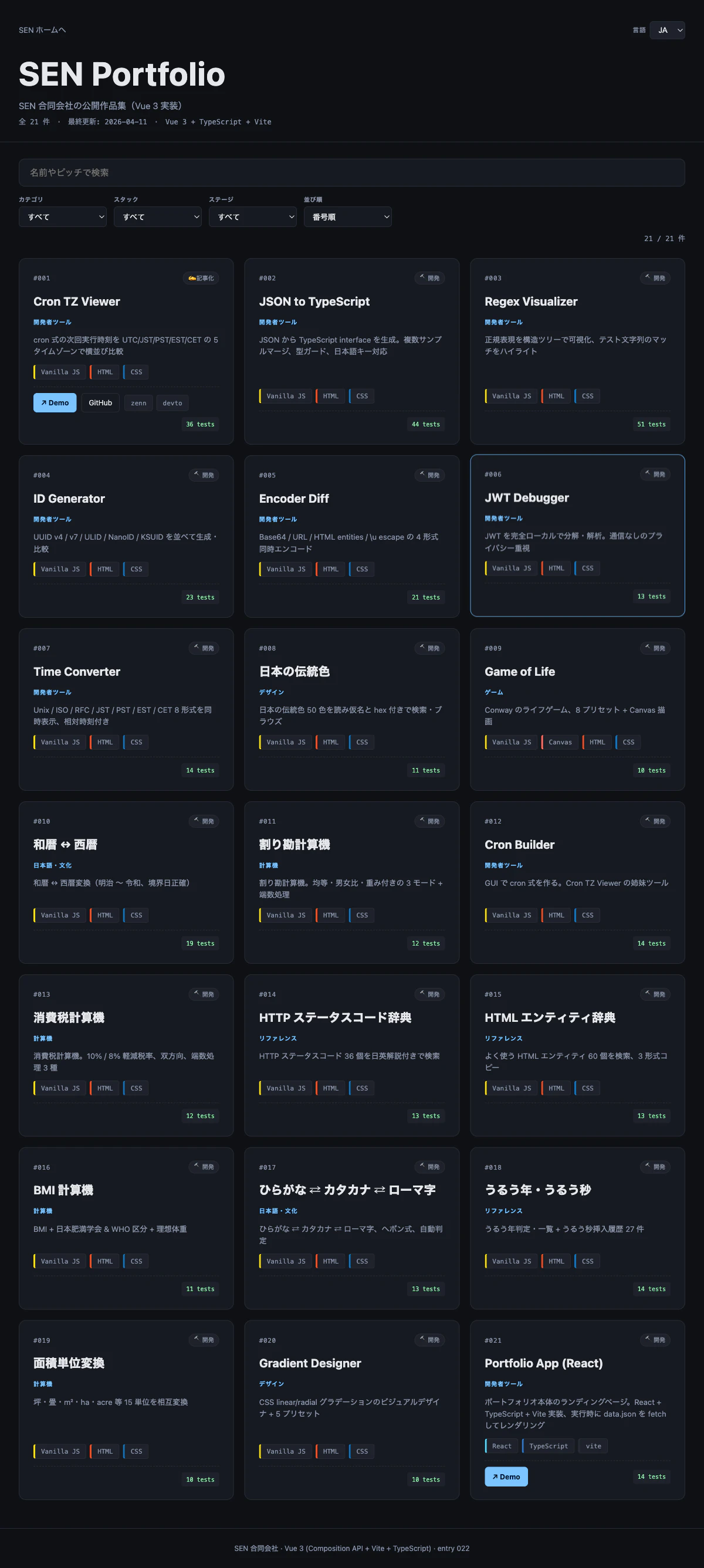
機能は React 版と完全に同じ:
- フィルタ(カテゴリ / スタック / ステージ)
- 検索(名前 / ピッチ / タグ)
- ソート(番号 / 新着 / 古い順 / 名前順)
- URL クエリ同期
- 日英 UI
- ダーク UI
- レスポンシブ
Vue 3 + TypeScript + Vite + Composition API。filter / data / types / CSS は 021 React 版とバイト単位で同一。
Composition API + <script setup> の簡潔さ
Vue の書き味は <script setup> を使うと非常に薄い:
<script setup lang="ts">
import { ref, computed, watchEffect } from 'vue'
import type { PortfolioData, Entry, Lang } from './types'
import { loadPortfolioData } from './data'
import { filterAndSort, type FilterState, type SortKey } from './filter'
import { MESSAGES, detectDefaultLang } from './i18n'

const status = ref<'loading' | 'error' | 'ready'>('loading')
const errorMsg = ref('')
const data = ref<PortfolioData | null>(null)
const lang = ref<Lang>(detectDefaultLang())
const filter = ref<FilterState>({ query: '', category: 'all', stack: 'all', stage: 'all', sort: 'number' })

loadPortfolioData()
  .then((d) => { data.value = d; status.value = 'ready' })
  .catch((e) => { errorMsg.value = String(e); status.value = 'error' })

const visible = computed(() =>
  data.value ? filterAndSort(data.value.entries, filter.value, lang.value) : []
)
</script>
React だと useState × 5、useEffect でロード、useMemo でメモ化、というところを、ref と computed だけで済む。特に computed は React の useMemo より直感的で、useEffect の依存配列を手で書く必要がない。
v-model と watchEffect で URL 同期
URL クエリ同期も宣言的に書ける:
<script setup lang="ts">
watchEffect(() => {
  const q = new URLSearchParams()
  if (filter.value.query) q.set('q', filter.value.query)
  if (filter.value.category !== 'all') q.set('category', filter.value.category)
  // ...
  q.set('lang', lang.value)
  window.history.replaceState(null, '', `${window.location.pathname}?${q.toString()}`)
})
</script>

<template>
  <input type="text" v-model="filter.query" :placeholder="m.searchPlaceholder" />
  <select v-model="filter.category">
    <option value="all">{{ m.allLabel }}</option>
    <option v-for="c in data.categories" :key="c.id" :value="c.id">
      {{ c.name[lang] }}
    </option>
  </select>
</template>
v-model が双方向バインディングを完結させてくれるので、React の value + onChange の 2 重記述が消える。watchEffect は依存を自動検出してくれるので、useEffect(..., [filter, lang]) みたいな依存配列を忘れるバグが起きようがない。
バンドル分析: なぜ Vue が React より 41% 小さい
vite build の結果:
dist/assets/index-<hash>.js 104.94 kB │ gzip: 28.76 kB
Vue 3 本体 + <template> コンパイラのランタイム部分 + アプリコード で gzip 28.76 kB。React + react-dom + アプリコードの 49.00 kB から 20 kB 以上削れている。
内訳を推測すると:
- react-dom が重い: 仮想 DOM diffing + リコンサイラで 40 kB 以上
- Vue の reactivity は proxy-based: リアクティブ機構自体が軽量
-
Vue テンプレートはコンパイル時最適化:
<template>はビルド時に render 関数に変換されるが、この中間表現が JSX より効率的に最適化される
特に大きいのは、Vue が「状態変化を追跡する粒度」が細かい こと。<input v-model="filter.query"> の filter.query を変えると、その input と computed の visible だけが更新されます。React では setFilter が component 全体を再 render します(React 19 の Compiler が入る前のモデル)。
その差が、本アプリのような「フィルタを頻繁に変える小 SPA」では gzip 的にも実行性能的にも効いてくる。
コンポーネント分割: EntryCard.vue
React 版では 1 ファイル (App.tsx) に EntryCard サブコンポーネントを function で定義していました。Vue 版では .vue ファイルの単位で分けます:
<!-- EntryCard.vue -->
<script setup lang="ts">
import type { Entry, Lang } from './types'
import { MESSAGES } from './i18n'

const props = defineProps<{
  entry: Entry
  lang: Lang
  stackMap: Map<string, { id: string; name: string; color: string }>
  stageMap: Map<string, { id: string; icon: string; name: Record<Lang, string> }>
  categoryMap: Map<string, { id: string; name: Record<Lang, string> }>
}>()

const stage = $computed(() => props.stageMap.get(props.entry.stage))
const category = $computed(() => props.categoryMap.get(props.entry.category))
</script>

<template>
  <article class="card">
    <div class="card-head">
      <span class="entry-number">#{{ String(entry.number).padStart(3, '0') }}</span>
      <span v-if="stage" class="stage-badge">{{ stage.icon }} {{ stage.name[lang] }}</span>
      <span v-if="entry.source === 'closed'" class="source-badge">🔒 Closed source</span>
    </div>
    <!-- ... -->
  </article>
</template>
defineProps<T>() の型推論が効くので TypeScript との相性がよく、.vue Single File Component の形式で template / script / style を 1 ファイルに収められる。ファイル分離は React と同じくらいやりやすい。
byte-identical な共通コード
重要な制約として、types.ts・filter.ts・data.ts・style.css・tests/filter.test.ts は React 版とバイト単位で同一です:
diff repos/portfolio-app-react/src/filter.ts repos/portfolio-app-vue/src/filter.ts
# → 差分なし
これで、「コンポーネント層だけが違う」 ことが構造的に保証されます。バンドル差はフレームワークのオーバーヘッド差、とほぼ言い切れる。
テスト
Vitest で 14 ケース。filter.ts の pure 関数に対して、React 版と完全に同じテストを走らせます:
test('filters by category', () => {
  const r = filterAndSort(entries, { ...defaults, category: 'dev-tool' }, 'ja')
  assert.ok(r.every((e) => e.category === 'dev-tool'))
})
Vue レイヤーに関するテストはなし。ロジックは全部純粋関数に寄せているので、フレームワークを変えても同じテストで OK。
おわりに
SEN 合同会社の ポートフォリオシリーズ 100+ の 22 件目、フレームワーク比較の 2 本目です。
- 📦 レポジトリ: https://github.com/sen-ltd/portfolio-app-vue
- 🌐 ライブデモ: https://sen.ltd/portfolio/portfolio-app-vue/
- 🏢 会社: https://sen.ltd/
次回は Svelte 5 + Runes 版(023)。gzip 18.92 kB で、さらに −23% 削ります。