
Thoughtworks Technology Radar Vol 34 の Trial 枠に Typst が載っている。LaTeX 代替の現代的タイプセット言語、コンパイル時間が桁違いに速いことで知られているやつ。「試してみたい」と思いつつ移行コストが見えなくて止まる人向けに、手元の Markdown を貼ると Typst マークアップが出てくる変換器 を 500 行 vanilla JS で書いた。実装してみると「Typst の表面構文は LaTeX より Markdown 寄り」という Tech Radar の評がそのまま体感できる。
🌐 Demo: https://sen.ltd/portfolio/markdown-to-typst/
📦 GitHub: https://github.com/sen-ltd/markdown-to-typst
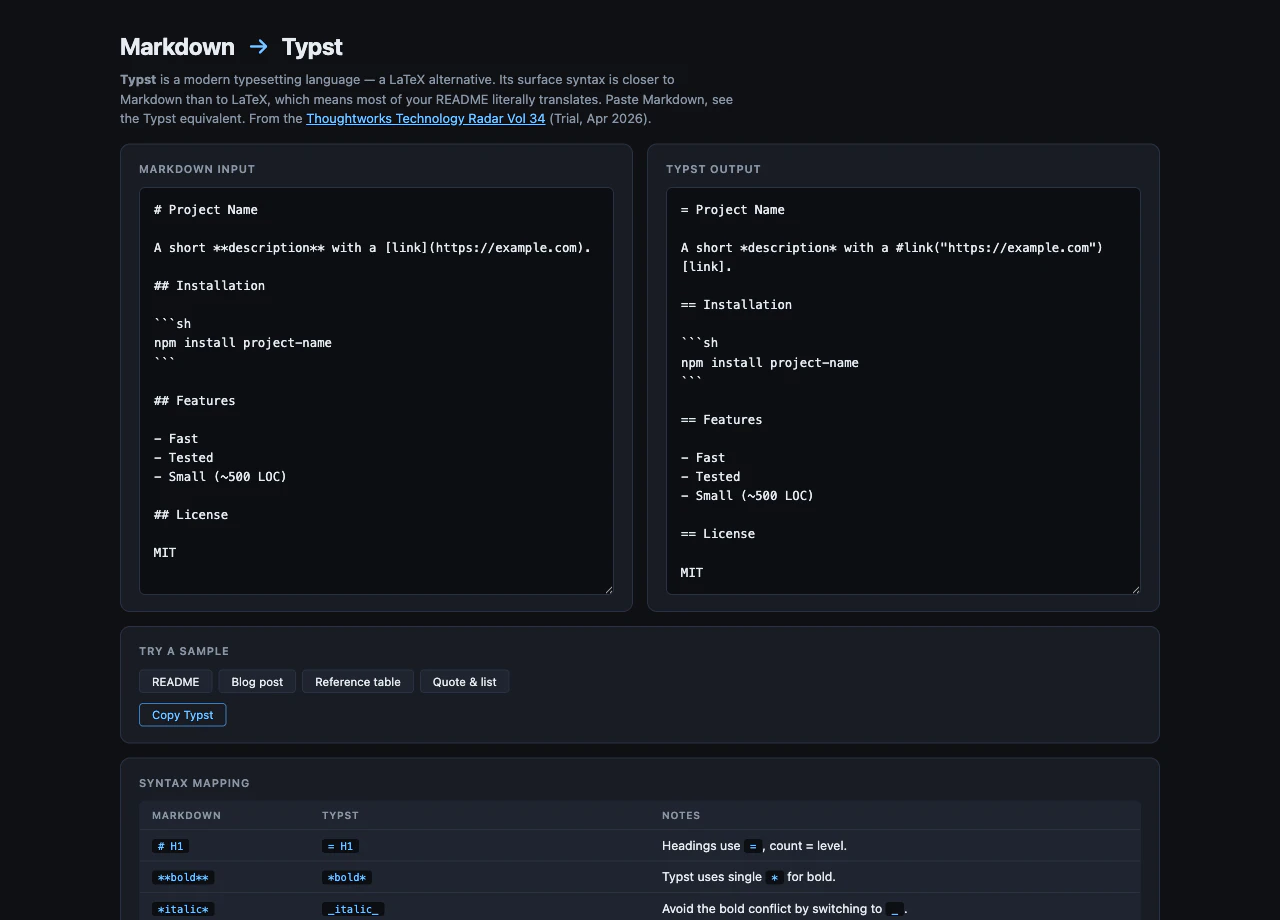
Typst が Markdown 寄りという話
LaTeX で \section{Hello} と書くものが Typst だと = Hello。\textbf{bold} が *bold*。\begin{itemize} \item foo が - foo。README の 7-8 割はそのまま動く 感じ。
これは数学記法をどうするかという議論よりずっと手前のレイヤーで、pdflatex のビルド時間に疲れている層への入り口として一番効くポイント。本ツールは「あなたの既存 Markdown を Typst にしたらどう書かれるか」を即座に見せる。
設計 — line-oriented + sentinel-and-restore
converter.js  ← mdToTypst + applyInline (DOM 非依存、28 tests)
presets.js    ← 4 種のサンプル
app.js        ← UI グルー
converter.js は line-oriented ブロックパーサ + インライン変換の 2 層構造。ブロックレベルは「ハンドラを順に試して、最初に成功した結果を採用する」シンプルな方式:
export function mdToTypst(md) {
  const lines = md.split("\n");
  const out = [];
  let i = 0;
  while (i < lines.length) {
    const remaining = lines.slice(i);
    const block =
      tryFencedCode(remaining) ||
      tryHorizontalRule(remaining) ||
      tryHeading(remaining) ||
      tryBlockquote(remaining) ||
      tryList(remaining) ||
      tryTable(remaining) ||
      tryBlank(remaining) ||
      tryParagraph(remaining);
    out.push(block.typst);
    i += block.consumed;
  }
  return out.join("\n").replace(/\n{3,}/g, "\n\n");
}
各 tryXxx は { typst, consumed } を返す or null。試行順は 「より具体的なものを先」: フェンス → 水平線 → ヘッダ → 引用 → リスト → テーブル → 空行 → 段落 (最後の fallback)。フェンスを最後にすると ``` の行が水平線として誤マッチする、というような事故を順序で防ぐ。
ハンドラ別の対応
ヘッダ:
function tryHeading(lines) {
  const m = lines[0].match(/^(#{1,6})\s+(.+?)\s*#*\s*$/);
  if (!m) return null;
  const level = m[1].length;
  const text = applyInline(m[2]);
  return { typst: `${"=".repeat(level)} ${text}`, consumed: 1 };
}
# の数 = = の数。Markdown と Typst が偶然一致しているわけではなく、Typst が意図的に Markdown スタイルを採用している。
テーブル:
function tryTable(lines) {
  if (lines.length < 2) return null;
  if (!/^\s*\|.+\|\s*$/.test(lines[0])) return null;
  if (!/^\s*\|?\s*:?-+:?\s*(\|\s*:?-+:?\s*)+\|?\s*$/.test(lines[1])) return null;
  // … セル分解 → #table(columns: N, [...], [...]) を出力
}
Typst の #table は positional args でセルを並べる。#table(columns: 3, [a], [b], [c], [1], [2], [3]) で 1 行目がヘッダ、2 行目がデータ。Markdown の |---|---|---| 区切り行は捨てて、ヘッダのセルだけ [*…*] で太字化する。
インライン: sentinel-and-restore でハマったところ
最初に書いた版で出たバグ:
入力: **description**
期待: *description* (Typst の太字)
実際: _description_ (italic 化)
理由はパス順:
- Bold
**x** → *x*の置換が走り**description**→*description* - Italic
*x* → _x_の置換が走り*description*→_description_
太字を平文に戻したつもりが、次の italic 変換に巻き込まれて二重変換になる。Markdown パーサあるある。
修正は sentinel placeholder + 後段で復元:
const boldStash = [];
text = text.replace(/\*\*([^*\n]+)\*\*/g, (_, body) => {
  boldStash.push(body);
  return `\x00BOLD${boldStash.length - 1}\x00`;  // 一時的に隔離
});

// 安全に italic 変換ができる (`*x*` はもう存在しないので誤マッチしない)
text = text.replace(/(^|[^*])\*([^*\n]+)\*/g, (_, pre, body) => `${pre}_${body}_`);

// 最後に復元
text = text.replace(/\x00BOLD(\d+)\x00/g, (_, i) => `*${boldStash[Number(i)]}*`);
\x00 は NULL 文字 で実テキストには絶対出てこない (出てきたら攻撃)。同じ手法でインラインコードも先に逃がす。普通の Markdown パーサが内部でやっているのと同じパターンで、自前実装で必ず一度は踏むワナ。
これでテストが通る:
test("mixed bold + italic", () => {
  assert.equal(applyInline("**bold** and *italic*"), "*bold* and _italic_");
});
リンクと画像
// [text](url) → #link("url")[text]
text = text.replace(/\[([^\]]+)\]\(([^)]+)\)/g, (_, label, url) =>
`#link("${url.trim()}")[${label}]`
);
//  → #image("url")
text = text.replace(/!\[([^\]]*)\]\(([^)]+)\)/g, (_, _alt, url) =>
`#image("${url.trim()}")`
);
Typst の #link(url)[label] は関数呼び出し + コンテンツブロック ([...]) の組み合わせ。Markdown の [text](url) より明示的だが、その分 後で programmatic に書き換えるのが楽。例えば「全リンクに target="_blank" 相当の属性を付ける」みたいな操作は LaTeX の \href より Typst の方がずっと素直。
#image は alt テキストを第 1 引数に取らない仕様。アクセシビリティ的には caption: [...] でキャプションとして渡す方が Typst 流。今のツールはとりあえず alt を捨てているが、ここは「Typst が意図的に分けた」良い設計判断と読んでいる。
CommonMark 完全対応ではない
意図的にカバーしていないもの:
- setext ヘッダ (
===下線) - reference-style links (
[a][1]+ 末尾の[1]: url) - HTML 埋め込み (
<div>…</div>) - ネスト リスト (深さ 1 のみ)
- マルチ段落 list item
理由は 「Typst 評価用ツール」だから。完全な CommonMark パーサが欲しいなら markdown-it / remark を使えばいい。本ツールの目的は「あなたの README が Typst でどう書かれるか」を見せること、その範囲では実用十分。
何を実装していないか — Typst レンダリング
本ツールは syntax mapping だけ。実際の PDF/SVG レンダリングは Typst 公式 CLI (typst compile) か typst.app に任せる。理由:
- Typst の WASM ビルド (
@myriaddreamin/typst.ts) は ~5-10 MB - フォントを bundle するとさらに数 MB
- CDN 経由は portfolio の「依存ゼロ、ビルドなし」原則に反する
- 「変換結果を見るだけで Typst を採用するか判断できる」のが本ツールのスコープ
レンダリングを試したい人には記事末尾でローカル install を案内している。
28 件のテスト
カテゴリ別:
- headings: 4 件 (h1-h6、emphasis 入り)
- paragraphs: 2 件
- inline emphasis: 4 件 (bold/italic/mixed/underscore)
- inline code: 3 件 (basic、metachars、emphasis 保護)
- links/images: 2 件
- lists: 3 件 (bullet/numbered/emphasis 入り)
- blockquotes: 2 件 (1 行/複数行)
-
horizontal rule: 2 件 (
---/***) - fenced code: 3 件 (plain/lang/emphasis 保護)
- tables: 2 件 (2×2/3 列複数行)
- end-to-end: 1 件 (README 形状の総合テスト)
「emphasis が code 内部に侵入しないこと」「fenced code の中身が verbatim になること」を独立テストにしているのが効く — sentinel-and-restore の正しさが回帰テストで保証される。
まとめ
- Typst の表面構文は意図的に Markdown 寄り で、ヘッダ / 強調 / リスト / インラインコードはほぼ 1:1 で対応する
- block-level handler の試行順 が事故防止の本質 (より具体的なものから先)
-
インライン変換は sentinel-and-restore が定石。Bold / Italic が同じ
*を取り合うパターンは Markdown パーサの古典バグ -
#link(url)[text]/#image(url)という関数呼び出し形式は明示的だが、後段で programmatic に処理しやすい - Typst レンダリングは ~5-10 MB の WASM が必要なので、syntax mapping だけに絞った tool が「移行判断」用途に最適
リポジトリ: https://github.com/sen-ltd/markdown-to-typst
このツールは弊社の OSS ポートフォリオ #248 として作成しました。Tech Radar 試してみた シリーズ第 2 弾 (前回は #247 TOON コンバータ)。次回は Structured output from LLMs を予定。SEN 合同会社(東京)では小さくて切れ味のあるツール群を継続的に公開しています: https://sen.ltd/portfolio/