
日記アプリはサーバが要らない部類のツール。書く本人しか読まないし、検索量も少ないし、写真を添付しないなら容量も 5 MB あれば余裕。ブラウザだけで完結する日記 を書いた。月カレンダーで日付を選んで書く、データは localStorage、JSON エクスポートで端末間移行できる。書くべきは月カレンダーの 6×7 グリッド計算と、文字数カウントの CJK 対応、連続日数 (streak) の境界条件、の 3 つ。
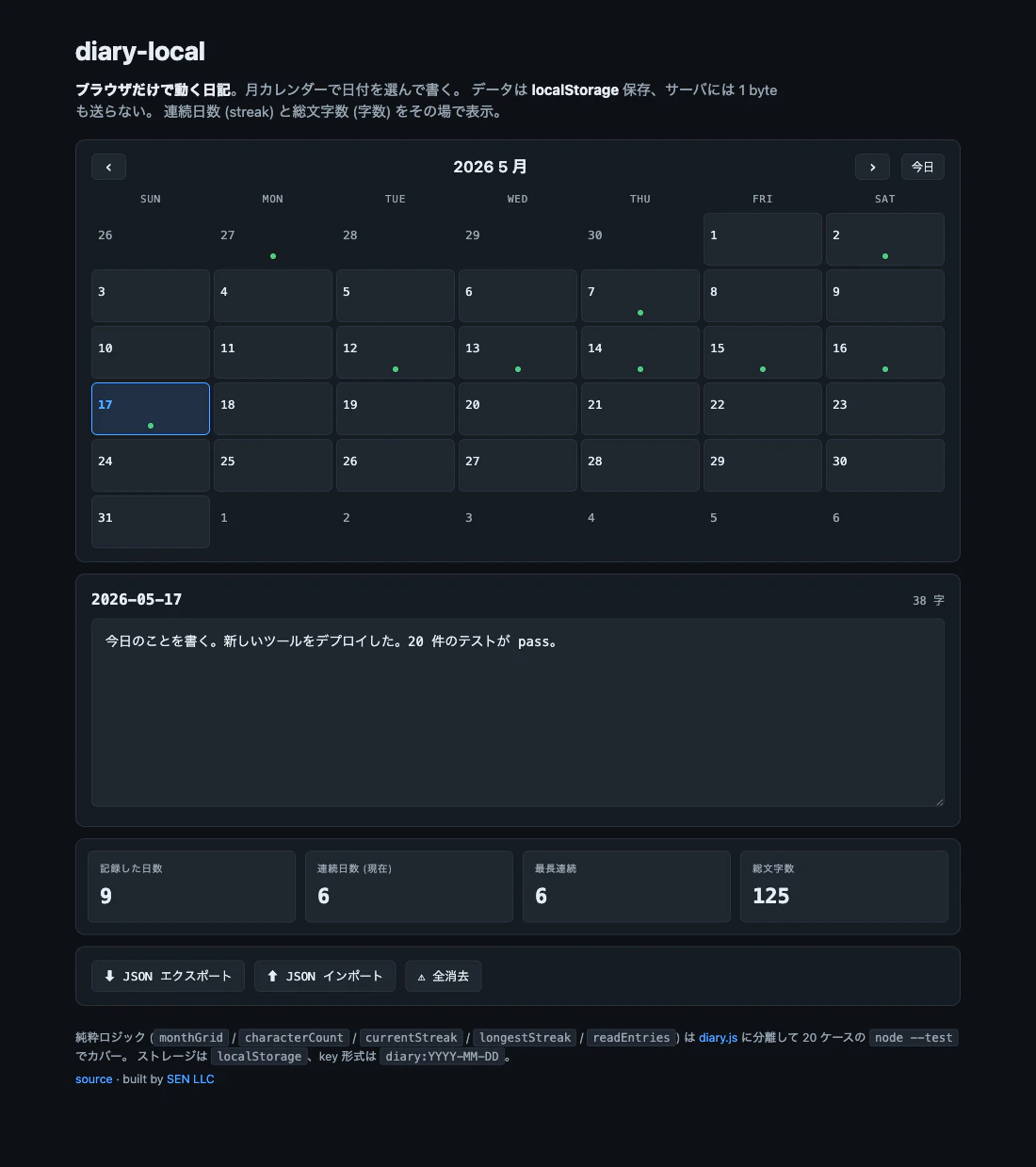
🌐 デモ: https://sen.ltd/portfolio/diary-local/
📦 GitHub: https://github.com/sen-ltd/diary-local
月カレンダー 6×7 グリッドの作り方
「2026 年 5 月のカレンダー」を 6 行 × 7 列のグリッドで描く、というのは見た目シンプルだが、月初の曜日と月末の日数によって前月末・翌月頭の日付がはみ出る数が変わる。
直感ではなく数式で書く:
export function monthGrid(year, month, todayIso = null, weekStart = 0) {
  const first = new Date(Date.UTC(year, month - 1, 1));
  const firstWeekday = first.getUTCDay();             // 0..6, Sun..Sat
  const offset = (firstWeekday - weekStart + 7) % 7;  // 月初までの空白セル数
  const start = new Date(Date.UTC(year, month - 1, 1 - offset));
  const today = todayIso || formatDate(new Date());
  const cells = [];
  for (let i = 0; i < 42; i++) {
    const d = new Date(start.getTime() + i * 86400_000);
    const iso = formatDate(d);
    cells.push({
      iso,
      day: d.getUTCDate(),
      inMonth: d.getUTCMonth() + 1 === month && d.getUTCFullYear() === year,
      isToday: iso === today,
    });
  }
  return { year, month, cells };
}
ポイント:
-
すべて UTC で計算。
new Date(2026, 4, 1)の Local 時刻ベースは tz の罠を含むので避ける。日記のセル単位は「日付」なので tz の分は関係ない -
offset = (firstWeekday - weekStart + 7) % 7で「Sunday-first か Monday-first か」を吸収。Monday-first ならweekStart = 1 - 常に 42 セル (6 行 × 7 列) 生成する。月によっては 5 行で済むこともあるが、UI のレイアウトを安定させるために 6 行固定が定石
-
ミリ秒 86400 で足す のは DST のないこの計算では安全。
setUTCDateを回すよりシンプル
テストで形を pin:
test("monthGrid produces 42 cells and marks in-month vs adjacent days", () => {
  const grid = monthGrid(2026, 5, "2026-05-18");
  assert.equal(grid.cells.length, 42);
  const inMay = grid.cells.filter((c) => c.inMonth);
  assert.equal(inMay.length, 31);  // May has 31 days
  const today = grid.cells.find((c) => c.iso === "2026-05-18");
  assert.equal(today.isToday, true);
});
文字数カウントは UTF-16 ではなく code-point で
日記の「今日は何字書いたか」を表示するとき、ナイーブに text.length を使うと CJK / 絵文字でハマる:
- 日本語の漢字 1 文字は UTF-16 で 1 unit →
length = 1(OK) - 絵文字 (例:
💖) は UTF-16 surrogate pair で 2 unit →length = 2(NG) - 国旗 / 家族絵文字 はもっと長い
正しくは code-point 単位で:
export function characterCount(text) {
  if (typeof text !== "string") return 0;
  const trimmed = text.trim();
  if (!trimmed) return 0;
  const collapsed = trimmed.replace(/\s+/g, " ");
  return [...collapsed].length;   // [...s] iterates code points
}
[...string] は ES2015 の iterator 仕様で code-point 単位に列挙する (for...of, Array.from, [...] のいずれも同じ)。これで [...'日本語'] は ["日", "本", "語"] で長さ 3、[...'a💖b'] は ["a", "💖", "b"] で長さ 3。
加えて、書きかけの末尾改行や行間の空白を trim + collapse してから数える方が「実質字数」になる。\n\nhello\n\n を 9 字ではなく 5 字と数える。
テスト:
test("characterCount counts code points, not UTF-16 units", () => {
  assert.equal(characterCount("日本語"), 3);
  assert.equal(characterCount("a💖b"), 3);   // 💖 is one
});
絵文字は ZWJ 含む grapheme cluster (例: 👨👩👧) だと code-point ベースでは 5 字になってしまう。完全な grapheme カウントが欲しければ Intl.Segmenter を使う:
const seg = new Intl.Segmenter('ja', { granularity: 'grapheme' });
const n = [...seg.segment(text)].length;
日記アプリでは「家族絵文字 1 字」と「個別絵文字 3 字」の差はあまり気にされないので、code-point ベースで十分という判断にした。
連続日数 (streak) の境界条件
「今日まで N 日連続で書いている」を計算する currentStreak は、見た目シンプルだが境界条件が 3 つある:
export function currentStreak(dates, todayIso) {
  const set = new Set(dates);
  if (!set.has(todayIso)) return 0;   // 今日書いていなければ streak は途切れている
  let n = 0;
  const today = parseDate(todayIso);
  let cur = today;
  while (set.has(formatDate(cur))) {
    n++;
    cur = new Date(cur.getTime() - 86400_000);
  }
  return n;
}
境界条件:
- 今日のエントリが無ければ 0: これは「streak は今日も書いて初めて維持される」という設計判断。「昨日まで連続 30 日、今日まだ書いていない」は streak 0 とする (= 今日中に書かないと break)。これは Duolingo などのアプリと同じ流派。逆に「streak は最後のエントリから遡って数える」 設計もあり、その場合は「昨日まで 30 日連続」を 30 と返す。本ツールは前者を選んだ
- どこかの日が抜けたら break: 5/15-5/17 と 5/18 (今日) が連続しているが、その間 5/16 が抜けていたら streak は今日 + 5/17 の 2 日 で止まる
- 空入力 → 0: 何も書いていない → 0、自明
テスト:
test("currentStreak is zero when today has no entry", () => {
  const dates = ["2026-05-15", "2026-05-16", "2026-05-17"];
  assert.equal(currentStreak(dates, "2026-05-18"), 0);
});

test("currentStreak breaks at the first missing day", () => {
  const dates = ["2026-05-15", "2026-05-17", "2026-05-18"];  // 5/16 missing
  assert.equal(currentStreak(dates, "2026-05-18"), 2);       // not 3, not 4
});
最長 streak は別関数 longestStreak(dates) で計算する (どこかの run の最大)。currentStreak と違って 今日の有無に依存しない ので、過去のベスト記録としての性格を持つ。
localStorage を 5 MB で運用する
ブラウザの localStorage クォータは仕様上 5 MB / origin (Chrome / Safari / Firefox とも実装値はこれに従う)。日記アプリで何を保存するか、量の見積もり:
- 日記エントリ 1 件 = 平均 300 字 = UTF-16 で 600 bytes、UTF-8 で 900 bytes
- localStorage の キー + 値 は UTF-16 でカウント (Chrome / Safari の実装)
- 365 日 × 5 年 = 1825 日分書いたとして、1825 × 600 bytes ≈ 1.1 MB
→ 5 MB のクォータは画像なしの日記なら数十年分入る。
ただし画像添付を許すと一発で詰む (1 枚 100-500 KB)。本ツールは画像非対応にすることで「localStorage で十分」を維持。画像が必要なら IndexedDB に Blob で書く別ツールが要る。
localStorage.setItem は クォータ超過時に QuotaExceededError を throw する。日記の小さい text だけならまず起きないが、ロジック側では catch しておく:
function saveEntry(iso, text) {
  try {
    if (text.trim().length === 0) {
      localStorage.removeItem(keyForDate(iso));   // 空文字は key 自体を削除
    } else {
      localStorage.setItem(keyForDate(iso), text);
    }
    flashStatus("ok", "保存しました");
  } catch (err) {
    flashStatus("bad", `保存失敗: ${err.message ?? err}`);
  }
}
「空文字なら key 削除」は 読み出しを楽にする ための工夫。readEntries が key 列挙で空文字を見つけてフィルタする手間を省く + クォータ消費もゼロにする。
key 設計: diary:YYYY-MM-DD
localStorage は flat key-value store。複数のアプリで共有することもあるので prefix を付ける のが定石:
export function keyForDate(iso) { return "diary:" + iso; }
export function isDiaryKey(k) { return k.startsWith("diary:"); }
export function dateFromKey(k) { return isDiaryKey(k) ? k.slice("diary:".length) : null; }
diary:2026-05-18 のような key にすることで:
- 同じドメインの他のアプリと衝突しない
-
for (let i = 0; i < localStorage.length; i++) { const k = localStorage.key(i); if (isDiaryKey(k)) ... }で日記エントリだけ列挙できる - 全消去ボタンで
localStorage.clear()を呼ぶと他アプリのデータも消えるが、本ツールは prefix フィルタで日記分だけ削除する
readEntries(storageLike) を pure 関数化しておくと、テストで synthetic な Storage-like オブジェクトを渡せる:
const storage = {
  get length() { return items.length; },
  key(i) { return items[i][0]; },
  getItem(k) {
    const hit = items.find((p) => p[0] === k);
    return hit ? hit[1] : null;
  },
};
const out = readEntries(storage);
これで node --test が localStorage を持たない環境でも回る。
まとめ
-
月カレンダー は常に 6 行 × 7 列 = 42 セル で固定。
offset = (firstWeekday - weekStart + 7) % 7で月初の空白を算出 -
文字数は
[...string].lengthで code-point ベースに数える。trim + whitespace collapse も忘れずに - 連続日数は「今日のエントリ無し = 0」 の流派を採用。日付セットへの O(N) スキャン
- localStorage 5 MB は画像なしなら十分。空文字 entry は key 自体を削除して読み出しを楽にする
-
diary:prefix で他アプリと隔離。Storage-like なインターフェースで pure 関数化するとテストが書きやすい
ソース: https://github.com/sen-ltd/diary-local — MIT、合計 ~350 行 (JS)、20 ユニットテスト、ビルド不要、依存ゼロ。
🛠 本記事は SEN 合同会社 が公開している小さな開発者ツール群の 1 つ。他は portfolio 一覧 から。