
きっかけ
webhook.site や requestbin.com は便利だが、顧客データを扱うサービスの Webhook デバッグに使うのは抵抗がある。実際のリクエストが第三者のログパイプラインを通ることになるし、無料枠にはレート制限や URL の有効期限もある。
1 ヶ月に 3 回同じ問題に当たった。GitHub Actions、Shopify アプリ、社内の請求 cron ── Webhook の送信元が何を送っているのか、受信側を除外して確認したい場面が繰り返された。
ローカルで動く自前のリクエストインスペクターを Slim 4 で作った。~200 行の実コード。
📦 GitHub: https://github.com/sen-ltd/webhook-inspector
作ったもの
リクエストインスペクターの本質は 3 つ:
- HTTP シンク。 あらゆるメソッド・ヘッダー・ボディを受け入れて 200 を返す
-
構造化ストア。 各リクエストを
{method, path, headers, body, query, client_ip, received_at, bytes}として記録 - 一覧 UI。 保存されたリクエストを新しい順に表示し、クリアできる
webhook.site が解決しなければならないマルチテナンシー、DDoS 対策、永続性、ドメイン名の問題は、localhost で動くツールにはすべて不要。それが設計のシンプルさにつながる。
技術的なポイント
ワイルドカードメソッドルート
Slim 4 の map() で GET POST PUT PATCH DELETE を一括キャプチャ:
$capture = function (
    ServerRequestInterface $request,
    ResponseInterface $response,
    array $args,
) use ($json, $maxBodyBytes, $validSlug) {
    $slug = (string) $args['slug'];
    if (!$validSlug($slug)) {
        return $json($response, ['error' => 'bad_slug'], 400);
    }
    $body = (string) $request->getBody();
    if (strlen($body) > $maxBodyBytes) {
        return $json($response, ['error' => 'too_large', 'limit_bytes' => $maxBodyBytes], 413);
    }
    $snap = RequestCapture::snapshot($request, $slug);
    $id   = webhook_inspector_repo()->append($slug, $snap);
    return $json($response, ['received' => true, 'slug' => $slug, 'id' => $id]);
};

$app->map(
    ['GET', 'POST', 'PUT', 'PATCH', 'DELETE'],
    '/bin/{slug}',
    $capture,
);
TRACE や CONNECT は YAGNI。Webhook はこの 5 メソッドで十分。
リングバッファ
slug ごとの FIFO キューに上限を設定。最新 N 件を保持し、超過したら古いものから捨てる:
public function append(string $slug, array $captured): string
{
    $id = $this->nextId();
    $captured['id'] = $id;

    if (!isset($this->bins[$slug])) {
        $this->bins[$slug] = [];
    }
    $this->bins[$slug][] = $captured;

    while (count($this->bins[$slug]) > $this->maxPerBin) {
        array_shift($this->bins[$slug]);
    }
    return $id;
}
array_shift のループは O(n) だが、maxPerBin = 100 で秒間数リクエストなら無視できる。SplQueue よりも foreach しやすいプレーン配列のほうがデバッグ時の可読性で勝る。
php -S のプロセスモデルの罠
PHP のビルトインサーバーはリクエストごとに新しいワーカーを生成するため、静的変数の「シングルトン」はリクエスト間で永続化されない。POST して一覧を見たら空 ── という現象が発生。
修正は flock 付きの JSON ファイルでリポジトリをバックアップすること。Docker コンテナ起動時に rm -f してクリーンスタート:
CMD ["sh", "-c", "rm -f /tmp/webhook-inspector-state.json \
                  && exec php -S 0.0.0.0:8000 -t public public/index.php"]
バイナリボディの安全な処理
Webhook ペイロードの大半は JSON だが、application/x-www-form-urlencoded や gzip された protobuf もある。UTF-8 テキストならそのまま、それ以外は Base64 にエンコード:
public static function encodeBody(string $body): array
{
    if ($body === '') {
        return ['body' => '', 'encoding' => 'utf-8'];
    }
    if (self::isUtf8Text($body)) {
        return ['body' => $body, 'encoding' => 'utf-8'];
    }
    return ['body' => base64_encode($body), 'encoding' => 'base64'];
}
トレードオフ
- 永続性なし。 再起動でクリア。デバッグツールとしてはこれが正解
-
認証なし。
localhost前提。公開する場合はリバースプロキシで認証を追加 - WebSocket なし。 ダッシュボードは 2 秒ごとのポーリング。リアルタイムに見えるには十分
-
メモリバウンド。 デフォルト設定(1 bin あたり 100 件、最大 5 MB)で最悪 ~500 MB。複数 bin を使うなら
MAX_BODY_MBを調整
試してみる
git clone https://github.com/sen-ltd/webhook-inspector
cd webhook-inspector
docker build -t webhook-inspector .
docker run --rm -p 8000:8000 webhook-inspector
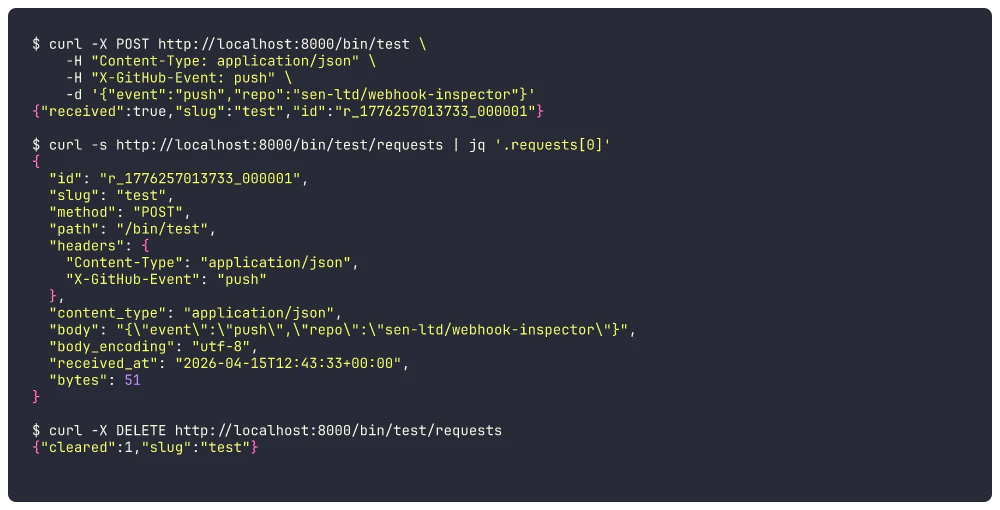
別ターミナルで:
# Webhook を送信
curl -X POST http://localhost:8000/bin/test \
  -H "Content-Type: application/json" \
  -H "X-GitHub-Event: push" \
  -d '{"event":"push"}'

# キャプチャを確認
curl -s http://localhost:8000/bin/test/requests | jq

# クリア
curl -X DELETE http://localhost:8000/bin/test/requests
ブラウザで http://localhost:8000/ を開けばポーリングダッシュボードも使える。
おわりに
35 件の PHPUnit テスト、~200 行のコード、52 MB の Alpine イメージ。Webhook デバッグに外部サービスを使いたくない場面で、手元で完結するリクエストインスペクターがあると便利。ソースを一気読みできるサイズに収めた。
SEN 合同会社 の 100+ ポートフォリオシリーズ エントリ #147。