
きっかけ
Slack で CSV が送られてくる。スキーマ不明、エンコーディング不明、区切り文字不明。まず知りたいのは:
- 何行何列?
- 各カラムの型は?
- null はどこにどれだけ?
- 数値なら min/max/mean、文字列なら長さの範囲、日付なら期間
- 値の例をいくつか
pandas の df.describe() はこれに近いが、数値と非数値で別テーブルになるし、コールドスタートで1秒かかる。csvkit の csvstat は近いが事実上メンテされていない。
csv-profile を作った。純 Python、標準ライブラリのみ、57MB の Alpine コンテナ。
GitHub: https://github.com/sen-ltd/csv-profile
作ったもの
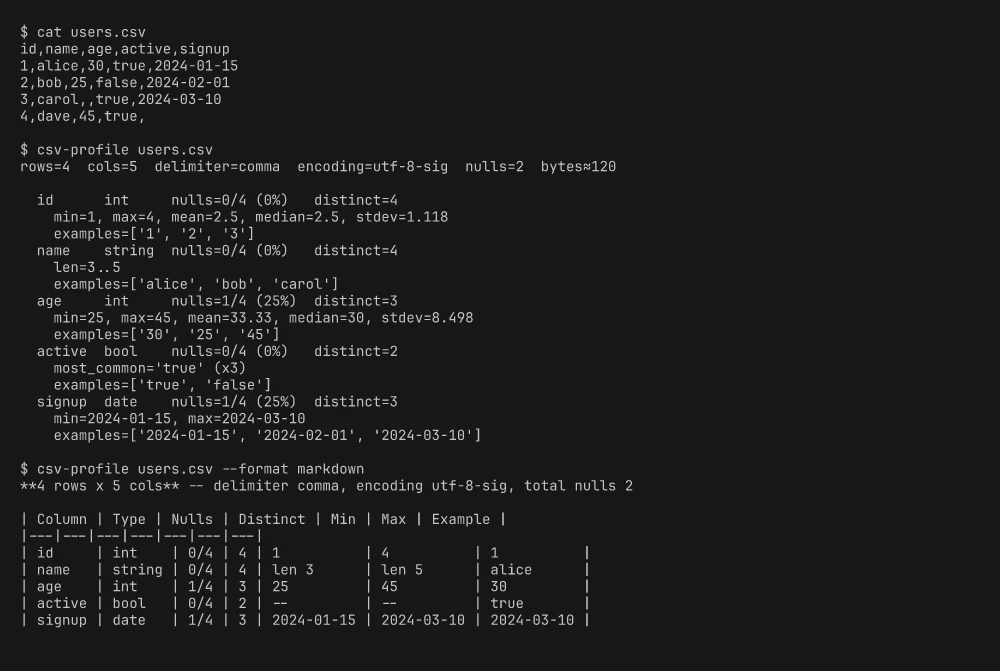
rows=4  cols=5  delimiter=comma  encoding=utf-8-sig  nulls=2  bytes≈120

  id      int     nulls=0/4 (0%)  distinct=4
    min=1, max=4, mean=2.5, median=2.5, stdev=1.118
  name    string  nulls=0/4 (0%)  distinct=4
    len=3..5
  age     int     nulls=1/4 (25%)  distinct=3
    min=25, max=45, mean=33.33, median=30, stdev=8.498
  active  bool    nulls=0/4 (0%)  distinct=2
    most_common='true' (×3)
  signup  date    nulls=1/4 (25%)  distinct=3
    min=2024-01-15, max=2024-03-10
出力形式は text / markdown / json の3種類。
技術的なポイント
妥協しない型推論
型推論の設計には2つのアプローチがある:
確率的: 「95% が整数だから int」。pandas のデフォルト。例外は NaN にサイレント変換。
全か無か: 「全ての非 null 値が int にパースできたら int。1つでもダメなら string」。
csv-profile は後者を選んだ。プロファイラを使う理由はおかしな行を見つけるためであり、「ほぼ int」はまさにそのおかしな行を隠す。
TYPE_LADDER = ("int", "float", "bool", "date", "datetime", "string")

def infer_column_type(values, *, empty_as_null=True):
    alive = {"int", "float", "bool", "date", "datetime"}

    for raw in values:
        if is_null(raw, empty_as_null=empty_as_null):
            continue

        if "int" in alive and not _try(parse_int, raw):
            alive.discard("int")
        if "float" in alive and not _try(parse_float, raw):
            alive.discard("float")
        if "bool" in alive and not _try(parse_bool, raw):
            alive.discard("bool")
        if "date" in alive and not _try(parse_date, raw):
            alive.discard("date")
        if "datetime" in alive and not _try(parse_datetime, raw):
            alive.discard("datetime")

        if not alive:
            return "string"

    for t in TYPE_LADDER:
        if t in alive:
            return t
    return "string"
候補の集合を持ち、パース失敗するたびに候補を消す。全部消えたら即 string で打ち切り。最後に残った中で最も厳しい型(ラダー順)を返す。
ポイント:
- int は float としてもパースできるので、全 int カラムでは両方生存。ラダーで int が先なので int が勝つ
- 0/1 は int でも bool でもパースできる。ラダーで int が先(0/1 カラムは数値フラグであることが多い)
- 全 null カラムは string(シグナルがないので最も安全なデフォルト)
厳格なパーサ
def parse_int(value: str) -> int:
    stripped = value.strip()
    if "." in stripped or "e" in stripped.lower() or "_" in stripped:
        raise ValueError("not an int")
    return int(stripped)
Python の int() は寛容すぎるので、1.0 を int と判定しないよう自前でガード。parse_float は nan / inf を拒否。parse_date は YYYY-MM-DD のゼロパディングのみ受け付ける。
エンコーディング検出
chardet を入れたくないので、フォールバックチェーンで対応:
_FALLBACK_ENCODINGS = ("utf-8-sig", "utf-8", "latin-1")
utf-8-sig を最初にするのがコツ。Excel が出力する BOM を消費してくれる。plain UTF-8 を先にすると、BOM がヘッダーの先頭文字にくっつくバグが出る。「フォールバック順は成功の厳しさでソートする」という教訓。
latin-1 は全バイトが有効なので必ず成功する。Shift-JIS や GBK の判定が必要なら --encoding フラグで明示指定。
Markdown フォーマッタ
PR のコメントに貼る用:
out.append("| Column | Type | Nulls | Distinct | Min | Max | Example |")
パイプ文字を含むデータ値のエスケープ(.replace("|", "\\|"))を忘れるとテーブルが崩れる。テストで発見。
試してみる
docker build -t csv-profile https://github.com/sen-ltd/csv-profile.git

mkdir -p /tmp/demo
cat > /tmp/demo/users.csv << 'CSV'
id,name,age,active,signup
1,alice,30,true,2024-01-15
2,bob,25,false,2024-02-01
3,carol,,true,2024-03-10
4,dave,45,true,
CSV

docker run --rm -v /tmp/demo:/work csv-profile users.csv
docker run --rm -v /tmp/demo:/work csv-profile users.csv --format markdown
docker run --rm -v /tmp/demo:/work csv-profile users.csv --format json
57MB のイメージ、外部依存ゼロ、61テスト。
おわりに
CSV プロファイラに持たせるべき意見は「ファイルの中身について嘘をつかない」ことだ。「ほぼ数値」は嘘。全か無かの推論がその具体的な形。
小さくて意見のはっきりした CLI は、大きくて寛容なライブラリより使い道がある。ただし、その意見が正しい場合に限る。
SEN 合同会社の 100+ ポートフォリオシリーズ Entry #130。