
コーディング規約に違反した箇所を探すのがめんどくさいので、
Rider使わずにできないかなと思って試してみました。
何がしたい
- Microsoft C#準拠 のコーディング規約に違反したらコンパイルエラーにする。
- Unity独自のクラス(UnityEngine・UnityEditor等)は特別なコーディング規約にしたい場合、そちらの規約エラーもコンパイルエラーにする
実行環境
- Unity6000.2.13f1
使用した.NET SDK
- dotnet-sdk-10.0.101
手順
- 事前に用意するもの
- Unityプロジェクト(既存でOK)
- PCに .NET SDK(dotnet コマンドが使える状態)
- もし無ければ「.NET SDK」をインストール(Windows/MacどちらもOK)
.NET SDK
- Unity側のフォルダを作る(適用範囲をAssets/Scripts内に限定したいため)
- Assets/Scripts を作る
既にあればOK。 - Assets/Scripts に asmdef を作る(必須)
UnityエディタでAssets/Scripts を右クリック
Create > Scripting > Assembly Definition
名前を Scripts にする(Scripts.asmdef ができる) - Analyzer配置用フォルダを作る
Assets/Scripts/Analyzers/ を作っておきます。
- Assets/Scripts を作る
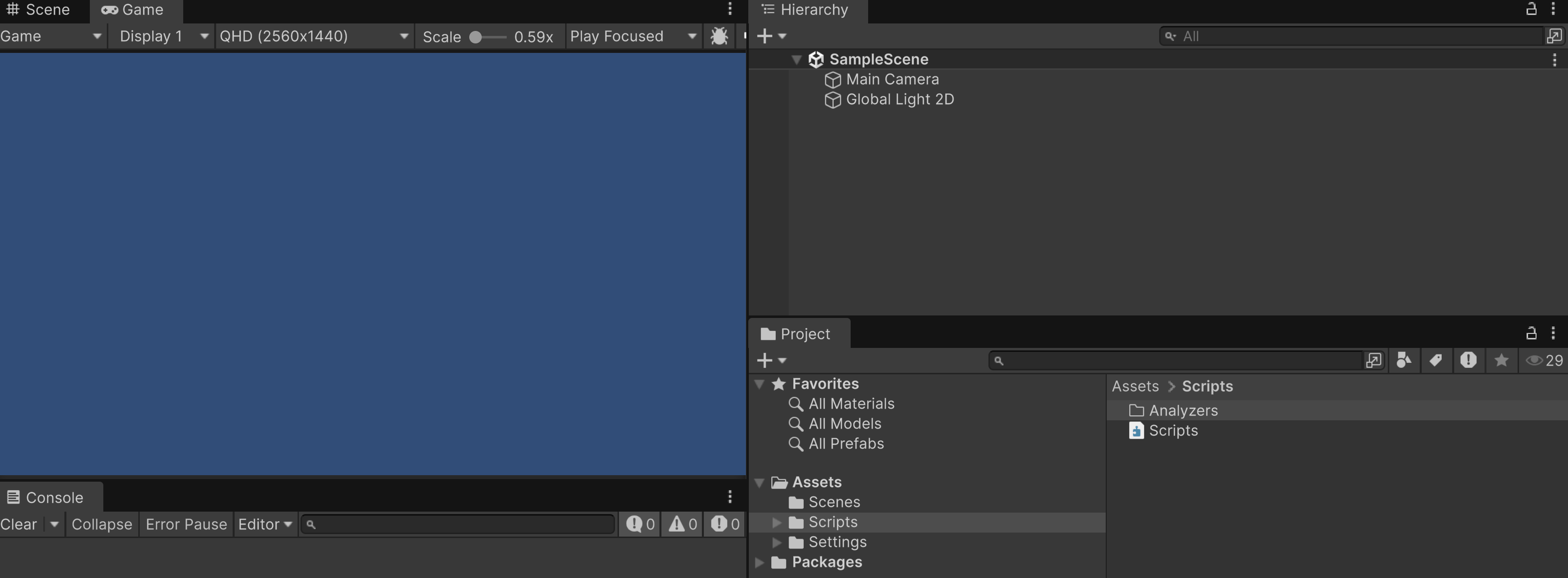
・ここまでの状態のフォルダ構成
-
.editorconfig を作る(共通ルール)
-
プロジェクトルートに .editorconfig を作成
Assets と同じ階層(プロジェクト直下)に置きます。
/.editorconfig(コピペOK)############################################################################### # .editorconfig # # 役割分担: # - editorconfig # C# 言語仕様レベルの共通ルール # (public / local / property / method / parameter など) # # - Roslyn Analyzer(UnityNamingAnalyzers.dll) # Unity 固有の判定が必要なルール # (UnityEngine.Object / UnityEditor / private field 分岐) # # private フィールドの命名ルールは editorconfig では定義せず、 # UVN10 / UVN11 / UVN12 として Analyzer 側で完全に管理する。 ############################################################################### # この editorconfig をプロジェクトルートとして扱う root = true ############################################################################### # C# 全ファイル共通設定 ############################################################################### [*.cs] # --------------------------------------------------------------------------- # 基本整形 # --------------------------------------------------------------------------- # 文字コードは UTF-8 固定 charset = utf-8 # 改行コードは LF(Git / クロスプラットフォーム向け) end_of_line = lf # ファイル末尾に必ず改行を入れる(diff 安定化) insert_final_newline = true # インデントはスペース4つ(Microsoft / Unity 標準) indent_style = space indent_size = 4 ############################################################################### # 命名スタイル定義 # # ※ ここでは「スタイルそのもの」を定義するだけ。 # 実際にどこへ適用するかは下の naming_rule で指定する。 ############################################################################### # PascalCase(例: MyProperty, DoSomething) dotnet_naming_style.pascal.capitalization = pascal_case # camelCase(例: localValue, argValue) dotnet_naming_style.camel.capitalization = camel_case ############################################################################### # public フィールド # # ルール: # - public フィールドは PascalCase # ############################################################################### dotnet_naming_symbols.public_fields.applicable_kinds = field dotnet_naming_symbols.public_fields.applicable_accessibilities = public dotnet_naming_rule.public_fields_pascal.symbols = public_fields dotnet_naming_rule.public_fields_pascal.style = pascal dotnet_naming_rule.public_fields_pascal.severity = error ############################################################################### # ローカル変数 # # ルール: # - camelCase # ############################################################################### dotnet_naming_symbols.locals.applicable_kinds = local dotnet_naming_rule.locals_camel.symbols = locals dotnet_naming_rule.locals_camel.style = camel dotnet_naming_rule.locals_camel.severity = error ############################################################################### # プロパティ # # ルール: # - PascalCase # ############################################################################### dotnet_naming_symbols.properties.applicable_kinds = property dotnet_naming_rule.properties_pascal.symbols = properties dotnet_naming_rule.properties_pascal.style = pascal dotnet_naming_rule.properties_pascal.severity = error ############################################################################### # メソッド(public / private) # # ルール: # - PascalCase # ############################################################################### dotnet_naming_symbols.methods.applicable_kinds = method dotnet_naming_symbols.methods.applicable_accessibilities = public, private dotnet_naming_rule.methods_pascal.symbols = methods dotnet_naming_rule.methods_pascal.style = pascal dotnet_naming_rule.methods_pascal.severity = error ############################################################################### # 引数(parameter) # # ルール: # - camelCase # ############################################################################### dotnet_naming_symbols.parameters.applicable_kinds = parameter dotnet_naming_rule.parameters_camel.symbols = parameters dotnet_naming_rule.parameters_camel.style = camel dotnet_naming_rule.parameters_camel.severity = error ############################################################################### # 自作 Roslyn Analyzer 診断レベル設定 # # UVN10: # - UnityEngine.Object 派生の private フィールド # - camelCase を要求(_禁止) # # UVN11: # - 非 Unity / 非 Editor 型の private フィールド # - _camelCase を要求 # # UVN12: # - UnityEditor 型の private フィールド(Editor拡張) # - _camelCase を要求(ツールコード扱い) # # ※ 現場差がある場合は warning / suggestion に落とす運用も可能 ############################################################################### dotnet_diagnostic.UVN10.severity = error dotnet_diagnostic.UVN11.severity = error dotnet_diagnostic.UVN12.severity = error
-
-
Roslyn Analyzer を作る(今回の核心)
ここからは Unity 外(ターミナル)で作業します。-
Analyzerプロジェクトを作成
任意の作業フォルダで:dotnet new analyzer -n UnityNamingAnalyzers cd UnityNamingAnalyzers私の環境ではエラーになったので、下記コマンドにてフォルダとプロジェクトを作成
cd %USERPROFILE%\Downloads mkdir UnityNamingAnalyzers cd UnityNamingAnalyzers dotnet new classlib -n UnityNamingAnalyzers cd UnityNamingAnalyzers -
.csproj を置き換え
UnityNamingAnalyzers.csproj をメモ帳等で開いて、中身を全部これに置き換えて保存してください。<Project Sdk="Microsoft.NET.Sdk"> <PropertyGroup> <TargetFramework>netstandard2.0</TargetFramework> <LangVersion>latest</LangVersion> <Nullable>enable</Nullable> </PropertyGroup> <ItemGroup> <PackageReference Include="Microsoft.CodeAnalysis.CSharp" Version="4.3.1" PrivateAssets="all" /> <PackageReference Include="Microsoft.CodeAnalysis.Analyzers" Version="3.3.4" PrivateAssets="all" /> </ItemGroup> </Project>
-
既存の Class1.cs を削除
このファイルは不要なので削除します: -
Analyzerコードを追加(今回のルール)
同じフォルダに新規ファイルを作成:
UnitySerializeFieldNamingAnalyzer.csusing System; using System.Collections.Immutable; using Microsoft.CodeAnalysis; using Microsoft.CodeAnalysis.Diagnostics; namespace UnityNamingAnalyzers; /// <summary> /// Unity プロジェクト向けの命名規約を強制する Roslyn Analyzer。 /// /// ■ 目的 /// editorconfig だけでは表現しづらい「Unity 固有の型判定(UnityEngine / UnityEditor)」を行い、 /// private フィールドの命名規約を統一する。 /// /// ■ ルール(診断ID) /// - UVN10: UnityEngine.Object 派生(Unityの参照型)の private フィールドは camelCase(先頭小文字・_禁止) /// - UVN11: 上記以外(非Unity/非Editor)の private フィールドは _camelCase(_ + 先頭小文字) /// - UVN12: UnityEditor 型の private フィールドは _camelCase(Editor拡張は C# 寄せ) /// /// ■ 運用 /// - エラー/警告などの厳しさは .editorconfig の dotnet_diagnostic.*.severity で調整する /// 例) dotnet_diagnostic.UVN10.severity = error /// </summary> [DiagnosticAnalyzer(LanguageNames.CSharp)] public sealed class UnityNamingAnalyzer : DiagnosticAnalyzer { // --------------------------------------------------------------------- // 1) 診断(DiagnosticDescriptor)定義 // --------------------------------------------------------------------- // ここで「どんな違反が起きたら、どんなID/メッセージで報告するか」を定義します。 // 重大度 (defaultSeverity) は "既定値" なので、実際の厳しさは editorconfig で上書きできます。 /// <summary> /// UVN10: /// UnityEngine.Object 派生の private フィールドは camelCase(_禁止)であるべき、というルール。 /// 例: /// - OK : private GameObject player; /// - NG : private GameObject _player; /// - NG : private GameObject Player; /// </summary> private static readonly DiagnosticDescriptor UnityPrivateCamelRule = new( id: "UVN10", title: "Unity private field must be camelCase", messageFormat: "UnityEngine.Object-derived private field '{0}' must be camelCase (no underscore)", category: "Naming", defaultSeverity: DiagnosticSeverity.Error, isEnabledByDefault: true); /// <summary> /// UVN11: /// 非 Unity / 非 Editor 型の private フィールドは _camelCase であるべき、というルール。 /// 例: /// - OK : private int _hp; /// - NG : private int hp; /// </summary> private static readonly DiagnosticDescriptor NonUnityPrivateUnderscoreRule = new( id: "UVN11", title: "Private field must be _camelCase", messageFormat: "Private field '{0}' must be _camelCase", category: "Naming", defaultSeverity: DiagnosticSeverity.Error, isEnabledByDefault: true); /// <summary> /// UVN12: /// UnityEditor 型の private フィールドは _camelCase であるべき、というルール。 /// 例: /// - OK : private SerializedObject _so; /// - NG : private SerializedObject so; /// </summary> private static readonly DiagnosticDescriptor UnityEditorPrivateUnderscoreRule = new( id: "UVN12", title: "UnityEditor private field must be _camelCase", messageFormat: "UnityEditor private field '{0}' must be _camelCase", category: "Naming", defaultSeverity: DiagnosticSeverity.Error, isEnabledByDefault: true); /// <summary> /// この Analyzer が提供する全診断一覧。 /// Roslyn はここで列挙された診断IDのみを「このAnalyzerが出し得る」と認識します。 /// </summary> public override ImmutableArray<DiagnosticDescriptor> SupportedDiagnostics => ImmutableArray.Create(UnityPrivateCamelRule, NonUnityPrivateUnderscoreRule, UnityEditorPrivateUnderscoreRule); // --------------------------------------------------------------------- // 2) Analyzer 登録(Initialize) // --------------------------------------------------------------------- // Roslyn へ「何を解析するか」を登録します。 // 今回は "フィールド (SymbolKind.Field)" を対象に解析したいので、RegisterSymbolAction を使います。 public override void Initialize(AnalysisContext context) { // 自動生成コード(designer.cs など)は対象外にする設定 context.ConfigureGeneratedCodeAnalysis(GeneratedCodeAnalysisFlags.None); // パフォーマンス向上:並列実行を許可 context.EnableConcurrentExecution(); // フィールドシンボルが見つかるたびに AnalyzeField を呼ぶ context.RegisterSymbolAction(AnalyzeField, SymbolKind.Field); } // --------------------------------------------------------------------- // 3) 解析本体(AnalyzeField) // --------------------------------------------------------------------- // ここが「このAnalyzerの心臓部」です。 // 受け取ったフィールドが対象条件に合うか判定し、命名規約違反なら診断を Report します。 private static void AnalyzeField(SymbolAnalysisContext context) { var field = (IFieldSymbol)context.Symbol; // 対象は private フィールドのみ(const は除外) // ※ readonly を除外したい、static を除外したい等はここで条件追加できます。 if (field.DeclaredAccessibility != Accessibility.Private) return; if (field.IsConst) return; // 自動実装プロパティの backing field(例: <X>k__BackingField)を除外したい場合は ON にする // if (field.IsImplicitlyDeclared) return; var name = field.Name; // Compilation から UnityEngine.Object 型を取得できれば "Unity参照環境" として判定可能。 // asmdef 等で UnityEngine が参照されていない場合は null になり得る点に注意。 var compilation = context.Compilation; var unityObject = compilation.GetTypeByMetadataName("UnityEngine.Object"); // UnityEditor 型かどうか(Editor アセンブリでは true になりやすい) // UnityEditor が参照されないアセンブリでは false になります。 bool isUnityEditorType = IsUnityEditorType(field.Type); // UnityEngine.Object 派生かどうか(Unity参照がないと unityObject が null なので false) bool isUnityRuntimeType = unityObject != null && InheritsFrom(field.Type, unityObject); // 優先順位(重複を避けるための設計) // 1) UnityEditor 型 → UVN12 // 2) UnityEngine.Object 派生 → UVN10 // 3) それ以外 → UVN11 // // ※ UnityEditor 型が UnityEngine.Object を継承しているケースもあるため、 // 「UnityEditor を最優先」にしています。 if (isUnityEditorType) { // UVN12: UnityEditor 型は _camelCase if (!IsUnderscoreCamelCase(name)) { Report(context, UnityEditorPrivateUnderscoreRule, field); } return; } if (isUnityRuntimeType) { // UVN10: UnityEngine.Object 派生は camelCase(_禁止) if (name.StartsWith("_", StringComparison.Ordinal) || !IsCamelCase(name)) { Report(context, UnityPrivateCamelRule, field); } return; } // UVN11: それ以外は _camelCase if (!IsUnderscoreCamelCase(name)) { Report(context, NonUnityPrivateUnderscoreRule, field); } } // --------------------------------------------------------------------- // 4) UnityEditor 型判定 // --------------------------------------------------------------------- // 「using UnityEditor; が書かれているか」ではなく、 // 型そのものが UnityEditor アセンブリ/名前空間に属するかを判定するのが安全です。 /// <summary> /// 型が UnityEditor 系かどうかを判定する。 /// /// 優先順位: /// 1) もっとも堅い方法: アセンブリ名が "UnityEditor" /// 2) 補助方法: 名前空間が "UnityEditor" で始まる(変則ケースの保険) /// </summary> private static bool IsUnityEditorType(ITypeSymbol type) { var asmName = type.ContainingAssembly?.Name; if (string.Equals(asmName, "UnityEditor", StringComparison.Ordinal)) return true; var ns = type.ContainingNamespace?.ToDisplayString(); if (!string.IsNullOrEmpty(ns) && ns.StartsWith("UnityEditor", StringComparison.Ordinal)) return true; return false; } // --------------------------------------------------------------------- // 5) 継承判定(UnityEngine.Object 派生判定に使用) // --------------------------------------------------------------------- /// <summary> /// type が baseType を継承しているか(同一型を含む)を判定する。 /// UnityEngine.Object 派生かどうかの判定に使う。 /// </summary> private static bool InheritsFrom(ITypeSymbol type, ITypeSymbol baseType) { var t = type; while (t != null) { if (SymbolEqualityComparer.Default.Equals(t, baseType)) return true; t = t.BaseType; } return false; } // --------------------------------------------------------------------- // 6) 命名チェック(文字列) // --------------------------------------------------------------------- // ここは「命名の形」をチェックするだけの関数。 // 実務でルールを変える場合も、この付近を触るのが安全です。 /// <summary> /// camelCase 判定(先頭が小文字であることだけをチェック)。 /// 例: "player" => true, "Player" => false /// </summary> private static bool IsCamelCase(string s) => !string.IsNullOrEmpty(s) && char.IsLower(s[0]); /// <summary> /// _camelCase 判定(先頭が '_' かつ、その次が小文字)。 /// 例: "_hp" => true, "hp" => false, "_" => false, "_Hp" => false /// </summary> private static bool IsUnderscoreCamelCase(string s) { if (string.IsNullOrEmpty(s)) return false; if (!s.StartsWith("_", StringComparison.Ordinal)) return false; if (s.Length == 1) return false; // "_" だけはNG return char.IsLower(s[1]); // "_x" で始まること } // --------------------------------------------------------------------- // 7) 診断報告(Report) // --------------------------------------------------------------------- // ここで「どの位置にエラーを出すか」を決めて ReportDiagnostic します。 /// <summary> /// 指定したルール(DiagnosticDescriptor)で診断を報告する。 /// 報告位置はフィールド宣言の Location を使用する。 /// </summary> private static void Report(SymbolAnalysisContext context, DiagnosticDescriptor rule, IFieldSymbol field) { var loc = field.Locations.Length > 0 ? field.Locations[0] : Location.None; context.ReportDiagnostic(Diagnostic.Create(rule, loc, field.Name)); } } -
ビルド(ここでDLLができる)
dotnet build -c Release成功すると DLL はここにできます:
...\UnityNamingAnalyzers\UnityNamingAnalyzers\bin\Release\netstandard2.0\UnityNamingAnalyzers.dll -
Unityに組み込む(Assets/Scriptsだけに適用)
- Unity側に配置
Unityプロジェクトで:Assets/Scripts/Analyzers/ に UnityNamingAnalyzers.dll をコピー。配置します。 - UnityでDLLをAnalyzerとして有効化
Unity Editorで UnityNamingAnalyzers.dll をクリックし、Inspectorで:
Any Platform を OFF
その他プラットフォームも全部 OFF(入ってしまうなら)
Asset Labels に RoslynAnalyzer を追加(完全一致)
これで Unity のコンパイル時に走ります。
- Unity側に配置
-
(注意)下記、赤枠のペン画像(編集ボタン)から "RoslynAnalyzer" と大文字小文字が完全一致した状態で入力してください。完全一致しないと正しく動きません

-
動作確認用スクリプト(Assets/Scripts配下に置く)
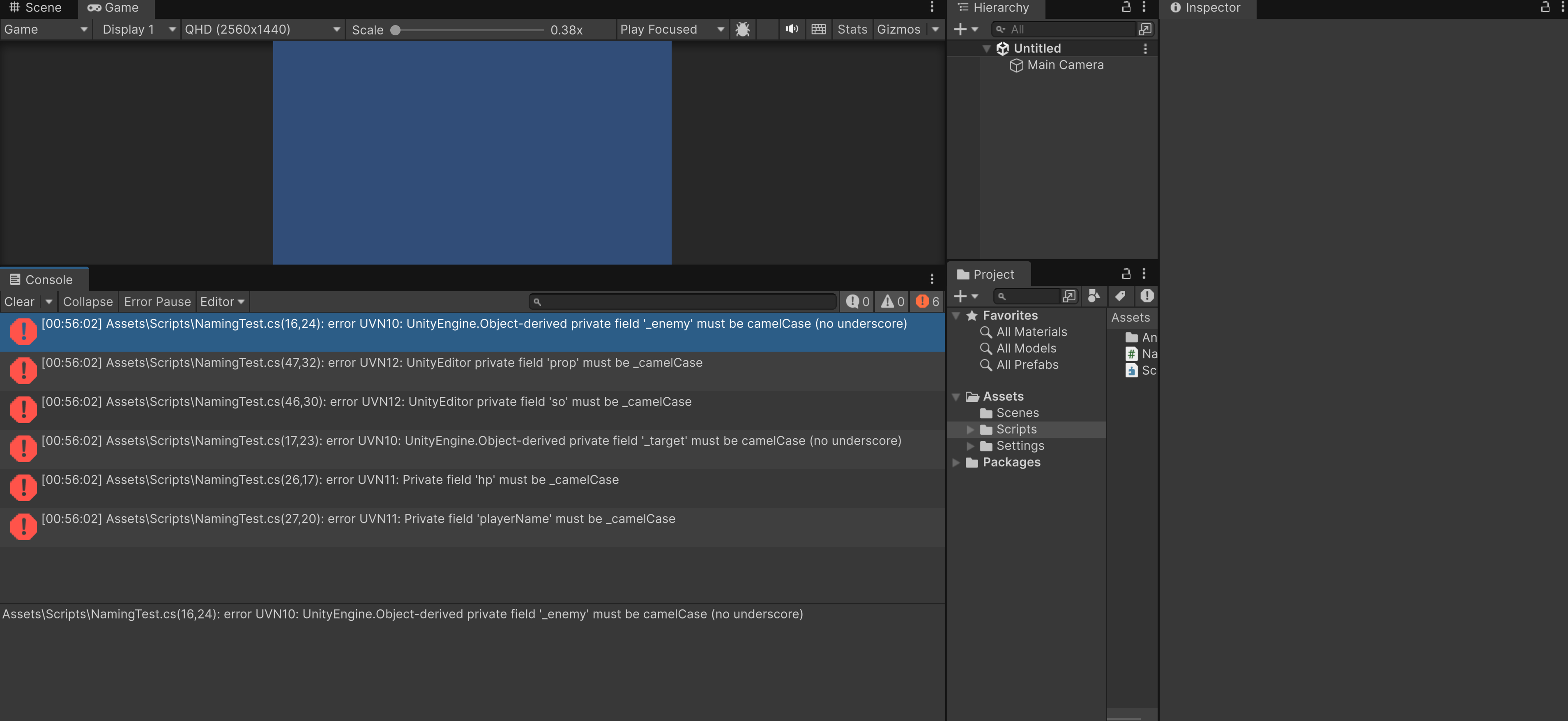
Assets/Scripts/NamingTest.cs を作って貼り付け:using UnityEngine; #if UNITY_EDITOR using UnityEditor; #endif public class NamingTest : MonoBehaviour { // ========================= // UVN10: UnityEngine.Object 派生 private field => camelCase(_禁止) // ========================= private GameObject player; // ✅ OK(Unity型 → camelCase) private Transform target; // ✅ OK(Unity型 → camelCase) private GameObject _enemy; // ❌ NG(UVN10) private Transform _target; // ❌ NG(UVN10) // ========================= // UVN11: 非Unity/非Editor private field => _camelCase // ========================= private int _hp; // ✅ OK(非Unity → _camelCase) private string _playerName; // ✅ OK(非Unity → _camelCase) private int hp; // ❌ NG(UVN11) private string playerName; // ❌ NG(UVN11) // public は editorconfig 側の命名規約テスト public int Hp; // ✅ OK(public PascalCase) public void DoSomething(int argValue) // ✅ OK(method Pascal, param camel) { int localValue = 0; // ✅ OK(local camel) Debug.Log(localValue + argValue); } #if UNITY_EDITOR // ========================= // UVN12: UnityEditor 型 private field => _camelCase // ========================= private SerializedObject _so; // ✅ OK(UnityEditor型 → _camelCase) private SerializedProperty _prop; // ✅ OK(UnityEditor型 → _camelCase) private SerializedObject so; // ❌ NG(UVN12) private SerializedProperty prop; // ❌ NG(UVN12) #endif }Unity が再コンパイルした瞬間に Console に
・UVN10: UnityEngine.Object派生のエラー
・UVN11: 非Unity/非Editor C#に関係するエラー
・UVN12: UnityEditor 型 に関するエラー
それでも表示されなかったら、Assetsを選択して右クリックし Reimport All を押してプロジェクトごと再ロードしてみてください。
-
不足部分
- Roslynの1つ1つの処理に関してもう少し詳しく記述
(AIに手伝ってもらいながら突貫で作ったので手が回らず) - .editconfigに関しても、各設定の意味と他にどんな事ができるのか?
展望
- 実際のプロジェクトで使われている事例が欲しいですね、効果があるのか知りたい。
- タイポもハンドリングできるようになるとうれしい
- Roslyn・.editconfig を使ってもっと楽ができないかを調べる。