

VueUse で クリップボード機能を使う。
単純に、useClipboard()関数を使えば出来てしまいます。
コード
コードペン用のコードなので、ちょっと書き方が変かもしれません。
(コードペンでVue(とVueUse)を使う前回の記事を参照)
前回のマウス座標取得コードも残してます。
js
const { createApp, ref } = Vue;
const { useMouse } = VueUse;
const { useClipboard } = VueUse;


const app = createApp({
  setup() {
    const { x, y } = useMouse();
    const source = ref("");
    const { text, copy, copied } = useClipboard({ source });

   return { x, y, source,text, copy, copied };

  },
});
app.mount('#app');
html
<div id="app" >
   マウス座標: {{ x }}, {{ y }}

  <div>
  <input v-model="source" />
    <button @click="copy(source)">コピー</button>
      <p>コピーしたテキスト: {{ text }}</p>
  </div>
</div>
動作
テキストボックスに「あいうえお」と書いて、コピーボタンを押すと、
クリップボードにあいうえおがコピーされます。
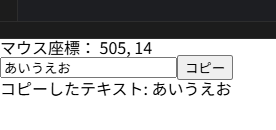
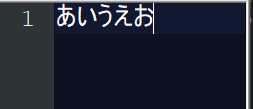
適当なテキストエディタを開いて、
貼り付けを押すと、「あいうえお」が貼り付けられました!
コードペン
See the Pen VueUse useClipboard by sasuke (@vhmbdiog-the-flexboxer) on CodePen.
このQiita埋め込みのコードペン上では動作しない模様?
ちゃんとコードペンのサイトに行かないとダメかもしれません。
(右上の「EDIT ON CODEPEN」から行けます)