
はじめに
2026年5月20日に、さくらのAI EngineにMessages APIが追加されました 🎉
参考:「さくらのAI Engine」Responses API・Messages API の提供開始
今回はそのMessages APIを使って、Claude CodeでさくらのAI Engineを利用するメモです。
さくらのAI Engineとは
マニュアル:さくらのAI Engine
さくらのAI Engine は従量課金型で様々な生成AIモデルを使える基盤プラットフォームサービスです。

対応しているLLMモデルはすべてさくらインターネットによりホスティングされているため、
データはすべてお客様とさくらインターネット間の通信だけで完結し、
チャットなどに使われるデータはLLMモデルの学習に使われることのない、データ安全性の高いサービスです。
前提
- さくらのAI Engineのアカウント、アカウントトークンを持っている
- https://manual.sakura.ad.jp/cloud/ai-engine/02-howto.html
- 今回は従量プランを契約しています
- Claude CodeまたはVS Code Claude拡張をインストールしている
Claude Code の設定
Claude CodeはAnthropic APIを利用するツールですが、
環境変数を設定することで、別のMessages API互換エンドポイントを利用できます。
今回は、Claude CodeからさくらのAI EngineのMessages APIを利用するように設定します。
設定ファイル
~/.claude/settings.json を作成します。
{
  "env": {
    "ANTHROPIC_BASE_URL": "https://api.ai.sakura.ad.jp",
    "ANTHROPIC_AUTH_TOKEN": "api_token",
    "ANTHROPIC_DEFAULT_OPUS_MODEL": "preview/Kimi-K2.6",
    "ANTHROPIC_DEFAULT_SONNET_MODEL": "preview/Kimi-K2.6",
    "ANTHROPIC_DEFAULT_HAIKU_MODEL": "preview/Kimi-K2.6"
  }
}
動作確認
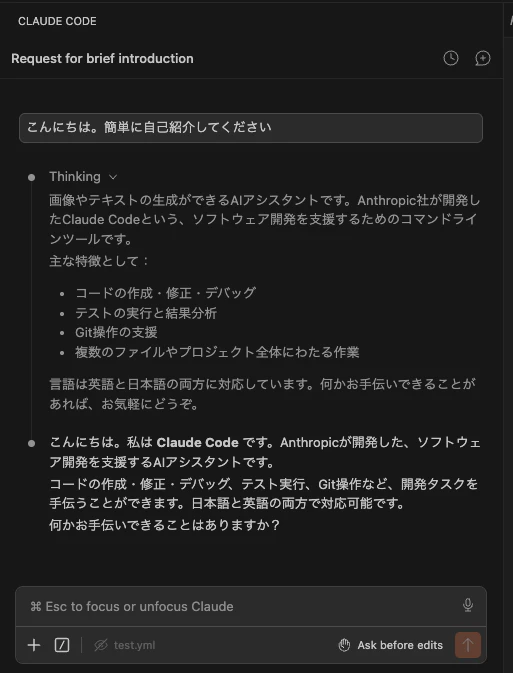
Claude Codeを開き、簡単なプロンプトを入力します。
(既に開いている場合は、再起動する)
こんにちは。簡単に自己紹介してください
正常に接続できている場合、AI Engine 経由で応答が返ってきます。
おわりに
Claude CodeをさくらのAI Engineにつないで Kimi-K2.6を使うメモを書きました。
ここまで読んでいただきありがとうございました