
Ember.js をアップグレードしていると、大量の Deprecation 警告 が出てきて「どこから出ているのか分からない…」ということがあります。
この記事では、特定の Deprecation の発生源をスタックトレース付きで確認する方法をまとめます。
Deprecation の例:@ember/service の inject
例えば、以下のような警告が出る場合があります。
DEPRECATION: Importing inject from @ember/service is deprecated. Please import service instead.
[deprecation id: importing-inject-from-ember-service] This will be removed in ember-source 7.0.0.
See: https://deprecations.emberjs.com/id/importing-inject-from-ember-service
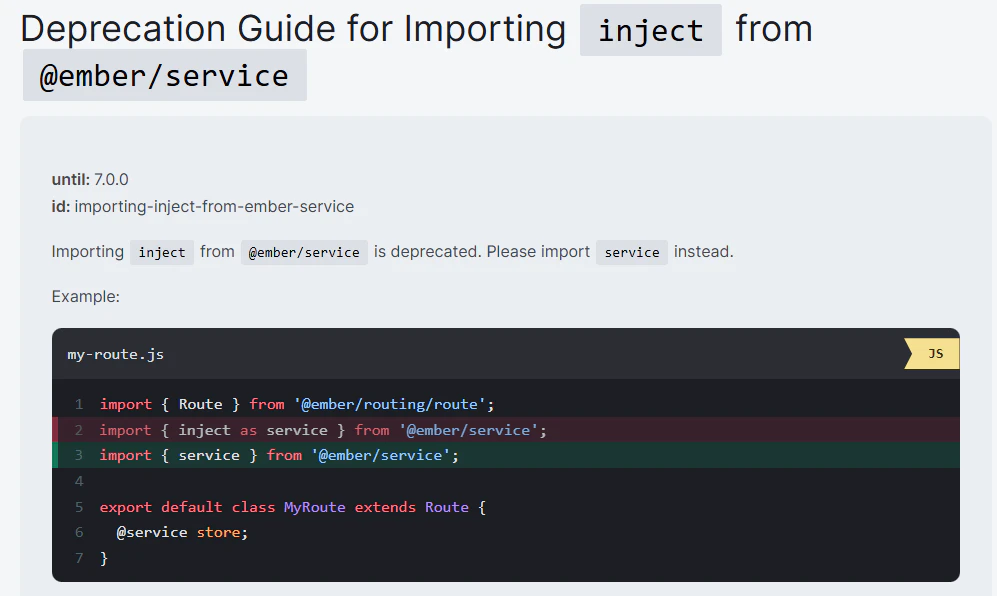
この場合、inject を使っているコードをすべて service に置き換える必要があります。
// NG
import { inject as service } from '@ember/service';

// OK
import { service } from '@ember/service';
registerDeprecationHandler を使って特定する
Ember.js には registerDeprecationHandler という仕組みがあり、Deprecation 警告をフックして任意の処理を挟むことができます。
これを利用すると「特定の ID のみトレースを出す」「CI で失敗させる」などが可能になります。
以下のように initializer を追加すると便利です。
👉 initializers について: https://guides.emberjs.com/release/applications/initializers/
// app/initializers/deprecation-trace.js
import { registerDeprecationHandler } from '@ember/debug';

export function initialize() {
  registerDeprecationHandler((message, options, next) => {
    if (options?.id === 'importing-inject-from-ember-service') {
      console.groupCollapsed(`[DEPRECATION] ${options.id}`);
      console.log(message);
      console.trace(); // ★ ここに /node_modules/... か /app/... の発生源が出ます
      console.groupEnd();

      // CIで強制エラーにしたい場合はコメントアウトを外す
      // throw new Error(options.id);
    }

    // 次のハンドラに処理を渡す
    next(message, options);
  });
}

export default { initialize };
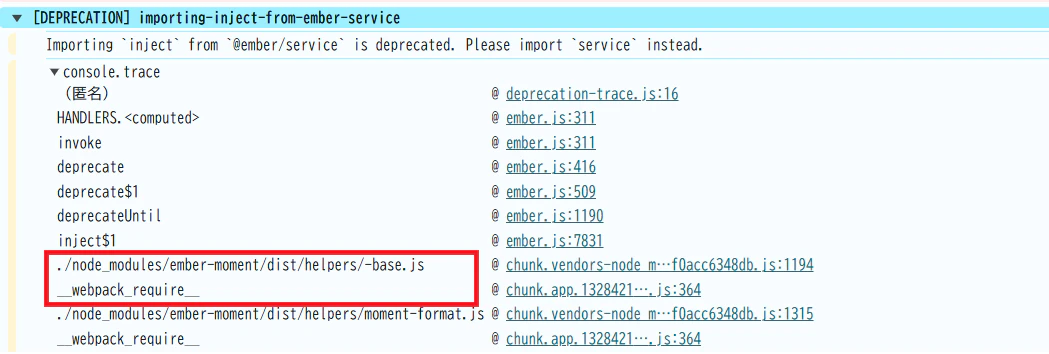
これを追加して再実行すると、以下のようにスタックトレースが確認できます。
-
/node_modules/...→ addon 由来 -
/app/...→ 自前コード由来
と切り分けられるので、修正対象を見極めやすくなります。
実例:ember-moment の Deprecation 修正
実際に ember-moment という addon では、この Deprecation に対応するパッチが入りました。
-
リリースノート
https://github.com/adopted-ember-addons/ember-moment/releases/tag/v10.0.2-ember-moment -
対応パッチ
https://github.com/adopted-ember-addons/ember-moment/pull/415
依存アドオンがまだ対応していない場合は、
- PR を送る
- フォークして対応する
- 一時的に自前でパッチを当てる
といった方法で乗り切ることになります。
まとめ
- Ember.js の Deprecation は放置するとアップグレードが難しくなる
-
registerDeprecationHandlerを使えば、発生源を スタックトレース付きで特定可能 -
/app/と/node_modules/の区別で、自分のコードか依存かを切り分けられる - 実際の解決事例(例:ember-moment)も参考にできる
👉 Ember を長期的に運用するなら「Deprecation の出どころを潰す仕組み」をプロジェクトに組み込んでおくと安心です。