
アドベントカレンダー、今年も参加表明したものの思ったより時間取れず。。
- とりあえず、前から興味のあった
Rustをブラウザ自作を教材として触り始めたので、その素人所感を載せます。これは完成させたら更新記事書きます!- 後はpython触り始めたので、ここにまとめます。
javaやphpとは違った魅力のある言語だなと感じつつ、
またそれらの言語との共通点も発見しつつ初心に帰り?学習しました〜
- 後はpython触り始めたので、ここにまとめます。
↓教材

Rustで作るブラウザ
業務ではphpでweb開発しているのでブラウザへの関心は強いです。
特に今年1年はPWA化や各ブラウザ(特にfirefox)での挙動の違いに悩まされたので、上記の教材が目に留まり、
お気に入りの池袋のジュンク堂で買いました。
- springでもflaskでもLaravelでもWeb開発を始めたばかり
- 自分みたいにRust自体に興味がある人
- 業務でREST APIの作成・デバッグを行っている人
の人とかは面白く学習できると思います。
とりあえず写経からやっているので思ったことをメモしています。
URLの読み取り
use alloc::string::String;
use alloc::string::ToString;
use alloc::vec::Vec;

#[derive(Debug, Clone, PartialEq)]

impl Url {
    pub fn new(url: String) -> Self {
        Self {
            url,
            host: "".to_string(),
            port: "".to_string(),
            path: "".to_string(),
            searchpart: "".to_string(),
    }
    }
    pub struct Url {
        url: String,
        host: String,
        port: String,
        path: String,
        searchpart: String,
    }

    pub fn host(&self) -> String {
        self.host.Clone()
    }

    pub fn port(&self) -> String {
        self.port.Clone()
    }

    pub fn path(&self) -> String {
        self.path.Clone()
    }

    pub fn searchpart(&self) -> String {
        self.searchpart.C
    }


    pub fn parse(&mut self) -> Result<Self, String> {
        if !self.is_http() {
            return err("Only http scheme is supported.".to_string())
        }

        self.host = self.extract_host();
        self.port = self.extract_port();
        self.path = self.extract_path();
        self.searchpart = self.extract_searchpart();
    }

    fn is_http(&self) -> bool {
        if self.url.contains("http://") {
            return true;
        }
        false
    }

    fn extract_host(&self) -> String {
        let url_parts: Vec<&str> = self
        .url
        .trim_start_matches("http://")
        .splitn(2, "/")
        .collect();

        if let Some(index) = url_parts[0].find(':') {
            url_parts[0][..index].to_string()
        } else {
            url_parts[0].to_string()
        }
    }

    fn extract_port(&self) -> String {
        let url_parts: Vec<&str> = self
        .url
        .trim_start_matches("http://")
        .splitn(2, "/")
        .collect();

        if let Some(index) = url_parts[0].find(':') {
            url_parts[0][index +1..].to_string()
        } else {
            "80".to_string()
        }
    }

    fn extract_path(&self) -> String {
        let url_parts: Vec<&str> = self
            .url
            .trim_start_matches("http://")
            .splitn(2, "/")
            .collect();

        if url_parts.len() < 2 {
            return "".to_string();
        }

        let path_and_searchpart: Vec<&str> = url_parts[1]. splitn(2, "?").
            collect();

        path_and_searchpart[0].to_string()
    }

    fn extract_searchpart(&self) -> String {
        let url_parts: Vec<&str> = self
            .url
            .trim_start_matches("http://")
            .splitn(2, "/")
            .collect();

        if url_parts.len() < 2 {
            return "".to_string();
        }

        let path_and_searchpart: Vec<&str> = url_parts[1]. splitn(2, "?").
            collect();

        if path_and_searchpart.len() < 2 {
            "".to_string()
        } else {
            path_and_searchpart[1].to_string()
        }
    }


}
-
"".to_string()
のように文字列リテラルでも参照型のように扱うのはjavaと同じ!
先頭大文字のStringもjavaと同じことですね -
-> Self
この戻り値の型指定の仕方もpythonとかの書き方と同じで、Selfを返却して、メソッドチェーンを実装するようにしています。
  fn extract_host(&self) -> String {
        let url_parts: Vec<&str> = self
        .url
        .trim_start_matches("http://")
        .splitn(2, "/")
        .collect();

        if let Some(index) = url_parts[0].find(':') {
            url_parts[0][..index].to_string()
        } else {
            url_parts[0].to_string()
        }
    }
-
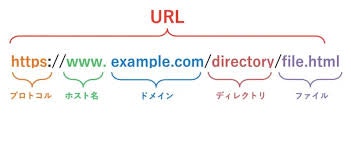
↑ここれへんのURL文字列の切り出しも、URLがどのように解析されるか表していて、URLが最小のトークンではなく、プログラム上は下記の構造として扱われる
-
明示的にreturn文を書かなかったら最後に記載した値が返却されるのは
rubyと同じ
if self.url.contains("http://") {
           return true;
       }
       false
- 例外を投げる ていう概念はないんだね
return err("Only http scheme is supported.".to_string())
HTTPリクエスト
extern crate alloc;
use alloc::string::String;
use alloc::vec::Vec;
use noli::net::TcpStream;
use saba_core::error::Error;
use saba_core::http::HttpResponse;

pub struct HttpClient {}

impl HttpClient {
    pub fn new() -> String {
        Self {}
    }

    pub fn get(&self, host: String, port: u16, path: string) -> Result<HttpResponse, Error> {
        let ips = match lookup_host(&host) {
            Ok(ips) => ips,
            Err(e) => {
                return Err(Error::Network(format!(
                    "Failed to find IP addresses: {:#?}",
                    e
                )))
            }
        };

        if ips.len() < 1 {
            return Err(Error::Network("Failed to find IP addresses".to_string()));
        }

        let socket_addr: SocketAddr = (ips[0], port).into();

        let mut stream = match TcpStream::connet(socket_addr) {
            Ok(stream) => stream,
            Err(_) => {
                return Err(Error::Network(
                    "Failed to connect to TCP stream".to_string(),
                ))
            }
        };

        let mut request = String::from("GET /");
        request.push_str(&path);
        request.push_str(" HTTP/1.1¥n");

        request.push_str("Host: ");
        request.push_str(&host);
        request.push("¥n");
        request.push_str("Accept: text/html¥n");
        request.push_str("Connection: close¥n");
        request.push("¥n");

        let _bytes_written = match stream.write(request.as_bytes()) {
            Ok(bytes) => bytes,
            Err(_) => {
                return Err(Error::Network(
                    "Failed to send a request to TCP stream".to_string(),
                ))
            }
        };

        let mut received = Vec::new();

        loop {
            let mut buf = [0u8; 4096];
            let bytes_read = match stream.read(&mut buf) {
                Ok(bytes) => bytes,
                Err(_) => {
                    return Err(Error::Network(
                        "Failed to receive a request from TCP stream".to_string(),
                    ))
                }
            };
            if bytes_read == 0 {
                break;
            }
            received.extend_from_slice(&buf[..bytes_read]);
        }

        match core::str::from_utf8(&received) {
            Ok(response) => HttpResponse::new(response.to_string()),
            Err(e) => Err(Error::Network(format!("Invalid received response: {}", e))),
        }
    }
}
-
TCPというワードが出てきますが、http(s)通信もTCPの一種、ポート80を使ったTCP通信なんですね
通信の階層分け↓(普段インフラ扱わないとあまりイメージすることはないですね。HTTPの上に階層がこんなに!)
 ・ インターフェース層(Ethernet, PPP etc)
     |_ インターネット層(IP, ICMP, ARP etc)
         |_ トランスポート層(TCP, UDP etc)
             |_ アプリケーション層(HTTP, SSH etc)
- Hostヘッダ
下記はHostヘッダを設定している箇所で、なぜHostを明示的に指定する必要があるかというと
一つのIPアドレスで複数のドメインのサイトを運用する場合に備えて
らしい。
余談ですが、
以前、業務でnginxのチューニングした際にconfにserver_nameを見て管理しているのはこの1サーバなのになんのため?と思いましたが、こういうことだったんですね。
request.push_str("Host: ");
request.push_str(&host);
-
GET "/"とかの表現は一番根源的なWebサーバへのアクセス方法で
GET パス HTTP/<バージョン> (改行)
の文字列を送信することでリソースへのアクセスができる。
↓
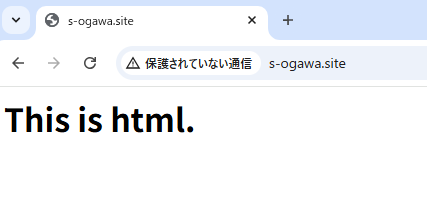
- ブラウザでアクセス(GUI)
- curl(プログラム)
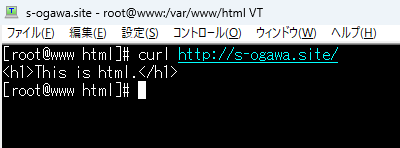
- curlで擬似的にtelnetを再現。http://~ のパスを直接は指定していないことに注目

まとめ
普段何気なくブラウザから様々なリソースにアクセスしているが、URLもHTML(DOM)もテキストが様々に解析されているという裏側を忘れてはいけないなと思った。
またそういったことをあまり意識せず開発できる業務で使っているLaravel等のフレームワークの偉大さを改めて感じました。
おまけ1
pythonの勉強始めたのとqiita頑張って投稿続けています。
(去年アドベントカレンダー投稿してから全然投稿してなかった💦)
おまけ2
2025年は
- 要件定義し客先で発表した。
- 軽く現場のチームのリーダー(の内一人)になった。
- メンターになった。
等、充実した一年でした☺️
みなさん、今年もお疲れ様でした。来年も頑張りましょう🎄🎍