
はじめに
kubectl delete pod を実行したとき、Pod の中では何が起きているのでしょうか?
「SIGTERM が送られて、30 秒待って、SIGKILL で強制終了」——ざっくりそう理解している方は多いと思います。しかし実際には、トラフィックの遮断、preStop フック、EndpointSlice の状態遷移、CNI のクリーンアップなど、複数のコンポーネントが連携する段階的なシャットダウンプロセスが走っています。
本記事では、Pod の停止フローを 5 つのステップに分解し、各ステップで何が起きるかを実機のログとともに解説します。
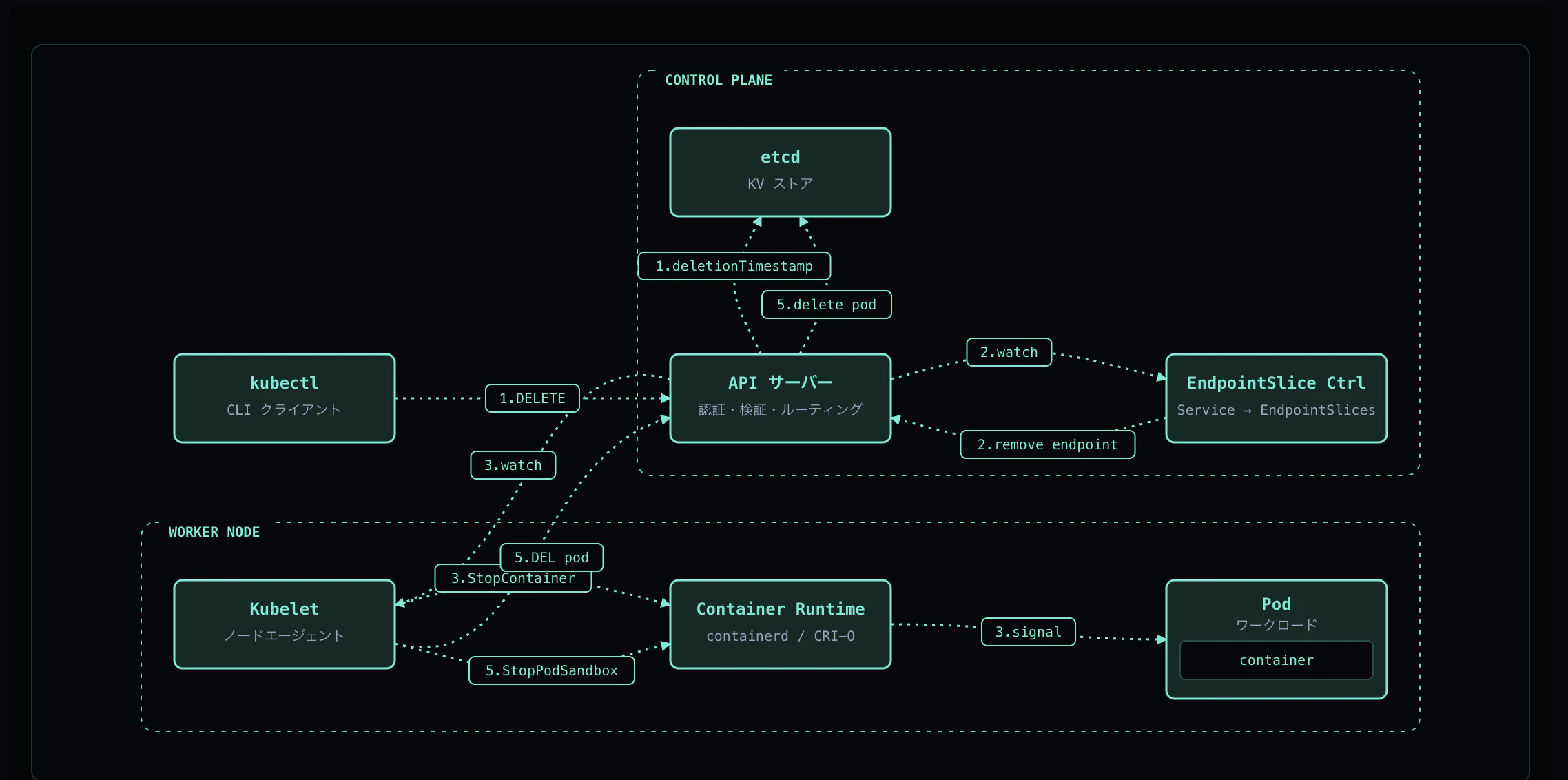
この記事のインタラクティブなアニメーション版は k8s-flows で公開しています。
全体像
Pod の停止は以下の順序で進みます:
kubectl delete pod
    ↓
① API Server が deletionTimestamp を設定(Terminating 状態)
    ↓
② EndpointSlice Controller がトラフィックを遮断
    ↓(並行して)
③ Kubelet が preStop → SIGTERM を実行
    ↓
④ grace period 超過時は SIGKILL で強制終了
    ↓
⑤ CNI クリーンアップ → Volume unmount → etcd から削除
重要なのは、② と ③ は並行して実行されるという点です。これにより、アプリが SIGTERM を受けて drain している間に、新規トラフィックは既に止まっている設計になっています。
検証環境
K8s     : v1.23.4
Runtime : containerd
Node    : kind-control-plane
検証用 Pod
apiVersion: v1
kind: Pod
metadata:
  name: term-demo
  labels: { app: term-demo }
spec:
  terminationGracePeriodSeconds: 30
  containers:
    - name: app
      image: busybox:1.36
      command: ["sh", "-c"]
      args:
        - |
          trap 'echo "SIGTERM received, draining..."; sleep 5; exit 0' TERM
          while true; do sleep 1; done
      lifecycle:
        preStop:
          exec:
            command: ["sh", "-c", "sleep 3"]   # preStop = 3s
      readinessProbe:
        exec:
          command: ["true"]
        periodSeconds: 2
---
apiVersion: v1
kind: Service
metadata:
  name: term-demo
spec:
  selector: { app: term-demo }
  ports: [{ port: 80, targetPort: 8080 }]
この Pod は以下の特徴を持ちます:
- preStop フック: 3 秒の sleep(接続のドレインをシミュレート)
- SIGTERM ハンドラ: 5 秒の drain 後に正常終了
- grace period: 30 秒
- readinessProbe: EndpointSlice の遷移を観察するため
Step 1: 削除リクエスト
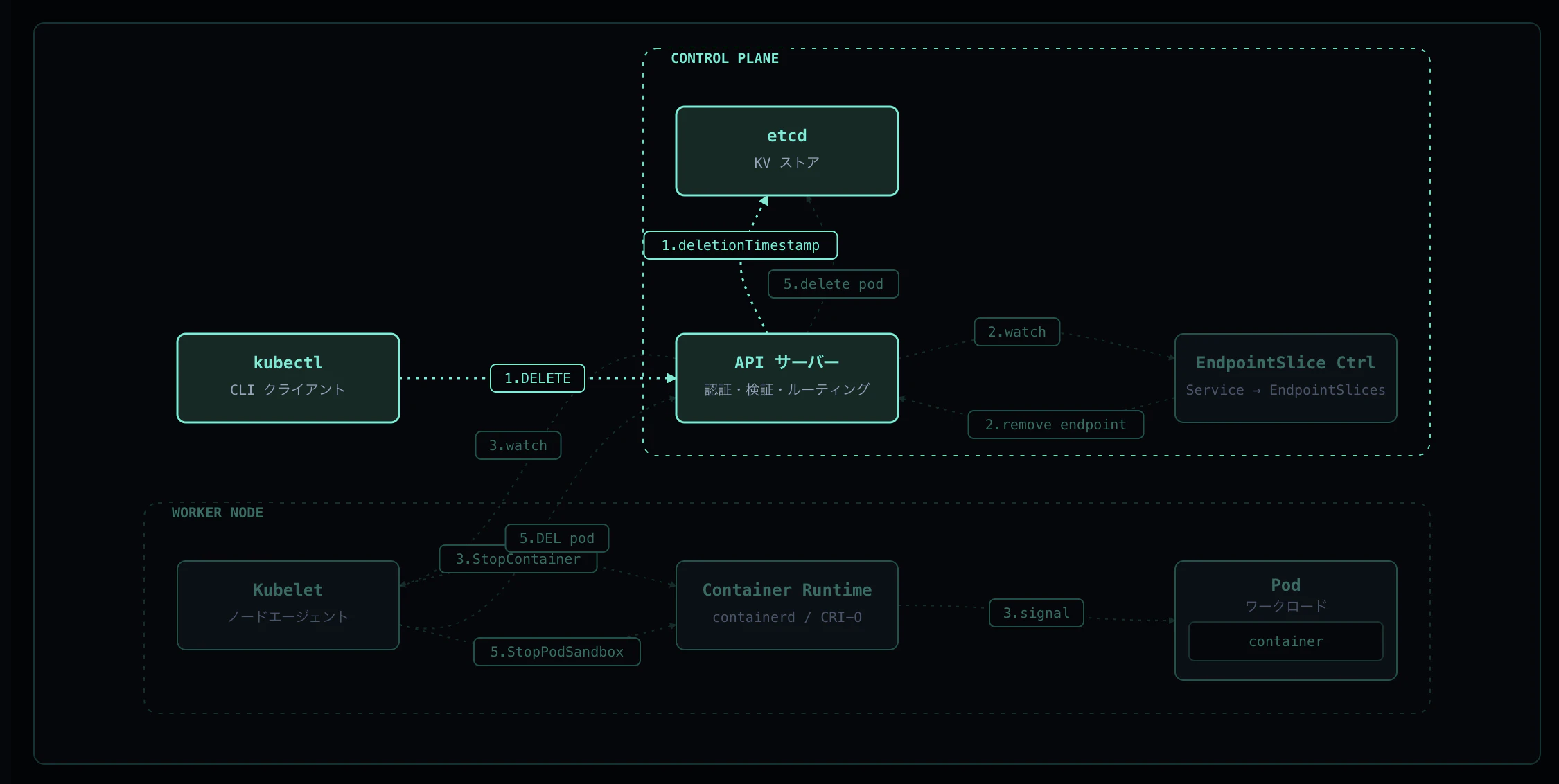
kubectl delete pod を実行すると、API Server は Pod オブジェクトを即座に削除しません。代わりに以下を設定します:
-
metadata.deletionTimestamp— Pod が消えるべき期限 -
metadata.deletionGracePeriodSeconds— grace period
$ kubectl delete pod term-demo --wait=false
pod "term-demo" deleted                                       # 11:53:40Z

$ kubectl get pod term-demo -o json | jq '{
    phase: .status.phase,
    deletionTimestamp: .metadata.deletionTimestamp,
    deletionGracePeriodSeconds: .metadata.deletionGracePeriodSeconds
  }'
{
  "phase": "Running",
  "deletionTimestamp": "2026-04-16T11:54:10Z",    # = 11:53:40 + 30s
  "deletionGracePeriodSeconds": 30
}
ポイント
-
.status.phaseは Running のまま —Terminatingは kubectl 表示上のラベルであり、内部的な phase ではありません deletionTimestamp = 削除受付時刻 + terminationGracePeriodSeconds
Step 2: EndpointSlice から除外
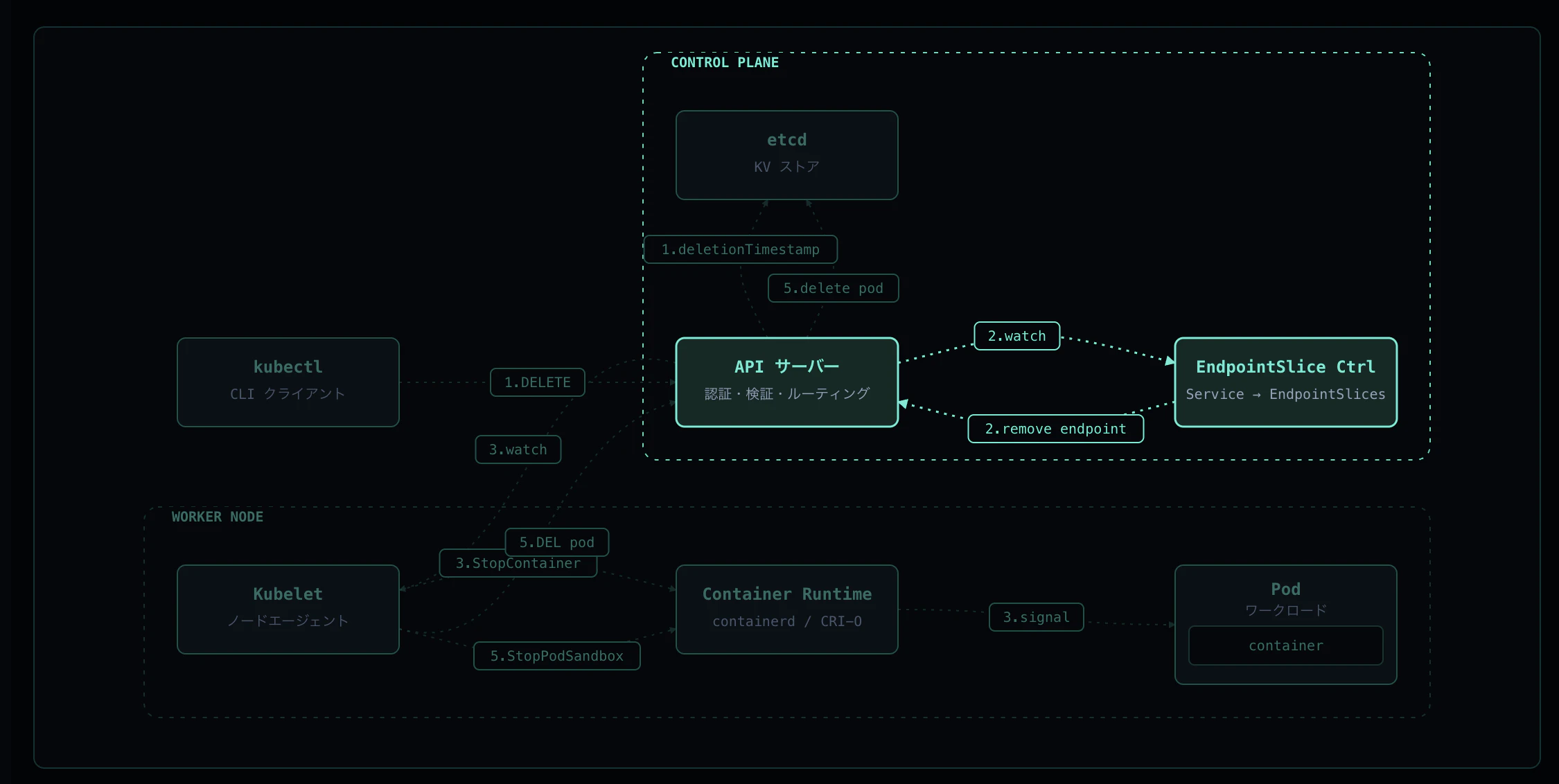
EndpointSlice Controller は Pod の変化を watch しています。Pod が Terminating になった瞬間、EndpointSlice の状態を以下のように変更します:
削除直後(ドレイン中):
endpoints:
  - addresses: [10.244.0.?]
    conditions:
      ready: false        # 新規トラフィックは受けない
      serving: true       # in-flight リクエストは捌く
      terminating: true
    targetRef:
      name: term-demo
Pod 完全削除後:
endpoints: null # EndpointSlice 本体は残るが entry は空
各ノードの kube-proxy がこの変化を受けて iptables/ipvs を更新し、新規トラフィックはこの Pod に流れなくなります。
3 つの conditions の意味
| フィールド | 値 | 意味 |
|---|---|---|
ready |
false |
Service 経由の新規ルーティング対象外 |
serving |
true |
コンテナはまだリクエストを処理できる状態 |
terminating |
true |
Pod は終了処理中 |
Step 3: preStop + SIGTERM
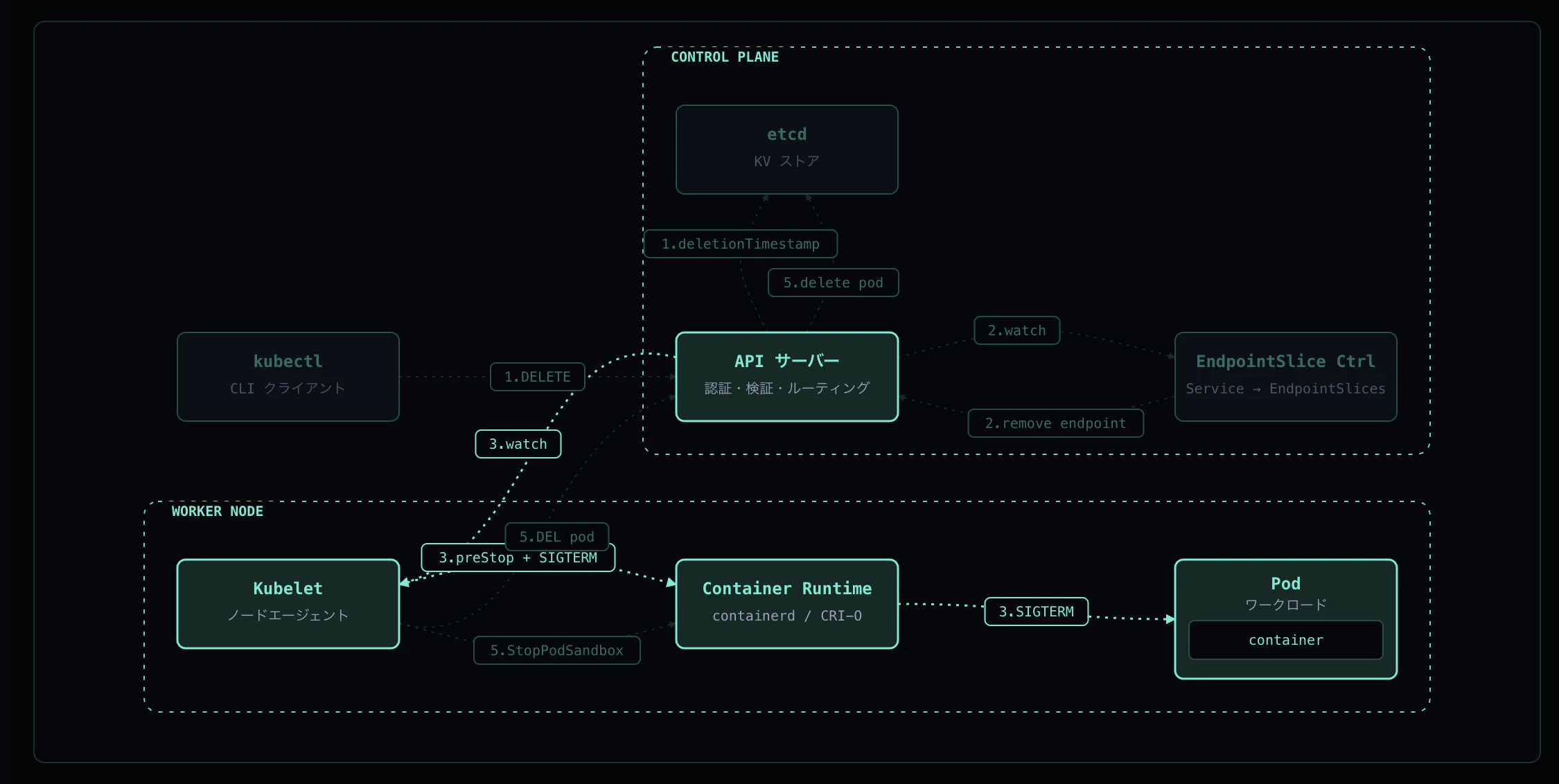
Kubelet は API Server から Pod の Terminating 通知を受け、Container Runtime(containerd)に対して grace period 相当のタイムアウト付きで StopContainer を要求します。
実行順序:
-
preStop フックを実行(この例では
sleep 3) - preStop 完了後、PID 1 に SIGTERM を送信
- アプリが drain して自発的に exit
実機ログ
アプリログ(PID 1 の出力):
[11:52:36] started
[11:53:43] received SIGTERM, draining...         # SIGTERM 到着
done                                             # 11:53:48 終了
containerd ログ:
11:53:43 StopContainer for "43a39963..." with timeout 30 (s)
11:53:43 Stop container "43a39963..." with signal terminated    # SIGTERM 送信
11:53:48 StopContainer for "43a39963..." returns successfully   # app が自発的に exit
タイムライン
| 区間 | 時間 | 内容 |
|---|---|---|
| 11:53:40 → 11:53:43 | 3 秒 | preStop の sleep 3
|
| 11:53:43 → 11:53:48 | 5 秒 | SIGTERM ハンドラの sleep 5(drain) |
grace period 30 秒のうち 8 秒で正常終了 — SIGKILL には至りません。
Step 4: SIGKILL(猶予超過時)
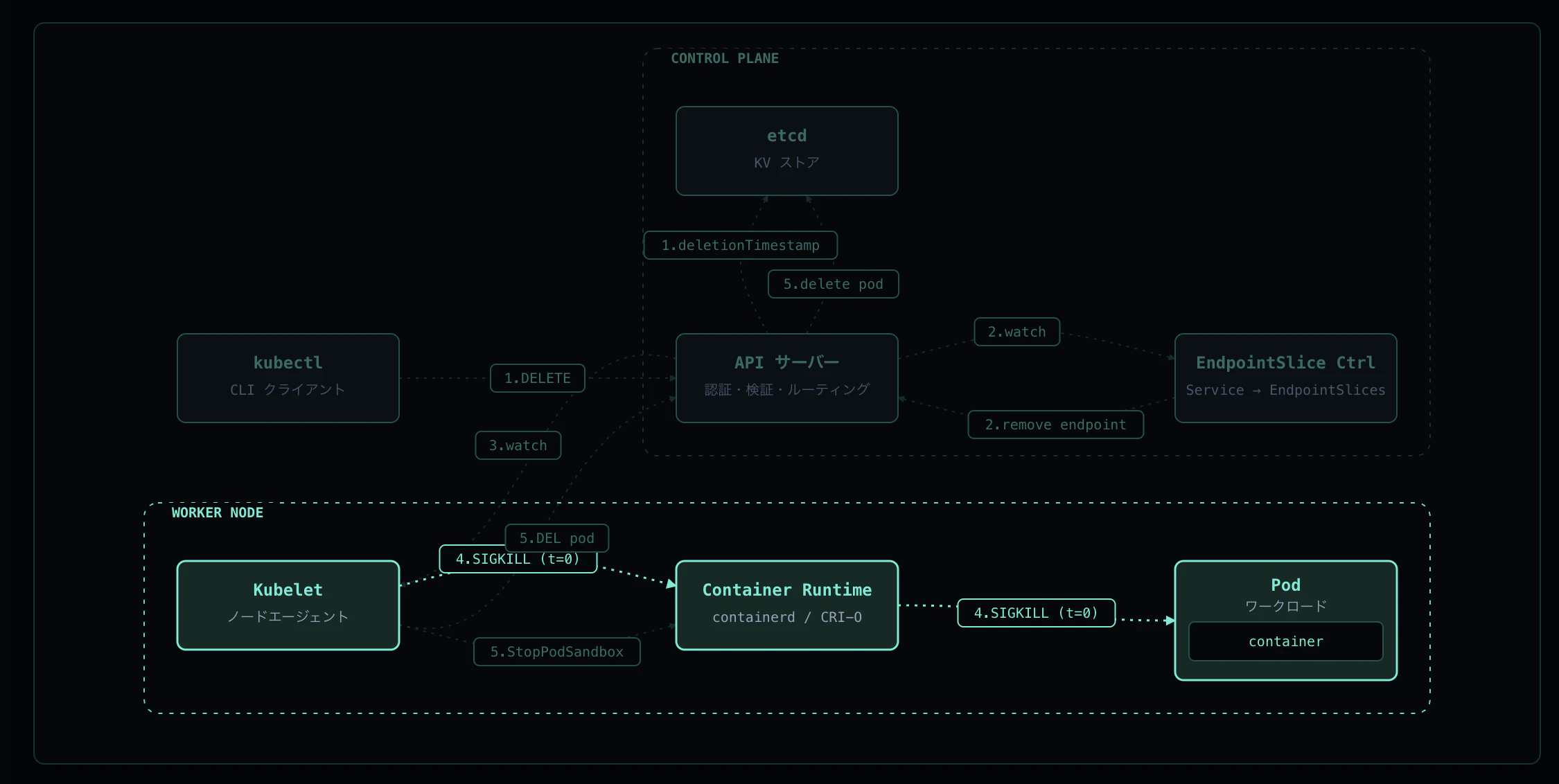
grace period を過ぎてもコンテナが生きている場合、Kubelet は Container Runtime に SIGKILL を送って強制終了します。
SIGKILL のテスト
SIGTERM を無視するアプリを grace=10s で検証します:
spec:
  terminationGracePeriodSeconds: 10
  containers:
    - name: app
      args:
        - |
          trap 'echo "SIGTERM received, ignoring"; sleep 120' TERM
          while true; do sleep 1; done
      lifecycle:
        preStop:
          exec:
            command: ["sh", "-c", "sleep 2"]
実機ログ
アプリログ:
[12:04:22] started (will not exit on SIGTERM)
[12:04:44] SIGTERM received, ignoring to simulate misbehaving app
containerd ログ:
12:04:44 StopContainer for "71d2a558..." with timeout 10 (s)
12:04:44 Stop container "71d2a558..." with signal terminated   # SIGTERM
12:04:54 Kill container "71d2a558..."                          # SIGKILL(10s 後)
12:04:54 StopContainer for "71d2a558..." returns successfully
SIGKILL の見分け方
| 指標 | 正常終了 | SIGKILL |
|---|---|---|
| containerd ログ |
StopContainer returns successfully のみ |
Kill container ... が追加で出る |
| アプリログ | SIGTERM received ... exit 0 |
SIGTERM received, ignoring... で途切れる |
| 完了までの時間 | grace period より短い | grace period ぴったり |
exitCode |
0 |
137(= 128 + 9) |
Step 5: クリーンアップと削除完了
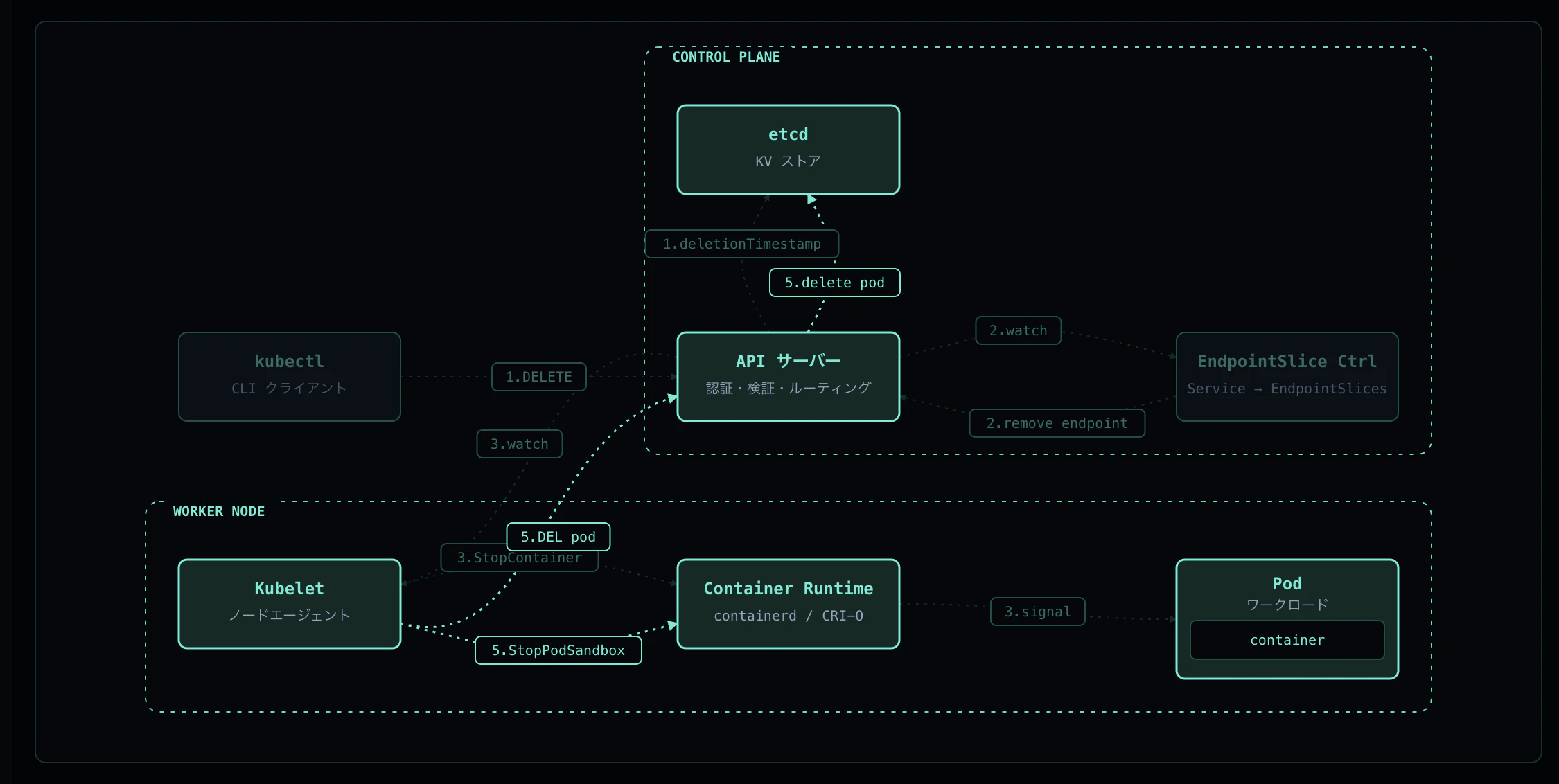
コンテナ停止後、以下のクリーンアップが実行されます:
- CNI DEL — Pod IP / veth / iptables エントリの解放
- Volume unmount — マウントされたボリュームの解除
- etcd 削除 — Kubelet が API Server に hard delete を送信、finalizers が空なら etcd から削除
実機ログ
containerd:
11:53:48 StopPodSandbox for "4c08f481..."
11:53:48 TearDown network for sandbox "4c08f481..." successfully   # CNI DEL
11:53:48 StopPodSandbox for "4c08f481..." returns successfully
kubelet:
11:53:48 operationExecutor.UnmountVolume started for volume "kube-api-access-ljv52"
11:53:48 UnmountVolume.TearDown succeeded for volume ".../kube-api-access-ljv52"
最終確認:
$ kubectl get pod term-demo
Error from server (NotFound): pods "term-demo" not found
総合タイムライン
正常終了ケース
| 時刻 (UTC) | 出来事 |
|---|---|
| 11:53:40 |
kubectl delete 受付(deletionTimestamp = +30s) |
| 11:53:40-43 | preStop exec(3 秒) |
| 11:53:43 | containerd → SIGTERM 送信 |
| 11:53:43-48 | アプリが drain(5 秒) |
| 11:53:48 | container exit → CNI DEL + Volume unmount |
| 11:53:59 | etcd から Pod 削除完了 |
削除から 約 19 秒で完全消滅。
SIGKILL ケース
| 時刻 (UTC) | 出来事 |
|---|---|
| 12:04:42 |
kubectl delete 受付(grace=10s) |
| 12:04:42-44 | preStop exec(2 秒) |
| 12:04:44 | SIGTERM 送信(アプリは無視) |
| 12:04:54 | SIGKILL 送信(10 秒後) |
| 12:04:58 | Pod 完全消滅 |
削除から 約 16 秒で完全消滅。
実務で気をつけるポイント
1. preStop と SIGTERM ハンドラは両方必要
- preStop: Kubernetes 側のフック。Sleep を入れて EndpointSlice の更新が全ノードに伝播する時間を稼ぐ
- SIGTERM ハンドラ: アプリ側の処理。in-flight リクエストを捌ききってからコネクションを閉じる
lifecycle:
  preStop:
    exec:
      command: ["sh", "-c", "sleep 5"]  # kube-proxy の反映待ち
2. grace period は preStop + drain 時間より長く
terminationGracePeriodSeconds は preStop の実行時間も含みます。
grace period ≥ preStop 時間 + アプリの drain 時間 + マージン
短すぎると SIGKILL が発火し、リクエストが中途半端に切れます。
3. SIGKILL 時の exitCode 137 を監視する
exitCode: 137 は SIGKILL を意味します。これが頻発する場合:
- grace period が短すぎる
- アプリが SIGTERM を正しくハンドルしていない
- preStop が時間を使いすぎている
まとめ
Pod の停止フローは「SIGTERM → SIGKILL」の 2 段階ではなく、5 つのステップで構成されています:
- 削除リクエスト — deletionTimestamp の設定
- トラフィック遮断 — EndpointSlice の更新
- preStop + SIGTERM — アプリへの graceful shutdown 要求
- SIGKILL — grace period 超過時の強制終了
- クリーンアップ — CNI / Volume / etcd の後片付け
これらの仕組みを理解することで、「デプロイ時に 503 が出る」「Pod が 30 秒待っても消えない」といったトラブルの原因を特定しやすくなります。
インタラクティブなアニメーションで各ステップを視覚的に確認したい方は、ぜひ k8s-flows をご覧ください。