
1. 概要
jsonファイルをインポートしてEC2で表示させたい
2. 背景
- EC2だけで作る最小データパイプライン(JSON生成 → FlaskでWeb表示)
- 今回は EC2単体で完結
3. ゴール
- EC2上でデータ生成(例:JSON/CSV or DB)
- EC2ローカルに格納(ファイル or SQLite)
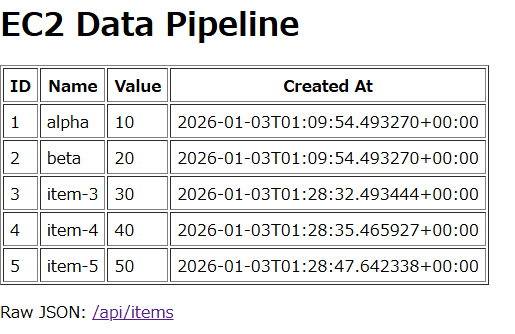
- Webで一覧表示(HTTPで確認できる)
- ファイル(JSON)→ Flaskで表示
- ブラウザで確認
4. 構成
ec2-data-pipeline/
├── app.py                # Flask app (serve data)
├── generate_data.py      # Data generation script
├── data/
│   └── items.json        # Stored JSON data
├── requirements.txt
└── README.md
5. 環境準備(Amazon Linux)
AWSコンソール上で以下を実行
sudo yum update -y
sudo yum install -y python3
python3 -m venv .venv
source .venv/bin/activate
requirements.txtの作成
flask>=3.0.0
pip install -r requirements.txt
6. データを生成して保存
generate_data.py
import json
from datetime import datetime, timezone
from pathlib import Path

DATA_DIR = Path("data")
DATA_PATH = DATA_DIR / "items.json"

def main() -> None:
    DATA_DIR.mkdir(parents=True, exist_ok=True)

    if DATA_PATH.exists():
        items = json.loads(DATA_PATH.read_text(encoding="utf-8"))
    else:
        items = []

    now = datetime.now(timezone.utc).isoformat()
    next_id = max((it["id"] for it in items), default=0) + 1

    items.append({
        "id": next_id,
        "name": f"item-{next_id}",
        "value": next_id * 10,
        "created_at": now,
    })

    DATA_PATH.write_text(
        json.dumps(items, ensure_ascii=False, indent=2),
        encoding="utf-8",
    )

    print(f"[OK] Appended item. count={len(items)}")

if __name__ == "__main__":
    main()
7. Flask で Web 表示
app.py
import json
from pathlib import Path
from flask import Flask, jsonify, render_template_string

app = Flask(__name__)
DATA_PATH = Path("data") / "items.json"

HTML = """<!doctype html>
<html>
<head>
  <meta charset="utf-8">
  <title>EC2 Data Pipeline</title>
</head>
<body>
  <h1>EC2 Data Pipeline</h1>
  <table border="1" cellpadding="6">
    <thead>
      <tr>
        <th>ID</th>
        <th>Name</th>
        <th>Value</th>
        <th>Created At</th>
      </tr>
    </thead>
    <tbody>
      {% for it in items %}
      <tr>
        <td>{{ it.id }}</td>
        <td>{{ it.name }}</td>
        <td>{{ it.value }}</td>
        <td>{{ it.created_at }}</td>
      </tr>
      {% endfor %}
    </tbody>
  </table>
</body>
</html>"""

@app.get("/api/items")
def api_items():
    items = json.loads(DATA_PATH.read_text(encoding="utf-8"))
    return jsonify(items)

@app.get("/")
def index():
    items = json.loads(DATA_PATH.read_text(encoding="utf-8"))
    return render_template_string(HTML, items=items)

if __name__ == "__main__":
    app.run(host="0.0.0.0", port=8000, debug=True)
8. 出力イメージ
9. 注意点
- セキュリティグループ
- sg-xxxxxxxxxxxx - launch-wizard-3 のInbound に TCP 8000 / My IP
- アクセス時は必ず
<Public IPv4>:8000を指定
10. まとめ
- EC2 だけでデータ生成〜Web表示まで完結
- ハマりどころはセキュリティグループとポート指定