
翻訳について
- 英語を日本語に
- 日本語を英語に
翻訳する際、普段からDeeplやGoogle翻訳を使っている方もいるかもしれません(自分もその一人です)
人によってはGeminiやChatGPTを使っている方もいるかと思います
今のままでも問題ないかと思いますが、一度テキストをコピーして別ページ又は別アプリを開いて翻訳する際のマウス移動やサイト・アプリを探すのが手間だと考えるようになりました
そこで、Ollama + Raycast を使うことでマウス移動なくしてサイト・アプリを探す必要もない状態で翻訳出来るのでは、と考えました
Ollamaとは
自分自身のPC上にローカルかつプライベートで大規模言語モデル LLM を自分自身のPC上に構築出来るオープンソースツールです
ローカルで動作する都合上、PCの性能に依存してしまうというデメリットもあります
Raycastについて
多機能なランチャーアプリです
Macの標準で入っているSpotlight検索を強化させたものになります
様々な機能がありPC操作を楽に行うことが出来ます
また、自分自身で拡張機能を開発することも可能です
最近、Beta版ではありますがWindows版が出ました
Selected Text機能(Dynamic Placeholders)
Raycastの Dynamic Placeholders の一種、今選択しているテキストをそのまま取得して使える機能です
{selection}
とプロンプトやコマンド内に書くとカーソルで選択しているテキストをそのままRaycastに送り込むことが出来ます
この機能を使うことでコピペによるテキストをRaycastに送り込む必要がなくなります
Ollama AI
OllamaとRaycastを連携するための拡張機能です
Raycast自体にAI機能を持っていますが、Ollamaと連携することでローカルモデルを使用できたり、プライバシーを保ちながらAI機能を使えるメリットがあります
環境構築
PC環境
- MacBook Pro 13-inch M1 2020
- メモリ: 16GB
- Docker Desktop: v29.3.1
- Raycast: v1.104.11
今回構築した自分の環境です
この環境では低スペックのため動作が重いです
今現在、発売されている新しいMacBookの方が動作は軽いかと思います
Docker
リソースを変更していきます
自分の環境だけだと思いますが、自分の環境に合わせて Memory Limit や Swap を変更してください

Ollamaインストール
ローカルにインストールする方法はありますが、前述でDockerの設定も書いた通り、今回はDockerでインストールしていきます
下記3つのうち、どれかのコマンドを選んでターミナル上で実行してください
1. PC再起動時にOllamaを自動起動
docker stop してもOllamaは再起動されます
docker run -d \
  --restart=always \
  -v ollama:/root/.ollama \
  -p 11434:11434 \
  --name ollama \
  ollama/ollama
2. PC再起動時にOllamaを自動起動
docker stop した場合、Ollamaは停止したまま再起動しません
docker run -d \
  --restart=unless-stopped \
  -v ollama:/root/.ollama \
  -p 11434:11434 \
  --name ollama \
  ollama/ollama
3. PC再起動時はOllamaは自動起動しない
PC再起動時は毎回、手動で docker start をする必要があります
docker run -d \
  --restart=no \
  -v ollama:/root/.ollama \
  -p 11434:11434 \
  --name ollama \
  ollama/ollama
モデルインストール
Gemma 4 が最近出てきたのでこのモデルを使用しようと考えていましたが、翻訳をしてくれなかったり、自分のPCでは性能不足でモデルが動かなかったりしました
そこで Gemma 3 を基盤として翻訳特化にさせたモデル TranslateGemma を使用することで翻訳を安定して自分の低スペックでも動作できるようしました
1. コンテナの中に入る
docker exec -it ollama bash
2. TranslateGemma をインストール
ollama pull translategemma:latest
3. modelfile を作成
モデルの「設定ファイル(設計図)」になります
自分専用のAIモデルを作成することが出来ます
ChatGPTの カスタム指示 や Geminiの Gem みたいなものです
ollama show --modelfile translategemma > translation_model
4. AIモデルを定義
FROM translategemma

SYSTEM """
You are a professional translator between Japanese (ja) and English (en).

Your task is to:
- Detect the language of the input text.
- If the input is Japanese, translate it into natural, fluent English.
- If the input is English, translate it into natural, fluent Japanese.

Your goal is to accurately convey the meaning and nuances of the original text while adhering to the target language’s grammar, vocabulary, and cultural sensitivities.

Output rules:
- Produce only the translated text.
- Do not include explanations, comments, or additional formatting.
- Keep the tone appropriate to the original text (formal/informal).
- Prefer accurate technical terminology when translating technical or engineering content.
"""

PARAMETER temperature 0.2
PARAMETER top_p 0.9
a. FROM TranslateGemma
ベースモデルを指定しています
b. SYSTEM
SYSTEM """
You are a professional translator between Japanese (ja) and
...
"""
AIの 人格・ルール を固定していきます
c. PARAMETER
PARAMETER temperature 0.2
ランダム性を低くして回答をしてもらうようにしています
PARAMETER top_p 0.9
選ばれる回答候補が多くなるように設定しています
設定し終えたら、コンテナ内には vi が入っていないため下記コマンドを実行することで modelfile に記載していきます
cat << 'EOF' > translation_model
FROM translategemma

SYSTEM """
You are a professional translator between Japanese (ja) and English (en).

Your task is to:
- Detect the language of the input text.
- If the input is Japanese, translate it into natural, fluent English.
- If the input is English, translate it into natural, fluent Japanese.

Your goal is to accurately convey the meaning and nuances of the original text while adhering to the target language’s grammar, vocabulary, and cultural sensitivities.

Output rules:
- Produce only the translated text.
- Do not include explanations, comments, or additional formatting.
- Keep the tone appropriate to the original text (formal/informal).
- Prefer accurate technical terminology when translating technical or engineering content.
"""

PARAMETER temperature 0.2
PARAMETER top_p 0.9
EOF
5. カスタムモデルを作成
ollama create translator -f translation_model
上記コマンドを実行することで modelfile を元にしてカスタムモデルを作成します
success と表示されれば成功です
RaycastとOllamaとの連携
Raycastに Ollama AI がインストールされていることを前提に話していきます
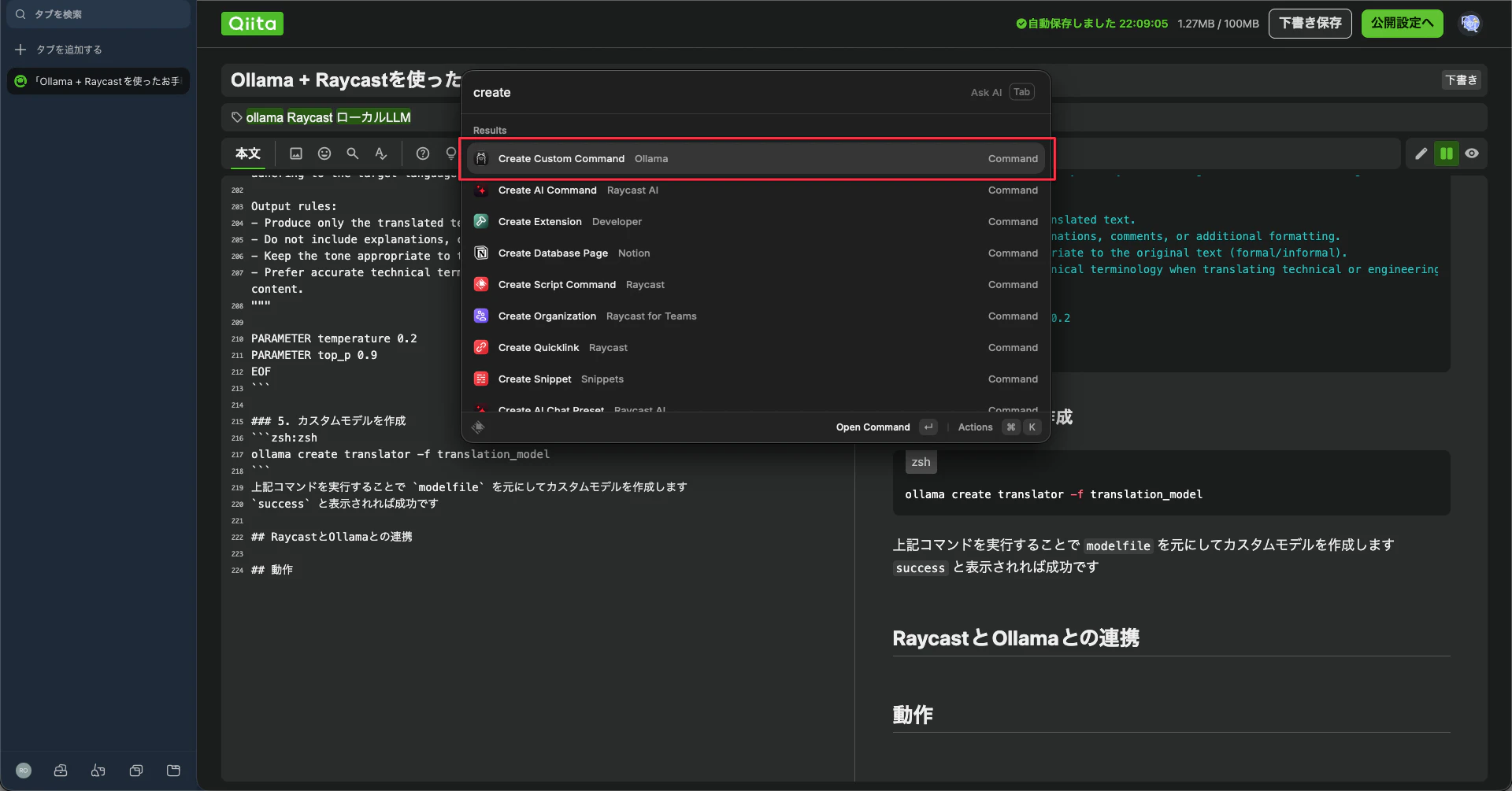
1. コマンド実行
Raycastを起動して create custom command と入力してコマンドを選んでください
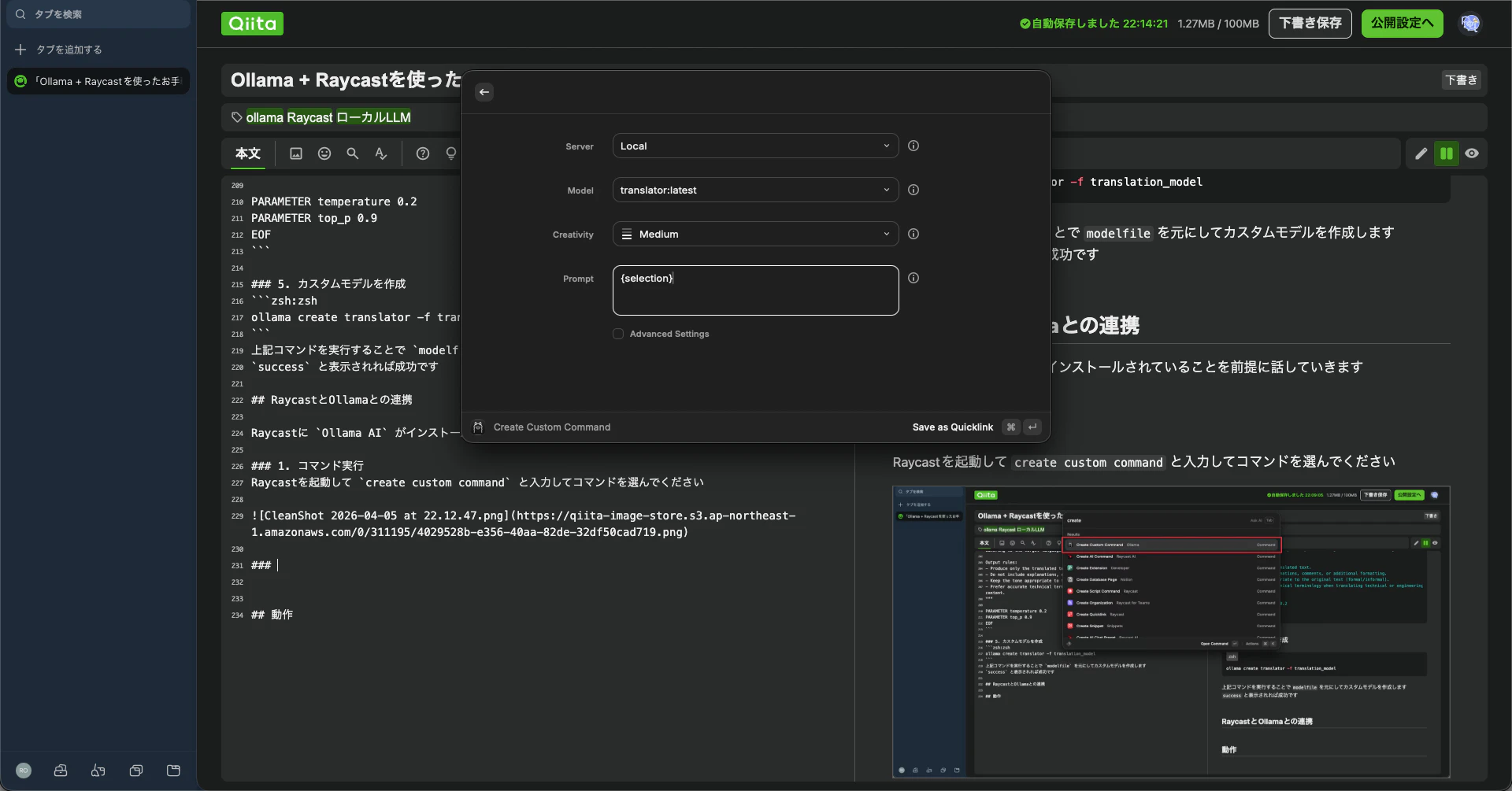
2. モデルやプロンプト設定
自動的にコンテナ内で作成したモデルが選択されているかと思います
Prompt に {selection} と入力してください
modelfileではなく Raycastの Prompt にモデル定義を記載してもよいですが修正等するのが大変なため比較的簡単に変更出来る modelfile にモデル定義を記載しています
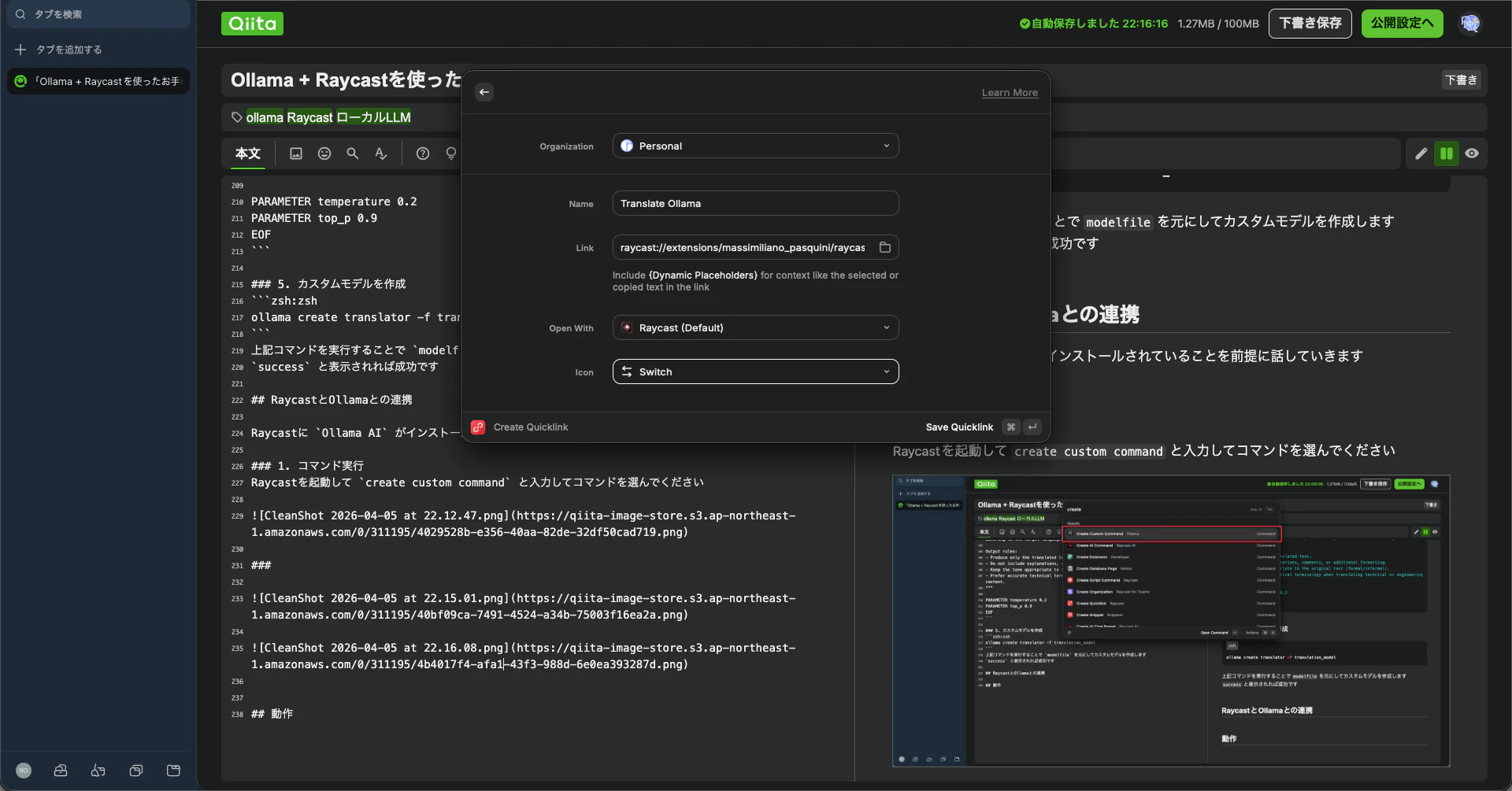
3. Raycastで実行する際の設定
ここは個々人の設定で問題ございません
自分がわかりやすい設定にしとく方が良いです
動作確認
作成が完了したら実際動作させていきます
1. 英語から日本語に翻訳

2. 日本語から英語に翻訳

まとめ
手軽で便利な翻訳システムがすぐに実装出来る良い時代になりました
今回は翻訳に特化したものですが、作り方次第では様々な用途に使用できると感じました
今後もOllama + Raycastを使って様々なシステムを開発してプライベートを充実させていきたいです