

はじめに
「登録ボタンを押すと入力された学習内容が表示される」というアプリを実装する際に、入力内容が1文字ずつ分かれて表示されて困ったため原因と解決法をまとめます。
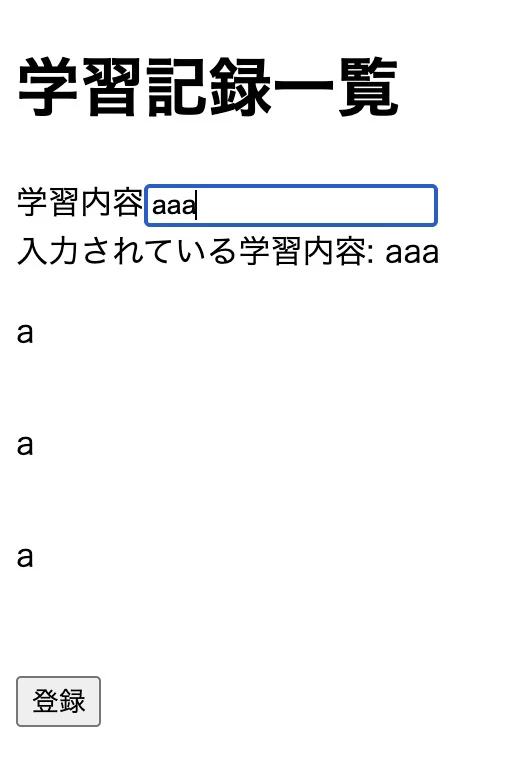
問題
App.tsx
export const App = () => {
  const [records, setRecords] = useState([]);
  const [studyContent, setStudyContent] = useState("");

  const onChangeStudyContent = (event) => {
    setStudyContent(event.target.value);
  };

  const onClickRegister = () => {
    if (studyContent === "") return;
    const newRecords = [...studyContent, setStudyContent];
    setRecords(newRecords);
    setStudyContent("");
  };

  return (
    <>
      <h1>学習記録一覧</h1>
      <div>
        学習内容
        <input
          type="text"
          value={studyContent}
          onChange={onChangeStudyContent}
        />
      </div>
      <div>入力されている学習内容: {studyContent}</div>
      <div>
        {records.map((record, key) => (
          <div key={key} style={{ display: "flex" }}>
            <p>{record}</p>
          </div>
        ))}
      </div>
      <button onClick={onClickRegister}>登録</button>
    </>
  );
};
解決方法
onClickRegisterを以下のように修正。
App.tsx
  const onClickRegister = () => {
    if (studyContent === "") return;
    const newRecords = [studyContent, setStudyContent];
    setRecords(newRecords);
    setStudyContent("");
  };
入力した内容を...studyContentとスプレッド構文で分解してしまっていたことが原因。
studyContentは文字列なので、一文字ずつ分かれて表示されて望まないふるまいをしていた。
ex.js
const str = "勉強";
console.log([...str]); // ["勉", "強"]と表示される
配列だと以下のようになる。
ex.js
const arr = ["数学", "英語"];
console.log([...arr, "理科"]); // ["数学", "英語", "理科"]と表示される
おわりに
当たり前のことですが、JavaScriptの基礎の構文の理解が大事だと実感しました。
同じことで困っている方がいましたら参考になれば幸いです!