
ゲーム画面を作る
シーンを作る
- Assetsパネルを右クリック→Create→Sceneと選択する
- GameSceneにリネームする
CanvasにUIを配置する
- ScoreLabel(Label)を追加する
- ResultPanel(EmptyNode)を追加する
- Background(Sprite)
- ResultTitleLabel(Label): 今回のスコア
- FinalScoreLabel(Label): 0
- ButtonContainer(EmptyNode)
- ContinueButton(Button): もう一回
- BackToMenuButton(Button): メニューへ
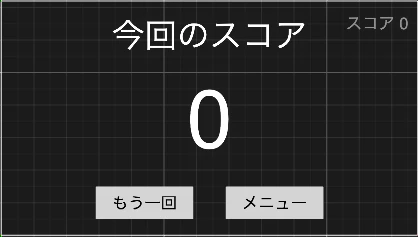
リザルトパネル表示中のゲーム画面のタッチ判定を無効化する
- ヒエラルキーパネルのResultPanelを選択する
- インスペクターのAdd Compnentを選択する
- BlockInputEventsで検索し、追加する
スクリプトを追加する
- assets/scriptsに
GameManager.tsを追加するGameManager.tsimport { _decorator, Component, Node, Label, director } from 'cc'; const { ccclass, property } = _decorator; @ccclass('GameManager') export class GameManager extends Component { @property(Label) scoreLabel: Label = null; @property(Node) resultPanel: Node = null; @property(Label) finalScoreLabel: Label = null; private score: number = 0; public addScore(pts: number) { this.score += pts; this.scoreLabel.string = `Score: ${this.score}`; } public finishGame() { this.finalScoreLabel.string = `${this.score}`; this.resultPanel.active = true; } public onRetryClick() { director.loadScene("GameScene"); } public onMenuClick() { director.loadScene("MenuScene"); } } - ヒエラルキーパネルのCanvasにGameManeger.tsをアタッチする
- 各ノードをドラッグ&ドロップする

- ContinueButtonのイベントを設定する

- BackToMenuButtonのイベントを設定する

まとめ
最低限のゲーム画面としてはこれで完成です。