
ログインフォームを作成する
ポップアップを作成する
- MenuSceneのヒエラルキーのCanvasにEnpty Nodeを追加する
-
AuthPopupにリネームする
ポップアップの裏の背景を作成する
- AuthPopupを右クリック→Create→2D Object→Spriteを選択する
※ポップアップ以外選択できなくする半透明の背景になります -
Blockerにリネームする - インスペクターパネル→Add Component→Widgetで検索→cc.Widgetを選択する
- Left, Right, Top, Bottomを0にする
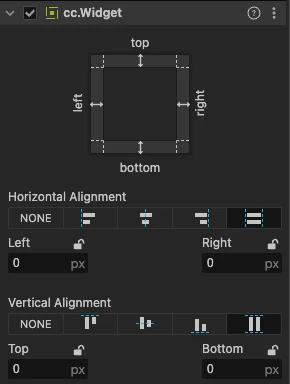
※画面全体が覆われない場合、AuthPopupも同じ設定にする - Spriteを黒の半透明にする

- Sprite Frameを
default_sprite_splashへ置き換える

ポップアップパネルを作る
- AuthPopupを右クリック→Create→2D Object→Spriteを選択する
-
PopupPanelにリネームする - インスペクターパネルのUITransformでサイズを変更する

- Sprite Frameを
default_sprote_splashに変更する
EditBoxを配置する
- PopupPanelを右クリック→UI Component→EditBoxと選択する
-
InputFieldにリネームする - インスペクターパネルのPlaceholderを「ユーザー名を入力してください」に変更する
- Input ModeをSINGLE_LINEにする
ボタンを設置する
- PopupPanelを右クリック→UI Component→Buttonと選択する
- インスペクターパネル→Add Component→Widgetで検索→cc.Widgetを選択する
- 画像と同じ設定をする

- ボタンのテキストを「ログイン」にする
まとめ
今回はパスワード認証なしで、サーバーに登録されているユーザー名で認証します。