
BGMとSEの音量を設定から変更する
AudioManager.tsを拡張する
public setBGMVolume(value: number) {
    this.bgmVolume = value;
    if (this.bgmSource) {
        this.bgmSource.volume = value;
    }
}

public setSEVolume(value: number) {
    this.seVolume = value;
}
設定ポップアップを作成する
- MenuSceneを選択する
- AuthPopupを右クリック→Duplicateを選択する
-
SettingPopupにリネームする -
LoginUserLabel``LoginStatusLabel``EditBox``LoginButtonは不要なので削除する - PopupPanelを右クリック→UI Component→Sliderと選択する
-
BGMSliderにリネームし位置を調整する - BGMSliderを右クリック→Duplicateを選択する
-
SESliderにリネームする - それぞれのSliderを判別しやすくするためLabelを追加する
設定を保持する
- ConfigManager.tsを作成する
ConfigManager.ts
import { sys, AudioSource, Slider, find } from 'cc'; export class ConfigManager { private static _bgmVolume: number = 0.5; private static _seVolume: number = 0.5; private static readonly BGM_KEY = 'SAVE_BGM_VOL'; private static readonly SE_KEY = 'SAVE_SE_VOL'; public static get bgmVolume() { return this._bgmVolume; } public static get seVolume() { return this._seVolume; } public static onBGMSliderChange(slider: Slider) { this._bgmVolume = slider.progress; const audioNode = find("AudioManager"); const audioComp = audioNode?.getComponent("AudioManager") as any; if (audioComp && audioComp.bgmSource) { audioComp.bgmSource.volume = this._bgmVolume; } this.save(); } public static onSESliderChange(slider: Slider) { this._seVolume = slider.progress; this.save(); const audioComp = find("AudioManager")?.getComponent("AudioManager") as any; audioComp?.playOpenSE(); } public static load() { const b = sys.localStorage.getItem(this.BGM_KEY); if (b !== null) this._bgmVolume = parseFloat(b); const s = sys.localStorage.getItem(this.SE_KEY); if (s !== null) this._seVolume = parseFloat(s); } private static save() { sys.localStorage.setItem(this.BGM_KEY, this._bgmVolume.toString()); sys.localStorage.setItem(this.SE_KEY, this._seVolume.toString()); } } - SettingPopupにConfigManagerをアタッチする
- BGMSliderのSliderEventsを設定する

- SESliderのSliderEventsを設定する

設定を開くボタンを設置する
- LoginButtonをDuplicateで複製する
- テキストを
SETTINGに置き換える - ボタンの位置を任意の位置に変更する
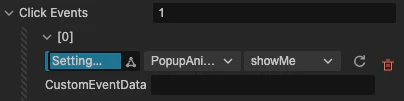
- Click Eventsをセッティングポップアップ用のものに置き換える
まとめ
これでSEとBGMをそれぞれ設定できるようになりました。