
GitHub Agentic Workflows とは?
GitHub Actions上で動くAIエージェントに、
リポジトリ作業を任せるためのワークフロー仕組みです。
workflowを 複雑なYAMLではなく、Markdown(自然言語)で記載できることが特徴です。
- 「何を達成したいか(Goal / Outcome)」をMarkdownに書く
- AIエージェントがリポジトリの状況(Issue/PR/CIなど)を読み、判断して実行する
- 実行基盤はGitHub Actions(スケジュール実行も可能)
- Copilot CLI、Claude Code、OpenAI Codexといったエージェントに対応!
例えば何ができる?
公式・紹介記事でも、以下のような用途が例として挙げられています。
1) Issueを自動作成
- 地味に辛い週次レポートを自動でIssueとして投稿
- 未完了のIssueをレポートとしてまとめる
- 未トリアージIssueを抽出して、優先度付けしてまとめる
2) PRレビュー支援・メンテ
- 変更差分を要約し、レビュー観点を提示
- 「止まっているPR」「レビュー待ちPR」を棚卸し
3) CI失敗の分析・レポート
- 失敗したワークフローの状況を自動でまとめる
- 再現手順・切り分け観点を整理
4) リポジトリの定期レポート
- 日次/週次で活動状況をまとめ、Issueとして残す
- “次にやるべきこと” を提案する
今回はGitHub Agentic Workflowsの紹介も兼ねて
4番をハンズオンしたいと思います!
プロジェクトが大規模だと、Open Issueが大量にあったり埋もれたりするので
これは便利ですね
もう少し特徴を紹介
- MarkdownでWorkflowを書き、GitHub Actionsで実行
- 作成の導線も複数あり(Web/ターミナル等)
- UIからも作成可能(VSCode Agent Mode等)
UIの作成方法は以下で案内されてました!
費用
生成AIの使用とGitHub Actionsを使用するので、それぞれの実行による
費用が発生します。
AIエンジン側の費用
- GitHub Copilotなら、requestsから消費
- OpenAIも実行するたびに費用が発生
- Claudeに関しては有料プランが必要
GitHub Actions側の実行コスト
- Agentic WorkflowsはActionsで動くので、Actionsの実行時間(分)やストレージ課金体系の影響あり
- GitHub Actions には料金に関する発表があり、今後変更が入る可能性があるため、運用時は公式の最新情報を確認してください!
【ハンズオン】 日次Triage Issueを自動生成
では早速実際に動かしてみましょう!
今回は以下のケースを想定したIssue自動作成を実施します。
本ハンズオンのゴール
- 毎日(または手動実行で)[triage] Daily Triage Report のIssueが作られる
- 自動作成されるIssueには、以下が記載される
- 未トリアージIssue
- 3日以上止まったPR
- 直近のCI失敗
1. 事前準備:GitHub CLI と gh-aw を入れる
GitHub CLI(gh)をインストール
(macOS例)
brew install gh
gh --version
Githubにログイン
// ブラウザが開くので、案内に沿ってログインしよう!
gh auth login

// 認証できたか確認
gh auth status
Agentic Workflows 用の拡張機能をインストール
gh extension install github/gh-aw

// ヘルプが出ればOK
gh aw --help
2. 雛形を追加する
では雛形mdファイルを追加していきましょう。
mdファイルに作成するIssueの内容を記載する必要がありますので!
実行したいリポジトリ直下で実行:
gh aw add-wizard githubnext/agentics/daily-repo-status
これで .github/workflows/ に以下が生成されます:
- daily-repo-status.md(Markdownワークフロー)
- daily-repo-status.lock.yml(Actions実行用lock)
3. Markdownを編集してみよう
daily-repo-status.md の safe-outputs.create-issue を変更します
safe-outputs:
  create-issue:
    title-prefix: "[triage] " # triageに変更
    labels: [report, triage]  # triageに変更
ファイル全体
---
description: |
  This workflow creates daily repo status reports. It gathers recent repository
  activity (issues, PRs, discussions, releases, code changes) and generates
  engaging GitHub issues with productivity insights, community highlights,
  and project recommendations.

on:
  schedule: daily
  workflow_dispatch:

permissions:
  contents: read
  issues: read
  pull-requests: read

network: defaults

tools:
  github:
    lockdown: false

safe-outputs:
  create-issue:
    title-prefix: "[triage] "
    labels: [report, triage]
source: githubnext/agentics/workflows/daily-repo-status.md@d19056381ba48cb1f7c78510c23069701fa7ae87
engine: codex
---

# Daily Triage Report

Create a daily triage report for maintainers as a GitHub issue.

## Goals

- Help the triage on-call quickly find what to act on today.
- Prioritize items (P0/P1/P2) with brief rationale.
- Keep the report short and actionable.

## Scope / Time window

- Issues/PRs created or updated in the last 24 hours.
- Stale PRs: no updates for 3+ days.
- CI failures: workflow runs failed in the last 24 hours (or latest failure per workflow).

## What to include

### P0 (Urgent / likely impacting users or releases)

- CI failures that block main branch or releases
- Security or outage-related issues (if detected)
- PRs that are merge-ready but blocked by CI or a critical review

### P1 (Important / should be handled soon)

- Untriaged issues (no labels OR no assignee)
- Stale PRs (no activity for 3+ days), especially ones close to merge
- Regressions or bugs with clear reproduction steps

### P2 (Nice to have / backlog grooming)

- Low-severity issues, docs improvements, refactors
- PRs needing minor follow-ups

## Output format

- Use headings: P0 / P1 / P2
- Each bullet must include:
  - Link
  - One-line summary
  - Suggested next action (label / assignee / comment / close / request info)

## Style

- Be concise. No fluff.
- Use emojis sparingly (optional).
4. lockファイルを再生成(重要)
Markdownを編集したら、必ずコンパイルする必要があります。
lockファイルが書き換えられるので、更新しましょう。
gh aw compile .github/workflows/daily-repo-status.md
git add .github/workflows/daily-repo-status.md .github/workflows/daily-repo-status.lock.yml
git commit -m "Customize daily report to triage report"
git push
5. 実行(手動実行 → Issueが作られる)
- GitHubの
Actionsタブで対象ワークフローを開き、Run workflow を押下 - Workflowが動き出します・・・

- 成功すると、Issuesに [triage] の日次レポートIssueが作成されます!
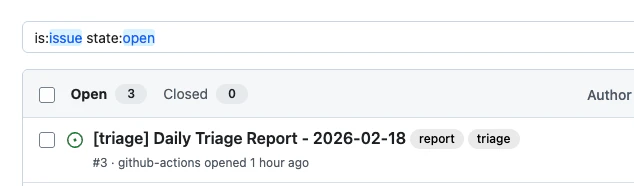
6. 自動で実行できるようにしよう!
on:
  schedule: daily
  workflow_dispatch:
mdファイルが上記のようになっていれば、
以後は定期的に実行されます(次回のスケジュール時刻に実行)
issueの中身を見てみると・・・
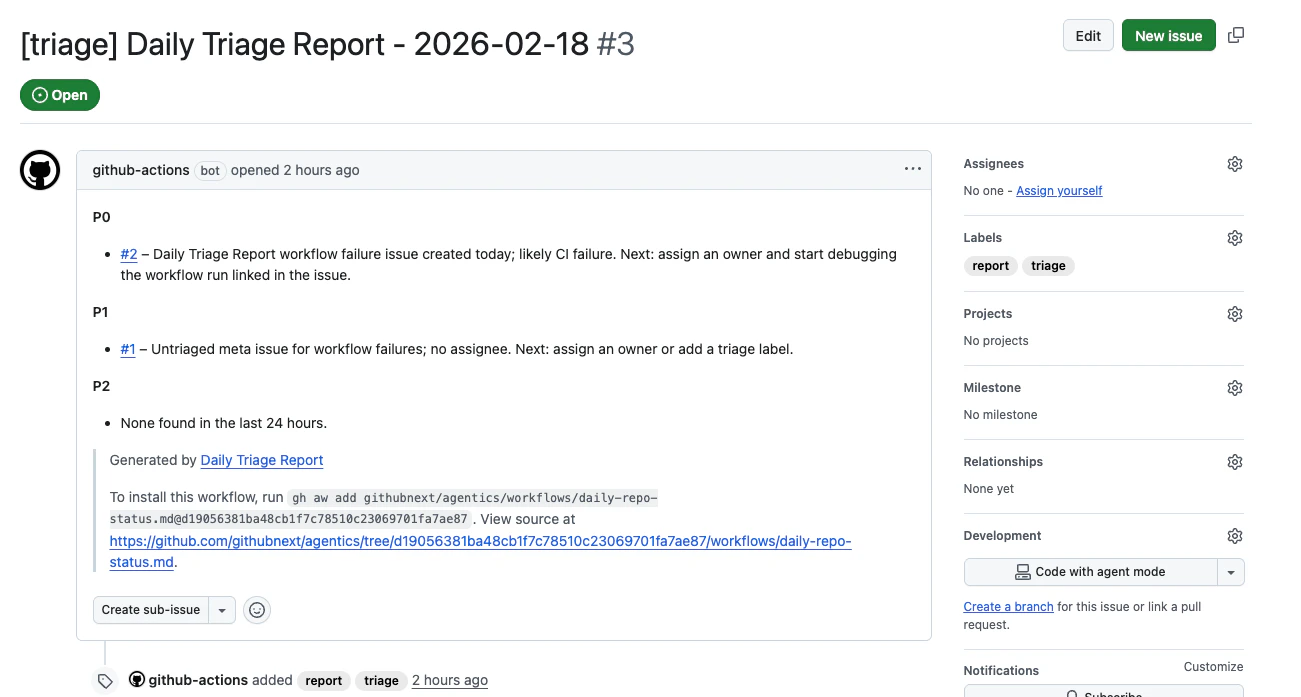
筆者が作成したのは2/18なのですが、日付がタイトルに入ったIssueができてますね!
triageやreportのラベルがついています。
今回はP0→P1→P2という感じで、優先度を分けた 今日対応するべきリスト
を揃える内容にしてみました!
他にも、
- 失敗したCIをまとめる
- レポートを自動作成して運用当番はTODOを確認する
などなど、Issueを使用したドキュメント整備が可能です!
参考