はじめに
今回は前回に引き続き、CloudFormationを使用してネットワーク環境を構築してみました。
AWSコンソール上での手動構築手順は以下をご参照ください。
今回のゴール
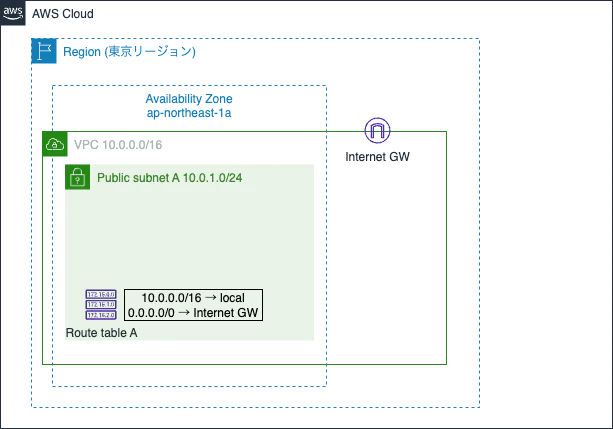
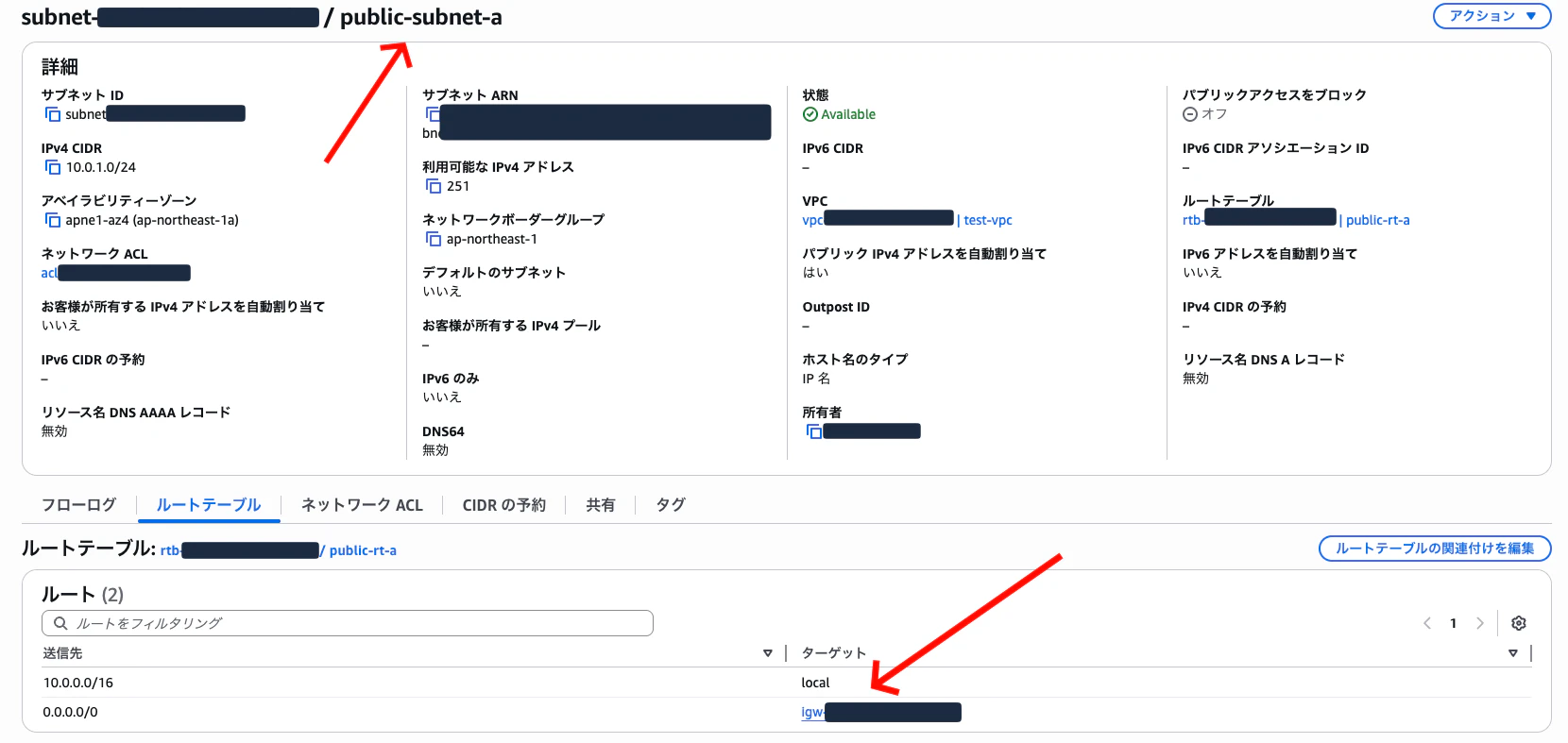
手順
- VPCを作成する
- Internet GWの作成とアタッチ
- AZ 1aにPublic subnet Aを作成する
- ルートテーブル Aを作成しPublic Subnet Aと関連付ける
1. VPCを作成する
「VPCの作成」や、「スタックの更新」などに関しては、こちらの記事をご参照ください。
2. Internet GWの作成とアタッチ
以下の公式ドキュメントを参照しながらテンプレートを編集します。
test.yml
AWSTemplateFormatVersion: "2010-09-09"
Description: Network Infrastructure

Resources:
  myVPC:
    Type: AWS::EC2::VPC
    Properties:
      CidrBlock: 10.0.0.0/16
      Tags:
        - Key: Name
          Value: test-vpc

  # Internet Gateway 作成
  myInternetGateway:
    Type: AWS::EC2::InternetGateway
    Properties:
      Tags:
        - Key: Name
          Value: test-igw

  # VPCにアタッチ
  AttachGateway:
    Type: AWS::EC2::VPCGatewayAttachment
    Properties:
      VpcId: !Ref myVPC # VPCリソースの ID / 値を参照する
      InternetGatewayId: !Ref myInternetGateway # 依存関係は Ref で解決される(通常 DependsOn 不要)
上記のテンプレートでスタックを更新すると、
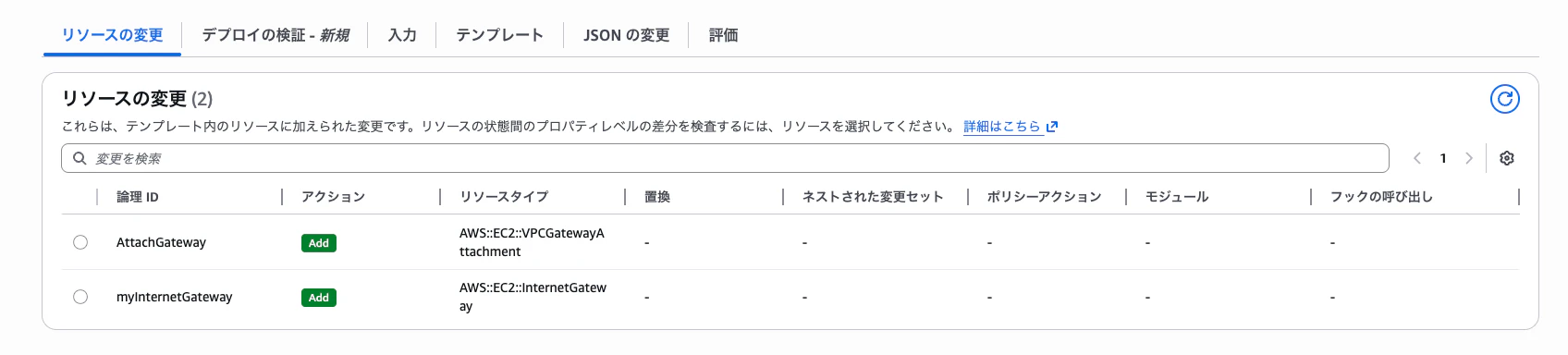
インターネットゲートウェイがVPCにアタッチされました。

3. AZ 1aにPublic subnet Aを作成する
以下の公式ドキュメントを参照しながらテンプレートを編集します。
test.yml
AWSTemplateFormatVersion: "2010-09-09"
Description: Network Infrastructure

Resources:
  myVPC:
    Type: AWS::EC2::VPC
    Properties:
      CidrBlock: 10.0.0.0/16
      Tags:
        - Key: Name
          Value: test-vpc

  myInternetGateway:
    Type: AWS::EC2::InternetGateway
    Properties:
      Tags:
        - Key: Name
          Value: test-igw

  AttachGateway:
    Type: AWS::EC2::VPCGatewayAttachment
    Properties:
      VpcId: !Ref myVPC
      InternetGatewayId: !Ref myInternetGateway

  PublicSubnetA:
    Type: AWS::EC2::Subnet
    Properties:
      VpcId: !Ref myVPC
      CidrBlock: 10.0.1.0/24
      AvailabilityZone: ap-northeast-1a
      MapPublicIpOnLaunch: true # EC2起動時に 自動でパブリックIPを付与するかを制御する。Public Subnetでは基本trueにしておく
      Tags:
        - Key: Name
          Value: public-subnet-a
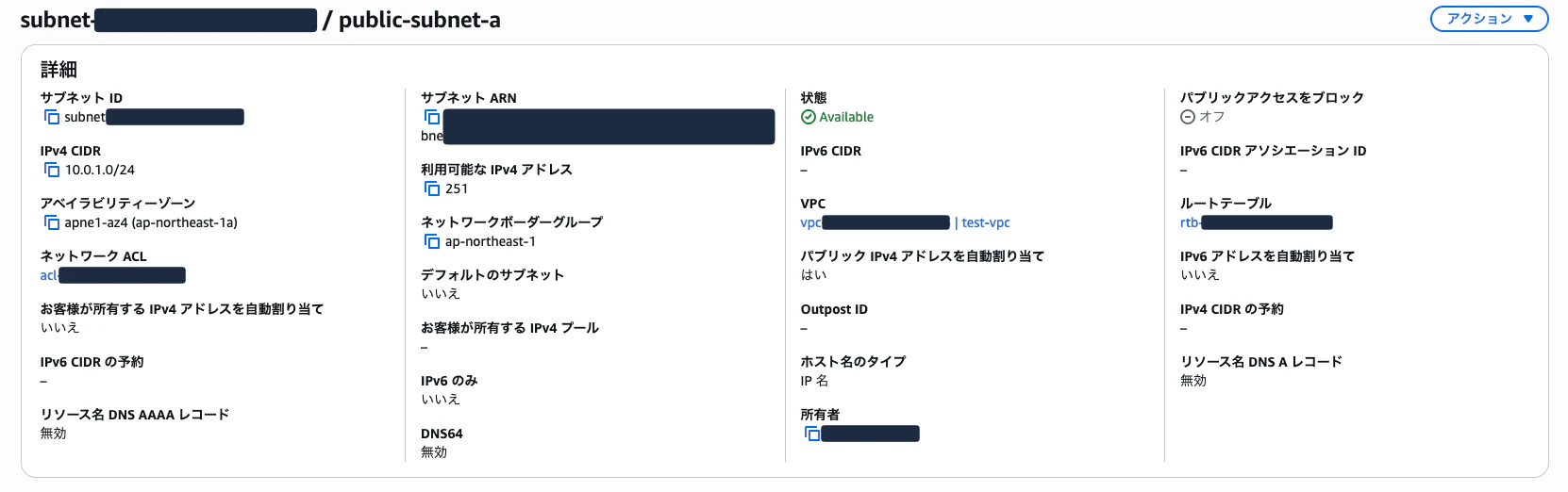
上記のテンプレートでスタックを更新すると、

サブネットAが作成されました。
4. ルートテーブル Aを作成しPublic Subnet Aと関連付ける
以下の公式ドキュメントを参照しながらテンプレートを編集します。
test.yml
AWSTemplateFormatVersion: "2010-09-09"
Description: Network Infrastructure

Resources:
  myVPC:
    Type: AWS::EC2::VPC
    Properties:
      CidrBlock: 10.0.0.0/16
      Tags:
        - Key: Name
          Value: test-vpc

  myInternetGateway:
    Type: AWS::EC2::InternetGateway
    Properties:
      Tags:
        - Key: Name
          Value: test-igw

  AttachGateway:
    Type: AWS::EC2::VPCGatewayAttachment
    Properties:
      VpcId: !Ref myVPC
      InternetGatewayId: !Ref myInternetGateway

  PublicSubnetA:
    Type: AWS::EC2::Subnet
    Properties:
      VpcId: !Ref myVPC
      CidrBlock: 10.0.1.0/24
      AvailabilityZone: ap-northeast-1a
      MapPublicIpOnLaunch: true
      Tags:
        - Key: Name
          Value: public-subnet-a

  # Route Table A
  PublicRouteTableA:
    Type: AWS::EC2::RouteTable
    Properties:
      VpcId: !Ref myVPC
      Tags:
        - Key: Name
          Value: public-rt-a

  # 0.0.0.0/0 → IGW
  PublicRouteA:
    Type: AWS::EC2::Route
    DependsOn: AttachGateway # IGWアタッチ後にルート作成するため DependsOn を使うのが安全
    Properties:
      RouteTableId: !Ref PublicRouteTableA
      DestinationCidrBlock: 0.0.0.0/0
      GatewayId: !Ref myInternetGateway

  # Subnet A と RouteTable A を関連付け
  PublicSubnetAssociationA:
    Type: AWS::EC2::SubnetRouteTableAssociation
    Properties:
      SubnetId: !Ref PublicSubnetA
      RouteTableId: !Ref PublicRouteTableA
上記のテンプレートでスタックを更新すると、
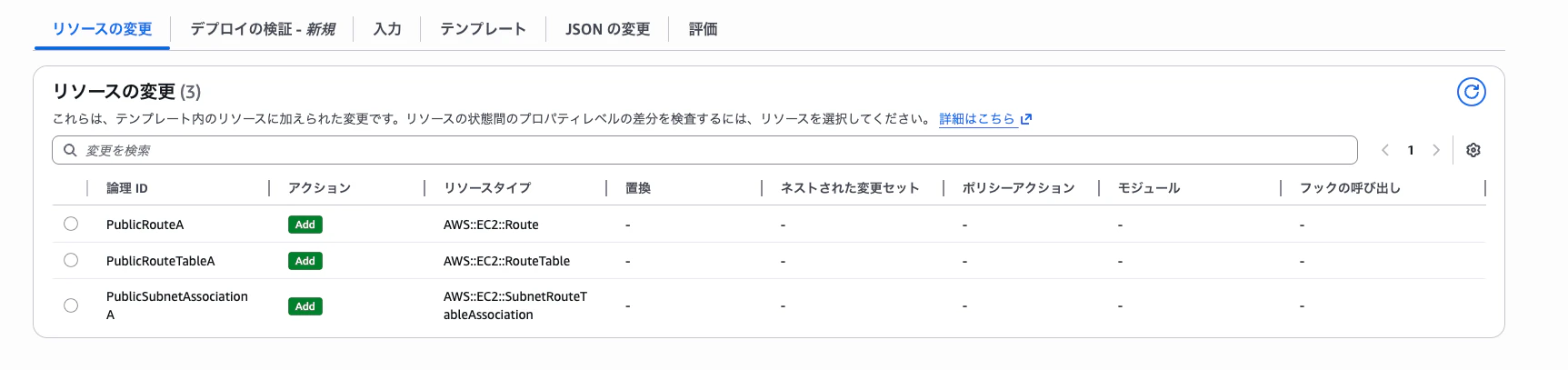
無事にサブネットへの関連付けも完了しました!