
アナウンスの通り Oracle AI Database 26ai のオンプレミス版が公開されました。本記事では Oracle Linux 9.6 に対する Oracle AI Database 26ai の初期インストールとデータベース作成について記述しています。
インストール・メディアの入手
Oracle AI Database 26ai のインストールメディアはこちらまたは、Oracle Software Delivery Cloud からダウンロードできます。Red Hat Enterprise Linux (Oracle Linux) 用の RPM 版と、ZIP 版が公開されています。本記事では RPM 版のインストールを試します。
Pre-Install
Oracle AI Database 26ai のインストール用にオペレーティング・システム設定を自動的に行う Pre-Install RPM の利用が便利です。こちら からダウンロードできます。
# rpm -qpR oracle-ai-database-preinstall-26ai-1.0-1.el9.x86_64.rpm
warning: oracle-ai-database-preinstall-26ai-1.0-1.el9.x86_64.rpm: Header V4 RSA/SHA256 Signature, key ID 8d8b756f: NOKEY
/bin/sh
/bin/sh
/bin/sh
/etc/redhat-release
/usr/bin/bash
bc >= 1.07.1
bind-utils
binutils >= 2.35.2
compat-openssl11
config(oracle-ai-database-preinstall-26ai) = 1.0-1.el9
ethtool
fontconfig >= 2.14.0
glibc >= 2.34
glibc-devel >= 2.34
initscripts
ksh
libaio >= 0.3.111
libgcc >= 11.3.1
libstdc++ >= 11.3.1
libxcrypt-compat >= 4.4.18
make >= 4.3
module-init-tools
net-tools >= 2.0
nfs-utils >= 2.5.4
openssh-clients
pam
policycoreutils
policycoreutils-python-utils
procps
psmisc
rpmlib(CompressedFileNames) <= 3.0.4-1
rpmlib(FileDigests) <= 4.6.0-1
rpmlib(PayloadFilesHavePrefix) <= 4.0-1
rpmlib(PayloadIsXz) <= 5.2-1
rpmlib(PayloadIsZstd) <= 5.4.18-1
smartmontools >= 7.2
sysstat >= 12.5.4
tar
unzip
util-linux-ng
xorg-x11-utils
xorg-x11-xauth
#
# rpm -ivh oracle-ai-database-preinstall-26ai-1.0-1.el9.x86_64.rpm
warning: oracle-ai-database-preinstall-26ai-1.0-1.el9.x86_64.rpm: Header V4 RSA/SHA256 Signature, key ID 8d8b756f: NOKEY
Verifying...                            ################################# [100%]
Preparing...                            ################################# [100%]
Updating / installing...
   1:oracle-ai-database-preinstall-26a  ################################# [100%]
#
RPM のインストールにより、カーネル・パラメーターの設定や、管理用グループ、ユーザーが作成されます。
# id oracle
uid=54321(oracle) gid=54321(oinstall) groups=54321(oinstall),54322(dba),54323(oper),54324(backupdba),54325(dgdba),54326(kmdba),54330(racdba)
RPM のインストール
Oracle AI Database 26ai の RPM 版をインストールします。インストール自体は簡単です。
# rpm -ivh oracle-ai-database-ee-26ai-1.0-1.el9.x86_64.rpm
warning: oracle-ai-database-ee-26ai-1.0-1.el9.x86_64.rpm: Header V3 RSA/SHA256 Signature, key ID 8d8b756f: NOKEY
Verifying...                          ################################# [100%]
Preparing...                          ################################# [100%]
Updating / installing...
   1:oracle-ai-database-ee-26ai-1.0-1 ################################# [100%]
[INFO] Executing post installation scripts...
[INFO] Oracle home installed successfully and ready to be configured.
To configure a sample Oracle AI Database, optionally modify the parameters in '/etc/sysconfig/oracledb_ORCLCDB-26ai.conf' and then run following service configuration script as root: /etc/init.d/oracledb_ORCLCDB-26ai configure
#
サンプル・データベースの作成
インストール完了後に、サンプルデータベースの作成を行う方法が出力されます。rootユーザーで「/etc/init.d/oracledb_ORCLCDB-26ai configure」コマンドを実行します。デフォルトでは以下の属性でデータベースが作成されます。変更するには /etc/sysconfig/oracledb_ORCLCDB-26ai.conf ファイルを変更します。
| パラメーター | 名前 | デフォルト値 |
|---|---|---|
| リスナーのポート番号 | LISTENER_PORT | 1521 |
| 文字コード | CHARSET | AL32UTF8 |
| データ格納ディレクトリ | ORACLE_DATA_LOCATION | /opt/oracle/oradata |
| TDE を有効化するか | CONFIGURE_TDE | false |
| TDE 対象表領域名 | ENCRYPT_TABLESPACES | '' |
# /etc/init.d/oracledb_ORCLCDB-26ai configure
/opt/oracle/product/26ai/dbhome_1/bin/dbca -silent -createDatabase -gdbName ORCLCDB -templateName General_Purpose.dbc -characterSet AL32UTF8 -createAsContainerDatabase true -numberOfPDBs 1 -pdbName ORCLPDB1 -createListener LISTENER:1521 -datafileDestination /opt/oracle/oradata -sid ORCLCDB -autoGeneratePasswords
Configuring Oracle AI Database ORCLCDB.
Prepare for db operation
8% complete
Copying database files
31% complete
Creating and starting Oracle instance
32% complete
36% complete
39% complete
42% complete
46% complete
Completing Database Creation
51% complete
53% complete
54% complete
Creating Pluggable Databases
58% complete
77% complete
Executing Post Configuration Actions
100% complete
Database creation complete. For details check the logfiles at:
 /opt/oracle/cfgtoollogs/dbca/ORCLCDB.
Database Information:
Global Database Name:ORCLCDB
System Identifier(SID):ORCLCDB
Look at the log file "/opt/oracle/cfgtoollogs/dbca/ORCLCDB/ORCLCDB.log" for further details.

Database configuration completed successfully. The passwords were auto generated, you must change them by connecting to the database using 'sqlplus / as sysdba' as the oracle user.
#
oracle ユーザーの環境変数を以下のように変更し、インスタンスに接続します。
| 環境変数名 | 設定値 | 備考 |
|---|---|---|
| ORACLE_BASE | /opt/oracle | |
| ORACLE_HOME | /opt/oracle/product/26ai/dbhome_1 | |
| ORACLE_SID | ORCLCDB | |
| PATH | \${PATH}:\${ORACLE_HOME}/bin | |
| NLS_LANG | 任意 | JAPANESE_JAPAN.AL32UTF8 等 |
SQL> SELECT * FROM V$VERSION;

BANNER
--------------------------------------------------------------------------------
BANNER_FULL
--------------------------------------------------------------------------------
BANNER_LEGACY
--------------------------------------------------------------------------------
    CON_ID
----------
Oracle AI Database 26ai Enterprise Edition Release 23.26.1.0.0 - Production
Oracle AI Database 26ai Enterprise Edition Release 23.26.1.0.0 - Production
Version 23.26.1.0.0
Oracle AI Database 26ai Enterprise Edition Release 23.26.1.0.0 - Production
         0
DBCA によるデータベース作成
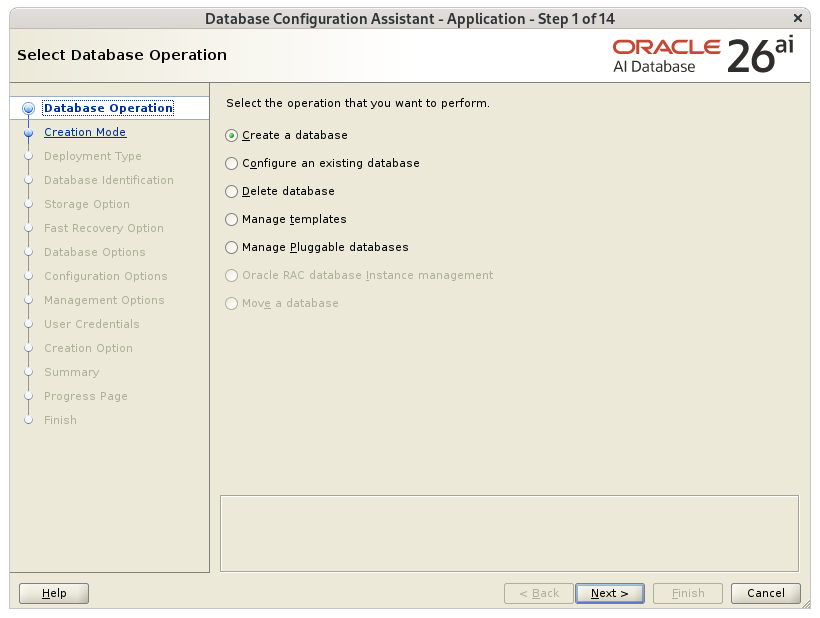
スクリプト /etc/init.d/oracledb_ORCLCDB-26ai はあくまでサンプル用データベースを簡易的に作成するツールです。従来通り、データベースの作成には Database Configuration Assistant(DBCA) が提供されています。設定項目は旧バージョンと変わりません。
参考
Oracle AI Database 26ai : Database Installation Guide 26ai for Linux G43069-03
Author: Noriyoshi Shinoda / Date: January 29, 2026