

※Qiita始めたのでHatenaやめようと思ったので昔の写しです。
参考はこちら
http://www.groovy-number.com/java/sample/PieChart.html
http://detail.chiebukuro.yahoo.co.jp/qa/question_detail/q1148380601
import static java.awt.RenderingHints.KEY_ANTIALIASING;
import static java.awt.RenderingHints.VALUE_ANTIALIAS_ON;

import java.awt.Color;
import java.awt.Graphics;
import java.awt.Graphics2D;
import java.util.Random;

public class PieChartPainter {
	private final Random r = new Random();

	/**
	 * 円グラフ描画
	 *
	 * @param graphics
	 * @param pieSize
	 *            円グラフ直径
	 * @param width
	 *            描画範囲幅
	 * @param height
	 *            描画範囲高さ
	 * @param data
	 *            グラフデータ
	 */
	public void paint(Graphics graphics, int pieSize, int width, int height,
			int[] data) {
		if (graphics instanceof Graphics2D) {
			// アンチエイリアス
			((Graphics2D) graphics).setRenderingHint(KEY_ANTIALIASING,
					VALUE_ANTIALIAS_ON);
		}

		// 配列の和
		int sum = sum(data);
		// 割合計算
		int tmp[] = new int[data.length];
		for (int i = 0; i < data.length; i++) {
			tmp[i] = (int) (((double) data[i] / sum) * 360.0);
		}
		// 誤差調整
		int cnt = 0;
		while (sum(tmp) != 360) {
			try {
				tmp[cnt++] += 1;
			} catch (Exception e) {
				break;
			}
		}
		// グラフ描画
		sum = 90;
		for (int i = 0; i < tmp.length; i++) {
			graphics.setColor(getColor(i));
			// 描画
			graphics.fillArc((width / 2) - (pieSize / 2), (height / 2)
					- (pieSize / 2), pieSize, pieSize, sum, -tmp[i]);
			sum -= tmp[i];
		}
	}

	private int sum(int data[]) {
		int sum = 0;
		for (int element : data) {
			sum += element;
		}
		return sum;
	}

	protected Color getColor(int index) {
		return new Color(r.nextInt(0xff), r.nextInt(0xff), r.nextInt(0xff));
	}
}
import java.awt.Color;
import java.awt.Dimension;
import java.awt.Graphics;
import java.util.Arrays;
import java.util.Random;

import javax.swing.JFrame;
import javax.swing.JPanel;

public class Sample extends JFrame {
	class SamplePanel extends JPanel {
		public static final int WIDTH = 400;
		public static final int HEIGHT = 400;

		private final Random r = new Random();

		private final int SIZE = 300;

		SamplePanel() {
			setPreferredSize(new Dimension(WIDTH, HEIGHT));
			setBackground(Color.WHITE);
		}

		/**
		 * paintComponent()
		 */
		@Override
		public void paintComponent(Graphics g) {
			super.paintComponent(g);

			int[] data;
			{
				int cnt = r.nextInt(10) + 2;
				int[] tmp = new int[cnt];
				for (int i = 0; i < tmp.length; i++) {
					tmp[i] = r.nextInt(100);
				}

				Arrays.sort(tmp);

				data = new int[cnt];
				for (int i = 0; i < data.length; i++) {
					data[i] = tmp[data.length - i - 1];
				}
			}

			PieChartPainter painter = new PieChartPainter();
			painter.paint(g, SIZE, WIDTH, HEIGHT, data);
		}
	}

	Sample() {
		add(new SamplePanel());
		pack();
		setTitle("円グラフ");
		setDefaultCloseOperation(JFrame.EXIT_ON_CLOSE);
		setLocationRelativeTo(null);
		setVisible(true);
	}

	/**
	 * 実行
	 */
	public static void main(String[] args) {
		new Sample();

	}
}
特定の扇だけ切り離したい。
こういうの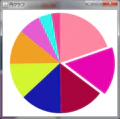
	/**
	 * 円グラフ描画
	 *
	 * @param graphics
	 * @param pieSize
	 *            円グラフ直径
	 * @param width
	 *            描画範囲幅
	 * @param height
	 *            描画範囲高さ
	 * @param data
	 *            グラフデータ
	 * @param highlightIndex
	 *            indexの扇だけ離す
	 */
	public void paint(Graphics graphics, double pieSize, double width,
			double height, int[] data, int highlightIndex) {
		if (graphics instanceof Graphics2D) {
			// アンチエイリアス
			((Graphics2D) graphics).setRenderingHint(KEY_ANTIALIASING,
					VALUE_ANTIALIAS_ON);
		}

		// 配列の和
		int sum = sum(data);
		// 割合計算
		int tmp[] = new int[data.length];
		for (int i = 0; i < data.length; i++) {
			tmp[i] = (int) (((double) data[i] / sum) * 360.0);
		}
		// 誤差調整
		int cnt = 0;
		while (sum(tmp) != 360) {
			try {
				tmp[cnt++] += 1;
			} catch (Exception e) {
				break;
			}
		}
		// グラフ描画
		sum = 90;
		for (int i = 0; i < tmp.length; i++) {
			graphics.setColor(getColor(i));

			if (i == highlightIndex) {
				// highlight
				int c = sum - (tmp[i] / 2);
				double r = Math.toRadians(c);
				double addX = (Math.cos(r) * pieSize) / 20;// 1/20離す
				double addY = (Math.sin(r) * pieSize) / 20;// 1/20離す
				// 描画
				graphics.fillArc((int) (((width / 2) - (pieSize / 2)) + addX),
						(int) (((height / 2) - (pieSize / 2)) - addY),
						(int) pieSize, (int) pieSize, sum, -tmp[i]);
			} else {
				// 描画
				graphics.fillArc((int) ((width / 2) - (pieSize / 2)),
						(int) ((height / 2) - (pieSize / 2)), (int) pieSize,
						(int) pieSize, sum, -tmp[i]);
			}
			sum -= tmp[i];
		}
	}