
どんなボタンがあったかな?って時に
コピペで使えるシリーズの記事を書いてみようかと、思ったので投稿しました。
まず、画像を確認して、下にコードがあるのでコピペ
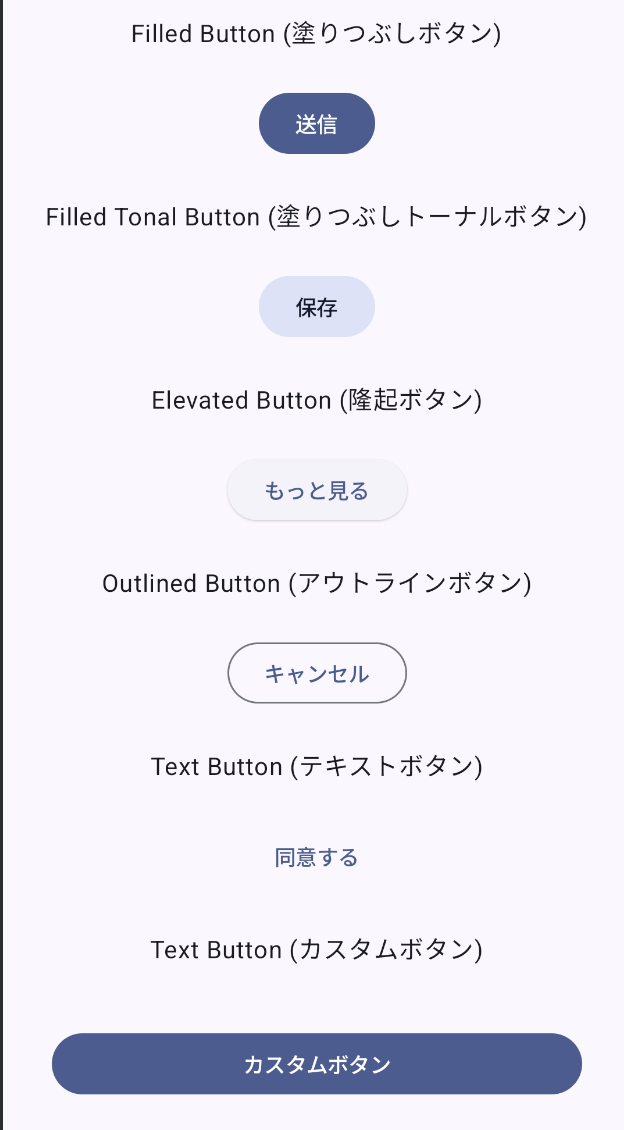
Filled Button (塗りつぶしボタン)
@Composable
fun MyFilledButton() {
    Button(onClick = { /* ボタンがクリックされた時の処理 */ }) {
        Text("送信")
    }
}
Filled Tonal Button (塗りつぶしトーナルボタン)
@Composable
fun MyFilledTonalButton() {
    FilledTonalButton(onClick = { /* ボタンがクリックされた時の処理 */ }) {
        Text("保存")
    }
}
Elevated Button (隆起ボタン)
@Composable
fun MyElevatedButton() {
    ElevatedButton(onClick = { /* ボタンがクリックされた時の処理 */ }) {
        Text("もっと見る")
    }
}
Outlined Button (アウトラインボタン)
@Composable
fun MyOutlinedButton() {
    OutlinedButton(onClick = { /* ボタンがクリックされた時の処理 */ }) {
        Text("キャンセル")
    }
}
Text Button (テキストボタン)
@Composable
fun MyTextButton() {
    TextButton(onClick = { /* ボタンがクリックされた時の処理 */ }) {
        Text("同意する")
    }
}
カスタムボタン
@Composable
fun MyCustomButton() {
    Button(
        onClick = { /* ボタンがクリックされた時の処理 */ },
        modifier = Modifier
            .fillMaxWidth() // 親の幅いっぱいに広げる
            .padding(16.dp) // 上下左右に 16dp のパディングを追加
    ) {
        Text("カスタムボタン")
    }
}