

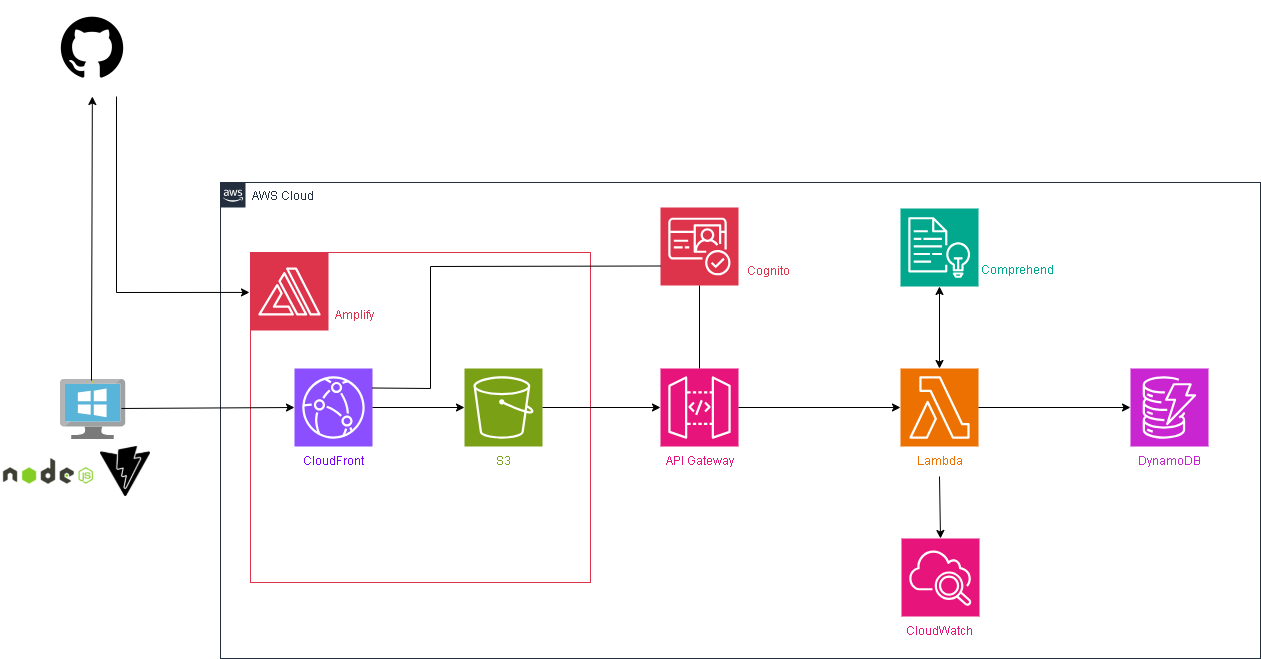
構築したこちらのWebアプリに対してユーザ認証機能を追加します。
また、API Gatewayも今のままだとURLを知っている人は直打ちすることが出来るというセキュリティリスクを内包しているので、これも認証済みの人からしか実行できないようにします。
環境イメージ
Cognitoを追加します。
構築
Cognito
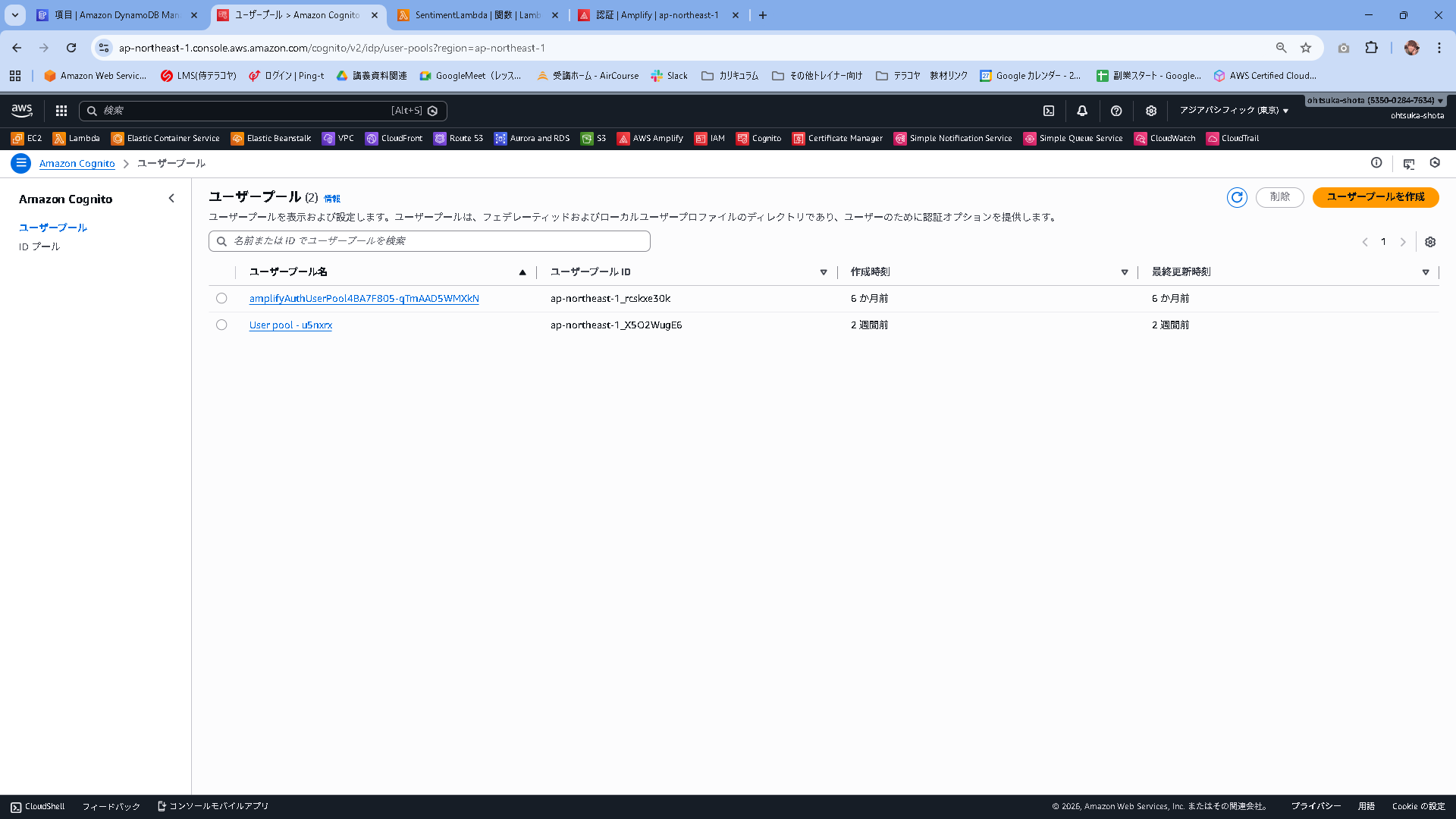
ユーザプールを作成していきます。
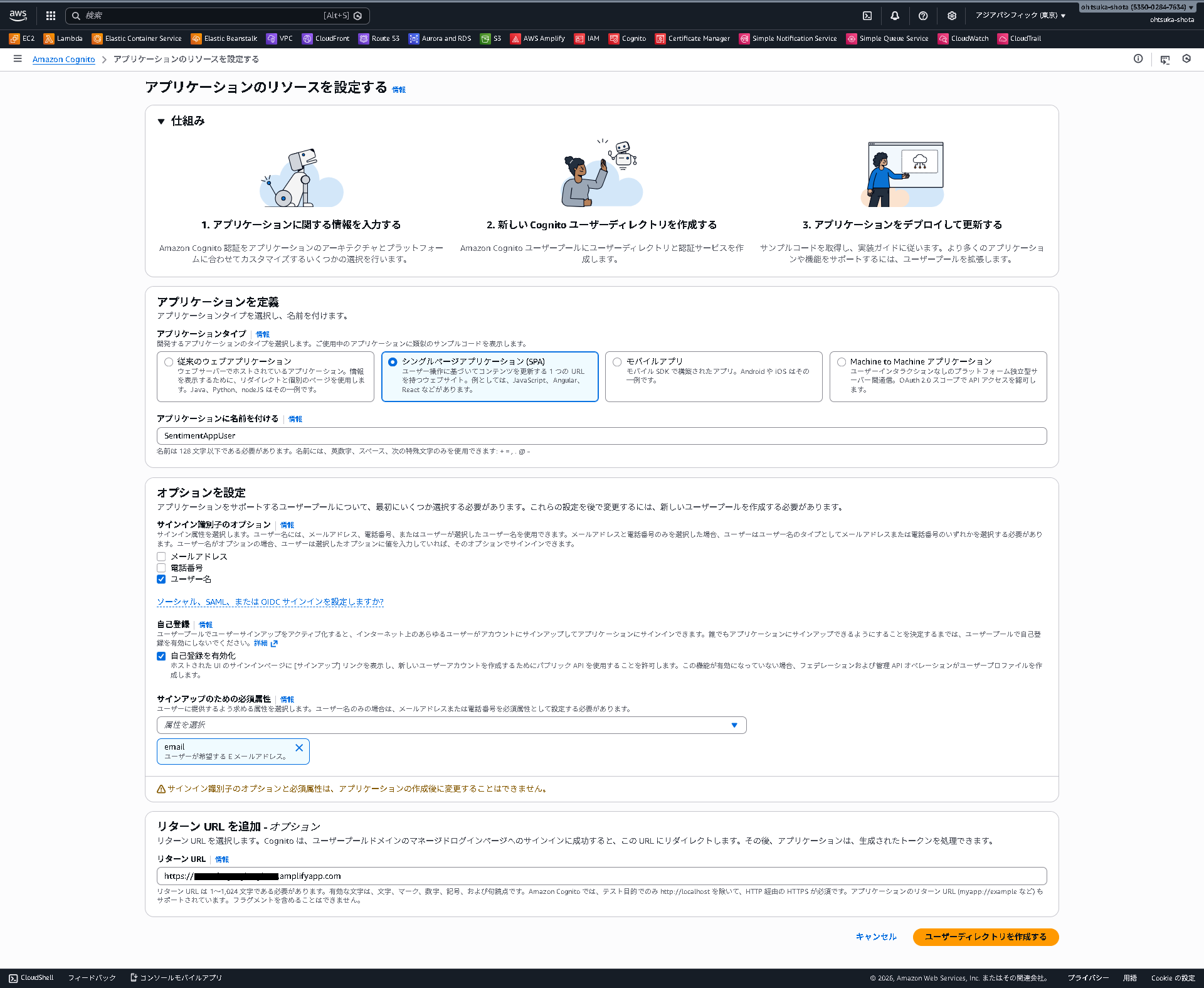
今回フロントエンドはReactで出来ているので、SPAを選択。
アプリケーションはSentimentAppUserとしました。
サインイン識別子はとユーザ名
サインアップはemail
リターンURLはAmplifyで払い出されているURLを指定します。
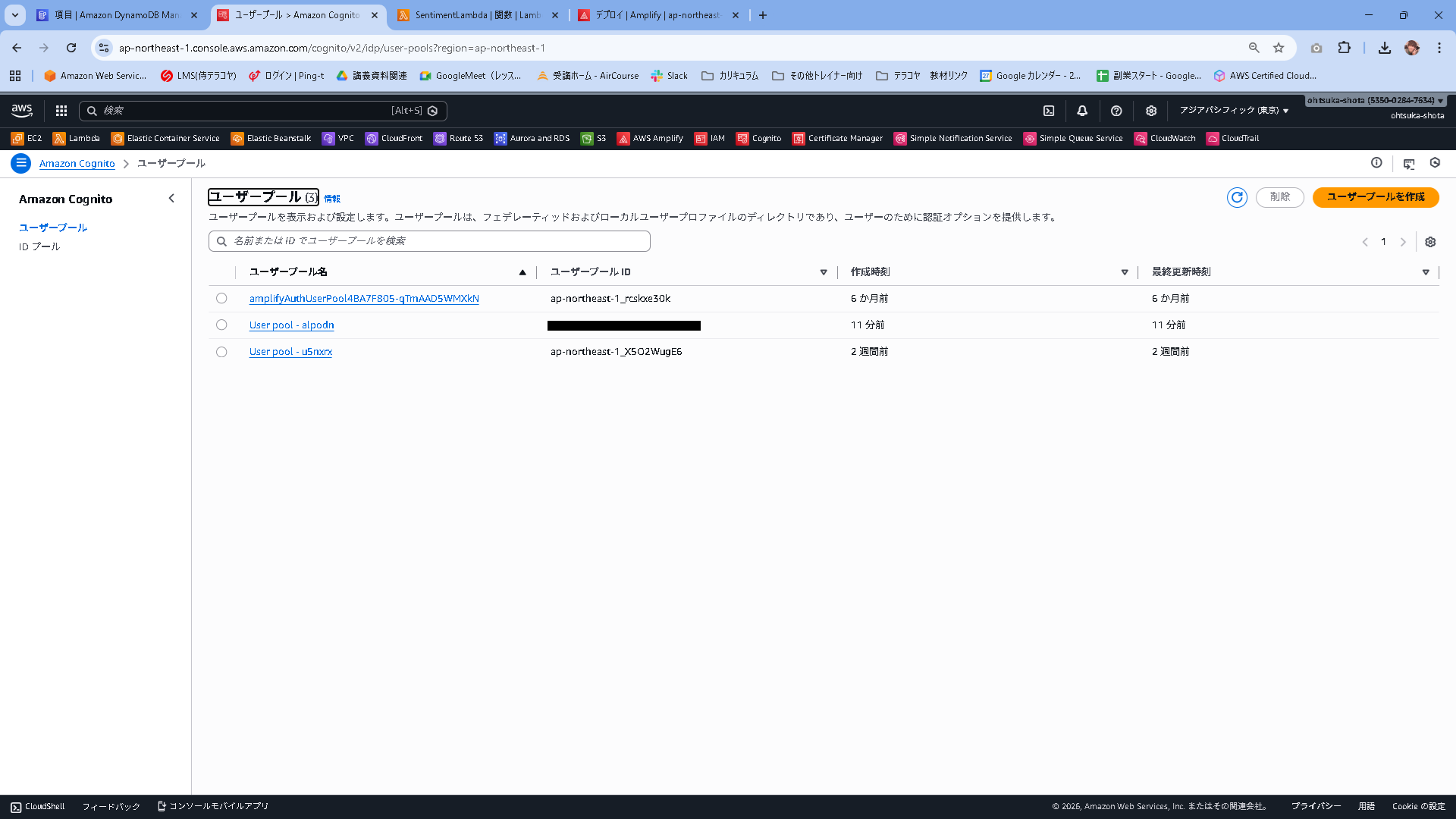
作成出来たことがわかります。
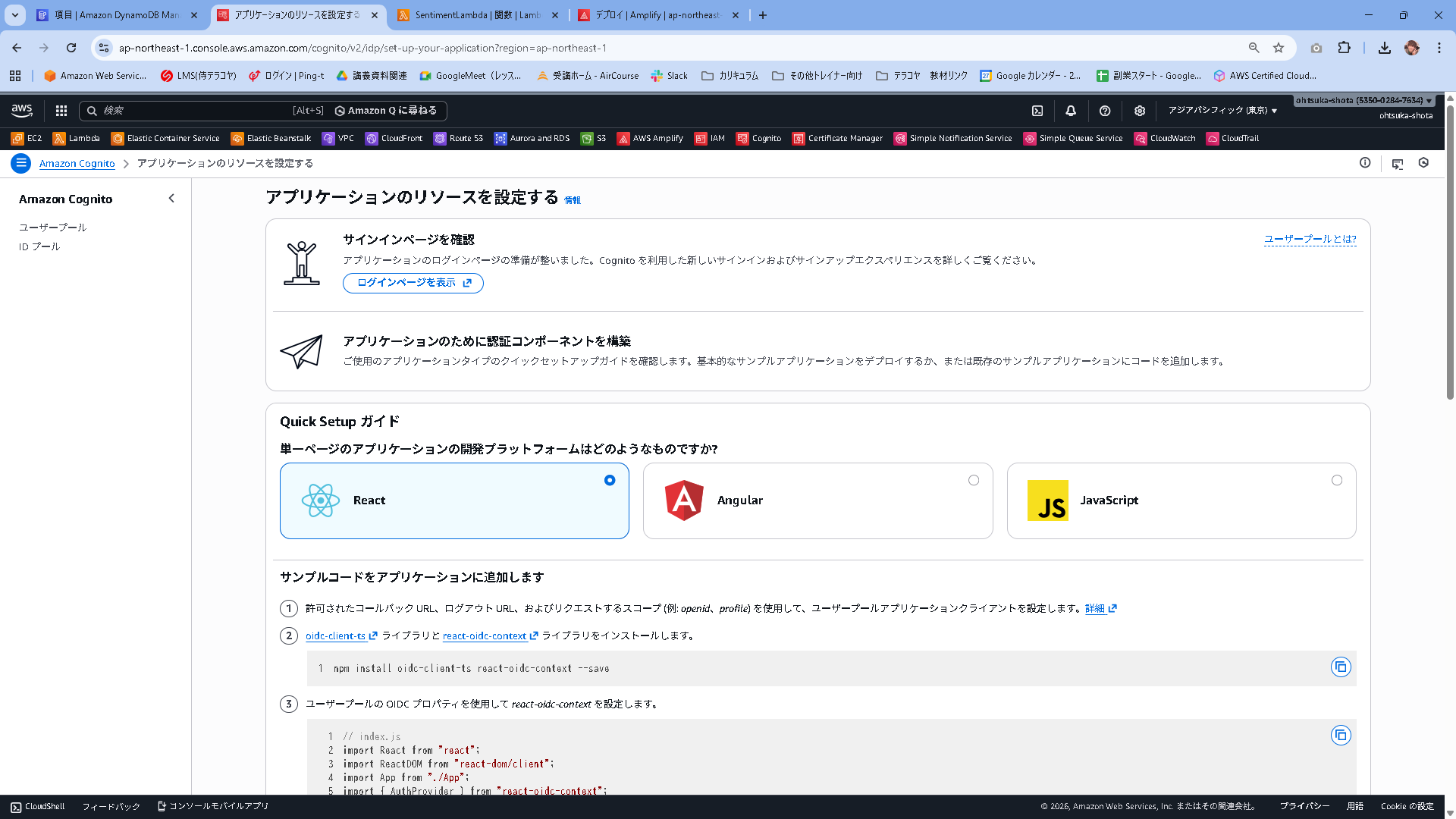
認証方法のタブでパスワードポリシーを変更することが出来ます。今回はデフォルトのまま行きたいと思います。

アプリケーションクライアントを押下します。ここのクライアントIDを控えます。

ユーザプールIDも控えます。
Amplify+コーディング
以下を実行して必要な資材をインストールします。
npm install aws-amplify @aws-amplify/ui-react
main.jsxを以下に書き換えます
import { StrictMode } from 'react'
import { createRoot } from 'react-dom/client'
import './index.css'
import App from './App.jsx'
// ★追加1: Amplifyライブラリの読み込み
import { Amplify } from 'aws-amplify';

// ★追加2: Cognitoの設定
Amplify.configure({
  Auth: {
    Cognito: {
      userPoolId: 'ap-northeast-1_xxxxxxxxx', // ここを書き換える
      userPoolClientId: 'xxxxxxxxxxxxxxxxx',    // ここを書き換える
    }
  }
});

createRoot(document.getElementById('root')).render(
  <StrictMode>
    <App />
  </StrictMode>,
)
App.jsxを以下に書き換えます。
import { useMemo, useState } from "react";
import { Authenticator } from '@aws-amplify/ui-react';
import '@aws-amplify/ui-react/styles.css';
import { fetchAuthSession } from 'aws-amplify/auth';

const API_BASE = (import.meta.env.VITE_API_BASE_URL ?? "").replace(/\/$/, "");

async function safeReadText(res) {
  try {
    return await res.text();
  } catch {
    return "";
  }
}

function formatScore(v) {
  if (typeof v !== "number" || Number.isNaN(v)) return "-";
  return v.toFixed(3);
}

// ★修正箇所: Authenticatorに設定を追加
export default function App() {
  return (
    <Authenticator
      // これを追加すると、Create Account画面にEmail入力欄が表示されます
      signUpAttributes={['email']}
    >

      {({ signOut, user }) => (
        <MainApp signOut={signOut} user={user} />
      )}
    </Authenticator>
  );
}

// --- 以下、MainAppの中身は変更ありません ---

function MainApp({ signOut, user }) {
  const [text, setText] = useState("");
  const [loading, setLoading] = useState(false);
  const [error, setError] = useState("");
  const [result, setResult] = useState(null);
  const [apiStatus, setApiStatus] = useState("unchecked");

  const canSubmit = useMemo(() => {
    const len = text.trim().length;
    return !loading && len > 0 && len <= 1000;
  }, [text, loading]);

  const apiStatusLabel =
    !API_BASE
      ? "未設定"
      : apiStatus === "ok"
        ? "接続OK"
        : apiStatus === "ng"
          ? "接続NG"
          : "未確認";

  async function onSubmit(e) {
    e.preventDefault();
    setError("");
    setResult(null);

    if (!API_BASE) {
      setApiStatus("unset");
      setError("API の設定がありません(VITE_API_BASE_URL を確認してください)。");
      return;
    }

    setLoading(true);
    try {
      const session = await fetchAuthSession();
      const token = session.tokens?.idToken?.toString();

      if (!token) {
        throw new Error("認証トークンの取得に失敗しました");
      }

      const res = await fetch(`${API_BASE}/analyze`, {
        method: "POST",
        headers: {
          "Content-Type": "application/json",
          "Authorization": token
        },
        body: JSON.stringify({ text: text.trim() }),
      });

      if (!res.ok) {
        const bodyText = await safeReadText(res);
        throw new Error(bodyText || `HTTP ${res.status}`);
      }

      const data = await res.json();
      setResult(data);
      setApiStatus("ok");
    } catch (err) {
      setApiStatus("ng");
      setError(err instanceof Error ? err.message : String(err));
    } finally {
      setLoading(false);
    }
  }

  const sentiment = result?.sentiment ?? "UNKNOWN";
  const scores = result?.scores ?? result?.SentimentScore ?? null;

  const sentimentClass =
    sentiment === "POSITIVE"
      ? "sentiment-positive"
      : sentiment === "NEGATIVE"
        ? "sentiment-negative"
        : sentiment === "MIXED"
          ? "sentiment-mixed"
          : sentiment === "NEUTRAL"
            ? "sentiment-neutral"
            : "sentiment-unknown";

  return (
    <div className="page">
      <main className="card">
        <div className="header">
          <div>
            <h1 className="title">感情分析デモ</h1>
            <p className="subtitle">ユーザー: {user?.signInDetails?.loginId || user?.username}</p>
            <p className="subtitle" style={{marginTop: '4px'}}>API接続: {apiStatusLabel}</p>
          </div>
          <div>
             <button
               onClick={signOut}
               className="btn"
               style={{ backgroundColor: '#4b5563', fontSize: '12px', padding: '8px 12px' }}
             >
               ログアウト
             </button>
          </div>
        </div>

        <form onSubmit={onSubmit} className="form">
          <textarea
            className="textarea"
            value={text}
            onChange={(e) => setText(e.target.value)}
            placeholder="ここに文章を入力してください(最大1000文字)"
          />

          <div className="row">
            <small className="counter">{text.length} / 1000</small>

            <button type="submit" className="btn" disabled={!canSubmit}>
              {loading ? "分析中..." : "分析する"}
            </button>
          </div>

          <p className="hint">
            改行しやすいように Enter 送信ではなくボタン送信にしています。
          </p>
        </form>

        {error && <div className="alert alert--error">{error}</div>}

        {result && (
          <section className="resultCard">
            <h2 className="h2">結果</h2>

            <div className="badges">
              <span className={`badge ${sentimentClass}`}>
                sentiment: <strong>{sentiment}</strong>
              </span>

              {scores && (
                <>
                  <span className="badge badge--pos">
                    Positive: <strong>{formatScore(scores.Positive)}</strong>
                  </span>
                  <span className="badge badge--neg">
                    Negative: <strong>{formatScore(scores.Negative)}</strong>
                  </span>
                  <span className="badge badge--neu">
                    Neutral: <strong>{formatScore(scores.Neutral)}</strong>
                  </span>
                  <span className="badge badge--mix">
                    Mixed: <strong>{formatScore(scores.Mixed)}</strong>
                  </span>
                </>
              )}
            </div>

            <pre className="pre">{JSON.stringify(result, null, 2)}</pre>
          </section>
        )}
      </main>
    </div>
  );
}
API Gateway
API Gatewayは今現在の設定だと、URLを知っている人であればダイレクトにアクセスして実行することが出来る状態です。これをCognito認証が出来ている人(≒Webからアクセスしてきている人)だけからしか実行できないようにします。
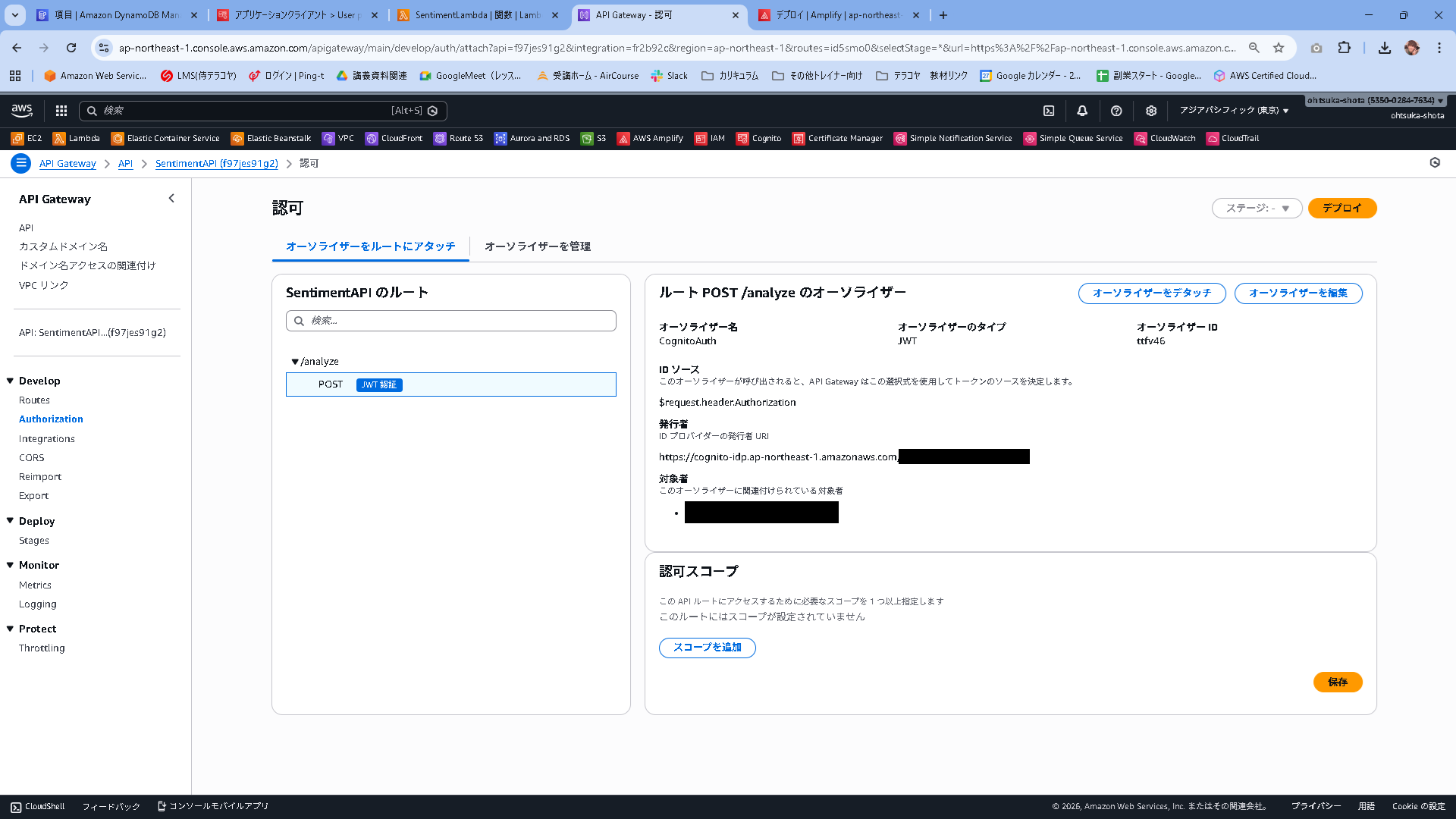
Authorizationを選択して、アタッチを押下します。

タイプ:JWT
名前:CognitoAuth
IDソース:$request.header.Authorization(デフォルト)
URL:https://cognito-idp.ap-northeast-1.amazonaws.com/CognitoのユーザプールID
対象者:CognitoのアプリケーションクライアントID
これで作成します。

作成・アタッチされたことを確認します。
制限が掛かっていることを確認します。
以下のコマンドを実行し、以前は出来ていたことが今回は401 Unauthorizedという内容でエラーが返ってきていることを確認します。
PS C:\Users\ohtsu> $payload = '{"text":"このサービスはとても便利で助かります"}'
PS C:\Users\ohtsu> [System.IO.File]::WriteAllText("payload.json", $payload, (New-Object System.Text.UTF8Encoding($false)))
PS C:\Users\ohtsu> curl.exe -i -X POST "API GatewayのIPアドレス" -H "Content-Type: application/json; charset=utf-8" --data-binary "@payload.json"
HTTP/1.1 401 Unauthorized
Date: Fri, 23 Jan 2026 12:27:33 GMT
Content-Type: application/json
Content-Length: 26
Connection: keep-alive
www-authenticate: Bearer
apigw-requestid: Xo1gchsNtjMEJmw=

{"message":"Unauthorized"}
動作確認
ローカルで以下を実行
npm run dev
ログインが求められることを確認します。

適当にユーザを入力して、Create Accountを押下します。

メールアドレス先に認証コードが飛んできているので、入力しましょう。
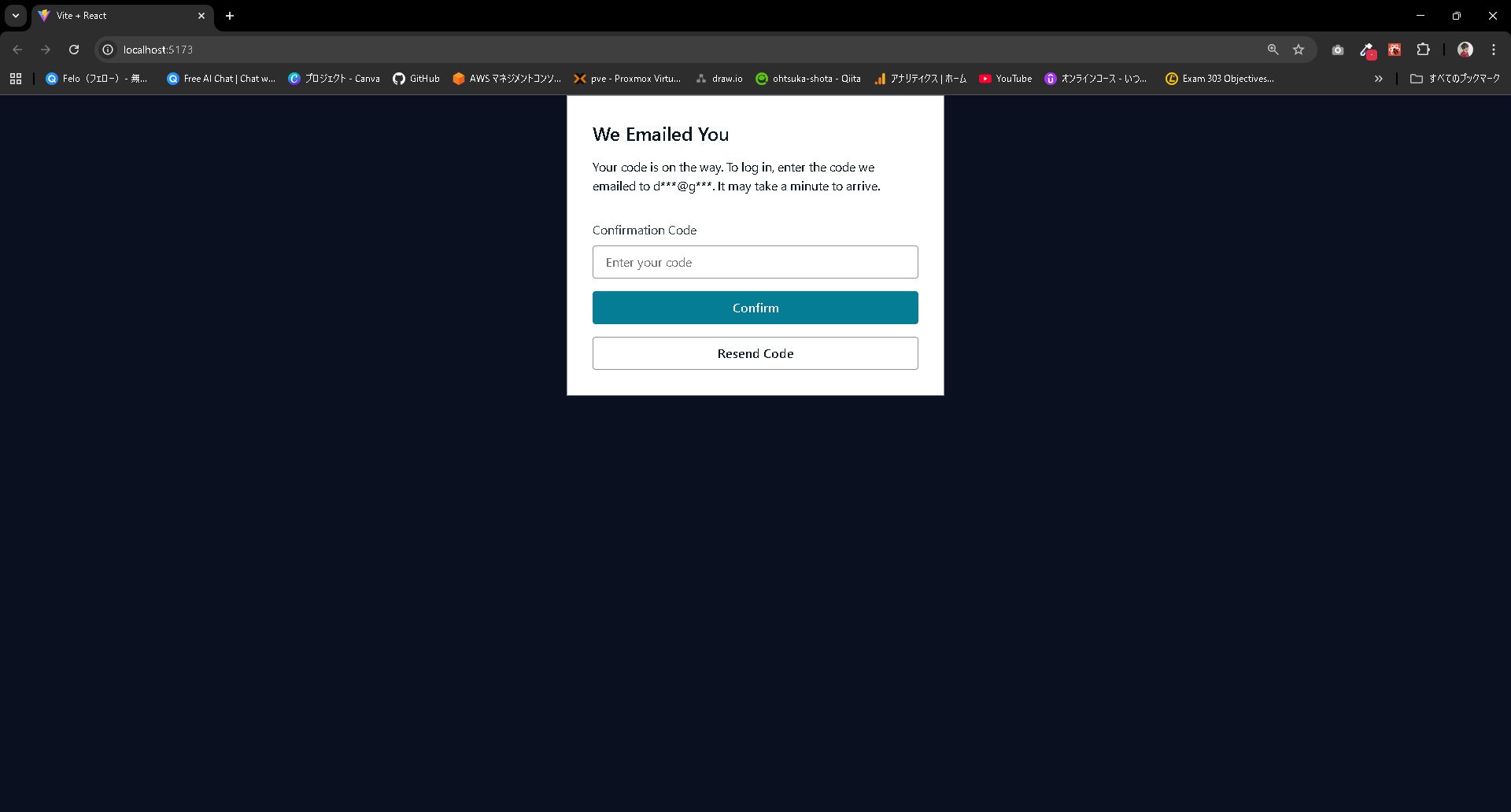
ログインが出来ると思います。APIの結果も帰ってきていることからこちらも問題なさそうです。

Cognitoのユーザプールにも登録されていることを確認します。

本番環境へのデプロイ
C:\Users\ohtsu\Documents\AWS\SentimentRepo>git add .
warning: in the working copy of 'package-lock.json', LF will be replaced by CRLF the next time Git touches it
warning: in the working copy of 'package.json', LF will be replaced by CRLF the next time Git touches it
warning: in the working copy of 'src/App.jsx', LF will be replaced by CRLF the next time Git touches it
warning: in the working copy of 'src/main.jsx', LF will be replaced by CRLF the next time Git touches it

C:\Users\ohtsu\Documents\AWS\SentimentRepo>git commit -m "ver1.1"
[main e232172] ver1.1
 4 files changed, 4616 insertions(+), 953 deletions(-)

C:\Users\ohtsu\Documents\AWS\SentimentRepo>git push origin main
Enumerating objects: 13, done.
Counting objects: 100% (13/13), done.
Delta compression using up to 20 threads
Compressing objects: 100% (7/7), done.
Writing objects: 100% (7/7), 25.87 KiB | 6.47 MiB/s, done.
Total 7 (delta 5), reused 0 (delta 0), pack-reused 0
remote: Resolving deltas: 100% (5/5), completed with 5 local objects.
To https://github.com/ohtsuka-shota/SentimentRepo.git
   8614dc5..e232172  main -> main
デプロイが走り、そして完了することを確認します。
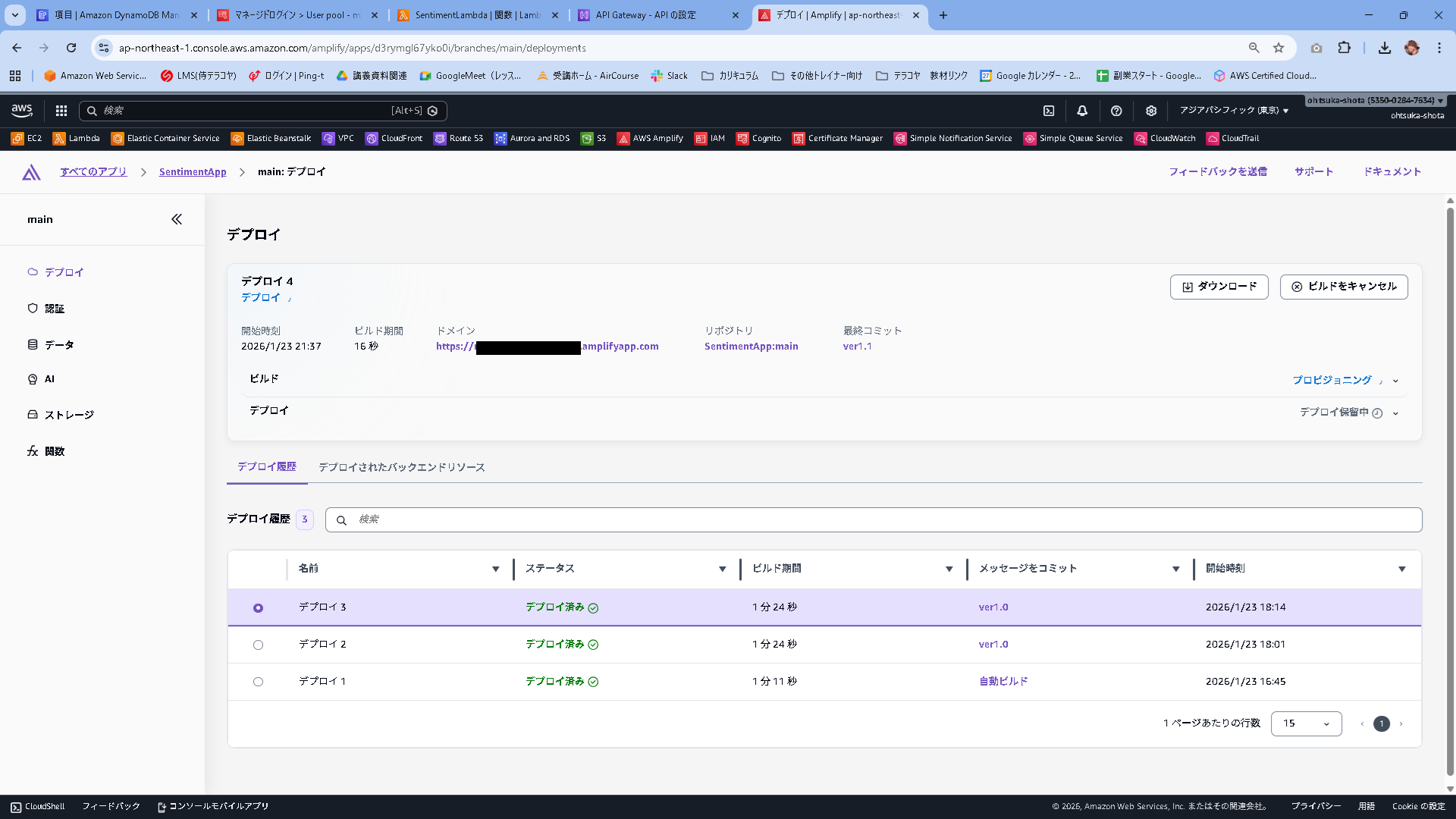

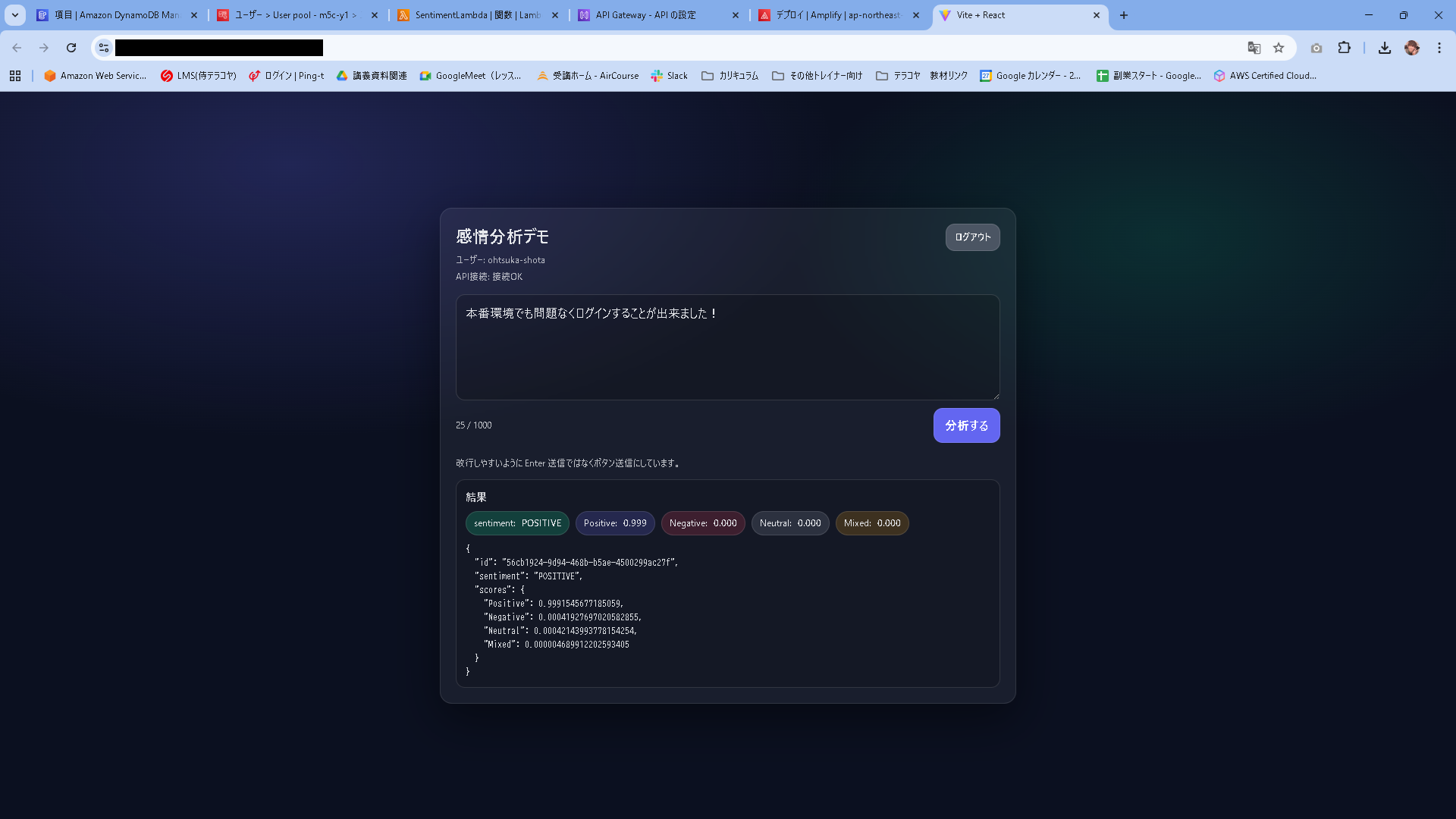
色々省略しますが、ユーザ登録からログイン、感情分析まで問題なくできました
【余談】ユーザ認証のUIを変えたり、コードを分割したい
src/App.jsx
import AuthGate from "./components/AuthGate";

export default function App() {
  return <AuthGate />;
}
src/components/AuthGate.jsx
import { Authenticator, View, Heading, Text } from "@aws-amplify/ui-react";
import "@aws-amplify/ui-react/styles.css";
import "../auth.css";

import MainApp from "./MainApp";

export default function AuthGate() {
  return (
    <div className="authShell">
      <Authenticator
        signUpAttributes={["email"]}
        components={{
          Header() {
            return (
              <View padding="xl" textAlign="center">
                <Heading level={3} className="authBrandTitle">
                  感情分析デモ
                </Heading>
                <Text className="authBrandSub">Secure API + Cognito Auth</Text>
              </View>
            );
          },
          Footer() {
            return (
              <View padding="large" textAlign="center">
                <Text className="authFooter">
                  © {new Date().getFullYear()} Sentiment Demo
                </Text>
              </View>
            );
          },
        }}
      >
        {({ signOut, user }) => (
          <div className="appAuthed">
            <MainApp signOut={signOut} user={user} />
          </div>
        )}
      </Authenticator>
    </div>
  );
}
src/components/MainApp.jsx
import { useMemo, useState } from "react";
import { fetchAuthSession } from "aws-amplify/auth";

const API_BASE = (import.meta.env.VITE_API_BASE_URL ?? "").replace(/\/$/, "");

async function safeReadText(res) {
  try {
    return await res.text();
  } catch {
    return "";
  }
}

function formatScore(v) {
  if (typeof v !== "number" || Number.isNaN(v)) return "-";
  return v.toFixed(3);
}

export default function MainApp({ signOut, user }) {
  const [text, setText] = useState("");
  const [loading, setLoading] = useState(false);
  const [error, setError] = useState("");
  const [result, setResult] = useState(null);
  const [apiStatus, setApiStatus] = useState("unchecked");

  const canSubmit = useMemo(() => {
    const len = text.trim().length;
    return !loading && len > 0 && len <= 1000;
  }, [text, loading]);

  const apiStatusLabel =
    !API_BASE
      ? "未設定"
      : apiStatus === "ok"
        ? "接続OK"
        : apiStatus === "ng"
          ? "接続NG"
          : "未確認";

  async function onSubmit(e) {
    e.preventDefault();
    setError("");
    setResult(null);

    if (!API_BASE) {
      setApiStatus("unset");
      setError("API の設定がありません(VITE_API_BASE_URL を確認してください)。");
      return;
    }

    setLoading(true);
    try {
      const session = await fetchAuthSession();
      const token = session.tokens?.idToken?.toString();

      if (!token) throw new Error("認証トークンの取得に失敗しました");

      const res = await fetch(`${API_BASE}/analyze`, {
        method: "POST",
        headers: {
          "Content-Type": "application/json",
          Authorization: token,
        },
        body: JSON.stringify({ text: text.trim() }),
      });

      if (!res.ok) {
        const bodyText = await safeReadText(res);
        throw new Error(bodyText || `HTTP ${res.status}`);
      }

      const data = await res.json();
      setResult(data);
      setApiStatus("ok");
    } catch (err) {
      setApiStatus("ng");
      setError(err instanceof Error ? err.message : String(err));
    } finally {
      setLoading(false);
    }
  }

  const sentiment = result?.sentiment ?? "UNKNOWN";
  const scores = result?.scores ?? result?.SentimentScore ?? null;

  const sentimentClass =
    sentiment === "POSITIVE"
      ? "sentiment-positive"
      : sentiment === "NEGATIVE"
        ? "sentiment-negative"
        : sentiment === "MIXED"
          ? "sentiment-mixed"
          : sentiment === "NEUTRAL"
            ? "sentiment-neutral"
            : "sentiment-unknown";

  return (
    <div className="page">
      <main className="card">
        <div className="header">
          <div>
            <h1 className="title">感情分析デモ</h1>
            <p className="subtitle">
              ユーザー: {user?.signInDetails?.loginId || user?.username}
            </p>
            <p className="subtitle" style={{ marginTop: "4px" }}>
              API接続: {apiStatusLabel}
            </p>
          </div>
          <div>
            <button
              onClick={signOut}
              className="btn"
              style={{
                backgroundColor: "#4b5563",
                fontSize: "12px",
                padding: "8px 12px",
              }}
            >
              ログアウト
            </button>
          </div>
        </div>

        <form onSubmit={onSubmit} className="form">
          <textarea
            className="textarea"
            value={text}
            onChange={(e) => setText(e.target.value)}
            placeholder="ここに文章を入力してください(最大1000文字)"
          />

          <div className="row">
            <small className="counter">{text.length} / 1000</small>

            <button type="submit" className="btn" disabled={!canSubmit}>
              {loading ? "分析中..." : "分析する"}
            </button>
          </div>

          <p className="hint">
            改行しやすいように Enter 送信ではなくボタン送信にしています。
          </p>
        </form>

        {error && <div className="alert alert--error">{error}</div>}

        {result && (
          <section className="resultCard">
            <h2 className="h2">結果</h2>

            <div className="badges">
              <span className={`badge ${sentimentClass}`}>
                sentiment: <strong>{sentiment}</strong>
              </span>

              {scores && (
                <>
                  <span className="badge badge--pos">
                    Positive: <strong>{formatScore(scores.Positive)}</strong>
                  </span>
                  <span className="badge badge--neg">
                    Negative: <strong>{formatScore(scores.Negative)}</strong>
                  </span>
                  <span className="badge badge--neu">
                    Neutral: <strong>{formatScore(scores.Neutral)}</strong>
                  </span>
                  <span className="badge badge--mix">
                    Mixed: <strong>{formatScore(scores.Mixed)}</strong>
                  </span>
                </>
              )}
            </div>

            <pre className="pre">{JSON.stringify(result, null, 2)}</pre>
          </section>
        )}
      </main>
    </div>
  );
}
src/auth.css
/* 背景を一気にプロダクトっぽく */
.authShell{
  min-height: 100vh;
  display: grid;
  place-items: center;
  padding: 24px;
  background:
    radial-gradient(1200px 600px at 10% 10%, rgba(139,92,246,.35), transparent 60%),
    radial-gradient(900px 500px at 90% 20%, rgba(34,211,238,.25), transparent 55%),
    radial-gradient(900px 500px at 50% 100%, rgba(16,185,129,.18), transparent 60%),
    #070a12;
}

/* サインイン/サインアップ画面(Authenticator)だけをいい感じに */
.authShell .amplify-authenticator{
  --amplify-colors-background-primary: rgba(17,24,39,.72);
  --amplify-colors-background-secondary: rgba(255,255,255,.04);
  --amplify-colors-font-primary: #e5e7eb;
  --amplify-colors-font-secondary: #a1a1aa;
  --amplify-colors-border-primary: rgba(255,255,255,.12);

  --amplify-colors-brand-primary-80: #a78bfa;
  --amplify-colors-brand-primary-90: #8b5cf6;
  --amplify-colors-brand-primary-100:#7c3aed;

  --amplify-components-authenticator-router-border-width: 0px;
  --amplify-components-authenticator-router-border-radius: 20px;
  --amplify-components-authenticator-router-box-shadow: 0 30px 80px rgba(0,0,0,.55);

  --amplify-components-fieldcontrol-border-radius: 14px;
  --amplify-components-button-border-radius: 14px;
}

/* カード本体を“ガラス”に */
.authShell .amplify-authenticator .amplify-card{
  background: rgba(17,24,39,.55);
  backdrop-filter: blur(12px);
  -webkit-backdrop-filter: blur(12px);
  border: 1px solid rgba(255,255,255,.10);
}

/* Primaryボタンをグラデに */
.authShell .amplify-button--primary{
  background: linear-gradient(135deg, #8b5cf6 0%, #22d3ee 100%);
  border: 0;
}
.authShell .amplify-button--primary:hover{
  filter: brightness(1.05);
}

/* 入力欄も少し上品に */
.authShell .amplify-input{
  background: rgba(255,255,255,.06);
}

/* ヘッダー/フッターの文字 */
.authBrandTitle{
  margin: 0;
  letter-spacing: .4px;
}
.authBrandSub{
  margin-top: 6px;
  color: rgba(229,231,235,.75);
  font-size: 13px;
}
.authFooter{
  color: rgba(229,231,235,.55);
  font-size: 12px;
}

/* ログイン後のあなたの画面は中央寄せを解除したい場合用(任意) */
.appAuthed{
  width: 100%;
}

.authBrandTitle{
    color:#fff
}
