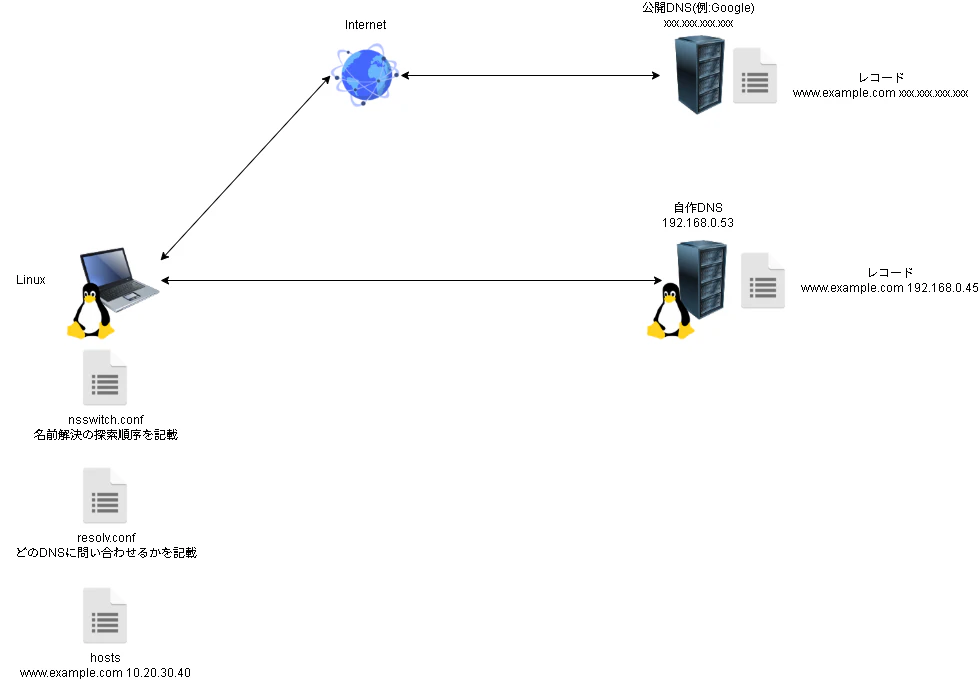
今回の検証用環境
今回はwww.example.comの名前解決をnsswitch.confの探索順序を変えてみた時にどういう動作になるかを見てみようと思います。
まタ、検証の為適宜resolv.confやhostsを書き換えます。
用語
/etc/nsswitch.confとは
nsswitch.conf は、Unix系オペレーティングシステムにおいて、名前解決の方法を設定するための構成ファイルです。このファイルは、ユーザー名、ホスト名、グループ名などの情報をどのように取得するかを指定します。例えば、ローカルのファイル、DNS、NIS、LDAPなど、さまざまな情報源からデータを取得する順序や方法を定義します。これにより、システムは効率的に必要な情報を取得できるようになります。
/etc/resolv.confとの違い
-
resolv.conf:
DNS(Domain Name System)に関する設定を行うファイルです。このファイルには、DNSサーバーのアドレスや検索ドメインなどが記述され、システムが名前解決を行う際にどのDNSサーバーを使用するかを指定します。 -
nsswitch.conf:
名前解決のソースを指定するファイルです。ユーザー名、ホスト名、グループ名などの情報をどのように取得するか(例: ローカルファイル、DNS、NISなど)を定義します。 -
名前解決の流れ
- まず、システムは nsswitch.conf を参照します。このファイルには、名前解決に使う情報源の順序が書かれています。
- 例えば、nsswitch.conf に「まずローカルファイル(files)を見て、次にDNSを使う(dns)」と書かれていれば、システムは最初にローカルの情報を探します。
動作確認
/etc/nsswitchの中身を見てみる
catコマンドでnsswitch.confの中身を見てみます。
passwdとかhostsとかservicesとかがありますが、それぞれの情報源をどの順序で確認するのかが書いています。
名前解決に着目するとhostsが名前解決に関わるものであり、①files②mdns4_minimal [NOTFOUND=return]③dnsという順序で確認していくよという事が書いています。
root@test-Standard-PC-i440FX-PIIX-1996:~# cat /etc/nsswitch.conf
# /etc/nsswitch.conf
#
# Example configuration of GNU Name Service Switch functionality.
# If you have the `glibc-doc-reference' and `info' packages installed, try:
# `info libc "Name Service Switch"' for information about this file.

passwd:         files systemd sss
group:          files systemd sss
shadow:         files systemd sss
gshadow:        files systemd

hosts:          files mdns4_minimal [NOTFOUND=return] dns
networks:       files

protocols:      db files
services:       db files sss
ethers:         db files
rpc:            db files

netgroup:       nis sss
automount:  sss
それぞれの意味合いは以下となります。
| 順序 | 説明 |
|---|---|
| files | ローカルの /etc/hosts ファイルを参照します。システムはこのファイルを見て、名前に対応するIPアドレスがあるかを確認します。 |
| mdns4_minimal[NOTFOUND=return] | mDNS(Multicast DNS)を使った名前解決を指します。特にローカルネットワーク内での名前解決に使用されます。 |
| dns | 最後にDNS(Domain Name System)を使った名前解決が行われます。/etc/resolv.conf に設定されたDNSサーバーに問い合わせて、名前をIPアドレスに変換します。 |
併せて、左側のpasswdやgroupの意味合いも記載しておきます。
このような情報を探索する時にnssswitchを使用します。
| 項目 | 説明 |
|---|---|
| passwd | ユーザーアカウント情報を取得するための設定。ユーザー名、UID、GID、ホームディレクトリ、シェルなどの情報が含まれます。 |
| shadow | ユーザーのパスワード情報を取得するための設定。ユーザーのパスワードハッシュやパスワードの有効期限など、セキュリティ関連の情報が含まれます。 |
| group | グループ情報を取得するための設定。files は /etc/group ファイル、systemd は systemd グループ管理、sss は SSSD を指します。 |
| gshadow | グループのパスワード情報を取得するための設定。files は /etc/gshadow ファイルを指します。 |
| hosts | ホスト名をIPアドレスに解決するための設定。files は /etc/hosts ファイル、mdns4_minimal は mDNS を使用、[NOTFOUND=return] は名前が見つからなかった場合に処理を終了、dns は DNS サーバーを指します。 |
| networks | ネットワーク情報を取得するための設定。files は /etc/networks ファイルを指します。 |
| protocols | プロトコル情報を取得するための設定。db はデータベース、files は /etc/protocols ファイルを指します。 |
| services | サービス情報を取得するための設定。db はデータベース、files は /etc/services ファイル、sss は SSSD を指します。 |
| ethers | イーサネットアドレス情報を取得するための設定。db はデータベース、files は /etc/ethers ファイルを指します。 |
| rpc | RPC(Remote Procedure Call)情報を取得するための設定。db はデータベース、files は /etc/rpc ファイルを指します。 |
| netgroup | ネットグループ情報を取得するための設定。nis は Network Information Service、sss は SSSD を指します。 |
| automount | 自動マウントの設定を取得するための設定。sss は SSSD を指します。 |
filesとかが何を示しているかを確認する
filesとかdnsとかが具体的に何を示しているのか、という事を覚えていない時にでもLinux上で確認する方法があるようなので、実際に見てみます。
manコマンドで確認することが出来ます。
root@test-Standard-PC-i440FX-PIIX-1996:~# man 5 nsswitch.conf
出力の一部をこちらに記載します。
この他にも、先ほど記載したpasswdが何なのか、とかも記載されています。
       The following files are read when "files" source is specified  for  re‐
       spective databases:

           aliases     /etc/aliases
           ethers      /etc/ethers
           group       /etc/group
           hosts       /etc/hosts
           initgroups  /etc/group
           netgroup    /etc/netgroup
           networks    /etc/networks
           passwd      /etc/passwd
           protocols   /etc/protocols
           publickey   /etc/publickey
           rpc         /etc/rpc
           services    /etc/services
           shadow      /etc/shadow
/etc/nsswitchのhostsの順序を変更して動作確認をしてみる。
動作確認の環境
まず、名前解決をするLinux(図の左下)の/etc/nsswitch.confでの探索順序を見ると、再掲になりますが以下のようになっておりました。この状態ではfiles(/etc/hosts)をみて、無いようであれば次の情報源を確認して、、、という感じで遷移していきます。
hosts: files mdns4_minimal [NOTFOUND=return] dns
そして同じLinux上の/etc/hostsを確認してみます。
www.example.comというドメインが10.20.30.40というレコードが記載されていることがわかります。
root@test-Standard-PC-i440FX-PIIX-1996:~# cat /etc/hosts
127.0.0.1 localhost
127.0.1.1 test-Standard-PC-i440FX-PIIX-1996
10.20.30.40 www.example.com

# The following lines are desirable for IPv6 capable hosts
::1     ip6-localhost ip6-loopback
fe00::0 ip6-localnet
ff00::0 ip6-mcastprefix
ff02::1 ip6-allnodes
ff02::2 ip6-allrouters
/etc/resolv.confは以下のように設定し、自作のDNSに名前解決をするように設定しています。
root@test-Standard-PC-i440FX-PIIX-1996:~# cat /etc/resolv.conf
# This is /run/systemd/resolve/stub-resolv.conf managed by man:systemd-resolved(8).
# Do not edit.
#
# This file might be symlinked as /etc/resolv.conf. If you're looking at
# /etc/resolv.conf and seeing this text, you have followed the symlink.
#
# This is a dynamic resolv.conf file for connecting local clients to the
# internal DNS stub resolver of systemd-resolved. This file lists all
# configured search domains.
#
# Run "resolvectl status" to see details about the uplink DNS servers
# currently in use.
#
# Third party programs should typically not access this file directly, but only
# through the symlink at /etc/resolv.conf. To manage man:resolv.conf(5) in a
# different way, replace this symlink by a static file or a different symlink.
#
# See man:systemd-resolved.service(8) for details about the supported modes of
# operation for /etc/resolv.conf.

nameserver 192.168.0.53
options edns0 trust-ad
search .
更に、自作しているDNSは192.168.0.53でホスティングしており、そのDNSにはwww.example.comに対して以下のAレコードが記載されています。
$TTL 86400
@   IN  SOA     auth-dns.example.com. admin.example.com. (
        2026040403
        3600
        1800
        604800
        86400 )

    IN  NS      auth-dns.example.com.

auth-dns   IN  A   192.168.0.51
www        IN  A   192.168.0.45
nslookupを使った際の動作確認の失敗(nslookupの仕様)
この状態でnslookupコマンドを実行して確認してみます。
想定ではhostsファイルのレコード(10.20.30.40)を出してほしかったのですが結果が異なって、DNSのレコード(192.168.0.45)を出してきています。
どうもこれはnslookupというコマンドは/etc/hostsをスキップするのがデフォルトの仕様の用だからです。nslookupはDNSそのものの動作確認をするツールというコンセプトの用で、このような結果になっているようです。
※digコマンドも同様の挙動を示すようです。
root@test-Standard-PC-i440FX-PIIX-1996:~# nslookup www.example.com
Server:		192.168.0.53
Address:	192.168.0.53#53

Non-authoritative answer:
Name:	www.example.com
Address: 192.168.0.45
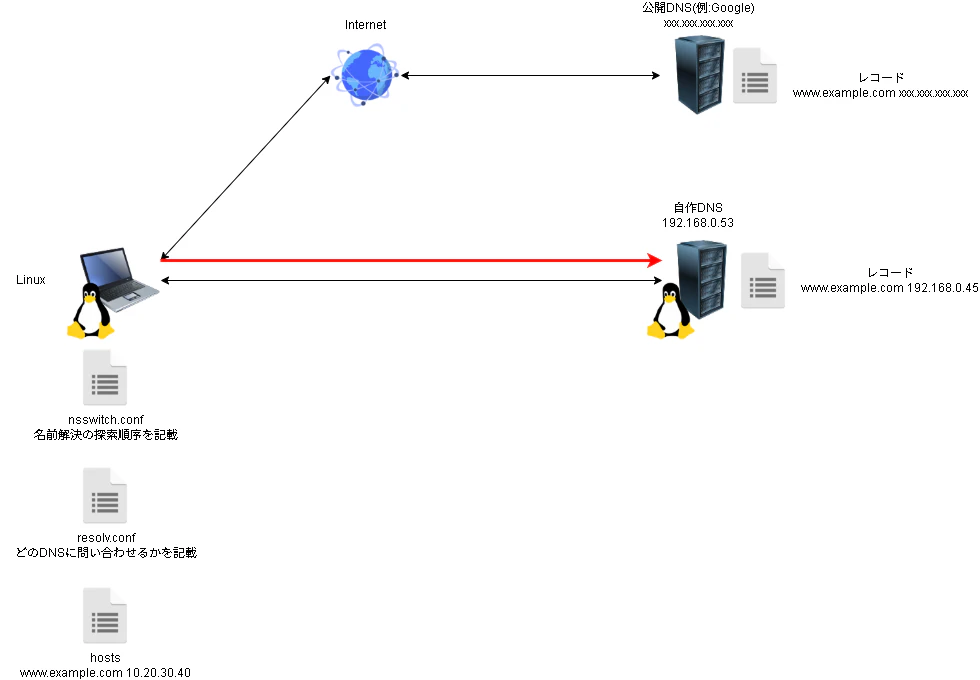
イメージに起こしてみます。
nslookupやdigコマンドはDNSの動作検証の為のコマンドであるため、OSの設定は見ずに直接DNSに問い合わせに行ってしまいます。
getentコマンドでの確認(/etc/hostsへの名前解決)
実際の挙動を確認するには、getent コマンドを使用するのが最適です。このコマンドを使えば、DNSと /etc/hosts が併存する環境においても、システムが実際に名前解決を行うフローに沿った結果を確認できます。
root@test-Standard-PC-i440FX-PIIX-1996:~# getent hosts www.example.com
10.20.30.40     www.example.com
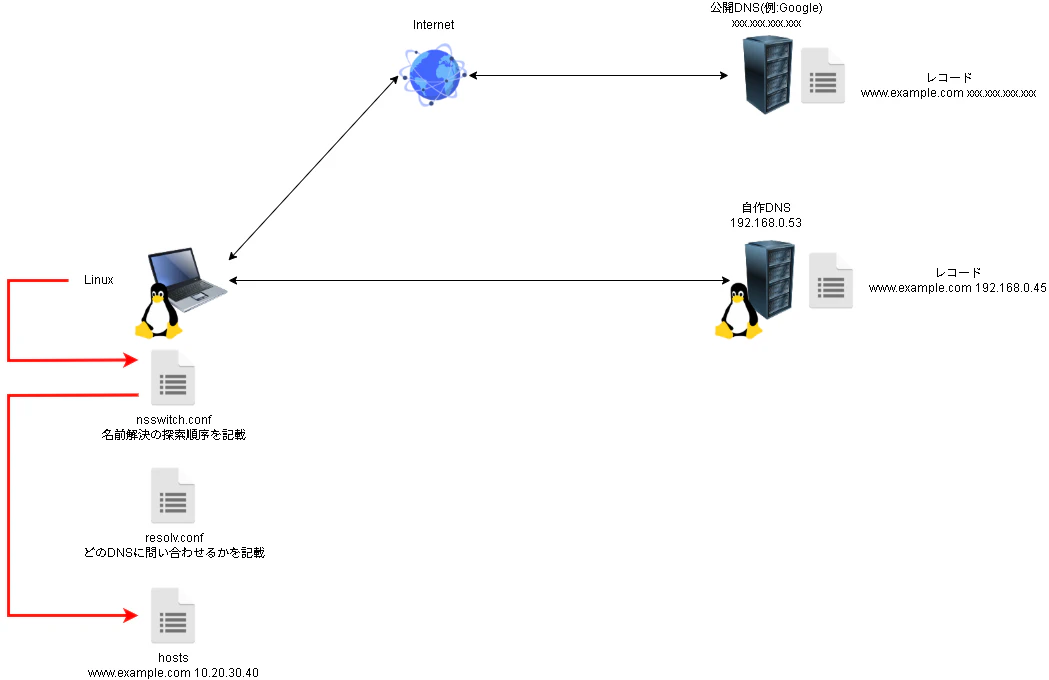
イメージに起こすとこうなるでしょうか。
nsswitch.confを見て、filesとなっているのでhostsに確認しています。
nsswitchの順序を変えて動作確認(自作DNSへの名前解決)
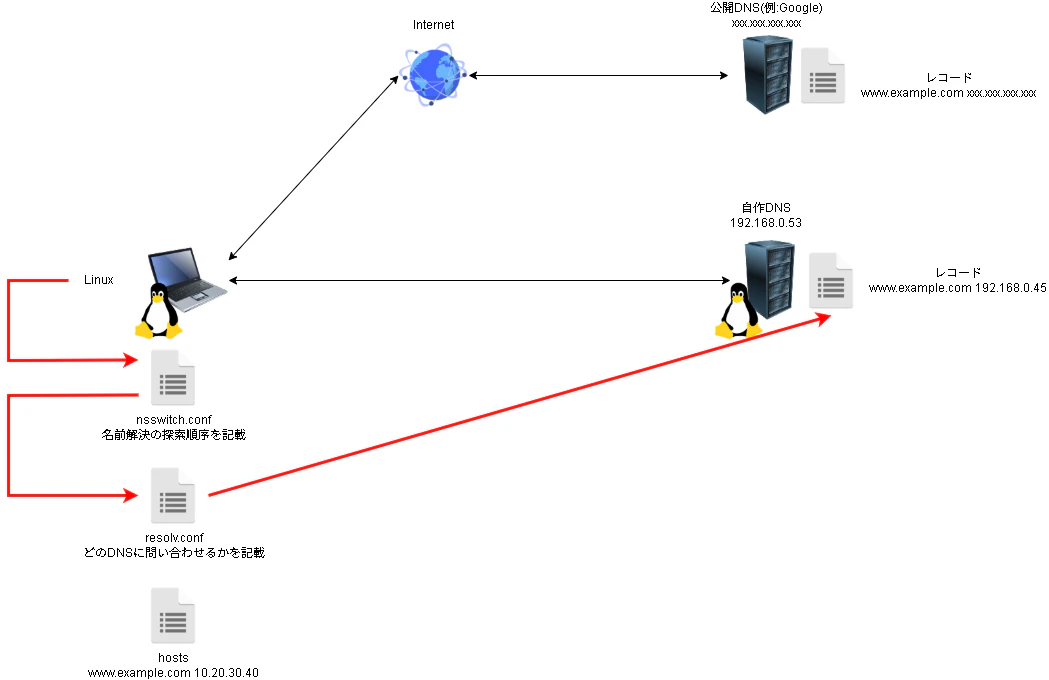
nsswitchの設定を以下のように修正します。
DNSでの名前解決をhostsよりあげてみます。
root@test-Standard-PC-i440FX-PIIX-1996:~# nano /etc/nsswitch.conf
root@test-Standard-PC-i440FX-PIIX-1996:~# cat /etc/nsswitch.conf
中略
hosts:          dns files
この状態でgetentを再度実行してみて、どのような出力になるかを確認します。
キャッシュをクリアして実行してみます。
すると、先ほどの出力とは異なり、DNSのレコードを出力していることがわかります。
root@test-Standard-PC-i440FX-PIIX-1996:~# resolvectl flush-caches
root@test-Standard-PC-i440FX-PIIX-1996:~# getent hosts www.example.com
192.168.0.45    www.example.com
この時のイメージ図となります。
nsswitchの順序を変えて動作確認(Google DNSへの名前解決)
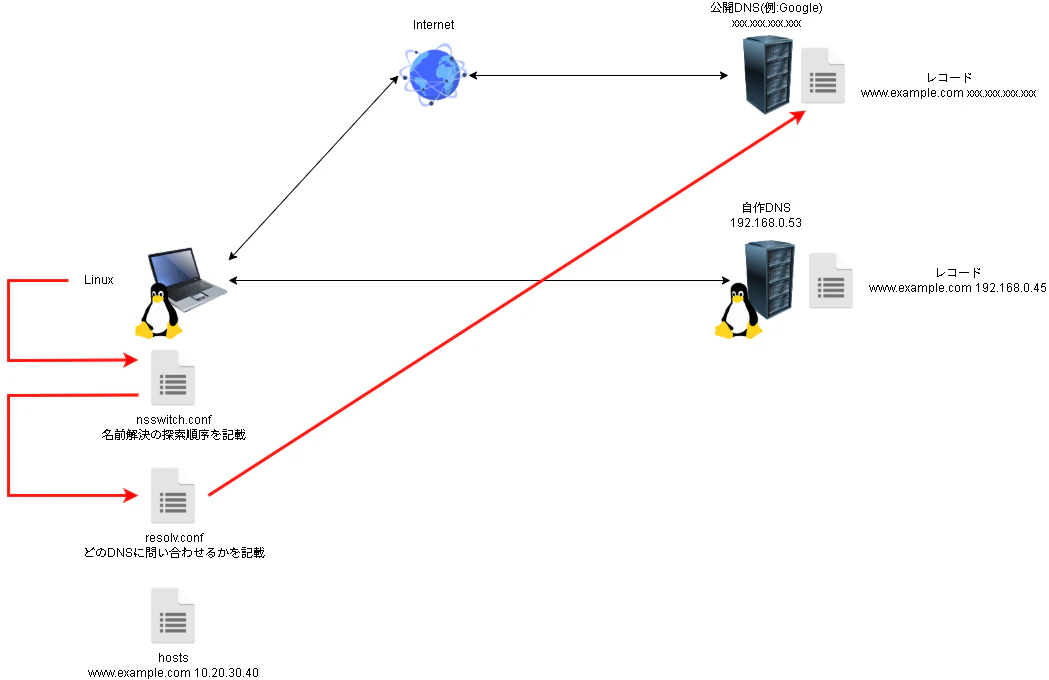
resolv.confを以下のように修正して、名前解決先のDNSを変更します。
root@test-Standard-PC-i440FX-PIIX-1996:~# nano /etc/resolv.conf
root@test-Standard-PC-i440FX-PIIX-1996:~# cat /etc/resolv.conf
中略
nameserver 8.8.8.8
この状態で同じようにgetentで名前解決の結果を確認してみます。
IPv6の結果(AAAAレコード)が返されていますね。
root@test-Standard-PC-i440FX-PIIX-1996:~# resolvectl flush-caches
root@test-Standard-PC-i440FX-PIIX-1996:~# getent hosts www.example.com
2606:4700:10::ac42:93f3 www.example.com
2606:4700:10::6814:179a www.example.com
この時のイメージ図です。
hostsへの名前解決しようとするが失敗して、自作DNSに解決させてみる
名前解決先のDNSのIPアドレスをGoogleのものから自作のものに修正します。
root@test-Standard-PC-i440FX-PIIX-1996:~# nano /etc/resolv.conf
root@test-Standard-PC-i440FX-PIIX-1996:~# cat /etc/resolv.conf
中略
nameserver 192.168.0.53
次にhostsのwww.example.comという部分をコメントアウトして、使えないようにします。
root@test-Standard-PC-i440FX-PIIX-1996:~# nano /etc/hosts
root@test-Standard-PC-i440FX-PIIX-1996:~# cat /etc/hosts
中略
#10.20.30.40 www.example.com
nsswitch.confもfilesを先に確認するように修正します。
root@test-Standard-PC-i440FX-PIIX-1996:~# nano /etc/nsswitch.conf
root@test-Standard-PC-i440FX-PIIX-1996:~# cat /etc/nsswitch.conf
中略
hosts:          files dns
この状態でgetentを実行して、名前解決の結果を確認します。
自作DNSのAレコードが結果として出力されています。
root@test-Standard-PC-i440FX-PIIX-1996:~# resolvectl flush-caches
root@test-Standard-PC-i440FX-PIIX-1996:~# getent hosts www.example.com
192.168.0.45    www.example.com
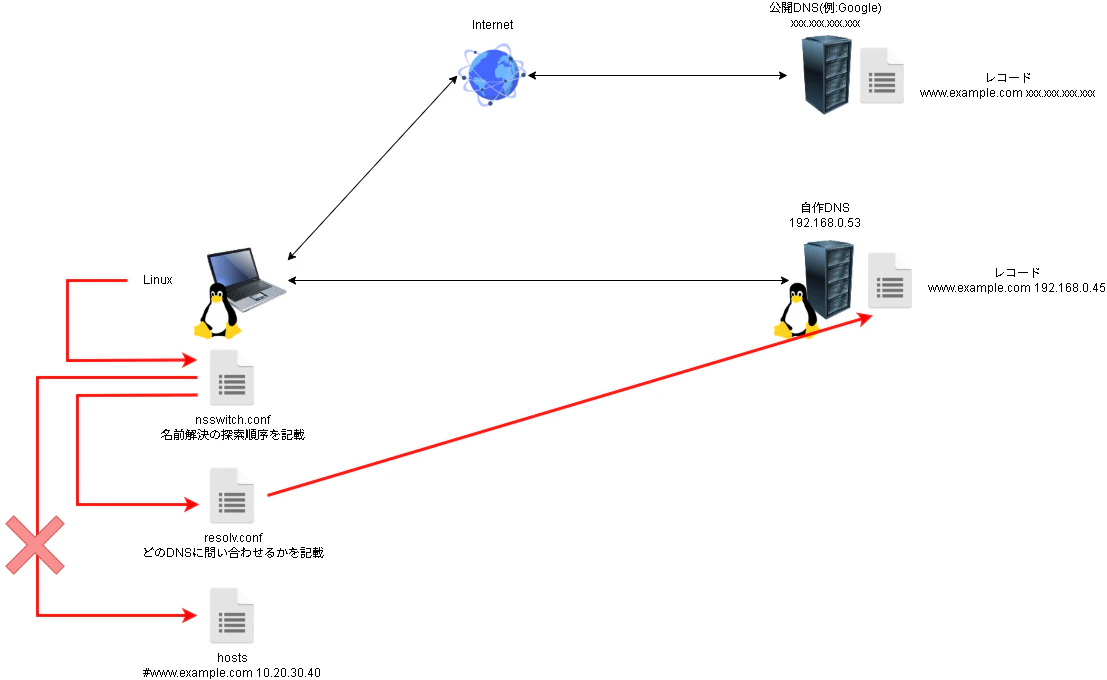
この時の処理イメージです。
nsswich.confを見て、最初にhostsファイルを見に行ったのですがレコードが存在していない為、次にDNSで確認を行い、DNSで管理しているAレコードを取得したという事になります。