

以下の記事ではACME(DNS-01)を使った証明書の自動取得環境を構築しましたが、今回はHTTP-01を使った証明書の取得環境を構築していきたいと思います。
用語
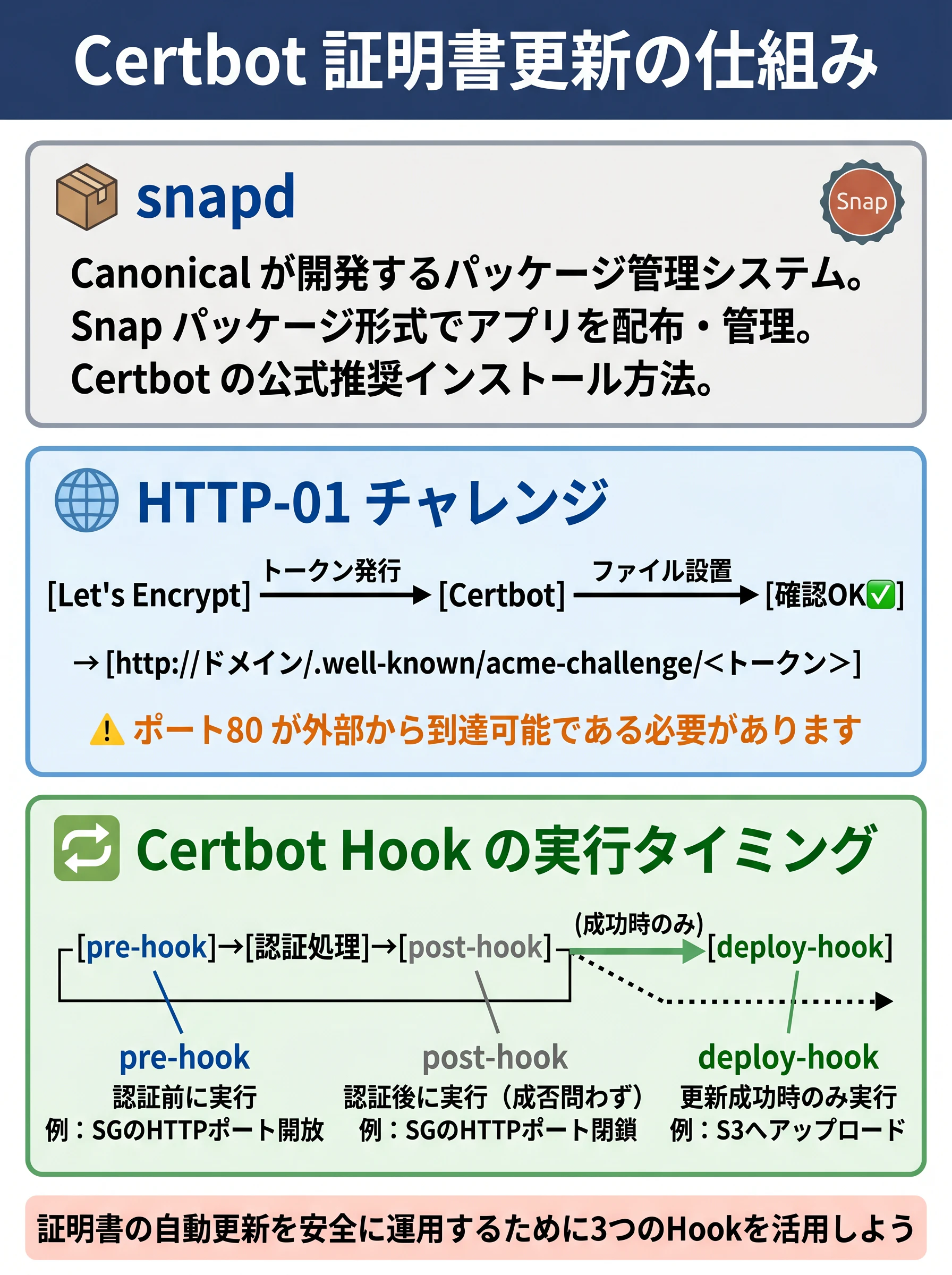
snapd
Canonicalが開発するパッケージ管理システム。Snapパッケージの形式でアプリケーションを配布・管理する。CertbotはEPELではなくsnapdを通じたインストールが公式推奨となっている。
HTTP-01チャレンジ
ACMEプロトコルにおけるドメイン所有権の確認方式の一つ。Let's EncryptがランダムなトークンをACMEクライアント(Certbot)に渡し、そのトークンをHTTPで公開することで所有権を証明する。具体的には http://<ドメイン>/.well-known/acme-challenge/<トークン> にアクセスできることを確認する。ポート80が外部からアクセス可能である必要がある。
pre-hook / post-hook / deploy-hook
Certbotが証明書の更新処理の前後に任意のスクリプトを実行する仕組み。
- pre-hook: 認証処理の前に実行される(例: SGのHTTPポートを開放)
- post-hook: 認証処理の後に実行される(成否に関わらず)(例: SGのHTTPポートを閉鎖)
- deploy-hook: 証明書の更新が成功した場合のみ実行される(例: S3へのアップロード)
※Felo AIで生成
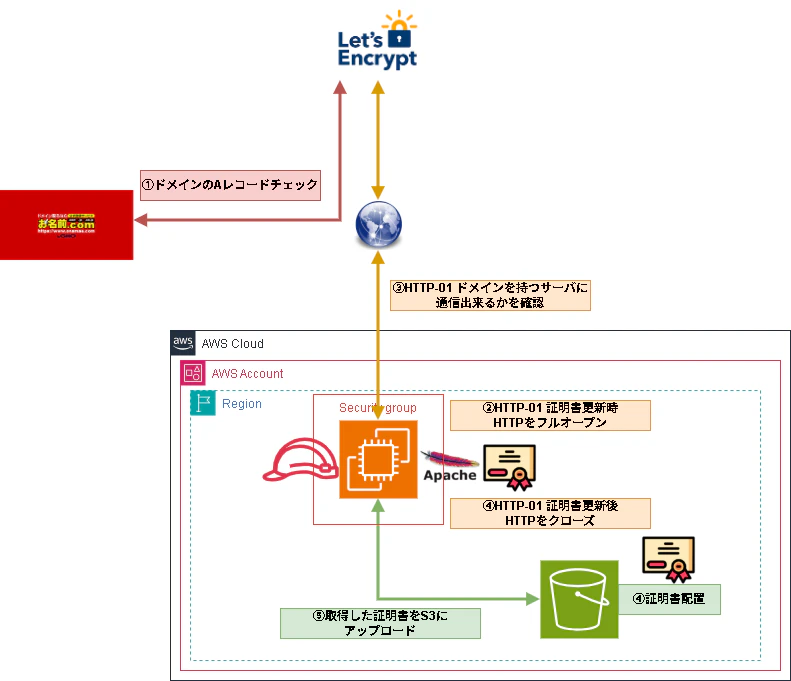
環境イメージ
構築
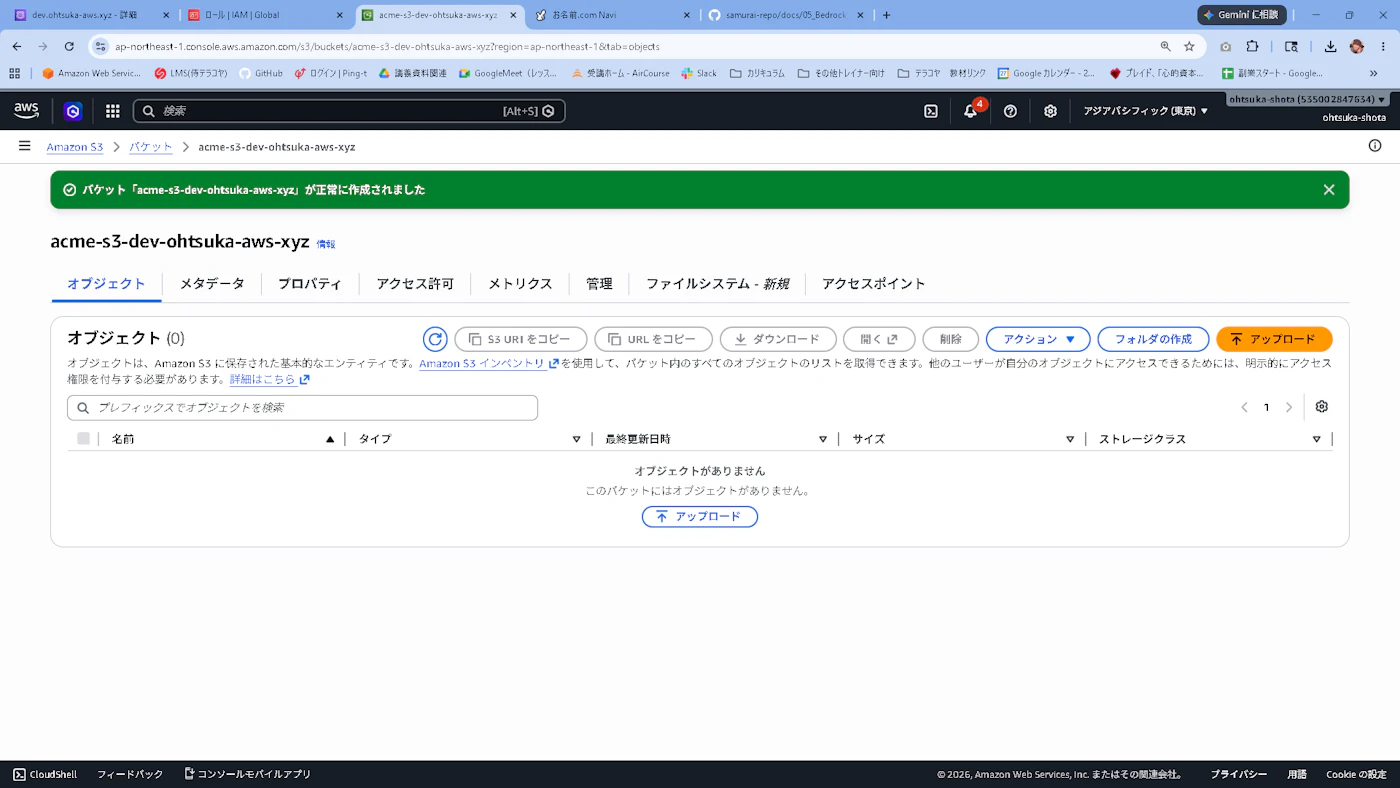
S3
S3はDNS-01で使用したacme-s3-dev-ohtsuka-aws-xyzというバケットを流用します。
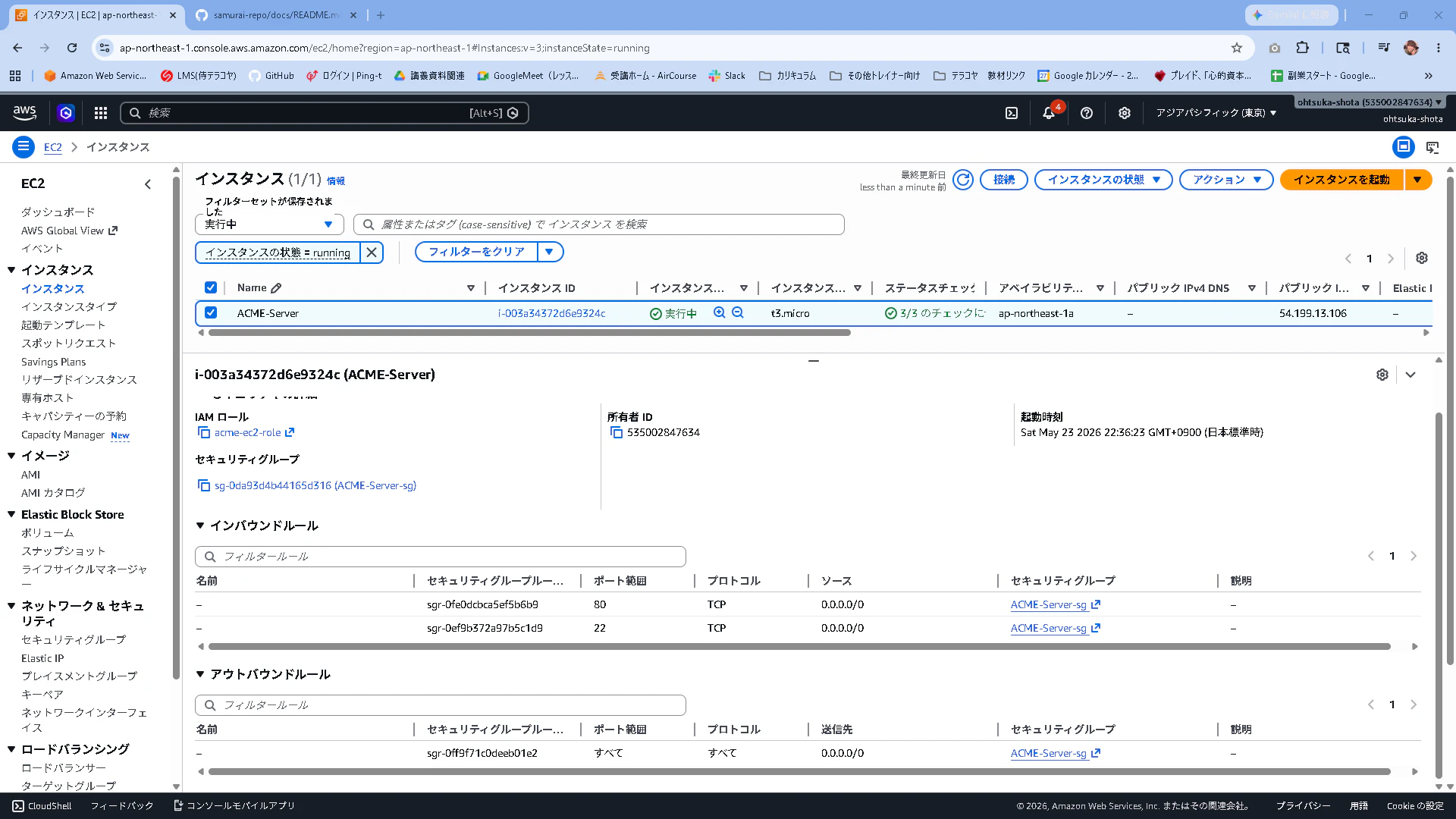
EC2での設定
RHEL9系でEC2を構築します。
t3.smallでパブリックサブネットに立ち上げたいと思います。
SGはSSHとHTTPのインバウンドを許可します。
※ t3.microだとsnapdをインストールするタイミングでメモリ不足でエラーになる可能性が高いです。私の環境では発生しました。
[root@ip-10-0-0-28 ~]# systemctl enable --now snapd.socket
Failed to enable unit: Unit file snapd.socket does not exist.
IAM RoleについてはS3へのFullAccessを与えたRoleを紐づけてます。
※本番環境では最小権限に沿って絞ってください。
EC2にSSH出来たら以下を実行しておきます。
[ec2-user@ip-10-0-0-28 ~]$ sudo su -
[root@ip-10-0-0-28 ~]# dnf update && dnf upgrade -y
[root@ip-10-0-0-28 ~]# dnf install -y httpd mod_ssl
[root@ip-10-0-0-28 ~]# systemctl start httpd
次にCertbotとApacheのプラグインをインストールします。EPELリポジトリのインストールを行い、snapdをインストール。そのsnapdを使ってcertbotをインストールします。ここまで終わったらexitしてセッションをいったん切ります。
[root@ip-10-0-0-28 ~]# dnf install -y snapd
[root@ip-10-0-0-28 ~]# systemctl enable --now snapd.socket
Created symlink /etc/systemd/system/sockets.target.wants/snapd.socket → /usr/lib/systemd/system/snapd.socket.
[root@ip-10-0-0-28 ~]# ln -s /var/lib/snapd/snap /snap
[root@ip-10-0-0-28 ~]# exit
改めてSSHでログインします。
Certbotをインストールします。
[root@ip-10-0-0-28 ~]# snap install core
[root@ip-10-0-0-28 ~]# snap install --classic certbot
[root@ip-10-0-0-28 ~]# ln -s /snap/bin/certbot /usr/bin/certbot
AWS CLIをインストールします。
[root@ip-10-0-0-28 ~]# curl "https://awscli.amazonaws.com/awscli-exe-linux-x86_64.zip" -o "awscliv2.zip"
[root@ip-10-0-0-28 ~]# dnf install -y unzip
[root@ip-10-0-0-28 ~]# unzip awscliv2.zip
[root@ip-10-0-0-28 ~]# ./aws/install
[root@ip-10-0-0-28 ~]# aws --version
aws-cli/2.34.53 Python/3.14.5 Linux/5.14.0-611.49.1.el9_7.x86_64 exe/x86_64.rhel.9
S3アップロード用スクリプトを作成します。
[root@ip-10-0-0-28 ~]# mkdir -p /opt/certbot-hooks
[root@ip-10-0-0-28 ~]# vi /opt/certbot-hooks/upload_to_s3.sh
[root@ip-10-0-0-28 ~]# cat /opt/certbot-hooks/upload_to_s3.sh
#!/bin/bash

# 環境に合わせて変更してください
S3_BUCKET="acme-s3-dev-ohtsuka-aws-xyz"
DOMAIN="web.ohtsuka-aws.xyz"

# Certbotが保存した証明書のパス
CERT_DIR="/etc/letsencrypt/live/${DOMAIN}"

# S3へアップロード
/usr/local/bin/aws s3 cp ${CERT_DIR}/cert.pem s3://${S3_BUCKET}/certificates/${DOMAIN}/cert.pem
/usr/local/bin/aws s3 cp ${CERT_DIR}/privkey.pem s3://${S3_BUCKET}/certificates/${DOMAIN}/privkey.pem
/usr/local/bin/aws s3 cp ${CERT_DIR}/chain.pem s3://${S3_BUCKET}/certificates/${DOMAIN}/chain.pem
/usr/local/bin/aws s3 cp ${CERT_DIR}/fullchain.pem s3://${S3_BUCKET}/certificates/${DOMAIN}/fullchain.pem

echo "S3へのアップロードが完了しました: $(date)" >> /var/log/certbot_s3_upload.log

[root@ip-10-0-0-28 ~]# chmod +x /opt/certbot-hooks/upload_to_s3.sh
[root@ip-10-0-0-28 ~]# ls -ltr /opt/certbot-hooks/upload_to_s3.sh
-rwxr-xr-x. 1 root root 746 May 23 14:35 /opt/certbot-hooks/upload_to_s3.sh
Apacheのconfを弄ります。confを弄った後はApacheにその設定を読み込ませるためApacheをrestartします。
[root@ip-10-0-0-28 ~]# vi /etc/httpd/conf.d/web.ohtsuka-aws.xyz.conf
[root@ip-10-0-0-28 ~]# cat /etc/httpd/conf.d/web.ohtsuka-aws.xyz.conf
<VirtualHost *:80>
    ServerName web.ohtsuka-aws.xyz
    DocumentRoot /var/www/html
</VirtualHost>
[root@ip-10-0-0-28 ~]# systemctl restart httpd
動作確認
以下のコマンドを実行していきます。
実行結果が以下となります。エラーが出ておりますが、これはweb.ohtsuka-aws.xyzというホストが見つからないことに依るようです。
[root@ip-10-0-0-28 ~]#
[root@ip-10-0-0-28 ~]# certbot certonly --apache -d web.ohtsuka-aws.xyz -m ohtsuka.se@gmail.com --agree-tos --no-eff-email --deploy-hook /opt/certbot-hooks/upload_to_s3.sh --dry-run
Saving debug log to /var/log/letsencrypt/letsencrypt.log
Simulating a certificate request for web.ohtsuka-aws.xyz

Certbot failed to authenticate some domains (authenticator: apache). The Certificate Authority reported these problems:
  Identifier: web.ohtsuka-aws.xyz
  Type:   dns
  Detail: DNS problem: NXDOMAIN looking up A for web.ohtsuka-aws.xyz - check that a DNS record exists for this domain; DNS problem: NXDOMAIN looking up AAAA for web.ohtsuka-aws.xyz - check that a DNS record exists for this domain

Hint: The Certificate Authority failed to verify the temporary Apache configuration changes made by Certbot. Ensure that the listed domains point to this Apache server and that it is accessible from the internet.

Some challenges have failed.
Ask for help or search for solutions at https://community.letsencrypt.org. See the logfile /var/log/letsencrypt/letsencrypt.log or re-run Certbot with -v for more details.
DNSにEC2のAレコードを登録します。
今回はDNS-01ではないのでRoute53に移管する必要もないため、お名前.com側でweb.ohtsuka-aws.xyzのAレコードを登録します。

暫く待った後、PCでnslookupを叩きます。EC2のIPアドレスが出力されればOKです。
C:\Users\ohtsu>ipconfig /flushdns

Windows IP 構成

DNS リゾルバー キャッシュは正常にフラッシュされました。

C:\Users\ohtsu>nslookup web.ohtsuka-aws.xyz 8.8.8.8
サーバー:  dns.google
Address:  8.8.8.8

権限のない回答:
名前:    web.ohtsuka-aws.xyz
Address:  52.192.1.143
もう一度CertbotでDry-Runをしてみます。
うまくいきました。
[root@ip-10-0-0-28 ~]# certbot certonly --apache -d web.ohtsuka-aws.xyz -m ohtsuka.se@gmail.com --agree-tos --no-eff-email --deploy-hook /opt/certbot-hooks/upload_to_s3.sh --dry-run
Saving debug log to /var/log/letsencrypt/letsencrypt.log
Simulating a certificate request for web.ohtsuka-aws.xyz
The dry run was successful.
Dry-Runを外してみます。
成功しました。
[root@ip-10-0-0-28 ~]# certbot certonly --apache -d web.ohtsuka-aws.xyz -m ohtsuka.se@gmail.com --agree-tos --no-eff-email --deploy-hook /opt/certbot-hooks/upload_to_s3.sh
Saving debug log to /var/log/letsencrypt/letsencrypt.log
Account registered.
Requesting a certificate for web.ohtsuka-aws.xyz
Hook 'deploy-hook' ran with output:
 Completed 1.3 KiB/1.3 KiB (15.1 KiB/s) with 1 file(s) remaining
 upload: ../etc/letsencrypt/live/web.ohtsuka-aws.xyz/cert.pem to s3://acme-s3-dev-ohtsuka-aws-xyz/certificates/web.ohtsuka-aws.xyz/cert.pem
 Completed 241 Bytes/241 Bytes (2.9 KiB/s) with 1 file(s) remaining
 upload: ../etc/letsencrypt/live/web.ohtsuka-aws.xyz/privkey.pem to s3://acme-s3-dev-ohtsuka-aws-xyz/certificates/web.ohtsuka-aws.xyz/privkey.pem
 Completed 1.5 KiB/1.5 KiB (21.3 KiB/s) with 1 file(s) remaining
 upload: ../etc/letsencrypt/live/web.ohtsuka-aws.xyz/chain.pem to s3://acme-s3-dev-ohtsuka-aws-xyz/certificates/web.ohtsuka-aws.xyz/chain.pem
 Completed 2.8 KiB/2.8 KiB (38.3 KiB/s) with 1 file(s) remaining
 upload: ../etc/letsencrypt/live/web.ohtsuka-aws.xyz/fullchain.pem to s3://acme-s3-dev-ohtsuka-aws-xyz/certificates/web.ohtsuka-aws.xyz/fullchain.pem

Successfully received certificate.
Certificate is saved at: /etc/letsencrypt/live/web.ohtsuka-aws.xyz/fullchain.pem
Key is saved at:         /etc/letsencrypt/live/web.ohtsuka-aws.xyz/privkey.pem
This certificate expires on 2026-08-21.
These files will be updated when the certificate renews.
Certbot has set up a scheduled task to automatically renew this certificate in the background.

- - - - - - - - - - - - - - - - - - - - - - - - - - - - - - - - - - - - - - - -
If you like Certbot, please consider supporting our work by:
 * Donating to ISRG / Let's Encrypt:   https://letsencrypt.org/donate
 * Donating to EFF:                    https://eff.org/donate-le
- - - - - - - - - - - - - - - - - - - - - - - - - - - - - - - - - - - - - - - -
S3へのアップロードもうまくいきました。
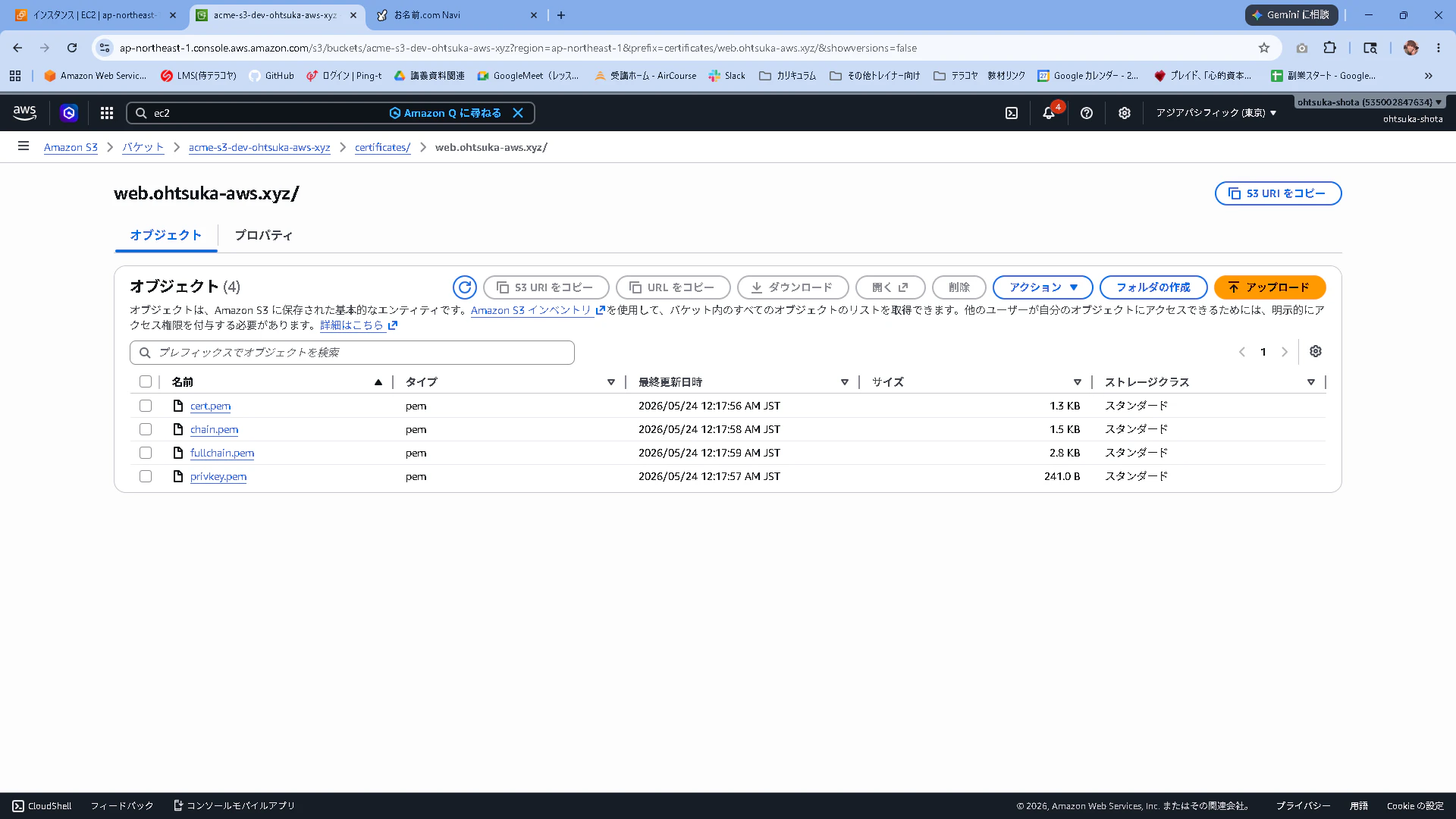
証明書がある状態でもう一度取得しようとすると「まだ有効な証明書があるけど再取得するんか?」と聞かれます。今回は1を選択して、再取得は控えました。
[root@ip-10-0-0-28 ~]# certbot certonly --apache -d web.ohtsuka-aws.xyz -m ohtsuka.se@gmail.com --agree-tos --no-eff-email --deploy-hook /opt/certbot-hooks/upload_to_s3.sh
Saving debug log to /var/log/letsencrypt/letsencrypt.log
Certificate not yet due for renewal

You have an existing certificate that has exactly the same domains or certificate name you requested and isn't close to expiry.
(ref: /etc/letsencrypt/renewal/web.ohtsuka-aws.xyz.conf)

What would you like to do?
- - - - - - - - - - - - - - - - - - - - - - - - - - - - - - - - - - - - - - - -
1: Keep the existing certificate for now
2: Renew & replace the certificate (may be subject to CA rate limits)
- - - - - - - - - - - - - - - - - - - - - - - - - - - - - - - - - - - - - - - -
Select the appropriate number [1-2] then [enter] (press 'c' to cancel): 1

- - - - - - - - - - - - - - - - - - - - - - - - - - - - - - - - - - - - - - - -
Certificate not yet due for renewal; no action taken.
- - - - - - - - - - - - - - - - - - - - - - - - - - - - - - - - - - - - - - - -
HTTP-01の課題
HTTP-01はHTTPで0.0.0.0/0のインバウンドを許可しないといけないっぽいです。それは少しリスキーだと感じる方も多いともいます。
そこでHTTP-01の時だけHTTPを開けるという方法が取れると思います。
EC2に設定しているIAM RoleにSGを変更するための権限を付与します。EC2FullAccessをアタッチします。
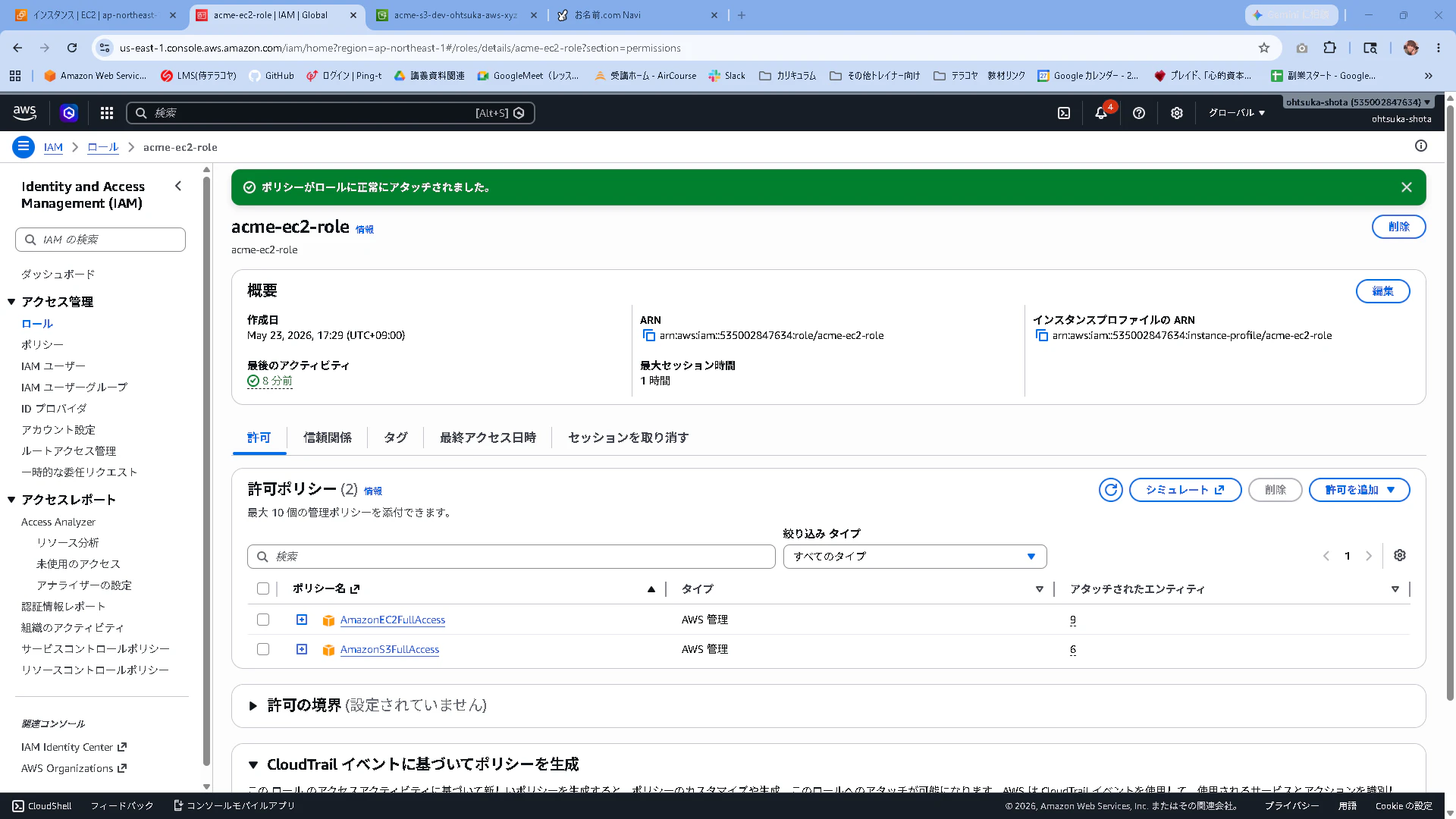
スクリプトを準備します。SGを開けるときのスクリプトは以下です。
[root@ip-10-0-0-28 ~]# vi /opt/certbot-hooks/open_sg.sh
[root@ip-10-0-0-28 ~]# cat /opt/certbot-hooks/open_sg.sh
#!/bin/bash
# SG_IDとリージョンはご自身の環境に合わせて変更してください
SG_ID="sg-0da93d4b44165d316"
REGION="ap-northeast-1"

/usr/local/bin/aws ec2 authorize-security-group-ingress --region ${REGION} --group-id ${SG_ID} --protocol tcp --port 80 --cidr 0.0.0.0/0
echo "SG Opened: $(date)" >> /var/log/certbot_sg.log

[root@ip-10-0-0-28 ~]# chmod +x /opt/certbot-hooks/open_sg.sh
[root@ip-10-0-0-28 ~]# ls -ltr /opt/certbot-hooks/open_sg.sh
-rwxr-xr-x. 1 root root 343 May 23 15:29 /opt/certbot-hooks/open_sg.sh
SGを閉じるときのスクリプトは以下です。
[root@ip-10-0-0-28 ~]# vi /opt/certbot-hooks/close_sg.sh
[root@ip-10-0-0-28 ~]# cat /opt/certbot-hooks/close_sg.sh
#!/bin/bash
# SG_IDとリージョンはご自身の環境に合わせて変更してください
SG_ID="sg-0da93d4b44165d316"
REGION="ap-northeast-1"

/usr/local/bin/aws ec2 revoke-security-group-ingress --region ${REGION} --group-id ${SG_ID} --protocol tcp --port 80 --cidr 0.0.0.0/0
echo "SG Closed: $(date)" >> /var/log/certbot_sg.log

[root@ip-10-0-0-28 ~]# chmod +x /opt/certbot-hooks/close_sg.sh
[root@ip-10-0-0-28 ~]# ls -ltr /opt/certbot-hooks/close_sg.sh
-rwxr-xr-x. 1 root root 340 May 23 15:31 /opt/certbot-hooks/close_sg.sh
動作確認
EC2のSGからHTTPのインバウンドを外しておきます。
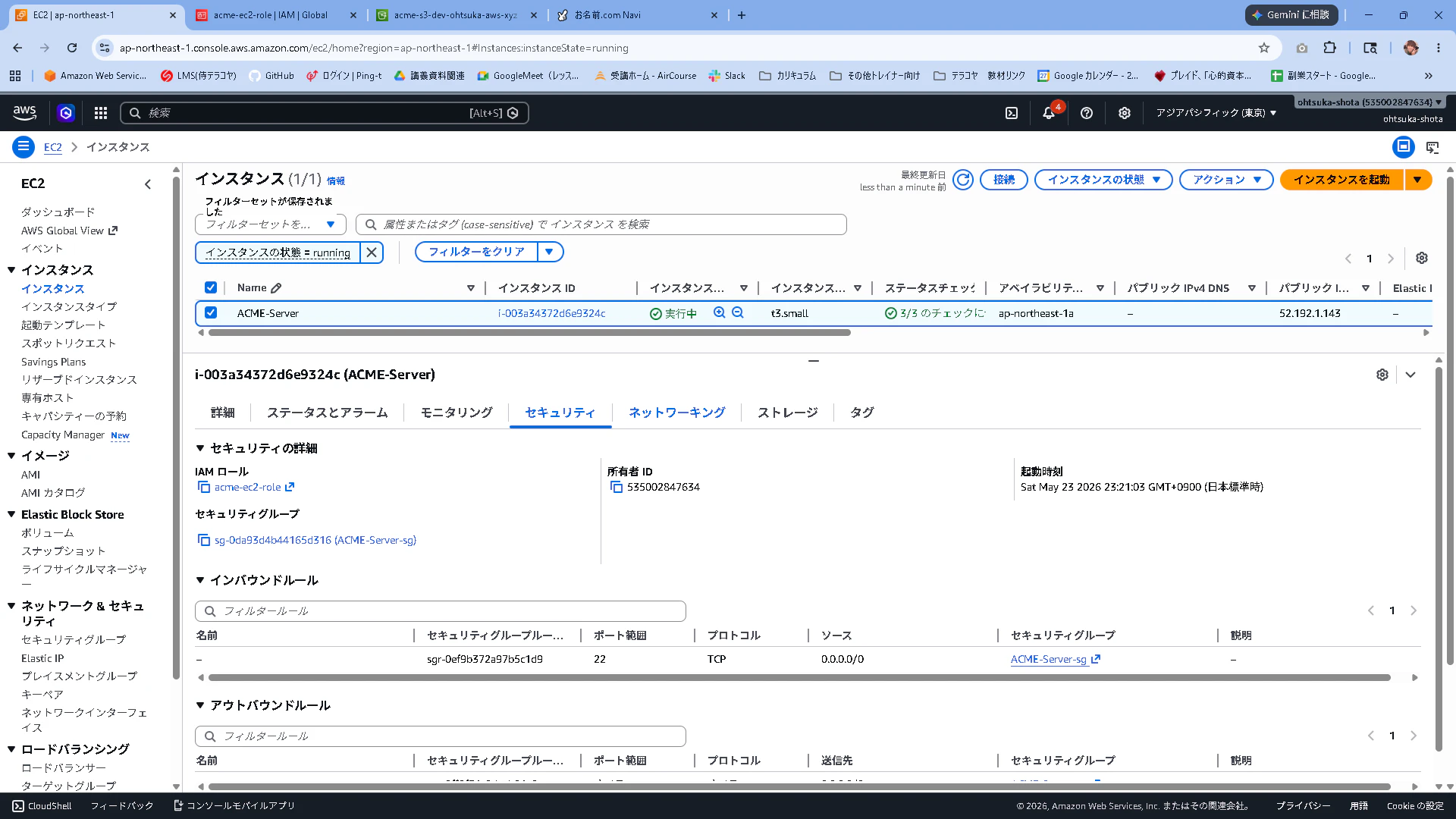
S3からも先ほど取得した証明書を削除しておきます。
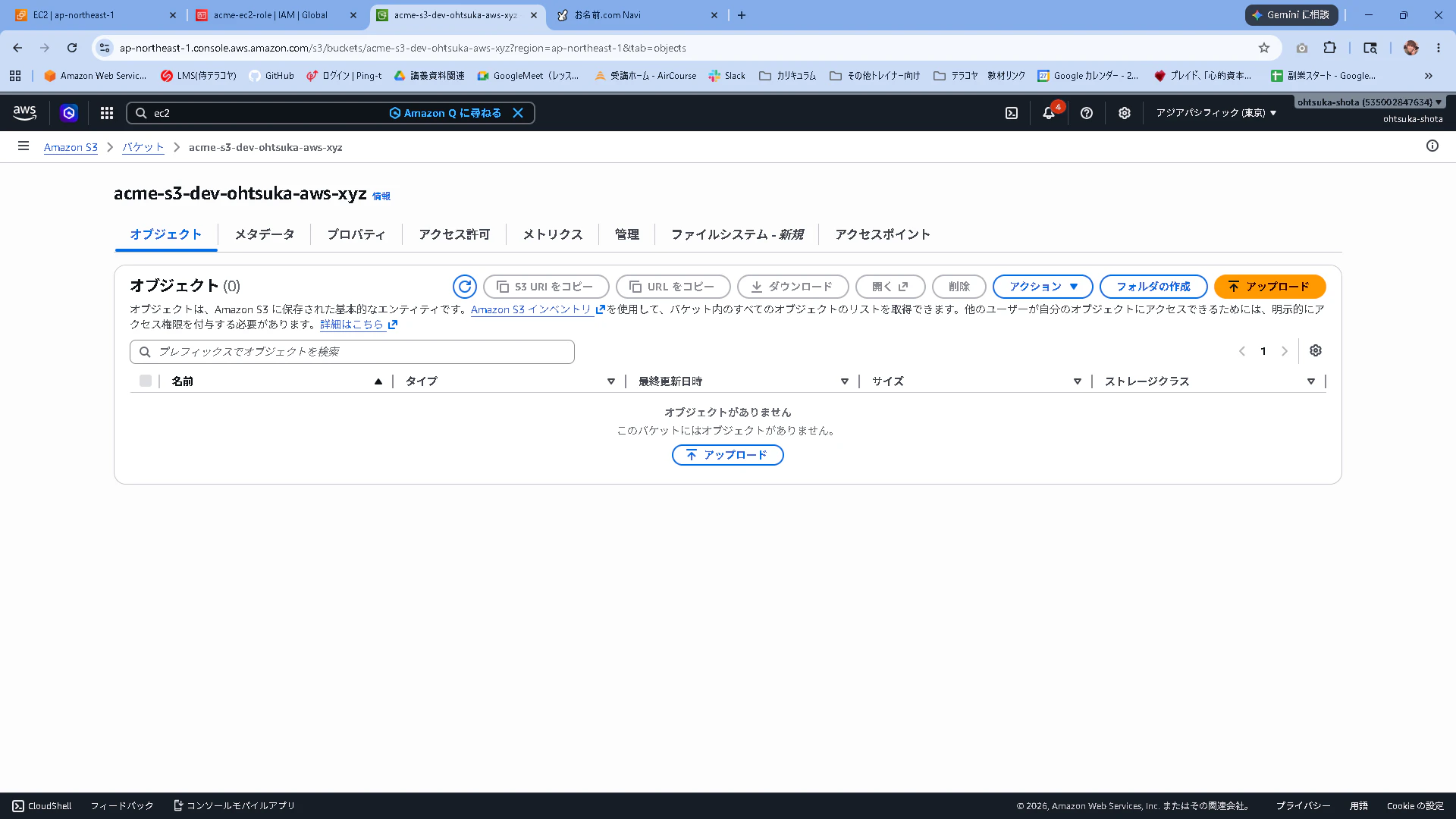
この状態で以下のコマンドを実行します。
証明書の取得前後でSGの開閉が行われています。
[root@ip-10-0-0-28 ~]# certbot renew --force-renewal --pre-hook /opt/certbot-hooks/open_sg.sh --post-hook /opt/certbot-hooks/clos
e_sg.sh --deploy-hook /opt/certbot-hooks/upload_to_s3.sh
Saving debug log to /var/log/letsencrypt/letsencrypt.log

- - - - - - - - - - - - - - - - - - - - - - - - - - - - - - - - - - - - - - - -
Processing /etc/letsencrypt/renewal/web.ohtsuka-aws.xyz.conf
- - - - - - - - - - - - - - - - - - - - - - - - - - - - - - - - - - - - - - - -
Hook 'pre-hook' ran with output:
 {
     "Return": true,
     "SecurityGroupRules": [
         {
             "SecurityGroupRuleId": "sgr-0ff6f5caeea124a07",
             "GroupId": "sg-0da93d4b44165d316",
             "GroupOwnerId": "535002847634",
             "IsEgress": false,
             "IpProtocol": "tcp",
             "FromPort": 80,
             "ToPort": 80,
             "CidrIpv4": "0.0.0.0/0",
             "SecurityGroupRuleArn": "arn:aws:ec2:ap-northeast-1:535002847634:security-group-rule/sgr-0ff6f5caeea124a07"
         }
     ]
 }
Renewing an existing certificate for web.ohtsuka-aws.xyz
Hook 'deploy-hook' ran with output:
 Completed 1.3 KiB/1.3 KiB (16.1 KiB/s) with 1 file(s) remaining
 upload: ../etc/letsencrypt/live/web.ohtsuka-aws.xyz/cert.pem to s3://acme-s3-dev-ohtsuka-aws-xyz/certificates/web.ohtsuka-aws.xyz/cert.pem
 Completed 241 Bytes/241 Bytes (3.2 KiB/s) with 1 file(s) remaining
 upload: ../etc/letsencrypt/live/web.ohtsuka-aws.xyz/privkey.pem to s3://acme-s3-dev-ohtsuka-aws-xyz/certificates/web.ohtsuka-aws.xyz/privkey.pem
 Completed 1.5 KiB/1.5 KiB (18.2 KiB/s) with 1 file(s) remaining
 upload: ../etc/letsencrypt/live/web.ohtsuka-aws.xyz/chain.pem to s3://acme-s3-dev-ohtsuka-aws-xyz/certificates/web.ohtsuka-aws.xyz/chain.pem
 Completed 2.8 KiB/2.8 KiB (35.6 KiB/s) with 1 file(s) remaining
 upload: ../etc/letsencrypt/live/web.ohtsuka-aws.xyz/fullchain.pem to s3://acme-s3-dev-ohtsuka-aws-xyz/certificates/web.ohtsuka-aws.xyz/fullchain.pem
Reloading apache server after certificate renewal

- - - - - - - - - - - - - - - - - - - - - - - - - - - - - - - - - - - - - - - -
Congratulations, all renewals succeeded:
  /etc/letsencrypt/live/web.ohtsuka-aws.xyz/fullchain.pem (success)
- - - - - - - - - - - - - - - - - - - - - - - - - - - - - - - - - - - - - - - -
Hook 'post-hook' ran with output:
 {
     "Return": true,
     "RevokedSecurityGroupRules": [
         {
             "SecurityGroupRuleId": "sgr-0ff6f5caeea124a07",
             "GroupId": "sg-0da93d4b44165d316",
             "IsEgress": false,
             "IpProtocol": "tcp",
             "FromPort": 80,
             "ToPort": 80,
             "CidrIpv4": "0.0.0.0/0"
         }
     ]
 }
-
pre-hook の成功
AWS CLIが実行され、SG(sg-0da93d4b44165d316)の80番ポートがパブリック(0.0.0.0/0)に開放されました("Return": true)。 -
証明書の更新成功
Renewing an existing certificate... と表示され、Let's Encryptの認証を無事に通過しました。 -
deploy-hook の成功
更新された新しい証明書(4つのファイル)が、S3バケットへ正常にアップロードされました。 -
post-hook の成功
最後にAWS CLIが実行され、先ほど開けたSGの80番ポートのルールが即座に削除(Revoke)されました("Return": true)。
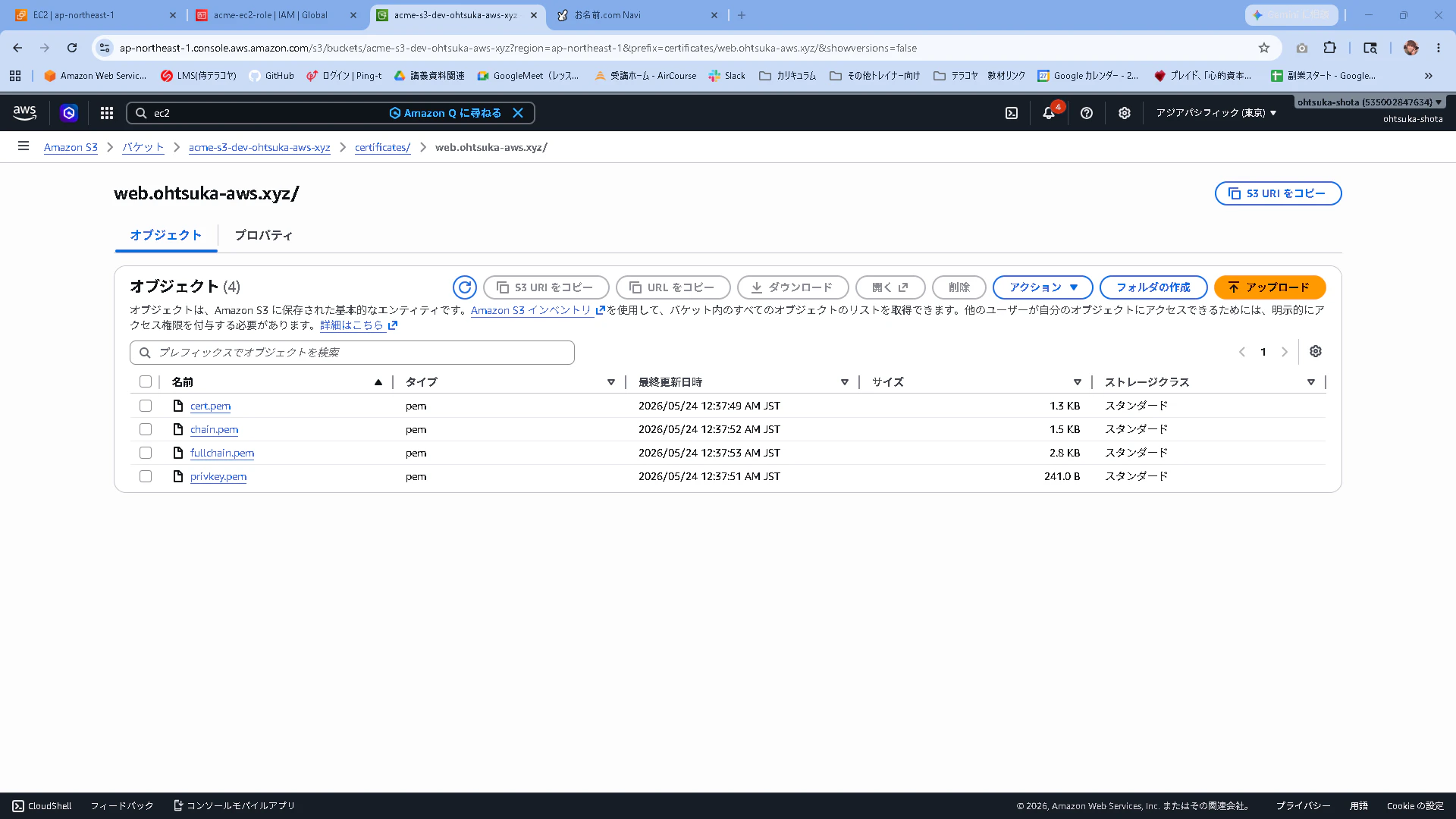
S3にも証明書がアップロードされています。
問題なさそうですね。処理時間が数十秒と極めて短いため、サイバーキルチェーンの各フェーズを考慮すれば、この時間内に攻撃を成立させることは極めて困難と言えるでしょう。
この処理をCrontabで設定しておくと自動化達成の一助になるでしょう。
0 3 * * * root certbot renew --pre-hook /opt/certbot-hooks/open_sg.sh --post-hook /opt/certbot-hooks/close_sg.sh --deploy-hook /opt/certbot-hooks/upload_to_s3.sh --quiet >> /var/log/certbot_renew.log 2>&1
DNS-01チャレンジ
チャレンジ方式の比較
| 項目 | DNS-01 | HTTP-01 |
|---|---|---|
| 所有権の証明方法 | DNSのTXTレコードにトークンを登録 |
/.well-known/acme-challenge/ にトークンを公開 |
| ポート80の開放 | 不要 | 必要 |
| ワイルドカード証明書 | 対応(*.example.com) |
非対応 |
| DNSプロバイダーのAPI連携 | 必要 | 不要 |
| 自動化の難易度 | DNSプロバイダー次第 | 比較的容易 |
| セキュリティリスク | DNSのAPI認証情報の管理が必要 | 証明書取得時にポート80を外部公開する必要がある |
| サーバーへの直接アクセス | 不要(サーバーが非公開でも可) | 必要(外部からHTTPアクセスできる必要がある) |
| 対応ドメイン数 | 複数・ワイルドカード含め柔軟 | 1ドメインずつ個別に対応 |
| DNS伝播待ちの影響 | あり(TTLによっては数分〜数十分) | 基本的になし(※新規ドメイン設定直後を除く) |
| 他サーバの代理取得(証明書の集中管理) | 容易(対象サーバに依存せず、別サーバで取得可能) | 困難(対象ドメインの80番ポート宛の通信をプロキシ等で転送する設定が必要) |