
はじめに
Svelteはあまり使われていないし、AIエージェント時代ならやっぱりシェアが多いReactかVueを選んだほうがいいのかな?とお考えのあなたのためにこの記事を書きます。
Svelte MCPを使おう
Svelte MCPはSvelteが提供する公式のMCPサーバーです。
Svelte MCP (Model Context Protocol) サーバーは、あなたの LLM または選択したエージェントがより良い Svelte コードを書くのを支援します。これは、目下のタスクに関連するドキュメントを提供し、生成されたコードを静的に分析して、修正やベストプラクティスを提案できるようにします。
https://svelte.jp/docs/mcp/overview
設定方法はいくつかありますが、以下のコマンドを実行し、指示に従い、設定するのが簡単で良いでしょう。
npx sv add mcp
MCP サーバーを最大限に活用するには、AGENTS.md(Claude Code を使用している場合は CLAUDE.md)に以下のプロンプトを含めることをお勧めします。これにより、LLM に利用可能なツールと、それらを使用する適切なタイミングを伝えられます。
https://svelte.jp/docs/mcp/overview#Usage
以下のプロンプトをAGENTS.mdまたはClaude Codeを使用している場合はCLAUDE.mdに書いてください。
You are able to use the Svelte MCP server, where you have access to comprehensive Svelte 5 and SvelteKit documentation. Here's how to use the available tools effectively:

## Available MCP Tools:

### 1. list-sections

Use this FIRST to discover all available documentation sections. Returns a structured list with titles, use_cases, and paths.
When asked about Svelte or SvelteKit topics, ALWAYS use this tool at the start of the chat to find relevant sections.

### 2. get-documentation

Retrieves full documentation content for specific sections. Accepts single or multiple sections.
After calling the list-sections tool, you MUST analyze the returned documentation sections (especially the use_cases field) and then use the get-documentation tool to fetch ALL documentation sections that are relevant for the user's task.

### 3. svelte-autofixer

Analyzes Svelte code and returns issues and suggestions.
You MUST use this tool whenever writing Svelte code before sending it to the user. Keep calling it until no issues or suggestions are returned.

### 4. playground-link

Generates a Svelte Playground link with the provided code.
After completing the code, ask the user if they want a playground link. Only call this tool after user confirmation and NEVER if code was written to files in their project.
Claude Opus 4.5を使おう
昨今、いろんなモデルが登場し日々進化してきていますが、2025年12月現在ではClaude Opus 4.5が一番Svelteのコードを書くのに適したモデルと言えます。
以下のベンチマークは、Runesと最新のSvelte機能を適切に使用して、LLMが機能的なSvelte 5コンポーネントを生成する能力を評価を示しています。
このベンチマークで唯一すべてのテストを100%クリアしているのがClaude Opus 4.5になります。
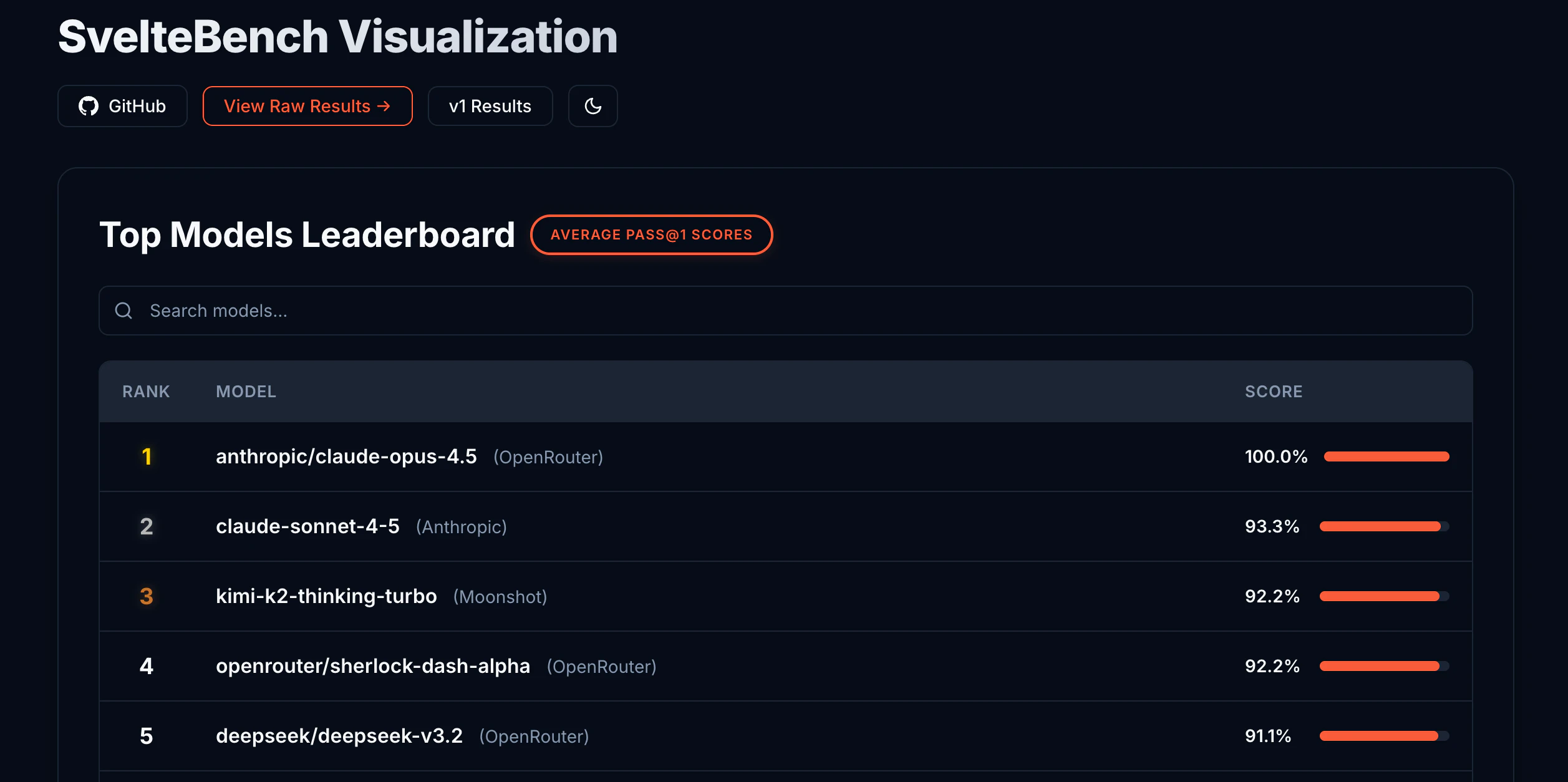
出典 :https://khromov.github.io/svelte-bench/benchmark-results-merged.html
さいごに
私は業務でSvelte5のコードを書いていますが、Svelte MCPが登場する以前はSvelte4のコードを生成してきたり、存在しないAPIを使用してきたりと正直、AIエージェントとの相性は悪かったと思います。
ただ、2025年12月現在ではSvelte MCPが登場したり、Claude Opus 4.5が登場したりと充分、業務で使える最新のSvelteコードを書いてくれます。
SvelteはAIエージェントとの相性が悪いのでは?と思って敬遠していた方々はぜひ一度使ってみてください。