
やりたいこと
踏み台用途のEC2インスタンスのセッションマネージャーによるログインをマネジメントコンソールを経由せずに接続したい。
それだけならAWS CLIで可能だが、使い慣れたRLoginでログインするため、SSHトンネル経由でログインしたい。
前提条件
- Windows 11
- RLoginの最新版がインストールされている
- AWS CLI, Session Manager Pluginはインストール済み
- AWSの認証設定は設定済み
- AWS
- インスタンスプロファイルで
AmazonSSMManagedInstanceCoreを追加したIAMロールを割り当て済み - EC2インスタンス作成時に鍵のPEMファイルを作成し設定済み
- Amazon Linux 2023を指定すること
- sshdを22番で起動していること
- セキュリティグループのインバウンドにはSSH不要
- インスタンスプロファイルで
やりかた
以下のPowerShellのスクリプトを任意の場所に置いておく。
自動起動が不要であれば SSMセッション開始 の箇所のみで良い。
エラー時にすぐに接続終了しないようtry-catchしている。
C:\Scripts\ssm-proxy.ps1
param (
    [Parameter(Mandatory=$true)]
    [string]$InstanceId,
    [int]$Port = 22,
    [string]$ProfileName = ""
)

# エラーが発生した時に即座にcatchブロックへ飛ばすための設定
$ErrorActionPreference = "Stop"

function Log-Msg($m) { [Console]::Error.WriteLine("[Proxy] $m") }

try {
    # プロファイル名が指定されている場合は環境変数にセットする
    if ($ProfileName) {
        $env:AWS_PROFILE = $ProfileName
    }

    # インスタンスの状態を取得
    $state = aws ec2 describe-instances `
        --instance-ids $InstanceId `
        --query "Reservations[0].Instances[0].State.Name" `
        --output text 2>$null

    # 停止中(stopping)なら、完全に止まるまで待機
    if ($state -eq "stopping") {
        Log-Msg "Instance is stopping."
        aws ec2 wait instance-stopped --instance-ids $InstanceId | Out-Null
        $state = "stopped"
    }

    # 停止済み(stopped)なら起動
    if ($state -eq "stopped") {
        Log-Msg "Starting instance $InstanceId"
        aws ec2 start-instances --instance-ids $InstanceId | Out-Null
        aws ec2 wait instance-running --instance-ids $InstanceId | Out-Null
        # SSM Agentの初期化待ち
        Start-Sleep -Seconds 10
    }

    # この時点で起動中(running)でないならエラー終了
    if ($state -ne "running") {
        Log-Msg "Instance is not running ($state)"
        throw "AWS SSM Session failed with exit code $LASTEXITCODE"
    }

    # SSMセッション開始
    aws ssm start-session `
        --target $InstanceId `
        --document-name AWS-StartSSHSession `
        --parameters "portNumber=$Port"

    if ($LASTEXITCODE -ne 0) {
        throw "AWS SSM Session failed with exit code $LASTEXITCODE"
    }

} catch {
    Log-Msg "end."
    Read-Host "end."
    exit 1
}
RLoginを以下のように設定する。
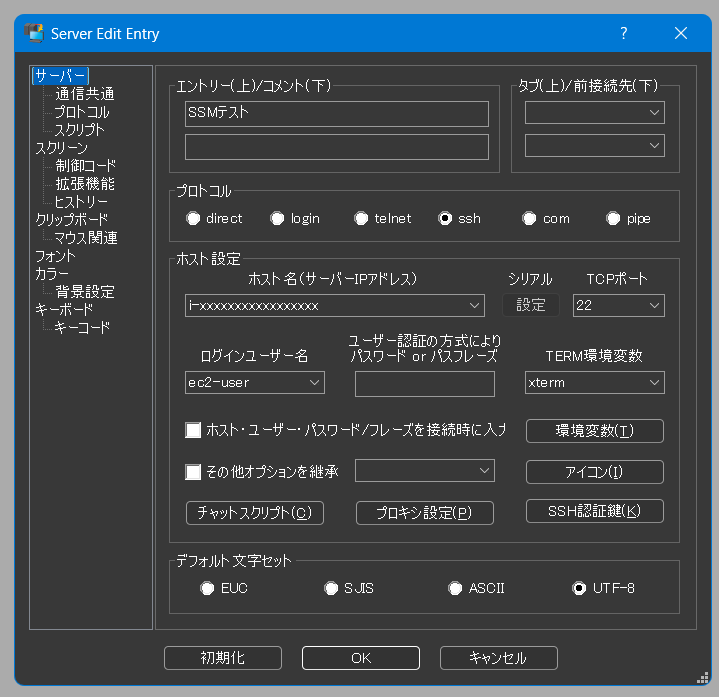
- ホスト名: インスタンス名(i-xxxxxxxxxxxxxxxxx)
- TCPポート:
22- sshではなく22に変更する
- ログインユーザー名:
ec2-user- SSHログイン時のユーザー名
「プロキシ設定」ボタンからProxy Commandを設定する。%SはインスタンスID、%pはポートに置換される。
~/.ssh/config だとホスト名は%hで違うので注意する。
スクリプトの第三引数にプロファイル名を設定しているので、複数アカウント管理の場合は最後にプロファイル名を入れる。
powershell.exe -File "C:\Scripts\ssm-proxy.ps1" %S %p
「SSH認証鍵」ボタンからPEMキーを設定する。
結果
接続できた。
Starting session with SessionId: XXXX-xxxxxxxxxxxxx
   ,     #_
   ~\_  ####_        Amazon Linux 2023
  ~~  \_#####\
  ~~     \###|
  ~~       \#/ ___   https://aws.amazon.com/linux/amazon-linux-2023
   ~~       V~' '->
    ~~~         /
      ~~._.   _/
         _/ _/
       _/m/'
まとめ
EC2インスタンスにSSHの設定を入れることでセッションマネージャー経由のアクセスができました。
インターネットにSSHを公開する方法よりかは安全になります。
SSM単体と比較するとsshdを起動しないといけないこととコマンドが監査ログに残らないことはデメリットとして挙げられそうです。
また、EC2にこだわらないなら踏み台をECSで立ち上げたり、CloudShellで十分なケースも多いです。
現状の構成がある中でセキュリティを確保しつつ、使い慣れたツールを使う用途ならこの方法もありです。
自環境では動作確認していますが、PowerShellの実行方法やスクリプトの内容に抜けがあるかもしれません。