

はじめに
Google Chat(以降、GC)とGoogle Apps Script(以降、GAS)の連携において、
GAS→GCに通知を送る仕組みはよく見かけますが、反対にGCからGASに情報を送る方向の記事は多くない印象です。
今回は、GCの入力フォームからGASを起動する仕組みにフォーカスして実用的な例を紹介します。
Google Chatの入力フォームとは
まず、ここでいうGCの入力フォームとは、チャットの入力欄のことではありません。
GCにはカードという仕組みがあり、自由に入力フォームの組み立てが可能です。
参考:
Cards v2 | Google Chat | Google for Developers
UI Kit Builder
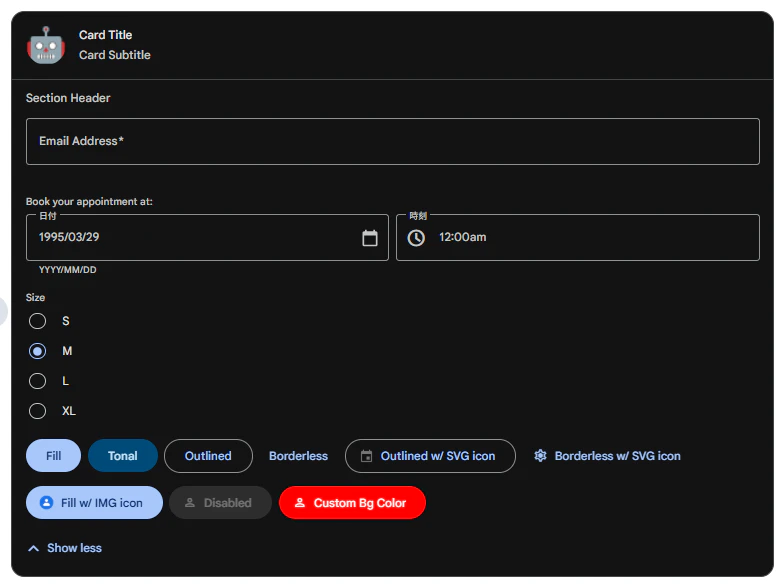
カードの呼び出し方は大きく2パターンあります。
- Bot等からスペースにカードが投稿される(受動的)
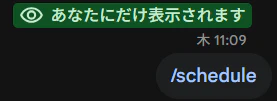
- ユーザーがスラッシュコマンドを打ってカードを表示する(能動的)
今回作るもの
今回は、この2パターンどちらも活用した仕組みを作ってみました。
無料の日程調整ツール「調整さん」をGC上で再現してみます。
使い方
-
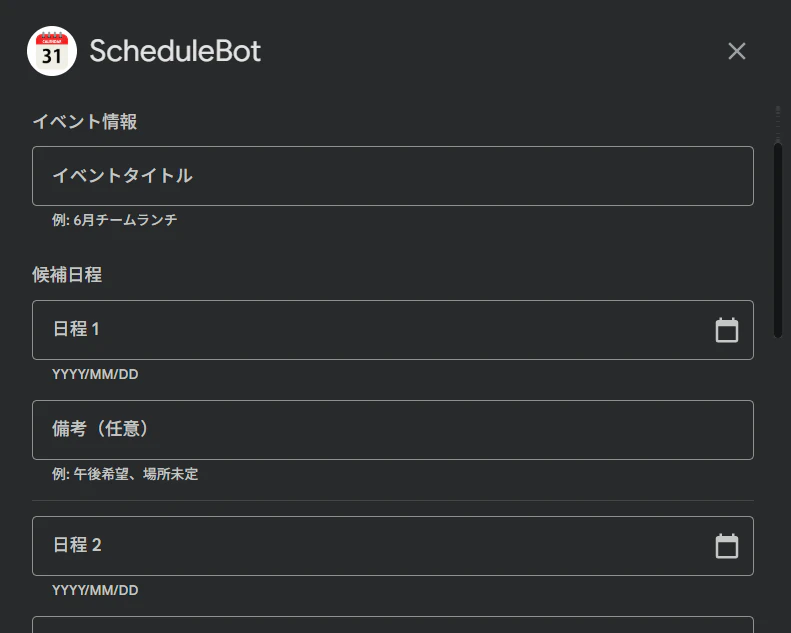
スラッシュコマンドを打つと、実行した人にしか見えない入力フォームが出てきて、
調整したい予定を登録する。
-
登録すると、全員が見れるメッセージが投稿されて、集計が表示される。
アコーディオンを開くと回答者一覧(黒塗り部分)が表示される。
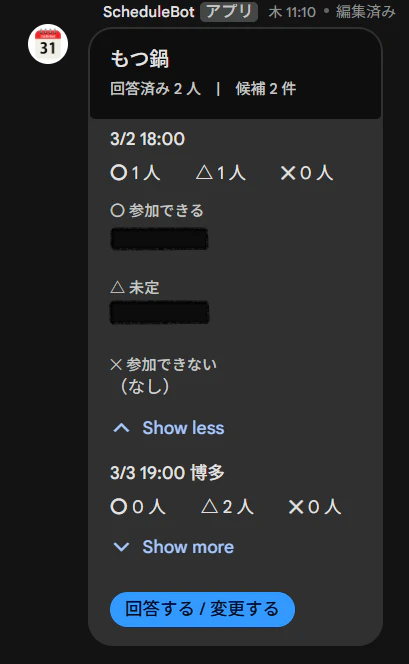
-
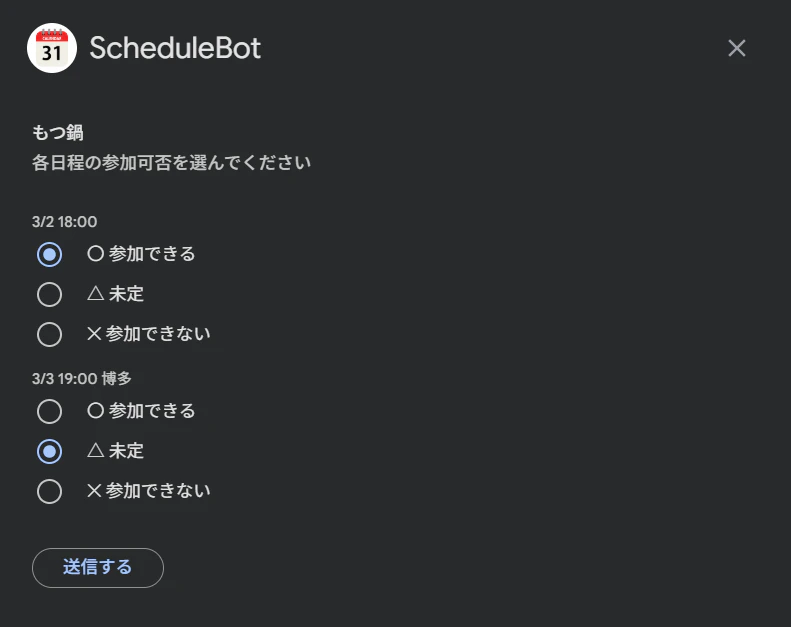
回答する/変更するボタンから自分の回答を登録できる
-
回答したら集計欄に反映される
構成
ユーザー
  │ 操作
  ▼
Google Chat
  │ HTTP
  ▼
Google Apps Script
  │ 読み書き
  ▼
スプレッドシート
データの保存にはスプレッドシートを使います。
GASとの連携が容易で、無料で利用できるため内部用アプリならDBを使わずとも十分です。
外部に公開することを想定している場合は、Cloud SQL等のDBサービスを導入したりGAS関数の中でリクエストの正当性を検証したりの検討が必要です。
データ構造
eventsシート

responsesシート

実装手順
事前準備(GCPコンソール)
Step 1: GCPプロジェクト作成
Google Cloud Console でプロジェクトを新規作成します。
- プロジェクト名: 任意(例:
schedule-bot-dev) - 組織,親リソース: 任意
Step 2: API有効化
「APIとサービス」→「ライブラリ」から以下を有効化します。
- Google Chat API
- Google Sheets API
- Apps Script API
Step 3: OAuth同意画面の設定
「APIとサービス」→「OAuth同意画面」
| 項目 | 入力値 |
|---|---|
| アプリ名 | 任意(例: ScheduleBot) |
| ユーザーサポートメール | 任意 |
| 対象 | 内部(Google Workspace アカウントの場合) |
| 連絡先 | 任意 |
「内部」を選ぶとテストユーザーの追加が不要になります。
GASプロジェクトの準備
Step 4: ファイル作成・コード貼り付け
script.google.com で新規プロジェクトを作成します。
既存の コード.gs を Code.gs の内容に書き換え、「+」→「スクリプト」で以下を追加します。
| ファイル名 | 役割 |
|---|---|
Commands |
スラッシュコマンド処理・入力フォーム生成 |
Dialogs |
フォーム送信・回答ダイアログ生成・回答送信 |
Cards |
スペース投稿カード生成 |
Spreadsheet |
スプレッドシート CRUD |
ChatAPI |
Chat REST API ラッパー |
処理の流れは以下のようになります。
- ユーザーがスラッシュコマンドを実行 →
Code→Commandsでダイアログ表示 - フォーム送信 →
Code→Dialogs→Spreadsheetに保存 →ChatAPIでスペースにカード投稿 - 回答ボタン押下 →
Code→Dialogsで回答ダイアログ表示 →Spreadsheetに保存 →ChatAPIでカード更新
各ファイルの内容は以下の通りです。
Code.gs
function doPost(e) {
  try {
    const payload = JSON.parse(e.postData.contents);
    console.log('doPost payload:', JSON.stringify(payload));
    const chat = payload.chat;

    if (!chat) {
      return jsonResponse({ text: '' });
    }

    // スラッシュコマンド
    if (chat.appCommandPayload) {
      return handleSlashCommand(payload);
    }

    // カードのボタン押下
    if (chat.buttonClickedPayload) {
      return handleCardClicked(payload);
    }

    return jsonResponse({ text: '' });

  } catch (err) {
    console.log('doPost error: ' + err.stack);
    return jsonResponse({ text: 'エラーが発生しました: ' + err.message });
  }
}

function handleCardClicked(payload) {
  const actionFromParams = getParam(payload, 'action');
  const legacyAction = payload.chat?.buttonClickedPayload?.action?.actionMethodName;
  const actionName = actionFromParams || legacyAction;
  console.log('handleCardClicked actionName:', actionName);

  switch (actionName) {
    case 'submit_schedule':
      return handleScheduleSubmit(payload);
    case 'open_answer':
      return handleOpenAnswer(payload);
    case 'submit_answer':
      return handleAnswerSubmit(payload);
    default:
      return jsonResponse({ text: `Unknown action: ${actionName}` });
  }
}

function jsonResponse(obj) {
  return ContentService
    .createTextOutput(JSON.stringify(obj))
    .setMimeType(ContentService.MimeType.JSON);
}
Commands.gs
function handleSlashCommand(payload) {
  const commandId = payload.chat?.appCommandPayload?.appCommandMetadata?.appCommandId;
  const spaceId = payload.chat?.appCommandPayload?.space?.name;

  if (commandId == 1) {
    return openScheduleInputDialog(spaceId);
  }

  return jsonResponse({ text: `Unknown command ID: ${commandId}` });
}

function openScheduleInputDialog(spaceId) {
  return jsonResponse({
    action: {
      navigations: [{
        pushCard: buildScheduleInputCard(spaceId)
      }]
    }
  });
}

function buildScheduleInputCard(spaceId) {
  return {
    header: {
      title: 'スケジュール調整を作成',
      subtitle: '候補日程を入力してください'
    },
    sections: [
      {
        header: 'イベント情報',
        widgets: [
          {
            textInput: {
              name: 'title',
              label: 'イベントタイトル',
              hintText: '例: 6月チームランチ',
              type: 'SINGLE_LINE'
            }
          }
        ]
      },
      {
        header: '候補日程',
        widgets: [
          ...buildDateSlot(0),
          { divider: {} },
          ...buildDateSlot(1),
          { divider: {} },
          ...buildDateSlot(2),
          { divider: {} },
          ...buildDateSlot(3),
          { divider: {} },
          ...buildDateSlot(4)
        ]
      },
      {
        widgets: [
          {
            buttonList: {
              buttons: [
                {
                  text: '作成する',
                  onClick: {
                    action: {
                      function: ScriptApp.getService().getUrl(),
                      parameters: [
                        { key: 'action', value: 'submit_schedule' },
                        { key: 'space_id', value: spaceId || '' }
                      ]
                    }
                  }
                }
              ]
            }
          }
        ]
      }
    ]
  };
}

function buildDateSlot(index) {
  return [
    {
      dateTimePicker: {
        name:  `date_${index}`,
        label: `日程 ${index + 1}`,
        type:  'DATE_ONLY'
      }
    },
    {
      textInput: {
        name:     `note_${index}`,
        label:    '備考(任意)',
        hintText: '例: 午後希望、場所未定',
        type:     'SINGLE_LINE'
      }
    }
  ];
}
Dialogs.gs
function handleScheduleSubmit(payload) {
  const inputs = payload.commonEventObject?.formInputs;

  const title = getFormValue(inputs, 'title');
  if (!title) {
    return dialogError('タイトルを入力してください');
  }

  const dates = [0, 1, 2, 3, 4]
    .filter(i => inputs?.[`date_${i}`]?.dateInput != null)
    .map(i => {
      const ms      = parseInt(inputs[`date_${i}`].dateInput.msSinceEpoch);
      const dateStr = msToDateString(ms);
      const note    = getFormValue(inputs, `note_${i}`);
      return dateStr + (note ? ` ${note}` : '');
    });

  const eventId = Utilities.getUuid();
  const spaceId = getParam(payload, 'space_id');

  try {
    createEvent(eventId, title, dates, spaceId);
    const card = buildPublicCardJSON(eventId);
    const message = postMessageToSpace(spaceId, card);
    if (message && message.name) {
      updateEventMessageName(eventId, message.name);
    }
  } catch (err) {
    console.log('handleScheduleSubmit error:', err.stack);
    return dialogError('カードの投稿に失敗しました: ' + err.message);
  }

  return closeDialog('スケジュールを作成しました!');
}

function handleOpenAnswer(payload) {
  const eventId = getParam(payload, 'event_id');
  const userId = payload.chat?.user?.name;

  const event = getEvent(eventId);
  if (!event) {
    return dialogError('スケジュールが見つかりません');
  }

  const existingAnswers = getUserResponse(eventId, userId);
  const dialog = buildAnswerDialog(event, existingAnswers);

  return jsonResponse({
    action: {
      navigations: [{ pushCard: dialog }]
    }
  });
}

function buildAnswerDialog(event, existingAnswers) {
  const dateWidgets = event.dates.map((date, i) => {
    const current = existingAnswers ? existingAnswers[i] : null;
    return {
      selectionInput: {
        name: `ans_${i}`,
        label: date,
        type: 'RADIO_BUTTON',
        items: [
          { text: '〇 参加できる',   value: '〇', selected: current === '〇' },
          { text: '△ 未定',         value: '△', selected: current === '△' },
          { text: '✕ 参加できない', value: '✕', selected: current === '✕' }
        ]
      }
    };
  });

  return {
    header: {
      title: event.title,
      subtitle: '各日程の参加可否を選んでください'
    },
    sections: [
      { widgets: dateWidgets },
      {
        widgets: [
          {
            buttonList: {
              buttons: [
                {
                  text: '送信する',
                  onClick: {
                    action: {
                      function: ScriptApp.getService().getUrl(),
                      parameters: [
                        { key: 'action', value: 'submit_answer' },
                        { key: 'event_id', value: event.eventId }
                      ]
                    }
                  }
                }
              ]
            }
          }
        ]
      }
    ]
  };
}

function handleAnswerSubmit(payload) {
  const eventId = getParam(payload, 'event_id');
  const userId = payload.chat?.user?.name;
  const displayName = payload.chat?.user?.displayName;

  const event = getEvent(eventId);
  if (!event) {
    return dialogError('スケジュールが見つかりません');
  }

  const inputs = payload.commonEventObject?.formInputs;
  const answers = event.dates.map((_, i) => {
    const val = getFormValue(inputs, `ans_${i}`);
    return val || '✕';
  });

  upsertResponse(eventId, userId, displayName, answers);

  const card = buildPublicCardJSON(eventId);
  updateMessage(event.messageName, card);

  return closeDialog('回答を送信しました!');
}

function getFormValue(inputs, key) {
  return inputs?.[key]?.stringInputs?.value?.[0] ?? null;
}

function getParam(payload, key) {
  const ceoParams = payload.commonEventObject?.parameters;
  if (ceoParams?.[key] !== undefined) return ceoParams[key];

  const params = payload.chat?.buttonClickedPayload?.action?.parameters || [];
  return params.find(p => p.key === key)?.value ?? null;
}

function closeDialog(toastText) {
  return jsonResponse({
    action: {
      navigations: [{ endNavigation: { action: 'CLOSE_DIALOG' } }],
      notification: { text: toastText }
    }
  });
}

function msToDateString(ms) {
  if (!ms || isNaN(ms)) return null;
  const d = new Date(ms);
  return `${d.getUTCMonth() + 1}/${d.getUTCDate()}`;
}

function dialogError(message) {
  return jsonResponse({
    action: { notification: { text: message } }
  });
}
Cards.gs
function buildPublicCardJSON(eventId) {
  const event     = getEvent(eventId);
  const responses = getResponsesForEvent(eventId);

  const sections = [
    ...event.dates.map((date, i) => buildDateSection(date, i, responses)),
    buildAnswerButtonSection(eventId)
  ];

  return {
    header: {
      title:    event.title,
      subtitle: `回答済み ${responses.length} 人 | 候補 ${event.dates.length} 件`
    },
    sections: sections
  };
}

function buildDateSection(date, dateIndex, responses) {
  const grouped = groupByAnswer(responses, dateIndex);
  const ok    = grouped['〇'].length;
  const maybe = grouped['△'].length;
  const no    = grouped['✕'].length;

  const okNames    = ok    > 0 ? grouped['〇'].join('、') : '<font color="#aaaaaa">(なし)</font>';
  const maybeNames = maybe > 0 ? grouped['△'].join('、') : '<font color="#aaaaaa">(なし)</font>';
  const noNames    = no    > 0 ? grouped['✕'].join('、') : '<font color="#aaaaaa">(なし)</font>';

  return {
    header:                    date,
    collapsible:               true,
    uncollapsibleWidgetsCount: 1,
    widgets: [
      { decoratedText: { text: `<b>〇</b> ${ok} 人  <b>△</b> ${maybe} 人  <b>✕</b> ${no} 人` } },
      { decoratedText: { topLabel: '〇 参加できる',   text: okNames    } },
      { divider: {} },
      { decoratedText: { topLabel: '△ 未定',         text: maybeNames } },
      { divider: {} },
      { decoratedText: { topLabel: '✕ 参加できない', text: noNames    } }
    ]
  };
}

function buildAnswerButtonSection(eventId) {
  return {
    widgets: [
      {
        buttonList: {
          buttons: [
            {
              text:    '回答する / 変更する',
              color:   { red: 0.2, green: 0.6, blue: 1.0, alpha: 1.0 },
              onClick: {
                action: {
                  function:    ScriptApp.getService().getUrl(),
                  parameters:  [
                    { key: 'action',   value: 'open_answer' },
                    { key: 'event_id', value: eventId }
                  ],
                  interaction: 'OPEN_DIALOG'
                }
              }
            }
          ]
        }
      }
    ]
  };
}

function groupByAnswer(responses, dateIndex) {
  const result = { '〇': [], '△': [], '✕': [] };
  responses.forEach(r => {
    const ans = r.answers[dateIndex];
    if (result[ans]) result[ans].push(r.displayName);
  });
  return result;
}
Spreadsheet.gs
const EVENT_COL = { ID: 1, TITLE: 2, DATES: 3, SPACE_ID: 4, MESSAGE_NAME: 5, CREATED_AT: 6 };
const RESP_COL  = { EVENT_ID: 1, USER_ID: 2, DISPLAY_NAME: 3, ANSWERS: 4, UPDATED_AT: 5 };

function initSpreadsheet() {
  const props = PropertiesService.getScriptProperties();
  let id = props.getProperty('SPREADSHEET_ID');

  if (!id) {
    const ss = SpreadsheetApp.create('ScheduleBot DB');
    id = ss.getId();
    props.setProperty('SPREADSHEET_ID', id);

    const eventsSheet = ss.getActiveSheet();
    eventsSheet.setName('events');
    eventsSheet.appendRow(['event_id', 'title', 'dates', 'space_id', 'message_name', 'created_at']);

    const responsesSheet = ss.insertSheet('responses');
    responsesSheet.appendRow(['event_id', 'user_id', 'display_name', 'answers', 'updated_at']);

    Logger.log(`Spreadsheet created: https://docs.google.com/spreadsheets/d/${id}`);
  }

  return SpreadsheetApp.openById(id);
}

function getSpreadsheet() {
  const id = PropertiesService.getScriptProperties().getProperty('SPREADSHEET_ID');
  if (!id) throw new Error('SPREADSHEET_ID が設定されていません。initSpreadsheet() を実行してください。');
  return SpreadsheetApp.openById(id);
}

function getSheet(name) {
  return getSpreadsheet().getSheetByName(name);
}

function createEvent(eventId, title, dates, spaceId) {
  getSheet('events').appendRow([
    eventId, title, JSON.stringify(dates), spaceId, '', new Date().toISOString()
  ]);
}

function updateEventMessageName(eventId, messageName) {
  const sheet = getSheet('events');
  const data = sheet.getDataRange().getValues();
  for (let i = 1; i < data.length; i++) {
    if (data[i][EVENT_COL.ID - 1] === eventId) {
      sheet.getRange(i + 1, EVENT_COL.MESSAGE_NAME).setValue(messageName);
      return;
    }
  }
}

function getEvent(eventId) {
  const data = getSheet('events').getDataRange().getValues();
  for (let i = 1; i < data.length; i++) {
    const row = data[i];
    if (row[EVENT_COL.ID - 1] === eventId) {
      return {
        eventId:     row[EVENT_COL.ID - 1],
        title:       row[EVENT_COL.TITLE - 1],
        dates:       JSON.parse(row[EVENT_COL.DATES - 1]),
        spaceId:     row[EVENT_COL.SPACE_ID - 1],
        messageName: row[EVENT_COL.MESSAGE_NAME - 1]
      };
    }
  }
  return null;
}

function upsertResponse(eventId, userId, displayName, answers) {
  const lock = LockService.getScriptLock();
  lock.tryLock(10000);

  try {
    const sheet = getSheet('responses');
    const data = sheet.getDataRange().getValues();
    const now = new Date().toISOString();
    const answersJson = JSON.stringify(answers);

    for (let i = 1; i < data.length; i++) {
      const row = data[i];
      if (row[RESP_COL.EVENT_ID - 1] === eventId && row[RESP_COL.USER_ID - 1] === userId) {
        sheet.getRange(i + 1, RESP_COL.DISPLAY_NAME).setValue(displayName);
        sheet.getRange(i + 1, RESP_COL.ANSWERS).setValue(answersJson);
        sheet.getRange(i + 1, RESP_COL.UPDATED_AT).setValue(now);
        return;
      }
    }
    sheet.appendRow([eventId, userId, displayName, answersJson, now]);
  } finally {
    lock.releaseLock();
  }
}

function getResponsesForEvent(eventId) {
  const data = getSheet('responses').getDataRange().getValues();
  const result = [];
  for (let i = 1; i < data.length; i++) {
    const row = data[i];
    if (row[RESP_COL.EVENT_ID - 1] === eventId) {
      result.push({
        userId:      row[RESP_COL.USER_ID - 1],
        displayName: row[RESP_COL.DISPLAY_NAME - 1],
        answers:     JSON.parse(row[RESP_COL.ANSWERS - 1])
      });
    }
  }
  return result;
}

function getUserResponse(eventId, userId) {
  const data = getSheet('responses').getDataRange().getValues();
  for (let i = 1; i < data.length; i++) {
    const row = data[i];
    if (row[RESP_COL.EVENT_ID - 1] === eventId && row[RESP_COL.USER_ID - 1] === userId) {
      return JSON.parse(row[RESP_COL.ANSWERS - 1]);
    }
  }
  return null;
}
ChatAPI.gs
const CHAT_API_BASE = 'https://chat.googleapis.com/v1';

function getAuthToken() {
  const keyJson = PropertiesService.getScriptProperties().getProperty('SERVICE_ACCOUNT_KEY');
  if (!keyJson) throw new Error('SERVICE_ACCOUNT_KEY が Script Properties に設定されていません');

  const key = JSON.parse(keyJson);
  const now = Math.floor(Date.now() / 1000);

  const header = Utilities.base64EncodeWebSafe(JSON.stringify({ alg: 'RS256', typ: 'JWT' })).replace(/=+$/, '');
  const claim  = Utilities.base64EncodeWebSafe(JSON.stringify({
    iss:   key.client_email,
    scope: 'https://www.googleapis.com/auth/chat.bot',
    aud:   'https://oauth2.googleapis.com/token',
    exp:   now + 3600,
    iat:   now
  })).replace(/=+$/, '');

  const sigBytes = Utilities.computeRsaSha256Signature(`${header}.${claim}`, key.private_key);
  const sig = Utilities.base64EncodeWebSafe(sigBytes).replace(/=+$/, '');

  const jwt = `${header}.${claim}.${sig}`;

  const resp = UrlFetchApp.fetch('https://oauth2.googleapis.com/token', {
    method: 'post',
    contentType: 'application/x-www-form-urlencoded',
    payload: `grant_type=urn%3Aietf%3Aparams%3Aoauth%3Agrant-type%3Ajwt-bearer&assertion=${jwt}`,
    muteHttpExceptions: true
  });

  const token = JSON.parse(resp.getContentText());
  if (!token.access_token) {
    throw new Error('サービスアカウントトークン取得失敗: ' + JSON.stringify(token));
  }
  return token.access_token;
}

function postMessageToSpace(spaceId, cardJSON) {
  const url = `${CHAT_API_BASE}/${spaceId}/messages`;
  const response = UrlFetchApp.fetch(url, {
    method: 'post',
    contentType: 'application/json',
    headers: { Authorization: `Bearer ${getAuthToken()}` },
    payload: JSON.stringify({ cardsV2: [{ cardId: 'schedule_card', card: cardJSON }] }),
    muteHttpExceptions: true
  });

  const result = JSON.parse(response.getContentText());
  if (response.getResponseCode() !== 200) {
    throw new Error(`Chat API error: ${result.error?.message}`);
  }
  return result;
}

function updateMessage(messageName, cardJSON) {
  if (!messageName) return;

  const url = `${CHAT_API_BASE}/${messageName}?updateMask=cardsV2`;
  const response = UrlFetchApp.fetch(url, {
    method: 'patch',
    contentType: 'application/json',
    headers: { Authorization: `Bearer ${getAuthToken()}` },
    payload: JSON.stringify({ cardsV2: [{ cardId: 'schedule_card', card: cardJSON }] }),
    muteHttpExceptions: true
  });

  const result = JSON.parse(response.getContentText());
  if (response.getResponseCode() !== 200) {
    throw new Error(`Chat API update error: ${result.error?.message}`);
  }
  return result;
}
appsscript.json は「プロジェクトの設定」→「appsscript.json ファイルをエディタで表示する」をオンにして以下に置き換えます。
{
  "timeZone": "Asia/Tokyo",
  "dependencies": {},
  "exceptionLogging": "STACKDRIVER",
  "runtimeVersion": "V8",
  "oauthScopes": [
    "https://www.googleapis.com/auth/chat.messages",
    "https://www.googleapis.com/auth/chat.messages.create",
    "https://www.googleapis.com/auth/spreadsheets",
    "https://www.googleapis.com/auth/script.external_request"
  ],
  "webapp": {
    "executeAs": "USER_DEPLOYING",
    "access": "ANYONE_ANONYMOUS"
  }
}
Step 5: GAS と GCP の紐付け
GAS エディタ「⚙️ プロジェクトの設定」→「Google Cloud Platform プロジェクト」→「プロジェクトを変更」
GCP ダッシュボードのプロジェクト番号(12桁の数字)を入力して「プロジェクトを設定」します。
Step 6: Spreadsheet初期化
GAS エディタで関数選択ドロップダウンから initSpreadsheet を選んで「▶ 実行」します。初回は権限確認が出るので「権限を確認」→「許可」の順に進みます。
実行ログに以下が出れば成功です。
Spreadsheet created: https://docs.google.com/spreadsheets/d/...
Step 7: サービスアカウント作成・JSONキー発行
GCP コンソール「IAM と管理」→「サービスアカウント」→「サービスアカウントを作成」
| 項目 | 入力値 |
|---|---|
| サービスアカウント名 | 任意(例: schedule-bot) |
| ロール | 「基本」→「編集者」 |
作成後、「キー」タブ →「鍵を追加」→「新しい鍵を作成」→「JSON」でキーをダウンロードします。
GAS エディタ「⚙️ プロジェクトの設定」→「スクリプトプロパティ」に以下を追加します。
| キー | 値 |
|---|---|
SERVICE_ACCOUNT_KEY |
ダウンロードした JSON ファイルの中身をまるごとペースト |
デプロイ・Chat App設定
Step 8: GAS を Web App としてデプロイ
GAS エディタ右上「デプロイ」→「新しいデプロイ」
| 項目 | 設定値 |
|---|---|
| 種類 | ウェブアプリ |
| 次のユーザーとして実行 | 自分 |
| アクセスできるユーザー | 全員 |
デプロイ後に表示される Web App の URL をコピーしておきます。
Step 9: Chat App設定(GCPコンソール)
GCP コンソール「Google Chat API」→「構成」を開きます。
アプリ情報
| 項目 | 入力値 |
|---|---|
| アプリ名 | 任意(例: ScheduleBot) |
| アバターの URL | 任意の公開画像 URL(必須項目) |
| 説明 | 任意 |
接続設定
- 「HTTP エンドポイント URL」を選択
- 「すべてのトリガーに共通の HTTP エンドポイント URL を使用する」を選択
- URL 欄に Step 8 の Web App URL を貼り付け
スラッシュコマンド
| 項目 | 入力値 |
|---|---|
| コマンドタイプ | スラッシュコマンド |
| 名前 | /schedule |
| コマンド ID | 1 |
| ダイアログを開く | チェックを入れる |
設定後「保存」します。
Step 10: Bot をスペースに追加して動作確認
Chat スペースのメンバー追加から Bot を検索して追加します。/schedule を打ってダイアログが表示されれば完成です。
最後に
GASとスプレッドシートだけで、Google Chat上でインタラクティブに動作するアプリが実装できました。
応用すれば、Googleフォームを使わずGoogle Chatだけで完結するアンケートを作ったり等色々できそうです。
何かいいアイディアが思いついたらまた試してみようと思います。