
はじめに
Webアプリケーションの開発スピードが上がる中、セキュリティテストを開発の最終工程だけで行うのはリスクが高まっています。本記事では、UIテストフレームワークの Playwright と、動的アプリケーションセキュリティテスト(DAST)ツールの OWASP ZAP を組み合わせ、ローカル環境で「セキュリティテストの自動化(Shift Left)」を実現する方法を紹介します。
アーキテクチャ
本プロジェクトでは、Page Object Model (POM) デザインパターンを採用し、Poetry で依存関係を管理します。
- Playwright: ブラウザを操作し、フォーム入力やページ遷移などのユーザー行動をシミュレートします。
- OWASP ZAP: プロキシとして動作し、Playwrightから送信される通信をキャプチャ・解析して脆弱性を特定します。
- Pytest: テスト全体を制御し、最終的なセキュリティレポートを出力します。
環境構築
1. 依存関係の管理 (Poetry)
Poetryを使用して、一貫した開発環境を構築します。
# pyproject.toml
[project]
name = "playwright-security-automation-framework"
dependencies = [
    "playwright (>=1.59.0)",
    "python-owasp-zap-v2-4 (>=0.1.0)",
    "pytest (>=9.0.3)"
]
2. OWASP ZAP の設定
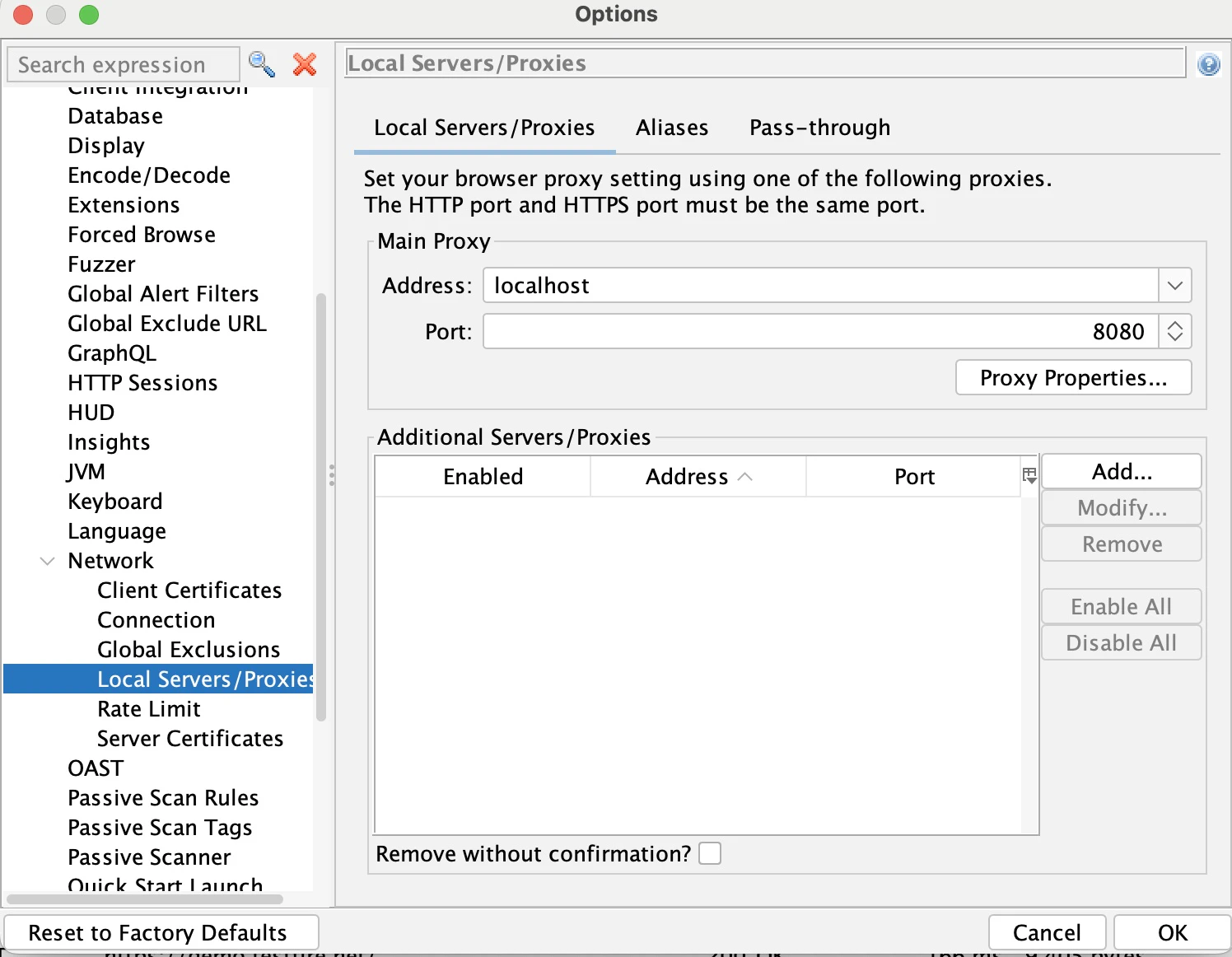
ZAPをデスクトップモードで起動し、以下の設定を行います。
-
Local Proxy:
localhost:8080に設定。
-
API Key:
Tools -> Options -> APIからキーを取得(スクリプトで使用)。

実装のポイント
1. ベースページクラス (BasePage)
Playwrightの操作をカプセル化します。特にXSSテスト時に発生するJavaScriptのダイアログ(Alert等)を自動で閉じる処理が重要です。
# src/app/core/base_page.py
from playwright.sync_api import Page, Response

class BasePage:
    """
    Base class for all Page Objects.
    Provides shared methods for browser interaction and element handling.
    """
    def __init__(self, page: Page):
        self.page = page

    def navigate(self, url: str) -> Response:
        """Navigates to the specified URL and waits for the network to be idle."""
        return self.page.goto(url, wait_until="networkidle")

    def fill_input(self, selector: str, value: str):
        """Waits for element visibility, then fills the input field."""
        self.page.wait_for_selector(selector, state="visible")
        self.page.fill(selector, value)
...
2. ZAP API マネージャー (ZAPManager)
ZAPのAPIを操作してスキャンの制御やレポート出力を行います。
# src/app/utils/zap_manager.py
from zapv2 import ZAPv2, reports

class ZAPManager:
    """
    Wrapper for OWASP ZAP API.
    Handles proxy session management, scanning status, and reporting.
    """
    def __init__(self, api_key: str, proxy: str):
        self.zap = ZAPv2(apikey=api_key, proxies={'http': proxy, 'https': proxy})

    def start_session(self, name: str):
        """Initializes a new ZAP session, overwriting existing session data if needed."""
        print(f"[*] Starting ZAP session: {name}")
        self.zap.core.new_session(name=name, overwrite=True)
...
3. テストケースの実装 (Pytest)
demo.testfire.net をターゲットに、検索窓へのXSSペイロード注入をテストします。
# tests/test_vulnerabilities.py
import pytest
from src.app.pages.search_page import SearchPage
from src.app.config import Config

@pytest.mark.parametrize("payload", Config.PAYLOADS)
def test_reflected_xss(browser_context, payload):
    """
    Test Case: Verify if the search input is vulnerable to Reflected XSS.
    Traffic is automatically routed through ZAP proxy for analysis.
    """
    page = browser_context.new_page()
    search_page = SearchPage(page)

    # Register dialog handler before navigation
    search_page.handle_dialog()

    # Step 1: Navigate to target
    search_page.navigate(Config.TARGET_URL)

    # Step 2: Inject security payload
    search_page.search_for(payload)

    # Step 3: Validate application state
    # We check if the page loaded. ZAP handles the vulnerability detection.
    assert page.is_visible('body'), "Page body should be visible after search"
自動化ワークフローの実行
ターミナルから以下のコマンドを実行するだけで、ブラウザ操作と並行してセキュリティスキャンが実行されます。
Bash
poetry run pytest
 playwright-security-automation-framework git:(main) poetry run pytest
=========================================================================================== test session starts ============================================================================================
platform darwin -- Python 3.12.12, pytest-9.0.3, pluggy-1.6.0 -- /Users/xxxx/Library/Caches/pypoetry/virtualenvs/playwright-security-automation-framework-yUxzjqWU-py3.12/bin/python
cachedir: .pytest_cache
rootdir: /Users/xxxx/safe/playwright-security-automation-framework
configfile: pytest.ini
testpaths: tests
collected 3 items

tests/test_vulnerabilities.py::test_reflected_xss[<script>alert('XSS')</script>] [*] Starting ZAP session: Altoro_Auto_Test
PASSED
tests/test_vulnerabilities.py::test_reflected_xss[<img src=x onerror=alert(1)>] PASSED
tests/test_vulnerabilities.py::test_reflected_xss['; WAITFOR DELAY '0:0:5'--] PASSED[*] Waiting for ZAP passive scan to complete...
[*] Attempting to generate report at: /Users/xxx/safe/playwright-security-automation-framework
[+] Success! Security report found at: /Users/xxx/safe/playwright-security-automation-framework/security_report.html


============================================================================================ 3 passed in 14.34s ============================================================================================
➜
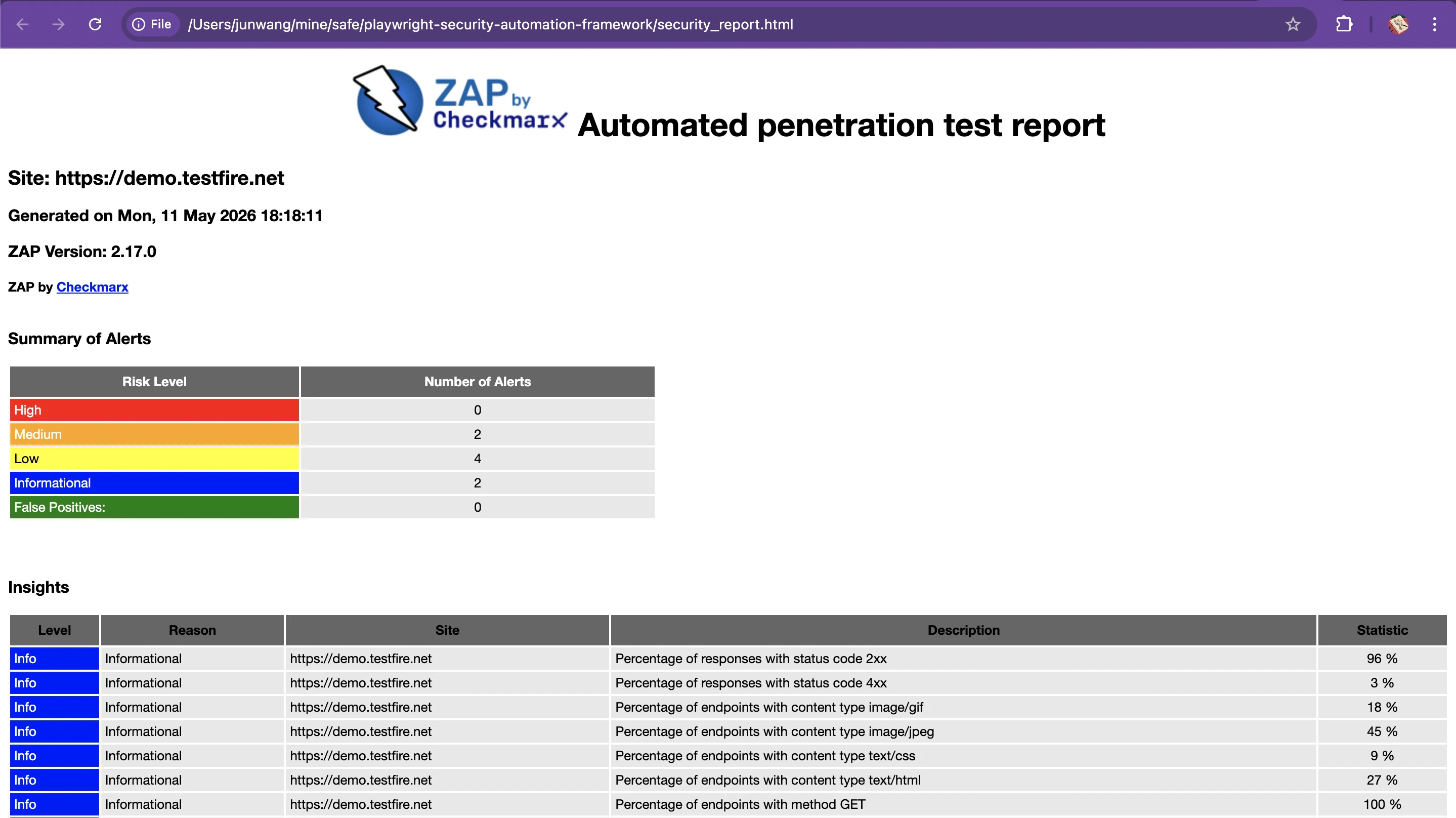
実行完了後、プロジェクトのルートディレクトリに security_report.html が生成されます。
まとめ
Playwrightの強力なブラウザ操作能力とOWASP ZAPのスキャン機能を組み合わせることで、手動の脆弱性診断をコードベースの自動テストへと置き換えることができました。これをCI/CDパイプラインに組み込むことで、リリースのたびに自動的にセキュリティチェックを実行する仕組みが構築可能です。
免責事項: 本記事で紹介した手法は、必ず自身が所有する、または許可を得たターゲットに対してのみ使用してください。