
はじめに
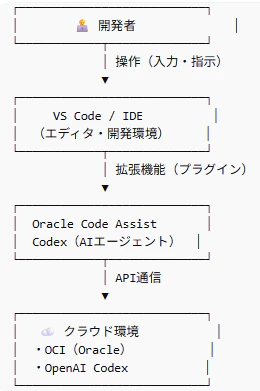
Oracle Code Assistの活用を目指し、
まずは以下の構成でCodexを動かしてみる
但し環境のセッティングの流れに関しては、自環境の依存性があるため省略する
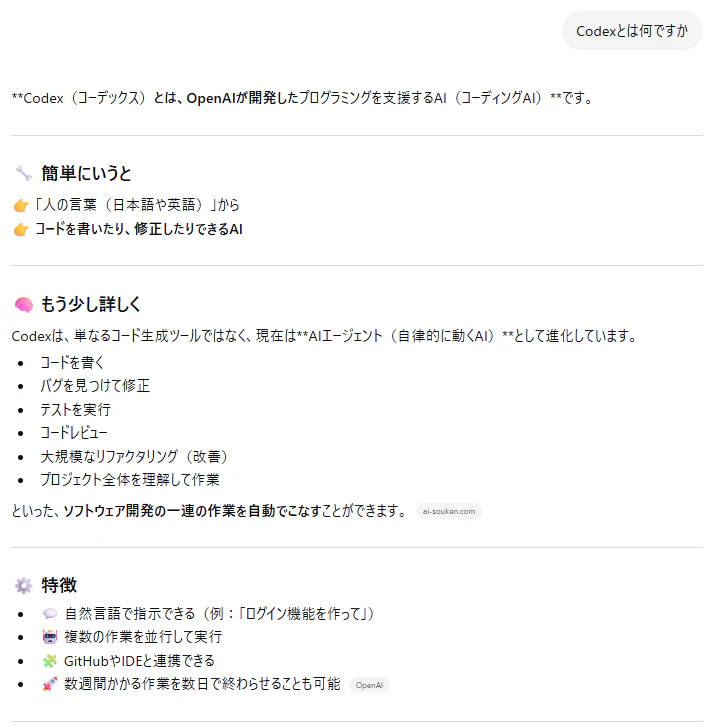
用語
Codex
Oracle Code Assist

IDE
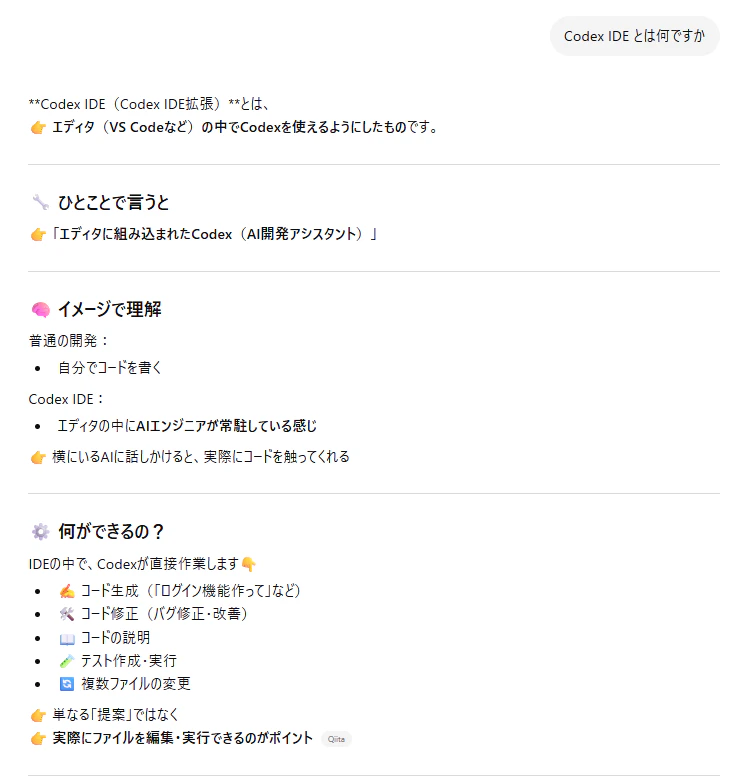
VS Code

操作、アプリを作る
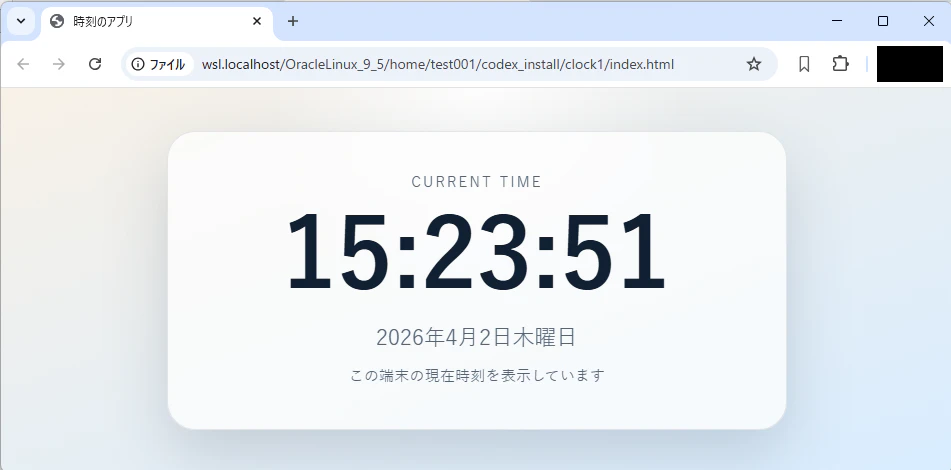
ブラウザ上で動作する、簡単な時刻表示のアプリを作成してみる

index.html
<!DOCTYPE html>
<html lang="ja">
  <head>
    <meta charset="UTF-8" />
    <meta name="viewport" content="width=device-width, initial-scale=1.0" />
    <title>時刻のアプリ</title>
    <link rel="stylesheet" href="./style.css" />
  </head>
  <body>
    <main class="clock-app">
      <p class="label">Current Time</p>
      <h1 id="time" class="time" aria-live="polite">--:--:--</h1>
      <p id="date" class="date">----年--月--日</p>
      <p class="note">この端末の現在時刻を表示しています</p>
    </main>
    <script src="./script.js"></script>
  </body>
</html>
script.js
const timeElement = document.getElementById("time");
const dateElement = document.getElementById("date");

const timeFormatter = new Intl.DateTimeFormat("ja-JP", {
  hour: "2-digit",
  minute: "2-digit",
  second: "2-digit",
});

const dateFormatter = new Intl.DateTimeFormat("ja-JP", {
  year: "numeric",
  month: "long",
  day: "numeric",
  weekday: "long",
});

function updateClock() {
  const now = new Date();
  timeElement.textContent = timeFormatter.format(now);
  dateElement.textContent = dateFormatter.format(now);
}

updateClock();
setInterval(updateClock, 1000);
style.css
:root {
  color-scheme: light;
  --bg-1: #f8f1e7;
  --bg-2: #d8ecff;
  --panel: rgba(255, 255, 255, 0.72);
  --panel-border: rgba(18, 35, 56, 0.1);
  --text-main: #112033;
  --text-sub: #526477;
  --shadow: 0 24px 60px rgba(17, 32, 51, 0.16);
}

* {
  box-sizing: border-box;
}

body {
  margin: 0;
  min-height: 100vh;
  display: grid;
  place-items: center;
  padding: 24px;
  font-family: "Hiragino Sans", "Yu Gothic", sans-serif;
  color: var(--text-main);
  background:
    radial-gradient(circle at top, rgba(255, 255, 255, 0.9), transparent 34%),
    linear-gradient(160deg, var(--bg-1), var(--bg-2));
}

.clock-app {
  width: min(92vw, 620px);
  padding: 40px 28px;
  border: 1px solid var(--panel-border);
  border-radius: 28px;
  background: var(--panel);
  backdrop-filter: blur(18px);
  box-shadow: var(--shadow);
  text-align: center;
}

.label {
  margin: 0 0 14px;
  font-size: 0.85rem;
  letter-spacing: 0.18em;
  text-transform: uppercase;
  color: var(--text-sub);
}

.time {
  margin: 0;
  font-size: clamp(3rem, 14vw, 6rem);
  line-height: 1;
  font-variant-numeric: tabular-nums;
}

.date {
  margin: 18px 0 8px;
  font-size: clamp(1rem, 3vw, 1.35rem);
  color: var(--text-sub);
}

.note {
  margin: 0;
  font-size: 0.95rem;
  color: var(--text-sub);
}

@media (max-width: 480px) {
  .clock-app {
    padding: 32px 20px;
    border-radius: 22px;
  }
}

作成されたindex.htmlを開くとブラウザで以下のように表示される
(実際には時刻表示がリアルタイムに変化している)
少々、機能拡張してみます
index.html
<!DOCTYPE html>
<html lang="ja">
  <head>
    <meta charset="UTF-8" />
    <meta name="viewport" content="width=device-width, initial-scale=1.0" />
    <title>時刻のアプリ</title>
    <link rel="stylesheet" href="./style.css" />
  </head>
  <body>
    <main class="clock-app">
      <p class="label">Current Time</p>
      <label class="selector" for="timezone-select">
        <span class="selector-label">表示する国・地域</span>
        <select id="timezone-select" class="selector-input" aria-label="表示する国または地域を選択">
          <option value="Asia/Tokyo" data-region="日本">日本 / JST / UTC+9</option>
          <option value="Asia/Seoul" data-region="韓国">韓国 / KST / UTC+9</option>
          <option value="Asia/Shanghai" data-region="中国">中国 / CST / UTC+8</option>
          <option value="Asia/Singapore" data-region="シンガポール">シンガポール / SGT / UTC+8</option>
          <option value="Asia/Kolkata" data-region="インド">インド / IST / UTC+5:30</option>
          <option value="Asia/Dubai" data-region="アラブ首長国連邦">アラブ首長国連邦 / GST / UTC+4</option>
          <option value="Europe/London" data-region="イギリス">イギリス / GMT / UTC+0</option>
          <option value="Europe/Paris" data-region="フランス">フランス / CET / UTC+1</option>
          <option value="Africa/Johannesburg" data-region="南アフリカ">南アフリカ / SAST / UTC+2</option>
          <option value="Australia/Sydney" data-region="オーストラリア">オーストラリア / AEST / UTC+10</option>
          <option value="Pacific/Auckland" data-region="ニュージーランド">ニュージーランド / NZST / UTC+12</option>
          <option value="America/New_York" data-region="アメリカ東部">アメリカ東部 / EST / UTC-5</option>
          <option value="America/Chicago" data-region="アメリカ中部">アメリカ中部 / CST / UTC-6</option>
          <option value="America/Denver" data-region="アメリカ山岳部">アメリカ山岳部 / MST / UTC-7</option>
          <option value="America/Los_Angeles" data-region="アメリカ西部">アメリカ西部 / PST / UTC-8</option>
          <option value="Pacific/Honolulu" data-region="ハワイ">ハワイ / HST / UTC-10</option>
          <option value="America/Sao_Paulo" data-region="ブラジル">ブラジル / BRT / UTC-3</option>
        </select>
      </label>
      <h1 id="time" class="time" aria-live="polite">--:--:--</h1>
      <p id="date" class="date">----年--月--日</p>
      <p id="timezone-detail" class="timezone-detail">日本 / JST / UTC+9</p>
      <p class="note">選択した国・地域の現在時刻を表示しています</p>
    </main>
    <script src="./script.js"></script>
  </body>
</html>
script.js
const timeElement = document.getElementById("time");
const dateElement = document.getElementById("date");
const timezoneSelect = document.getElementById("timezone-select");
const timezoneDetailElement = document.getElementById("timezone-detail");

function createTimeFormatter(timeZone) {
  return new Intl.DateTimeFormat("ja-JP", {
    hour: "2-digit",
    minute: "2-digit",
    second: "2-digit",
    timeZone,
  });
}

function createDateFormatter(timeZone) {
  return new Intl.DateTimeFormat("ja-JP", {
    year: "numeric",
    month: "long",
    day: "numeric",
    weekday: "long",
    timeZone,
  });
}

function createZoneNameFormatter(timeZone) {
  return new Intl.DateTimeFormat("en-US", {
    timeZone,
    timeZoneName: "short",
  });
}

function createOffsetFormatter(timeZone) {
  return new Intl.DateTimeFormat("en-US", {
    timeZone,
    timeZoneName: "longOffset",
  });
}

function getTimeZoneName(timeZone) {
  const zonePart = createZoneNameFormatter(timeZone)
    .formatToParts(new Date())
    .find((part) => part.type === "timeZoneName");

  return zonePart ? zonePart.value : timeZone;
}

function normalizeOffset(offsetText) {
  return offsetText
    .replace("GMT", "UTC")
    .replace(/([+-])0(\d)/, "$1$2")
    .replace(":00", "");
}

function getUtcOffset(timeZone) {
  const offsetPart = createOffsetFormatter(timeZone)
    .formatToParts(new Date())
    .find((part) => part.type === "timeZoneName");

  return offsetPart ? normalizeOffset(offsetPart.value) : "UTC+0";
}

function formatTimezoneLabel(option) {
  const region = option.dataset.region;
  const timeZone = option.value;
  const zoneName = getTimeZoneName(timeZone);
  const utcOffset = getUtcOffset(timeZone);

  return `${region} / ${zoneName} / ${utcOffset}`;
}

function updateOptionLabels() {
  Array.from(timezoneSelect.options).forEach((option) => {
    option.textContent = formatTimezoneLabel(option);
  });
}

function updateTimezoneDetail() {
  const selectedOption = timezoneSelect.selectedOptions[0];
  const detailText = formatTimezoneLabel(selectedOption);

  timezoneDetailElement.textContent = detailText;
}

function updateClock() {
  const now = new Date();
  const timeZone = timezoneSelect.value;
  const timeFormatter = createTimeFormatter(timeZone);
  const dateFormatter = createDateFormatter(timeZone);

  timeElement.textContent = timeFormatter.format(now);
  dateElement.textContent = dateFormatter.format(now);
  updateTimezoneDetail();
}

updateOptionLabels();
timezoneSelect.addEventListener("change", updateClock);
updateClock();
setInterval(updateClock, 1000);
style.css
:root {
  color-scheme: light;
  --bg-1: #f8f1e7;
  --bg-2: #d8ecff;
  --panel: rgba(255, 255, 255, 0.72);
  --panel-border: rgba(18, 35, 56, 0.1);
  --text-main: #112033;
  --text-sub: #526477;
  --shadow: 0 24px 60px rgba(17, 32, 51, 0.16);
}

* {
  box-sizing: border-box;
}

body {
  margin: 0;
  min-height: 100vh;
  display: grid;
  place-items: center;
  padding: 24px;
  font-family: "Hiragino Sans", "Yu Gothic", sans-serif;
  color: var(--text-main);
  background:
    radial-gradient(circle at top, rgba(255, 255, 255, 0.9), transparent 34%),
    linear-gradient(160deg, var(--bg-1), var(--bg-2));
}

.clock-app {
  width: min(92vw, 620px);
  padding: 40px 28px;
  border: 1px solid var(--panel-border);
  border-radius: 28px;
  background: var(--panel);
  backdrop-filter: blur(18px);
  box-shadow: var(--shadow);
  text-align: center;
}

.label {
  margin: 0 0 14px;
  font-size: 0.85rem;
  letter-spacing: 0.18em;
  text-transform: uppercase;
  color: var(--text-sub);
}

.selector {
  display: grid;
  gap: 8px;
  margin: 0 auto 22px;
  text-align: left;
}

.selector-label {
  font-size: 0.95rem;
  color: var(--text-sub);
}

.selector-input {
  width: 100%;
  padding: 12px 14px;
  border: 1px solid rgba(18, 35, 56, 0.12);
  border-radius: 14px;
  font: inherit;
  color: var(--text-main);
  background: rgba(255, 255, 255, 0.96);
}

.time {
  margin: 0;
  font-size: clamp(3rem, 14vw, 6rem);
  line-height: 1;
  font-variant-numeric: tabular-nums;
}

.date {
  margin: 18px 0 8px;
  font-size: clamp(1rem, 3vw, 1.35rem);
  color: var(--text-sub);
}

.timezone-detail {
  margin: 0 0 8px;
  font-size: 1rem;
  font-weight: 600;
  color: var(--text-main);
}

.note {
  margin: 0;
  font-size: 0.95rem;
  color: var(--text-sub);
}

@media (max-width: 480px) {
  .clock-app {
    padding: 32px 20px;
    border-radius: 22px;
  }
}
index.htmlを更新してみます
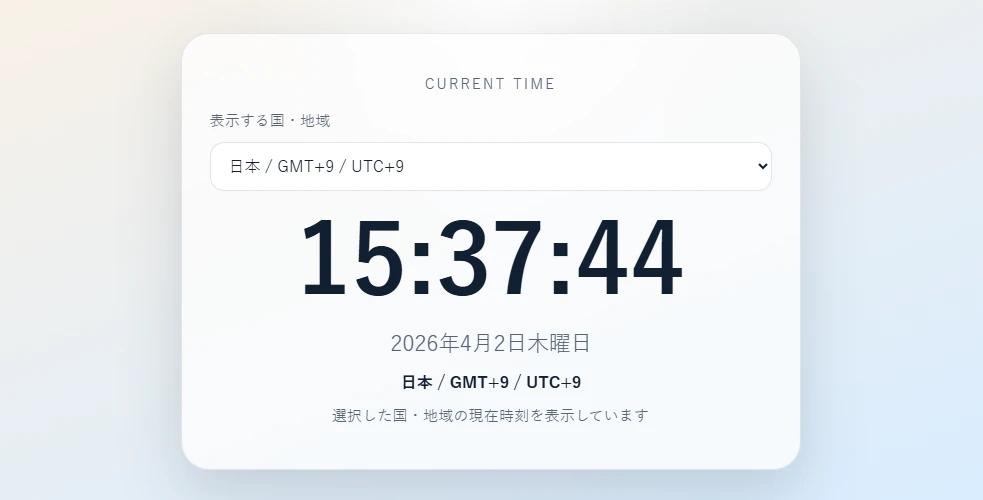

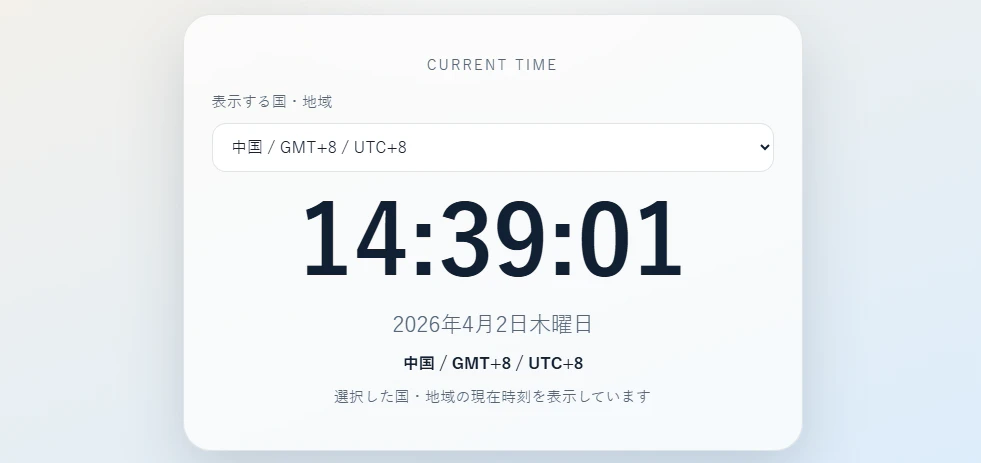
今回は非常にシンプルなアプリでしたが、
自然言語での要求に対し、ものの数分で作成することが出来ました